# Tibero Columnar Compression

## Overview

TCC is a data storage method that can improve compression and reduce disk I/O.

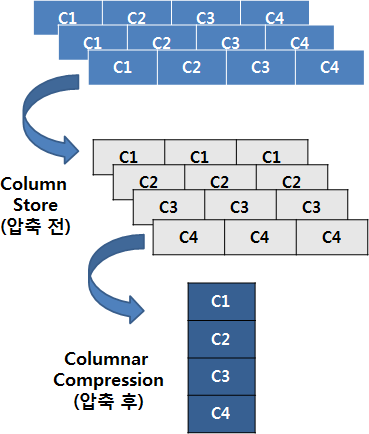
TCC collects and stores each column of a table individually and stores them consecutively instead of the traditional method of placing columns in a row.

If columns are placed in a row like this, the same data pattern will iterate, which is very effective for compression techniques like RLE (Run-Length Encoding), LZ4 (Lempel-Ziv 4), gzip (GNU zip), and bzip2 (block zip version 2).

<figure><img src="https://content.gitbook.com/content/DM6AKzMr2C1ujDvfZK54/blobs/Qm6kGXqP3XaMGu5KUy4n/4.png" alt=""><figcaption><p>Figure 1. TCC configuration (Compression Unit)</p></figcaption></figure>

### Benefits&#x20;

* Compression rate is greatly improved. The amount of improvement varies depending on a data pattern, but a user can expect an improvement of 4:1 - 10:1 in compression rate in a general OLAP business environment.
* As the compression rate is improved, the number of I/O operations is decreased. \
  This means that if  &#x20;the number of I/O operations is a cause of a performance bottleneck, then performance can be improved. Furthermore, ZetaData performs decompression in a SSVR instance, so it does not consume a DB server's resources. CPU resources on the storage nodes are usually spare.
* As data is placed by columns, unnecessary columns are not read. If the number of columns that are  \
  necessary is less than the number of all columns, then the amount of I/O operations can be greatly  \
  reduced.

The following is a list of situations where using TCC can provide benefits

#### Tables with almost no updates or deletes

As described above, if an update is made for a table configured using TCC, it will lead to performance\
degradation. As a result, TCC is suitable for loading large amounts of data through DPL/DPI. As well,\
it is suitable for storing or deleting an entire table depending on the table data's lifecycle.

#### Tables where full table scan is mainly used

TCC is recommended when a full table scan is frequently used. The uses of a full table scan can be\
determined by selectivity or the use of aggregation.

#### Tables with a constant or similar data length/pattern

TCC provides a high compression rate when performing directory compression,  RLE, LZ4, gzip, bzip2, and differential compression. Also, if a compression rate is mostly constant, the number of\
recompressions will be decreased when loading data, which improves loading speed.

#### Tables with large projectivity

TCC provides benefits when only some columns of a table are needed. Compression units that\
correspond to unneeded columns are not read. However, if data is stored as row-oriented, then all the\
columns of a row must be read regardless of the number of columns needed. This results in a relatively large number of blocks to be read.

### &#x20;<a href="#bookmark111" id="bookmark111"></a>

***

## Initialization parameters <a href="#bookmark111" id="bookmark111"></a>

The following describes the initialization parameters related to TCC. \
CC\_CU\_BLKCNT is a system parameter and the rest of the parameters are session parameters.

| Parameter                    | Description                                                                                                                                                                                                                                                                                                                                                                                  |
| ---------------------------- | -------------------------------------------------------------------------------------------------------------------------------------------------------------------------------------------------------------------------------------------------------------------------------------------------------------------------------------------------------------------------------------------- |
| CC\_CU\_BLKCNT               | <p>The maximum number of blocks a compression unit (CU) can have.</p><p>A large CU is usually beneficial for compression, but beyond a certain point it becomes too full to be useful. An unnecessarily large CU can also be detrimental if there is iterative decompression.</p><p>It is recommended to set it less than DB\_FILE\_MULTIBLOCK\_READ\_COUNT. (default: 4, range: 1 - 32)</p> |
| CC\_CU\_PCTUSE               | <p>The minimum percentage of capacity that will fit in the CU.</p><p>When configuring CUs, try to fill at least this percentage. While a large value can prevent wasted space, it can also reduce performance due to more recompression when loading . (Default: 95, range: 0 - 99)</p>                                                                                                      |
| CC\_TYPICAL\_ROW\_SIZE       | <p>The typical row size of the data to be compressed.</p><p>It is used as a hint when compression is first started. This value and CC\_EXPECT ED\_RATE can be used to estimate how many rows will fit in a CU to make compression go faster. (Default: 100, range: 3 - 1000)</p>                                                                                                             |
| CC\_EXPECTED\_RATE           | <p>The general compression ratio of the data to be compressed (hint).</p><p>Used in conjunction with CC\_TYPICAL\_ROW\_SIZE during the initial CU configuration. Predictions for subsequent CUs use the results of the previous CU.</p><p>(default: 25, range: 1 - 100)</p>                                                                                                                  |
| CC\_CU\_WRITEOUT\_THRESH OLD | <p>CC\_CU\_WRITEOUT\_THRESHOLD is a setting that specifies the minimum fill percentage that a single block must meet in order for a write operation to proceed. This means that the block is written to disk only when the data in the block is at least the set percentage full.</p><p>(default: 85, range: 0 - 99)</p>                                                                     |

###

***

## TCC table creation commands

When executing a CREATE TABLE command, the following options can be used to create a TCC table

```sql
CREATE TABLE {table-name} COMPRESS FOR QUERY LOW
```

This is the level that maximizes performance losses during column compression due to OLTP-like operations.

```sql
CREATE TABLE {table-name} COMPRESS FOR QUERY HIGH
```

This is a medium compression level. The performance of compression/decompression is also medium.

```sql
CREATE TABLE {table-name} COMPRESS FOR ARCHIVE LOW
```

This is a higher compression level. The performance of compression/decompression is somewhat worse.

```sql
CREATE TABLE {table-name} COMPRESS FOR ARCHIVE HIGH
```

This is the maximum compression level. It also has the lowest compression/decompression performance.

{% hint style="info" %}
**Note**

Set only up to COMPRESS to apply the existing default compression method rather than column compression.
{% endhint %}

&#x20;The following is an example of using the option.

```sql
CREATE TABLE T(A NUMBER) COMPRESS FOR QUERY HIGH
```

###

***

## Cautions for using TCC

While TCC offers many benefits in comparison with the row-oriented storage structure, it also has its\
downsides. Improper use can result in significant damage to performance.&#x20;

Use caution in the following situations.

### Tables with frequent updates or deletes

When an update is made in a table stored using TCC, the table is decompressed and its rows become\
row-oriented. Furthermore, more blocks must be read than compared with reading blocks in row units.\
For example, when executing UPDATE SET A=1, B=2 WHERE C=3, if a table is stored in a row-oriented\
method, then only one block needs to be read. However, if a table is stored using TCC, then three\
compression units must be read.

If CC\_CU\_BLKCNT is large, the performance is even more damaged. Each CU will need as many block I/Os as CC\_CU\_BLKCNT to process a single row. Therefore, if there isn't much of a difference in compression rates, it is recommended to use an appropriate size for CC\_CU\_BLKCNT.

### Tables with many accesses via indexes

When a table is accessed using an index, it must be decompressed in CU units every time. \
(However,&#x20;this does not mean every row is decompressed. Decompressed data is reused for sequential rowids.)\
Therefore, when a table is accessed by using an index, it may be decompressed, which leads to\
performance degradation. If a table is accessed in row units, it is disadvantageous to use the TCC\
storage method.  As with indexed access, the TCC storage is inefficient in all cases where access is row-by-row.

###
