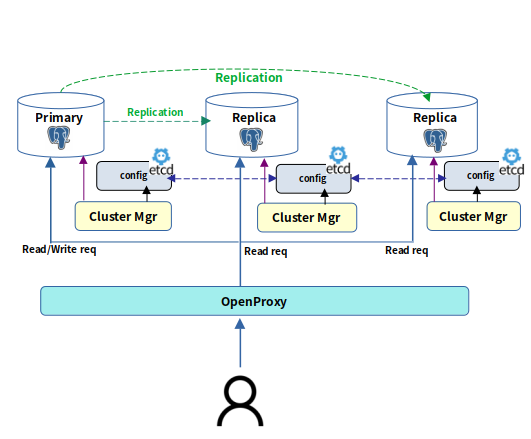
Loading...
Loading...
Loading...
Loading...
Loading...
Loading...
Loading...
Loading...
Loading...
Loading...
Loading...
Loading...
Loading...
Loading...
Loading...
Loading...
Loading...
Loading...
Loading...
Loading...
Loading...
Loading...
Loading...
Loading...
Loading...
Loading...
Loading...
Loading...
Loading...
Loading...
Loading...
Loading...
Loading...
Loading...
Loading...
Loading...
Loading...
Loading...
Loading...
Loading...
Loading...
Loading...
Loading...
Loading...
Loading...
Loading...
Loading...
Loading...
Loading...
Loading...
Loading...
Loading...
Loading...
Loading...
Loading...
Loading...
Loading...
Loading...
Loading...
Loading...
Loading...
Loading...
Loading...
Loading...
Loading...
Loading...
Loading...
Loading...
Loading...
Loading...
Loading...
Loading...
Loading...
Loading...
Loading...
Loading...
Loading...
Loading...
Loading...
Loading...
Loading...
Loading...
Loading...
Loading...
Loading...
Loading...
Loading...
Loading...
Loading...
Loading...
Loading...
Loading...
Loading...
Loading...
Loading...
Loading...
Loading...
Loading...
Loading...
Loading...
LENGTH 는 주어진 str의 길이를 반환합니다.
str
문자열을 반환하는 임의의 연산식입니다. CHAR, TEXT 타입을 가질 수 있습니다.
LENGTH(str) SELECT LENGTH('abc'::char(6));
length
--------
6
(1 row)
SELECT LENGTH(''::char(6));
length
--------
6
(1 row)nls_param
str를 정렬하기 위해 사용할 문자 집합을 정의하는 파라미터입니다. TEXT, CHAR 타입의 데이터가 올 수 있습니다. 'NLS_SORT=sort'와 같은 형식으로 정의할 수 있습니다. 정의하지 않으면 세션에 정의 된 값을 사용합니다.
SELECT NAME FROM T ORDER BY NLSSORT(NAME);
name
------
BAR
FOO
(2 rows)RAWTOHEX는 문자열 raw 값을 16진수로 표현된 문자열로 바꾸는 함수입니다.
raw
문자열 값을 반환하는 임의의 연산식입니다.
RAWTOHEX
(
raw IN { bytea | text }
)
RETURNS text;SELECT RAWTOHEX('AB');
rawtohex
----------
4142
(1개 행)본 문서에서는 OpenProxy의 Connection Pooling, 로드밸런싱, 가상 IP 및 이중화 구성에 대한 설명과 Configuration 파라미터를 통해 해당 기능을 관리하는 방법에 대하여 기술합니다.
num1, num2
num1이나 num2는 숫자형 타입이거나 숫자형 타입으로 변환될 수 있는 타입이어야 합니다. num1이나 num2은 두 타입 중 숫자형 우선순위에 따라 더 높은 순위의 타입으로 변환되고, 또한 그 타입으로 반환됩니다
SELECT REMAINDER(3,2);
remainder
-----------
-1pattern
정규 표현식으로 작성된 문자열을 반환하는 임의의 연산식입니다. TEXT, CHAR의 타입이 올 수 있습니다.
position
숫자 값을 반환하는 임의의 연산식으로 패턴 검사를 시작할 위치를 지정합니다.
match_param
문자열을 반환하는 임의의 연산식으로 패턴을 검사할 방법을 설정합니다. 다음과 같은 값을 사용할 수 있고, 여러 개를 동시에 사용할 수 있습니다.
i : 대소문자를 구분하지 않습니다.
c : 대소문자를 구분합니다.
n : 점(.)이 줄바꿈 문자도 포함합니다.
m : 입력문자열이 한 줄 이상입니다.
x : pattern의 공백문자를 무시합니다.
SELECT REGEXP_COUNT('abcabcabc','abc', 2);
regexp_count
--------------
2
(1 row)OpenHA의 핵심 관리 모듈인 OpenHA 클러스터 매니저(OpenHA Cluster Manager) 설치 과정에 대해서 안내합니다.
OpenHA의 핵심 관리 모듈로, 각 노드에 설치된 PostgreSQL 데이터베이스 인스턴스의 라이프사이클을 관리하고, 클러스터 구성을 통한 고가용성 기능을 제공합니다. 장애 발생 시 자동 Failover, Primary 노드 선출, 클러스터 상태 조회 등의 기능을 수행합니다.
이 모듈은 Patroni 기술을 기반으로 구현되었으며, REST API를 통해 클러스터 제어가 가능합니다.
OpenHA Cluster Manager 설치 과정에 대해서 기술합니다.
해당 노드에 PostgreSQL 서버가 설치되어 있어야 하며, postgres 사용자가 구성되어 있어야 합니다.
OpenHA Cluster Manager는 PostgreSQL 설정값에 포함된 Data Directory와 Binary Directory를 참조하여 런타임에 PostgreSQL 서버의 라이프사이클을 직접 관리합니다.
OpenHA DCS(Distributed Configuration Store, etcd 기반)가 먼저 구동되어 있어야 합니다.
설치를 완료하면 아래와 같은 명령어로 버전을 확인할 수 있습니다.
TO_YMINTERVAL
(
sql_format IN text -- format: '[+|-]years-months'
)
RETURNS interval;
TO_YMINTERVAL
(
ym_iso_format IN text -- format: '[-]P[<years>Y][<months>M]'
)
RETURNS interval;TO_YMINTERVAL은 문자열을 INTERVAL YEAR TO MONTH 타입으로 변환하는 함수입니다.
sql_format
구간의 값을 반환하는 text 타입이며, 다음과 같은 포맷으로 구성됩니다. '[+|-]years-months'
ym_iso_format
OpenSQL v3.0 은 오픈소스 관계형 데이터베이스 관리시스템 (RDBMS) 인 PostgreSQL을 기반으로 높은 성능과 고가용성을 제공하는 데이터베이스 클러스터입니다.
PostgreSQL 기반의 오픈소스 관계형 데이터베이스 관리 시스템으로 뛰어난 확장성과 SQL 표준을 준수합니다.
OpenSQL 클러스터의 고가용성을 담당하는 솔루션으로, OpenHA Cluster Manager와 OpenHA DCS로 구성됩니다.
OpenHA Cluster Manager Patroni 기반의 클러스터 관리 모듈로, 각 데이터베이스 노드의 상태를 실시간 감지하고 자동 Failover, Primary 노드 선출, 구성 변경 관리 기능을 수행합니다.
OpenHA DCS(Distributed Configuration Store)
구간의 값을 반환하는 text 타입이며 다음과 같은 포맷으로 구성됩니다. '[-]P[Y][M]'
years
0~177999999 사이의 정수입니다.
months
0~11 사이의 정수입니다. ym_iso_format의 경우 0~999999999 사이의 정수가 들어올 수 있습니다.
. ./setenv.sh `pwd`
OPENSQL_INSTALL_HOME is set to: /home/opensql3.0-rockylinux9.4-pg16.8
OPENSQL_HOME is set to: /home/opensql
OPENSQL_HOME added to /home/opensql/.bashrc sudo -E ./install.sh patroni[root@396dd54381db scripts]$ patroni --version
patroni 4.0.5
[root@396dd54381db scripts]$ patronictl version
patronictl version 4.0.5SELECT DATE '2008-03-20' + TO_YMINTERVAL('2-7') AFTER;
after
------------------------
2010-10-20 09:00:00+09
(1개 행)
SELECT DATE '2008-03-20' + TO_YMINTERVAL('P2Y7M') AFTER;
after
------------------------
2010-10-20 09:00:00+09
(1개 행)PostgreSQL 커넥션풀링, 로드밸런싱 및 VIP Failover 기능을 제공하며, Rust 언어로 작성된 고성능 Connection Pooler 입니다.
Full, 증분, 차분 백업 방식을 제공하며, Python 언어로 작성된 오픈소스 PostgreSQL 데이터베이스 백업 관리 솔루션입니다.
ASCIISTR은 주어진 문자열을 데이터베이스 문자 집합의 아스키 문자열로 반환합니다. ASCII 이외의 문자는 \xxxx 형태로 변경됩니다. xxxx는 UTF-16 코드입니다.
str
문자열을 반환하는 임의의 연산식입니다.
ASCIISTR
(
str IN text
)
RETURNS text;SELECT ASCIISTR('A한글B');
asciistr
--------------
A\D55C\AE00B
(1개 행)systimestamp 함수는 현재 문(statement)의 타임스탬프를 서버의 시간대 기준으로 반환합니다.
내부적으로는 GetCurrentTimestamp()를 호출하여 서버의 타임존에 맞춰 타임스탬프 값을 가져옵니다.
SYSTIMESTAMP()
RETURNS timestamptz;SELECT SYSTIMESTAMP();
systimestamp
-------------------------------
2025-03-06 23:41:29.160617+09
(1 row)Python 기반 오픈소스 솔루션인 Barman에 대해 안내합니다.
Barman은 Python 기반 오픈소스 솔루션으로 PostgreSQL 데이터베이스의 Full 및 증분 방식의 백업 생성과 관리, 특정 시점 지정 복구 (PITR) 기능을 지원합니다.
본 문서는 OpenSQL 패키징 툴을 이용해 작성한 OpenSQL 패키지로부터 Barman을 설치하는 방법에 대하여 기술합니다.
. ./setenv.sh `pwd`
OPENSQL_INSTALL_HOME is set to: /home/opensql3.0-rockylinux9.4-pg16.8
OPENSQL_HOME is set to: /home/opensql
OPENSQL_HOME added to /home/opensql/.bashrc./install.sh barman$ barman --version
3.11.1 Barman by EnterpriseDB (www.enterprisedb.com)TO_DATE
(
str IN text
)
RETURNS timestamp;
TO_DATE
(
str IN text,
fmt IN text
)
RETURNS timestamp;
TO_DATE
(
num IN integer,
fmt IN text
)
RETURNS timestamp;텍스트(또는 정수형 값을 문자열로 변환한 값)를 Oracle 스타일의 날짜/시간 형식에 따라 TIMESTAMP(0)(밀리세컨드 없는 시분초까지의 날짜+시분초) 값으로 변환합니다.
포맷 모델(fmt)이 제공되면 해당 형식에 맞게 날짜를 해석하며, 제공되지 않을 경우 기본 형식에 따라 변환됩니다.
빈 문자열을 입력하면 NULL을 반환합니다.
Oracle과 달리 타입 안정성을 지키기 위해, 날짜 타입의 변수를 받지 않습니다.
OpenHA의 분산 구성 저장소로, 클러스터 멤버십과 각 인스턴스 상태를 안정적으로 저장·공유하며, 리더 선출을 수행합니다. 이 기능은 etcd 기술을 기반으로 구현되었으며, 관리 도구로 etcdctl을 제공합니다.
. ./setenv.sh `pwd`
OPENSQL_INSTALL_HOME is set to: /home/opensql3.0-rockylinux9.4-pg16.8
OPENSQL_HOME is set to: /home/opensql
OPENSQL_HOME added to /home/opensql/.bashrc./install.sh etcd설치를 완료하면 아래의 명령어로 OpenHA DCS(etcd 와 etcdctl 기반)의 버전을 확인할 수 있습니다.
[opensql@396dd54381db etcd-v3.5.6-linux-amd64]etcd --version
etcd Version: 3.5.6
Git SHA: cecbe35ce
Go Version: go1.16.15
Go OS/Arch: linux/amd64
[opensql@396dd54381db etcd-v3.5.6-linux-amd64]etcdctl version
etcdctl version: 3.5.6
API version: 3.5SYS_GUID는 16 바이트의 RAW 데이터로 구성된 전역 고유 식별자를 생성해서 반환합니다.
uuid는 pseudorandom 방식으로 생성됩니다.
str
text 타입입니다; 날짜 및 시간 정보를 포함한 문자열입니다. 빈 문자열이면 NULL로 처리됩니다.
num
integer 타입입니다; 정수형 값으로, 내부적으로 문자열로 변환되어 날짜로 해석됩니다.
fmt
text 타입입니다; 입력 문자열의 날짜/시간 형식을 지정하는 포맷 모델입니다.
예를 들어, 'YYYY-MM-DD HH24:MI:SS'와 같이 사용합니다.
지원하는 포멧 모델은 PG 공식 문서 를 참조합니다.
str
text 타입입니다; 변환할 날짜/시간 문자열입니다.
fmt
text 타입입니다; 입력 문자열의 형식을 나타내는 포맷 모델입니다. (예: 'YYYY-MM-DD HH24:MI:SSOF' )
지원하는 포멧 모델은 PG 공식 문서 를 참조합니다.
-- 텍스트와 포맷 모델을 사용하여 날짜/시간 문자열을 TIMESTAMP로 변환
SELECT TO_DATE('2023-06-01 12:34:56', 'YYYY-MM-DD HH24:MI:SS');
to_date
---------------------
2023-06-01 12:34:56
(1 row)
-- 텍스트만 전달한 경우 기본 변환 형식을 사용 (빈 문자열은 NULL 반환)
SELECT TO_DATE('2023-06-01 12:34:56');
to_date
---------------------
2023-06-01 12:34:56
(1 row)
-- 정수형 값을 문자열로 해석하여 TIMESTAMP로 변환
SELECT TO_DATE(20230601, 'YYYYMMDD');
to_date
---------------------
2023-06-01 00:00:00
(1 row)SELECT TO_TIMESTAMP_TZ('2023-06-01 12:34:56+09', 'YYYY-MM-DD HH24:MI:SSOF');
to_timestamp_tz
------------------------
2023-06-01 12:34:56+09
(1 row)SYS_GUID()SELECT SYS_GUID();
sys_guid
------------------------------------
\xc3a83bc2e6f845c8bdf884af0c0516ac
(1 row)OpenSQL v3.0 의 components 별 실행 순서는 아래와 같습니다.
Etcd
Patroni + PostgreSQL
OpenProxy
각 Components 별 설정/실행을 아래 순서대로 기술합니다.
sessiontimezone 함수는 현재 세션의 타임존을 텍스트 값으로 반환합니다.
내부적으로는 show_timezone() 함수를 호출하여 현재 세션의 시간대를 조회한 후, 이를 텍스트로 변환해 반환합니다.
SESSIONTIMEZONE()
RETURNS text;select sessiontimezone();
sessiontimezone
-----------------
Asia/Seoul
(1 row)Etcd
Patroni
OpenProxy
TO_SINGLE_BYTE
(
str IN text
)
RETURNS text;SELECT TO_SINGLE_BYTE('Hello, world!');
-- 예제 결과: 'Hello, world!'
to_single_byte
----------------
Hello, world!
(1 row)MEDIAN
(
expression IN { smallint, int, bigint,
real, double precision,
timestamp, timestamptz, time, timetz, date }
)
RETURNS median;MEDIAN 집계 함수는 그룹 내의 값들 중 중앙값(median)을 계산하여 반환하는 통계 함수입니다.
Oracle의 MEDIAN 함수를 참고하여 PostgreSQL에서 구현했습니다.
정수형, 실수형, 날짜/시간 타입 데이터 타입에 대해 사용 가능합니다.
내부적으로, MEDIAN 함수는 두 단계로 동작합니다.
집계 단계
그룹 내의 값들을 타입에 맞는 벡터(리스트 자료구조)에 수집하는 단계입니다.
NULL 값은 집계에서 무시됩니다.
최종 계산 단계
그룹 내 모든 값들 수집 완료 시 최종적으로 중앙 값을 산출하는 단계입니다.
먼저, 집계된 벡터 내의 값들을 퀵 정렬 알고리즘으로 정렬합니다.
집계된 값의 개수가 홀수인 경우 중앙 값을 반환합니다.
집계된 값의 개수가 짝수인 경우 중앙의 두 값의 평균을 계산하여 반환합니다.
실수형: real(float4), double precision
날짜/시간형: timestamp, timestamptz, time, timetz, date집계 시 NULL 값은 무시되며, 각 타입에 맞는 내부 벡터에 값들이 저장됩니다.
짝수 개의 값이 집계된 경우, 중앙의 두 값의 평균이 계산되어 반환합니다.
내부적으로 C 코드에서 qsort 함수를 사용하여 값들을 정렬합니다.
날짜 및 시간 관련 데이터의 경우, Oracle 방식의 처리 로직에 따라 추가적인 타임존 및 형 변환 처리 진행합니다.
타임존이 있는 날짜 및 시간 관련 데이터의 경우, 중앙의 두 값을 UTC로 타임존 변경 후 평균값 계산합니다.
UTC 기준으로 평균 값 계산 후 중앙 두 값 중 큰 값의 타임존을 채택합니다.
expression
집계할 값으로, 아래와 같은 데이터 타입을 지원합니다.
* 정수형: smallint, int, bigint
# 테스트 테이블
create table employees (name varchar, salary integer, hire_date timestamptz);
INSERT INTO employees (name, salary, hire_date) VALUES
('John Doe', 55000, '2020-03-15 09:00:00'),
('Jane Smith', 62000, '2019-07-22 10:30:00'),
('Michael Johnson', 72000, '2018-11-10 08:45:00'),
('Emily Davis', 48000, '2021-05-01 12:00:00'),
('David Wilson', 53000, '2017-09-17 14:20:00'),
('Sarah Brown', 60000, '2016-12-05 09:15:00'),
('James Taylor', 75000, '2015-06-30 16:45:00'),
('Jessica Martinez', 68000, '2022-01-25 11:10:00'),
('Daniel Anderson', 58000, '2020-10-05 13:35:00'),
('Laura Thomas', 49500, '2023-08-12 08:00:00');
-- 정수형 데이터의 중앙값 계산 예제
SELECT MEDIAN(salary) FROM employees;
median
--------
59000
(1 row)
-- 날짜형 데이터의 중앙값 계산 예제
SELECT MEDIAN(hire_date) FROM employees;
median
------------------------
2019-11-17 21:45:00+09주어진 숫자 값을 특정 단위(예: 'DAY', 'HOUR', 'MINUTE', 'SECOND')로 해석하여 INTERVAL 타입으로 변환합니다.
숫자 값은 정수부와 소수부로 나뉘며,
'DAY'인 경우 정수부는 일(day)로, 소수부는 24를 곱해 시간, 분, 초로 변환됩니다.
'HOUR'인 경우 정수부는 시간(hour)로, 소수부는 60을 곱해 분과 초로 변환됩니다.
'MINUTE'인 경우 정수부는 분(minute)로, 소수부는 60을 곱해 초(second)로 변환됩니다.
position
정수 값을 반환하는 임의의 연산식입니다. position이 0보다 작은 경우 str의 뒤에서부터 추출됩니다.
length
정수 값은 반환하는 임의의 연산식입니다. 만약 length가 지정되지 않으면 str의 position 위치에서부터 마지막까지 문자열을 추출하며, length가 1보다 작으면 NULL을 반환합니다.
SELECT SUBSTR('ABCDEFG', 3, 2), SUBSTR('ABCDEFG', -3, 2);
substr | substr
--------+--------
CD | EF'SECOND'인 경우 입력된 숫자 전체가 초(second)로 해석됩니다.
만약 잘못된 단위가 전달되면 오류를 발생시킵니다.
NUMTODSINTERVAL
(
number IN double precision,
unit IN text
)
RETURNS interval;COSH는 n의 hyperbolic cosine입니다.
본 안내서는 OpenSQL을 사용하는 사용자를 대상으로 기술합니다.
O2 Extensions는 TmaxTibero의 OpenSQL에서만 지원되는 확장 기능이므로, 이에 대한 기술 문서는 OpenSQL 매뉴얼에 'O2 Extensions' 항목으로 통합하여 제공합니다.
number
double precision 타입입니다; 변환할 시간 값입니다. 소수부가 있을 경우 하위 단위(시간, 분, 초)로 변환됩니다.
unit
text 타입입니다;숫자 값의 단위를 지정합니다. 유효한 단위는 'DAY', 'HOUR', 'MINUTE', 'SECOND'입니다. 예를 들어, 'DAY'를 지정하면 소수부가 시간, 분, 초로 차례로 변환됩니다.
num
Numeric data type이거나 Numeric으로 변환될 수 있는 data type을 인자로 취할 수 있습니다.
반환 타입은 인자로 주었던 numeric data type과 같습니다.
-- 1.5 DAY는 1일 12시간으로 변환됨
SELECT NUMTODSINTERVAL(1.5, 'DAY');
numtodsinterval
-----------------
1 day 12:00:00
(1 row)
-- 2.75 HOUR는 2시간 45분으로 변환됨
SELECT NUMTODSINTERVAL(2.75, 'HOUR');
numtodsinterval
-----------------
02:45:00
(1 row)
-- 30 MINUTE는 30분 0초로 변환됨
SELECT NUMTODSINTERVAL(30, 'MINUTE');
numtodsinterval
-----------------
00:30:00
(1 row)
-- 90 SECOND는 90초 그대로 반환됨
SELECT NUMTODSINTERVAL(90, 'SECOND');
numtodsinterval
-----------------
00:01:30
(1 row)COSH(num)SELECT COSH(0);
cosh
------
1LAST_DAY
(
value IN date
)
RETURNS date;
LAST_DAY
(
value IN TIMESTAMP with time zone
)
RETURNS TIMESTAMP without time zone;-- DATE 타입 예제: '2023-05-15'가 속한 달의 마지막 날짜 반환
SELECT LAST_DAY('2023-05-15'::date);
-- 결과: '2023-05-31' (2023년 5월의 마지막 날)
last_day
------------
2023-05-31
(1 row)
-- TIMESTAMPTZ 타입 예제: '2023-05-15 14:30:00+09'가 속한 달의 마지막 날짜 반환
SELECT LAST_DAY('2023-05-15 14:30:00+09'::timestamptz);
-- 결과: 타임스탬프 값으로 해당 달의 마지막 날과 원래 시간 정보가 결합되어 반환됨
last_day
---------------------
2023-05-31 14:30:00
(1 row)OpenSQL 설치를 위한 기본환경 설정 및 PostgreSQL 설치 과정을 안내합니다.
OpenSQL은 PostgreSQL 기반의 데이터베이스 패키지로 본 매뉴얼은 OpenSQL 설치를 위한 기본환경 설정 및 PostgreSQL 설치 과정을 안내합니다.
OpenSQL 바이너리 압축을 해제하면 scripts 디렉토리 안에 setenv.sh , install.sh 등 OpenSQL 설치를 위한 스크립트가 포함되어 있습니다.
opensql 유저가 생성되며 해당 유저로 전환됩니다.
OpenSQL이 설치될 위치를 환경 변수 OPENSQL_HOME 로 설정합니다.
OPENSQL 환경 변수를 bashrc에 설정하고, OPENSQL을 설치하는데 필요한 디렉터리 위치를 설정합니다.
OPENSQL_HOME 이 설정되어 있지 않다면 수행이 실패합니다.
TRUNC 함수는 날짜나 타임스탬프 값에서 하위 단위를 잘라내고, 지정한 포맷 모델에 맞춰 값을 자른(버림) 결과를 반환합니다.
즉, 값의 시간 또는 날짜 부분에서 소수점 이하(또는 세부 단위)를 제거하여, 원하는 단위(예: 연, 월, 일 등)까지만 남깁니다.
만약 포맷 문자열(fmt)이 제공되지 않으면, 기본적으로 'DDD' (일 단위)로 처리됩니다.
타임스탬프 버전의 경우, 내부의 시간 정보를 함께 처리하여 시간 단위 이하를 잘라내며, 초 이하 정보는 0으로 설정됩다.
HEXTORAW는 16진수로 표현된 문자열의 RAW 값을 구하는 함수입니다.
expr1, expr2
정수 값을 반환하는 임의의 연산식인자 중 하나라도 NULL이면 결과는 NULL인자는 범위 -(2^(n-1)) ~ (2^(n-1) - 1) 내에 있어야 합니다. 인자가 범위를 벗어나면, 결과는 undefined다.* 현재 n은 64입니다.
str
16진수 형태의 문자열 값을 반환하는 임의의 연산식입니다.
설치를 완료하면 아래의 명령어로 postgresql 의 설치 경로와 설치 버전을 확인할 수 있습니다.
fmt
text 타입입니다;
날짜나 타임스탬프 값을 어느 단위까지 절삭할지를 지정하는 포맷 문자열입니다. 예를 들어, 'YYYY' (연도), 'MM' (월), 'DDD' (일) 등으로 지정할 수 있습니다. 이 값이 NULL이면 기본값(예: 'DDD')으로 처리됩니다.
expr
date, timestamp, timestamptz 타입입니다;
절삭(Truncation)할 대상 날짜 또는 타임스탬프 값입니다. 만약 이 값이 NULL이면 결과 역시 NULL이 됩니다.
SELECT BITAND(6,3);
bitand
--------
2HEXTORAW
(
str IN text
)
RETURNS bytea;SELECT HEXTORAW('DB') AS col;
col
------
\xdb
(1개 행)./create_user.sh <password>export OPENSQL_HOME="path/to/install"
export PG_HOME="path/to/pg"
export PG_DATA_DIR="path/to/pg_data". ./setenv.sh `pwd`
OPENSQL_INSTALL_HOME is set to: /home/opensql3.0-rockylinux9.4-pg16.8sudo -E ./install.sh postgresql$ $PG_HOME/bin/pg_config
BINDIR = /usr/pgsql-16/bin
DOCDIR = /usr/pgsql-16/doc
HTMLDIR = /usr/pgsql-16/doc/html
INCLUDEDIR = /usr/pgsql-16/include
PKGINCLUDEDIR = /usr/pgsql-16/include
INCLUDEDIR-SERVER = /usr/pgsql-16/include/server
LIBDIR = /usr/pgsql-16/lib
PKGLIBDIR = /usr/pgsql-16/lib
LOCALEDIR = /usr/pgsql-16/share/locale
MANDIR = /usr/pgsql-16/share/man
SHAREDIR = /usr/pgsql-16/share
SYSCONFDIR = /etc/sysconfig/pgsql
PGXS = /usr/pgsql-16/lib/pgxs/src/makefiles/pgxs.mk
CONFIGURE = '--enable-rpath' '--prefix=/usr/pgsql-16' '--includedir=/usr/pgsql-16/include' '--mandir=/usr/pgsql-16/share/man' '--datadir=/usr/pgsql-16/share' '--libdir=/usr/pgsql-16/lib' '--with-lz4' '--with-zstd' '--enable-tap-tests' '--with-icu' '--with-llvm' '--with-perl' '--with-python' '--with-tcl' '--with-tclconfig=/usr/lib64' '--with-openssl' '--with-pam' '--with-gssapi' '--with-includes=/usr/include' '--with-libraries=/usr/lib64' '--enable-nls' '--enable-dtrace' '--with-uuid=e2fs' '--with-libxml' '--with-libxslt' '--with-ldap' '--with-selinux' '--with-systemd' '--with-system-tzdata=/usr/share/zoneinfo' '--sysconfdir=/etc/sysconfig/pgsql' '--docdir=/usr/pgsql-16/doc' '--htmldir=/usr/pgsql-16/doc/html' 'CFLAGS=-O2 -flto=auto -ffat-lto-objects -fexceptions -g -grecord-gcc-switches -pipe -Wall -Werror=format-security -Wp,-D_FORTIFY_SOURCE=2 -Wp,-D_GLIBCXX_ASSERTIONS -specs=/usr/lib/rpm/redhat/redhat-hardened-cc1 -fstack-protector-strong -specs=/usr/lib/rpm/redhat/redhat-annobin-cc1 -m64 -march=x86-64-v2 -mtune=generic -fasynchronous-unwind-tables -fstack-clash-protection -fcf-protection' 'LDFLAGS=-Wl,--as-needed' 'LLVM_CONFIG=/usr/bin/llvm-config-64' 'CLANG=/usr/bin/clang' 'PKG_CONFIG_PATH=:/usr/lib64/pkgconfig:/usr/share/pkgconfig'
CC = gcc
CPPFLAGS = -D_GNU_SOURCE -I/usr/include/libxml2 -I/usr/include
CFLAGS = -Wall -Wmissing-prototypes -Wpointer-arith -Wdeclaration-after-statement -Werror=vla -Wendif-labels -Wmissing-format-attribute -Wimplicit-fallthrough=3 -Wcast-function-type -Wshadow=compatible-local -Wformat-security -fno-strict-aliasing -fwrapv -fexcess-precision=standard -Wno-format-truncation -Wno-stringop-truncation -O2 -flto=auto -ffat-lto-objects -fexceptions -g -grecord-gcc-switches -pipe -Wall -Werror=format-security -Wp,-D_FORTIFY_SOURCE=2 -Wp,-D_GLIBCXX_ASSERTIONS -specs=/usr/lib/rpm/redhat/redhat-hardened-cc1 -fstack-protector-strong -specs=/usr/lib/rpm/redhat/redhat-annobin-cc1 -m64 -march=x86-64-v2 -mtune=generic -fasynchronous-unwind-tables -fstack-clash-protection -fcf-protection
CFLAGS_SL = -fPIC
LDFLAGS = -Wl,--as-needed -L/usr/lib64 -L/usr/lib64 -Wl,--as-needed -Wl,-rpath,'/usr/pgsql-16/lib',--enable-new-dtags
LDFLAGS_EX =
LDFLAGS_SL =
LIBS = -lpgcommon -lpgport -lselinux -lzstd -llz4 -lxslt -lxml2 -lpam -lssl -lcrypto -lgssapi_krb5 -lz -lreadline -lm
VERSION = PostgreSQL 16.8TRUNC
(
expr IN date [, fmt IN text]
)
RETURNS date;
TRUNC
(
expr IN timestamp without time zone [, fmt IN text]
)
RETURNS timestamp without time zone;
TRUNC
(
expr IN timestamp with time zone [, fmt IN text]
)
RETURNS timestamp with time zone;# 테스트 1
-- 날짜 절삭: '2023-05-15'를 월 단위로 절삭하여, 해당 월의 첫 날을 반환함
SELECT TRUNC('2023-05-15'::date, 'MONTH');
-- 결과: '2023-05-01'
trunc
------------
2023-05-01
(1 row)
# 테스트 2
-- 날짜 절삭: 포맷 미지정 시, 원래 날짜가 그대로 반환됨
SELECT TRUNC('2023-05-15'::date);
-- 결과: '2023-05-15'
trunc
------------
2023-05-15\q
(1 row)
# 테스트 3
-- 타임스탬프 절삭: '2023-05-15 14:35:20'를 시간 단위로 절삭하여, 분과 초를 제거함
SELECT TRUNC('2023-05-15 14:35:20'::timestamp, 'HH24');
-- 결과: '2023-05-15 14:00:00'
trunc
---------------------
2023-05-15 14:00:00
(1 row)
# 테스트 4
-- timestamptz 절삭: '2023-05-15 14:35:20+09'의 경우, 포맷 미지정 시 기본 포맷('DDD')으로 절삭됨
SELECT TRUNC('2023-05-15 14:35:20+09'::timestamptz);
-- 결과: 타임스탬프 값이 절삭된 결과 반환 (일 단위로 절삭)
trunc
------------------------
2023-05-15 00:00:00+09
(1 row)본 문서에서는 사설 TLS 인증서를 발급하여 해당 TLS 인증서를 가진 클라이언트만 ETCD3 클러스터에 접근하여 데이터 CRUD를 수행할 수 있도록 구성하는 방법에 대하여 설명합니다.
사설 인증서 설치 및 관리를 위해 Cloudflare의 cfssl, cfssljson 을 설치합니다.
#!/bin/bash
CFSSL_VERSION=1.6.5
CFSSL_PATH=/usr/local/bin
ARCH=amd64
curl -L "https://github.com/cloudflare/cfssl/releases/download/v${CFSSL_VERSION}/cfssl_${CFSSL_VERSION}_linux_${ARCH}" -o cfssl
curl -L "https://github.com/cloudflare/cfssl/releases/download/v${CFSSL_VERSION}/cfssljson_${CFSSL_VERSION}_linux_${ARCH}" -o cfssljson
curl -L "https://github.com/cloudflare/cfssl/releases/download/v${CFSSL_VERSION}/cfssl-certinfo_${CFSSL_VERSION}_linux_${ARCH}" -o cfssl-certinfo
chmod +x cfssl cfssljson cfssl-certinfo
sudo cp cfssl cfssljson cfssl-certinfo ${CFSSL_PATH}/Makefile을 필요에 따라 아래와 같이 수정합니다.
해당 예시의 경우, 파일 관리 편의성을 위해 cfssljson 명령어로 export 하여 생성하는 .pem 파일의 이름 템플릿을 변경하였습니다.
$ vim Makefile
.PHONY: cfssl ca req clean
CFSSL = @env PATH=$(GOPATH)/bin:$(PATH) cfssl
JSON = env PATH=$(GOPATH)/bin:$(PATH) cfssljson
all: ca req
cfssl:
HTTPS_PROXY=127.0.0.1:12639 go get -u -tags nopkcs11 github.com/cloudflare/cfssl/cmd/cfssl
HTTPS_PROXY=127.0.0.1:12639 go get -u github.com/cloudflare/cfssl/cmd/cfssljson
HTTPS_PROXY=127.0.0.1:12639 go get -u github.com/mattn/goreman
ca:
mkdir -p certs
$(CFSSL) gencert -initca config/ca-csr.json | $(JSON) -bare certs/etcd-ca
req:
$(CFSSL) gencert \
-ca certs/etcd-ca.pem \
-ca-key certs/etcd-ca-key.pem \
-config config/ca-config.json \
config/req-csr.json | $(JSON) -bare certs/${infra0}
$(CFSSL) gencert \
-ca certs/etcd-ca.pem \
-ca-key certs/etcd-ca-key.pem \
-config config/ca-config.json \
config/req-csr.json | $(JSON) -bare certs/${infra1}
$(CFSSL) gencert \
-ca certs/etcd-ca.pem \
-ca-key certs/etcd-ca-key.pem \
-config config/ca-config.json \
config/req-csr.json | $(JSON) -bare certs/${infra2}
$(CFSSL) gencert \
-ca certs/etcd-ca.pem \
-ca-key certs/etcd-ca-key.pem \
-config config/ca-config.json \
config/req-csr.json | $(JSON) -bare certs/${infra0}-peer
$(CFSSL) gencert \
-ca certs/etcd-ca.pem \
-ca-key certs/etcd-ca-key.pem \
-config config/ca-config.json \
config/req-csr.json | $(JSON) -bare certs/${infra1}-peer
$(CFSSL) gencert \
-ca certs/etcd-ca.pem \
-ca-key certs/etcd-ca-key.pem \
-config config/ca-config.json \
config/req-csr.json | $(JSON) -bare certs/${infra2}-peer
clean:
rm -rf certs인증서 CSR (Certificate Signing Request) 를 필요에 따라 아래와 같이 수정합니다.
“CN” 항목은 삭제합니다. 현 Patroni에서 ETCD에 접근하기 위해 클라이언트로 이용하는 Python gRPC gateway가 TLS Common Name이 적용된 인증서를 지원하지 않습니다.
host 항목에 구성할 ETCD 클러스터의 IP 주소 및 호스트 이름 (필요시) 을 배열로 입력합니다.
인증기관 (CA) CSR 을 필요에 따라 아래와 같이 수정합니다.
“CN” 항목은 삭제합니다.
필요에 따라 names 항목을 아래와 같이 수정합니다.
make 를 실행하여 인증서를 생성합니다.
설정한 infra0, infra1, infra2 환경변수 값은 생성된 .pem 인증서의 파일 이름으로 사용됩니다.
ETCD 실행 시 환경변수 파일 $OPENSQL_HOME/etc/etcd.env 혹은 명령줄 인자를 통해 https 연결과 인증서를 설정합니다.
생성한 인증기관 (CA) 인증서 etcd-ca, etcd-ca-key 를 이용해 서명된 인증서를 가지고 있는 클라이언트만 이 ETCD 인스턴스에 접근할 수 있게 됩니다.
$OPENSQL_HOME/etc/etcd.env 파일 혹은 ETCD 실행 시 명령줄 인자를 통해 ADVERTISE_CLIENT_URLS, LISTEN_CLIENT_URLS 변경합니다.
http://127.0.0.1:2379 는 Local 환경에서의 사용을 위한 것으로 불필요하면 삭제 가능합니다.
#Certs 항목은 위 과정을 통해 발급한 인증서들을 등록합니다. peer 는 Client, 나머지는 Server 사이드 TLS 인증서로 활용됩니다.
ETCD_TRUSTED_CA_FILE : 서버가 신뢰할 TLS 인증서의 인증 기관 (CA) 인증서 경로입니다. 유효한 인증서가 구성된 경우 ETCD 서버는 모든 클라이언트의 인증서를 검증하게 됩니다. 별도 인증 기관을 설정하지 않고 클라이언트 인증을 활용하는 경우 ETCD_CLIENT_CERT_AUTH=true
ROUND
(
expr IN date [, fmt IN text]
)
RETURN date;
ROUND
(
expr IN timestamp without time zone [, fmt IN text]
)
RETURN timestamp without time zone;
ROUND
(
expr IN timestamp with time zone [, fmt IN text]
)
RETURN timestamp with time zone;ROUND 함수는 날짜나 타임스탬프 값을 주어진 포맷 모델에 따라 반올림합니다.
즉, 지정한 단위(예: 연, 월, 분 등)에 맞춰 날짜나 시간의 값을 조정해서 반환합니다.
포맷 문자열(fmt)을 통해 반올림 단위를 지정할 수 있으며, 값이 NULL이면 그대로 NULL을 반환합니다.
타임스탬프 버전의 경우, 시간 부분을 반올림한 후 초는 0으로 설정됩니다.
expr
UNISTR
(
str IN text
)
RETURNS text;입력된 텍스트 내의 Unicode escape 시퀀스를 실제 Unicode 문자로 변환하여 반환합니다.
지원하는 escape 형식은 다음과 같습니다.
\XXXX : 4자리 16진수 형식입니다
\uXXXX : 4자리 16진수 형식입니다 (앞에 'u' 접두사가 붙음)
\+XXXXXX : '+' 기호 뒤에 6자리 16진수 형식입니다
\UXXXXXXXX : 'U' 기호 뒤에 8자리 16진수 형식입니다
함수는 surrogate pair 처리를 통해 올바른 Unicode 코드 포인트로 변환하며, 잘못된 surrogate pair가 감지되면 오류를 발생시킵니다.
'U+0000' 는 유효하지 않은 유니코드 입니다. 따라서 다음과 같은 예시는 오류를 발생시킵니다.
\0000 , \u0000 , \+000000 , \U00000000
PostgreSQL은 확장성이 뛰어난 오픈소스 데이터베이스로 잘 알려져 있습니다. 이러한 명성을 이루는 데에는 PostgreSQL의 기능을 유연하게 확장할 수 있는 Extension Framework가 큰 역할을 합니다. Extension을 활용한 기능 확장은 PostgreSQL의 다양한 데이터 타입 및 함수 지원을 가능하게 하며, 더 나아가 내부 기능의 개선도 가능합니다.
Extension의 중요한 특징은 PostgreSQL 인스턴스에 동적으로 로딩 된다는 것입니다. 즉, PostgreSQL에서는 Extension을 통해 새로운 기능을 추가할 때 소스를 다시 빌드하거나 실행 파일을 교체할 필요가 없습니다. 인스턴스 기동 시 초기화 작업이 필요한 Extension을 제외하면, Extension을 추가할 때 인스턴스를 다시 기동하는 일도 필요 없습니다. 이러한 점 때문에 PostgreSQL에서는 새로운 기능을 추가하는 작업이 매우 간편합니다.
O2는 OpenSQL for Oracle의 약어로, Oracle 데이터 타입, 뷰, 내장 함수 및 내장 패키지를 호환해주는 Extension의 집합입니다. O2는 오픈소스 프로젝트인 Orafce를 기반으로 시작되었지만, 다양한 방면에서 많은 변화가 있었습니다. 원래 하나의 Extension으로 관리되었던 Orafce를 여러 개의 Extension으로 분리하였습니다.
O2 Extensions에는 아래 Extension이 포함되어 있습니다.
O2Types: Oracle 데이터 타입 호환 Extension
O2Views: Oracle 뷰 호환 Extension
O2Functions: Oracle 내장 함수 호환 Extension
Package Extensions: Oracle 내장 패키지 호환 Extension 모음
DBMS_ALERT
DBMS_ASSERT
DBMS_OUTPUT
원래 하나의 Extension으로 관리되었던 Orafce를 여러 개의 Extension으로 분리하여, 패치 작업의 유연성을 크게 향상 시켰습니다. 또한, 오랜 기간 동안 점진적으로 개발되면서 공통된 컨벤션이나 프레임워크의 부재가 문제였는데, 이를 통합하는 과정에서 개선시켰습니다.
O2 Extension에서 제공하는 내장 함수나 패키지는 내부적으로 사용자 정의 함수(UDF)로 구성되어 있습니다. PostgreSQL은 사용자 정의 함수를 작성할 때 SQL, PL/pgSQL뿐만 아니라 C/C++, Python, Perl, Rust 등 다양한 프로그래밍 언어를 지원합니다. O2 Extension은 특히 SQL 및 PL/pgSQL로 작성된 사용자 정의 함수를 C 코드로 변경하여 성능을 향상시켰습니다.
PostgreSQL Query 실행 엔진이 SQL이나 PL/pgSQL로 작성된 UDF를 실행할 때 내부적으로 커서를 생성하여 서브쿼리를 실행하지만, C 코드로 작성된 함수는 컴파일 된 라이브러리에서 직접 실행되므로 빠른 성능을 보장합니다. 또한, C 코드로 구현하면 PostgreSQL 라이브러리를 활용하여 더 정교하고 유연한 구현이 가능합니다.
기존 Orafce는 하나의 Extension으로 관리되었기 때문에, 전체 구현 중 하나의 요소에 문제가 발생하면 전체 Extension을 업데이트해야 했습니다. 반면, O2는 여러 개의 Extension으로 나누어 관리함으로써, 문제가 발생한 Extension만 교체하면 됩니다. 예를 들어, DBMS_ALERT나 DBMS_PIPE와 같이 공유 메모리를 사용하는 패키지는 shared_preload_libraries에 추가하여 DB 인스턴스를 기동해야 하는데, O2의 경우 이들 Extension이 별도로 분리되어 있어 필요한 Extension만 shared_preload_libraries에 추가하면 되도록 개선했습니다. 이와 같은 개선 사항들은 O2 Extension이 PostgreSQL 사용자들에게 더 강력하고 유연한 Oracle 호환 기능을 제공할 수 있습니다. 또한, O2 Extension의 도입으로 인해 성능, 유연성, 안정성이 크게 향상되었습니다.
TO_MULTI_BYTE
(
str IN text
)
RETURNS text;단일 바이트(ASCII) 문자를 데이터베이스 인코딩에 따른 해당 다중 바이트 문자로 변환합니다.
예를 들어, ASCII 범위(0x20 ~ 0x7E)에 해당하는 문자는 미리 정의된 다중 바이트 매핑 테이블(UTF8, EUC_JP, EUC_CN 등)에 따라 변환됩니다.
데이터베이스 인코딩이 해당 매핑 테이블 중 하나에 해당하면, 입력 문자열의 각 문자를 대응하는 다중 바이트 문자열로 치환하고, 그 외의 문자는 그대로 반환합니다.
str
OpenProxy의 PostgreSQL 서버 로드 밸런싱 및 쿼리 라우팅 기능에 대한 전반적인 설명과 구성 방법에 대하여 기술합니다.
PostgreSQL의 Streaming Replication 구성에서 Primary가 아닌 Replica 인스턴스는 Read-Only 쿼리만을 처리할 수 있습니다. OpenProxy는 구성에 따라 Read-Only 쿼리를 Replica 인스턴스들 중 하나로 보내어 처리하고 결과를 반환하는 로드밸런싱 기능을 제공합니다.
OpenProxy에서는 기본적으로 Pool (OpenProxy에 접속 시 Database 이름으로 구분되는 PostgreSQL 서버군) 단위로 로드밸런싱 옵션을 관리하며 Pool마다 다른 설정을 부여할 수 있습니다.
Read-Only 쿼리를 식별해 Replica 인스턴스로 보내기 위해서는 openproxy.toml 구성에서 아래 옵션을 활성화해야 합니다.
query_parser_enabled : Query Parsing 기능을 활성화합니다. Read / Write Splitting 외에도 Plugin 기능 활용을 위해서는 해당 옵션이 활성화되어 있어야 합니다.
LISTAGG 함수는 Oracle의 LISTAGG 집계 함수를 PostgreSQL에서 구현한 확장 함수입니다.
이 함수는 그룹 내의 여러 텍스트 값을 하나의 문자열로 결합하여 반환합니다.
안내서 정보
안내서 제목 : OpenSQL 매뉴얼 발행일 : 2026-05-21 소프트웨어 버전 : OpenSQL 3 안내서 버전 : v1.5.0
OpenSQL® (이하 OpenSQL) 제품은 오픈소스 PostgreSQL DBMS에 대한 운영 및 관리를 제공합니다. 본 안내서는 OpenSQL을 사용하는 사용자를 대상으로 기술합니다.
데이터베이스의 이해
RDBMS의 이해
o2functions extension 설치 후 신규 함수들이 추가되며, 아래의 2가지 형식으로 사용하여야 합니다.
스키마(기본 oracle)의 이름을 function 앞에 추가하여 사용합니다.
스키마(기본 oracle)를 가장 높은 우선순위 search_path로 설정한 경우, 스키마를 생략하고 사용할 수 있습니다.
각 함수들 사양은 스키마를 생략한 형태로 기술합니다.
DBMS_RANDOM
DBMS_SCHEDULER
DBMS_SQL
DBMS_JOB
DBMS_RLS
UTL_FILE
ETCD_CERT_FILE : Client - Sever 통신에 사용할 TLS 인증서 경로입니다.
ETCD_KEY_FILE : Client - Server 통신에 사용할 TLS Key 경로입니다.
ETCD_PEER_TRUSTED_CA_FILE : ETCD Peer간 통신에 사용할 TLS 인증서의 인증 기관 (CA) 인증서 경로입니다.
ETCD_PEER_CERT_FILE : ETCD Peer간 통신에 사용할 TLS 인증서 경로입니다.
ETCD_PEER_KEY_FILE : ETCD Peer간 통신에 사용할 TLS Key 경로입니다.
date, timestamp, timestamptz 타입입니다; 반올림할 대상 날짜 또는 타임스탬프 값입니다.
fmt
text 타입입니다;
반올림 기준을 나타내는 포맷 문자열입니다.
예를 들어, 'YYYY', 'MM', 'DDD', 'HH24' 등 다양한 단위로 반올림할 수 있습니다. 이 값이 NULL이면, 기본값으로 처리되어 원래 값을 그대로 반환하거나 'DDD' (일 단위 반올림)로 처리됩니다.
str
text 타입입니다; 변환할 대상 텍스트입니다. 이 문자열 내의 Unicode escape 시퀀스들이 실제 Unicode 문자로 치환됩니다.
text 타입입니다; 변환할 대상 문자열입니다. ASCII 문자들이 다중 바이트 문자로 치환됩니다.
변환의 단위를 나타내는 값입니다. 'YEAR', 'MONTH' 중 하나의 값만 올 수 있습니다.
{schema_name}.{function_name}
-- 예시) o2views extension 설치 후, 새로 추가된 sysdate라는 함수 사용
-- select oracle.sysdate();
query_parser_read_write_splitting : Parsing한 쿼리를 기반으로 Replica로 보낼 수 있는 (Read-Only) 쿼리인지 Primary에서만 처리할 수 있는 쿼리인지 판단하는 Infer 기능을 활성화합니다.
Pool의 PostgreSQL 구성에 따라 위 옵션으로 동작하는 OpenProxy는 사용자 쿼리를 파싱하여 Read-Only 트랜잭션을 Replica Role을 가진 서버로 사용자 요청을 보내 처리할 수 있습니다.
Simple Query 프로토콜로 SELECT 쿼리를 처리하거나 Extended 프로토콜로 명시적인 Transaction Block 없이 SELECT 만 파싱하여 처리하는 경우는 Replica로 라우팅할 수 있습니다.
명시적인 Transaction 내에서 1개 혹은 여러 개의 Statement를 처리하는 경우는 Primary로 라우팅합니다.
이 외에 Primary 노드도 Read-Only 쿼리를 보내는 대상에 포함하고자 하는 경우는 아래와 같이 primary_reads_enabled 옵션을 활성화해야 합니다.
session 풀링 모드 (하나의 클라이언트가 하나의 PostgreSQL 서버 연결에서 처리되는 방식) 에서도 해당 옵션은 동작하지만 클라이언트의 첫 쿼리를 infer() 한 결과로 얻은 PostgreSQL 서버 연결이 클라이언트 세션 종료시까지 유지되므로, SELECT 쿼리를 먼저 처리하고 이후 Primary에서만 처리되어야 하는 쿼리를 보내는 경우 에러가 발생할 수 있습니다.
Query 파싱 및 로드밸런싱 기능을 사용하고자 하는 경우에는 transaction 풀링 모드 (하나의 트랜잭션이 하나의 PostgreSQL 서버 연결에서 처리되는 방식) 를 사용하는 것을 권장합니다.
Pool 단위로 Read-Only 쿼리를 처리할 Replica를 선택하는 방식을 설정할 수 있습니다.
random 방식은 PostgreSQL 서버 중 랜덤하게 하나의 서버를 선택하여 요청을 라우팅하는 방식입니다.
loc 방식은 처리중인 Connection 수가 가장 적은 PostgreSQL 서버로 요청을 라우팅하는 방식입니다.
Prepared Statement는 PostgreSQL Extended Protocol에서 쿼리를 실행하는 방식의 하나로, 사용자 지정 쿼리를 전처리한 (Pre-compiled) 쿼리 실행 Plan 형태로 DBMS 서버에 오브젝트 형태로 저장하여 사용하는 방식입니다.
PostgreSQL에서는 클라이언트 세션 단위로 Prepared Statement 생성 및 처리를 지원합니다.
OpenProxy의 session 풀링 모드에서는 하나의 Client가 종료시까지 하나의 PostgreSQL 서버 연결에서만 처리되므로 별도의 작업이 필요 없으나, transaction 풀링 모드에서는 하나의 Client에서의 요청이 Transaction 단위로 여러 개의 PostgreSQL 서버 연결에서 처리가 될 수 있으므로 Prepared Statement 처리 시 문제가 발생할 수 있습니다.
이를 위해 OpenProxy는 transaction 풀링 모드로 동작 시 Prepared Statement 캐시 기능을 제공합니다.
Client들이 선언한 모든 Prepared Statement는 Pool의 prepared_statements_cache_size 값에 따라 0인 경우 클라이언트 세션별로, 0보다 큰 값인 경우 글로벌 Cache에 저장됩니다. 기본값은 클라이언트 세션별로 저장하는 0 입니다.
한 번 실행된 Prepared Statement는 Pool이 관리하는 서버 연결마다 최대 server_prepared_statements_cache_size 만큼의 크기를 가진 Cache 내에 저장됩니다. 기본값은 5000 이며 1 보다 작은 값은 무시되어 1 이 자동으로적용됩니다.
서버 Prepared Statement 캐시는 Query 구문과 Parameter 타입, 갯수를 기반으로 한 64비트 Hash 값을 키로 구분하며 클라이언트가 실행하려는 Prepared Statement가 서버 연결에 Cache 되어 있는 경우 Parsing 과정을 생략합니다.
같은 쿼리여도 Query 구문에 공백 혹은 주석이 다른 경우, Parameter 타입과 값이 다른 경우는 서로 다른 Statement로 인식됩니다.
해당 글로벌 Cache는 LRU (Least Recently Used) 방식으로 유지되며, 값이 너무 작은 경우 Prepared Statement를 많이 선언하는 클라이언트 요청 처리 시 문제가 발생할 수 있습니다.
transaction 풀링 모드에서 Query Parser를 활성화하는 경우 아래 SQL 명령어들의 처리가 제한됩니다.
이름을 가진 (Named) Prepared Statement를 사용자가 명시적으로 SQL 레벨에서 생성하고 실행을 지시하는 명령어입니다. transaction 풀링 모드에서는 각 Transaction이 서로 다른 서버 Connection에서 실행될 수 있으므로 정상적으로 동작하지 않습니다.
session 풀링 모드에서는 Client와 Server 사이의 Connection이 세션이 유지되는 동안 동일하므로 사용할 수 있습니다.
CREATE FUNCTION 구문을 이용해 사용자 지정 함수를 Database에 생성하는 경우, 해당 함수가 Primary 노드에서만 실행되어야 하는 DDL 혹은 DML 구문을 포함한다면 SELECT 쿼리를 이용한 해당 함수의 실행이 OpenProxy 구성 설정에 따라 Replica 노드로 라우팅되어 에러가 발생할 수 있습니다.
특정 구문의 실행을 명시적 Transaction Block BEGIN … COMMIT 으로 감싸 Primary 노드로만 라우팅하는 방향으로 우회할 수 있습니다.
text 타입입니다; 각 텍스트 값 사이에 삽입할 구분자입니다. 구분자 없이 호출할 경우 내부적으로 구분자 없이 처리합니다.
expression
text 타입입니다; 집계할 값으로, NULL인 경우 해당 값은 무시합니다.
delimiter
$ vim config/req-csr.json
{
"CN": "etcd", # 삭제
"hosts": [
"localhost",
"127.0.0.1",
"node1",
"node2",
"node3",
"172.18.0.2",
"172.18.0.3",
"172.18.0.4"
],
"key": {
"algo": "ecdsa",
"size": 384
},
"names": [
{
"O": "autogenerated",
"OU": "etcd cluster",
"L": "the internet"
}
]
}$ vim config/ca-csr.json
{
"CN": "Autogenerated CA", # 삭제
"key": {
"algo": "rsa",
"size": 2048
},
"names": [
{
"O": "TmaxTibero",
"OU": "OpenSQL",
"L": "Seongnam-si",
"ST": "Gyeonggi-do",
"C": "KR"
}
]
}$ infra0=node1 infra1=node2 infra2=node3 make$ ls -l
total 84
-rw-r--r-- 1 opensql opensql 985 1월 6 18:10 etcd-ca.csr
-rw------- 1 opensql opensql 1679 1월 6 18:10 etcd-ca-key.pem
-rw-rw-r-- 1 opensql opensql 1281 1월 6 18:10 etcd-ca.pem
-rw-r--r-- 1 opensql opensql 623 1월 6 18:10 node1.csr
-rw------- 1 opensql opensql 288 1월 6 18:10 node1-key.pem
-rw-rw-r-- 1 opensql opensql 1196 1월 6 18:10 node1.pem
-rw-r--r-- 1 opensql opensql 623 1월 6 18:10 node2.csr
-rw------- 1 opensql opensql 288 1월 6 18:10 node2-key.pem
-rw-rw-r-- 1 opensql opensql 1196 1월 6 18:10 node2.pem
-rw-r--r-- 1 opensql opensql 623 1월 6 18:10 node3.csr
-rw------- 1 opensql opensql 288 1월 6 18:10 node3-key.pem
-rw-rw-r-- 1 opensql opensql 1196 1월 6 18:10 node3.pem
-rw-r--r-- 1 opensql opensql 623 1월 6 18:10 node1-peer.csr
-rw------- 1 opensql opensql 288 1월 6 18:10 node1-peer-key.pem
-rw-rw-r-- 1 opensql opensql 1196 1월 6 18:10 node1-peer.pem
-rw-r--r-- 1 opensql opensql 623 1월 6 18:10 node2-peer.csr
-rw------- 1 opensql opensql 288 1월 6 18:10 node2-peer-key.pem
-rw-rw-r-- 1 opensql opensql 1196 1월 6 18:10 node2-peer.pem
-rw-r--r-- 1 opensql opensql 623 1월 6 18:10 node3-peer.csr
-rw------- 1 opensql opensql 288 1월 6 18:10 node3-peer-key.pem
-rw-rw-r-- 1 opensql opensql 1196 1월 6 18:10 node3-peer.pem$ vim $OPENSQL_HOME/etc/etcd.env
#$OPENSQL_HOME/etc/etcd.env
## 아래 내용을 추가하여 허용할 인증서의 인증기관과 공개키 - 사설키를 각각 등록합니다.
## 위치한 .pem 인증서는 etcd 프로세스를 시작할 사용자가 읽기 권한을 가진 파일이어야 합니다.
#Cert
ETCD_TRUSTED_CA_FILE=$OPENSQL_HOME/etc/pki/etcd-ca.pem
ETCD_CERT_FILE=$OPENSQL_HOME/etc/pki/node3.pem
ETCD_KEY_FILE=$OPENSQL_HOME/etc/pki/node3-key.pem
ETCD_PEER_TRUSTED_CA_FILE=$OPENSQL_HOME/etc/pki/etcd-ca.pem
ETCD_PEER_CERT_FILE=$OPENSQL_HOME/etc/pki/node3-peer.pem
ETCD_PEER_KEY_FILE=$OPENSQL_HOME/etc/pki/node3-peer-key.pem#$OPENSQL_HOME/etc/etcd.env
# ...
ETCD_ADVERTISE_CLIENT_URLS=https://172.18.0.2:2379
ETCD_LISTEN_CLIENT_URLS=https://172.18.0.2:2379,http://127.0.0.1:2379
# ...
#Certs
ETCD_TRUSTED_CA_FILE=$OPENSQL_HOME/etc/pki/etcd-ca.pem
ETCD_CERT_FILE=$OPENSQL_HOME/etc/pki/node1.pem
ETCD_KEY_FILE=$OPENSQL_HOME/etc/pki/node1-key.pem
ETCD_PEER_TRUSTED_CA_FILE=$OPENSQL_HOME/etc/pki/etcd-ca.pem
ETCD_PEER_CERT_FILE=$OPENSQL_HOME/etc/pki/node1-peer.pem
ETCD_PEER_KEY_FILE=$OPENSQL_HOME/etc/pki/node1-peer-key.pem# 테스트 1
-- 날짜 반올림 예제: '2023-05-15' 날짜를 월 단위로 반올림
SELECT ROUND('2023-05-15'::date, 'MONTH');
-- 결과: 해당 월의 시작일 또는 월의 특정 기준일로 조정된 날짜 반환
round
------------
2023-05-01
(1 row)
# 테스트 2
-- 날짜 반올림 예제 (포맷 미지정): 기본 포맷('DDD')으로 반올림
SELECT ROUND('2023-05-15'::date);
-- 결과: '2023-05-15' 날짜가 포맷 모델에 따라 반올림된 결과 반환
round
------------
2023-05-15
(1 row)
# 테스트 3
-- 타임스탬프 반올림 예제: '2023-05-15 14:35:20' 타임스탬프를 시간 단위로 반올림
SELECT ROUND('2023-05-15 14:35:20'::timestamp, 'HH24');
-- 결과: '2023-05-15 15:00:00' (분과 초가 0으로 조정됨)
round
---------------------
2023-05-15 15:00:00
(1 row)
# 테스트 4
-- 타임스탬프 with time zone 반올림 예제: 기본 포맷('DDD')으로 반올림
SELECT ROUND('2023-05-15 14:35:20+09'::timestamptz);
-- 결과: 포맷 모델에 따라 반올림된 타임스탬프 반환
round
------------------------
2023-05-16 00:00:00+09
(1 row)-- 4자리 16진수 Unicode escape를 사용한 예제 (예: \0041는 'A'로 변환)
SELECT UNISTR('\0041\0042\0043');
-- 결과: 'ABC'
unistr
--------
ABC
(1 row)
-- 다양한 형식의 escape 시퀀스를 포함한 예제
SELECT UNISTR('\u0041 \+00420042 \U00000041');
unistr
----------
A 䈀42 A
(1 row)
select unistr('\0441\043B\043E\043D');
unistr
--------
слон
(1 row)
select unistr('d\u0061t\U00000061');
unistr
--------
data
(1 row)
-- 잘못된 형식 예제
SELECT unistr('wrong: \db99');
ERROR: invalid Unicode surrogate pair
SELECT unistr('wrong: \db99\0061');
ERROR: invalid Unicode surrogate pair
SELECT unistr('wrong: \+00db99\+000061');
ERROR: invalid Unicode surrogate pair
SELECT unistr('wrong: \+2FFFFF');
ERROR: invalid Unicode escape value
SELECT unistr('wrong: \udb99\u0061');
ERROR: invalid Unicode surrogate pair
SELECT unistr('wrong: \U0000db99\U00000061');
ERROR: invalid Unicode surrogate pair
SELECT unistr('wrong: \U002FFFFF');
ERROR: invalid Unicode escape value
SELECT unistr('wrong: \0000');
ERROR: invalid Unicode code point
SELECT unistr('wrong: \u0000');
ERROR: invalid Unicode code point
SELECT unistr('wrong: \+000000');
ERROR: invalid Unicode code point
SELECT unistr('wrong: \U00000000');
ERROR: invalid Unicode code pointSELECT TO_MULTI_BYTE('Hello, World!');
to_multi_byte
----------------------------
Hello, World!
(1 row)SELECT NUMTOYMINTERVAL (10, 'YEAR');
numtoyminterval
-----------------
10 years
(1개 행)
SELECT NUMTOYMINTERVAL (10, 'month');
numtoyminterval
-----------------
10 mons
(1개 행)
SELECT NUMTOYMINTERVAL (0, 'month');
numtoyminterval
-----------------
00:00:00
(1개 행)-- 현재 접속 세션에서 스키마 'oracle'를 가장 우선순위 높은 search_path로 설정
set search_path to oracle, public;
{function_name}
-- 예시) o2views extension 설치 후, 새로 추가된 sysdate라는 함수 사용
-- select sysdate();SINH(num)SELECT SINH(0);
sinh
------
0RAWTOHEX
(
raw IN { bytea | text }
)
RETURNS text;SELECT RAWTONHEX('AB');
rawtohex
----------
4142
(1개 행)[pools.my_pool]
pool_mode = "transaction"
query_parser_enabled = true
query_parser_read_write_splitting = true[pools.my_pool]
pool_mode = "transaction"
query_parser_enabled = true
query_parser_read_write_splitting = true
primary_reads_enabled = true[pools.my_pool]
load_balancing_mode = "random" ## "random", "loc"[pools.my_pool]
pool_mode = "transaction"
prepared_statements_cache_size = 1000
server_prepared_statements_cache_size = 5000LISTAGG(
[ ALL | DISTINCT ]
expression
[, delimite]
)
[OVER ( [query_partition_clause] );
RETURNS text;
query_partition_caluse :
PARTITION BY
{ expr[, expr ]...
| ( expr[, expr ]... )
}# 테스트 테이블
create table employees ( first_name varchar, last_name varchar );
INSERT INTO employees (first_name, last_name) VALUES
('John', 'Doe'),
('Jane', 'Smith'),
('Michael', 'Johnson'),
('Emily', 'Davis'),
('David', 'Wilson'),
('Sarah', 'Brown'),
('James', 'Taylor'),
('Jessica', 'Martinez'),
('Daniel', 'Anderson'),
('Laura', 'Thomas');
# 테스트 1
select listagg(last_name, ',') from employees ;
listagg
----------------------------------------------------------------------
Doe,Smith,Johnson,Davis,Wilson,Brown,Taylor,Martinez,Anderson,Thomas
(1 row)
# 테스트 2
select listagg(last_name) from employees ;
listagg
-------------------------------------------------------------
DoeSmithJohnsonDavisWilsonBrownTaylorMartinezAndersonThomas
(1 row)운영체제 및 시스템 환경의 이해
UNIX 계열 (LINUX 포함) 운영체제의 기본 지식
티맥스티베로 OpenSQL 매뉴얼에 적용되는 저작권 안내사항 입니다.
경기도 성남시 분당구 정자일로 45 티맥스타워
Tel : +82-1544-8629
E-Mail : docs@tibero.com
이 소프트웨어(OpenSQL®) 사용설명서의 내용과 프로그램은 저작권법과 국제 조약에 의해서 보호받고 있습니다. 사용설명서의 내용과 여기에 설명된 프로그램은 TmaxTibero Co., Ltd.와의 사용권 계약 하에서만 사용이 가능하며, 사용설명서는 사용권 계약의 범위 내에서만 배포 또는 복제할 수 있습니다.
이 사용 설명서의 전부 또는 일부분을 TmaxTibero의 사전 서면 동의 없이 전자, 기계, 녹음 등의 수단을 사용하여 전송, 복제, 배포, 2차적 저작물 작성 등의 행위를 하여서는 안됩니다. 이 소프트웨어 사용 설명서와 프로그램의 사용권 계약은 어떠한 경우에도 사용 설명서 및 프로그램과 관련된 지적 재산권(등록 여부를 불문)을 양도하는 것으로 해석되지 아니하며, 브랜드나 로고, 상표 등을 사용할 권한을 부여하지 않습니다. 사용 설명서는 오로지 정보의 제공만을 목적으로 하고, 이로 인한 계약상의 직접적 또는 간접적 책임을 지지 아니하며, 사용설명서 상의 내용은 법적 또는 상업적인 특정한 조건을 만족시키는 것을 보장하지는 않습니다. 사용 설명서의 내용은 제품의 업그레이드나 수정에 따라 그 내용이 예고 없이 변경될 수 있으며, 내용상의 오류가 없음을 보장하지 않습니다.
OpenSQL®는 TmaxTibero Co., Ltd.의 등록 상표입니다. 기타 모든 제품들과 회사 이름은 각각 해당 소유주의 상표로서 참조용으로만 사용됩니니다.
Noto는 Google Inc.의 상표입니다. Noto 글꼴은 오픈 소스입니다. 모든 Noto 글꼴은 SIL Open Font License, 버전 1.1에 따라 게시됩니다. (https://www.google.com/get/noto/)
본 제품의 일부 파일 또는 모듈은 아래의 라이선스를 준수합니니다.
Apache License Version 2.0
Apache License Version 1.1
Mozilla Public License Version 1.1
Berkeley Software Distribution (BSD)
MIT License
본 문서는 총 4개의 장으로 구성됩니다.
TmaxTibero의 OpenSQL의 구성을 설명합니다.
OpenSQL 제품으로 구성된 환경을 설치하는 방법에 대하여 기술합니다.
OpenSQL 제품으로 구성된 환경을 관리하는 방법에 대하여 기술합니다.
TmaxTibero의 OpenSQL에서만 지원되는 확장 기능인 O2 Extensions 기능을 설명합니다.
본 안내서는 OpenSQL을 실무에 적용하거나 운용하는 데 필요한 모든 사항을 포함하지 않습니다.
OpenHA DCS는 OpenSQL 클러스터의 구성 정보와 각 인스턴스 상태를 저장·공유하며, 리더 선출 기능을 수행하는 분산 구성 저장소입니다.
이 모듈은 etcd 기술을 기반으로 구현되었으며, 관리 도구로 etcdctl을 제공합니다.
OpenHA DCS는 최소 3개의 노드로 구성해야하며, 노드 간 통신을 위한 설정이 필요합니다.
설정 파일은 $OPENSQL_HOME/etc/etcd.env에서 관리됩니다.
$OPENSQL_HOME 은 OPENSQL이 설치될 위치입니다.
# $OPENSQL_HOME/etc/etcd.env
# mandatory configuration
ETCD_NAME=<ETCD_NODE_NAME>
# Initial cluster configuration
ETCD_INITIAL_CLUSTER=<ETCD_NODE_NAME>=http://<NODE1_IP>:2380,<ETCD_NODE_NAME2>=http://<NODE2_IP>:2380, ...
ETCD_INITIAL_CLUSTER_STATE=new
ETCD_INITIAL_CLUSTER_TOKEN=etcd-cluster
# Peer configuration
ETCD_INITIAL_ADVERTISE_PEER_URLS=http://<NODE_IP>:2380
ETCD_LISTEN_PEER_URLS=http://<NODE_IP>:2380
# Client/server configuration
ETCD_ADVERTISE_CLIENT_URLS=http://<NODE_IP>:2379
ETCD_LISTEN_CLIENT_URLS=http://<NODE_IP>:2379,http://127.0.0.1:2379
#data dir
ETCD_DATA_DIR=/opensql/etc/etcdOpenHA DCS는 TLS 인증서를 사용하여 클라이언트 및 노드 간 통신을 암호화할 수 있습니다.
설정 예시는 다음과 같습니다.
[클라이언트 - 서버]간 인증과 [서버 - 서버] 간 Peer 인증으로 나뉘며 두 경우에 같은 TLS 인증서 세트를 사용할 수 있습니다.
노드 주소가 아래와 같고 etcd 노드들과 클러스터 구성을 하는 경우
node1 172.176.0.2
node2 172.176.0.3
node3 172.176.0.4
아래와 같이 3개의 노드에 각각 systemd 서비스 파일로 etcd 등록/관리합니다.
Systemd 서비스로 등록하는 예시는 아래와 같습니다. 명령줄 도구 systemctl 의 daemon-reload 명령어를 이용해 새로 정의한 etcd.service 서비스 정의를 포함해 Configuration을 갱신합니다.
등록한 서비스는 아래 예시처럼 활성화 (Enable) 할 수 있습니다. 활성화된 서비스는 시스템 부팅 시 자동으로 시작됩니다.
서비스를 아래 예시처럼 직접 시작하거나 중지, 재 시작할 수 있습니다. 활성화된 서비스도 명시적으로 사용자가 시작하거나 시스템을 재부팅하기 전까지는 동작하지 않으므로 필요에 따라 직접 실행합니다.
구동중인 서비스의 상태는 아래 예시와 같이 확인할 수 있습니다.
또는 아래 예시처럼 명령줄에서 직접 실행할 수도 있다.
etcd 동작을 아래 명령어를 통해 3개 노드의 etcd 클러스터 상태를 확인한다.
TO_CHAR
(
value IN { smallint | int | bigint | real | double precision | numeric | text | timestamp | timestamptz }
[, fmt IN text]
)
RETURNS text숫자, 날짜, 타임스탬프 또는 문자열 값을 지정한 포맷 모델(fmt)에 따라 문자열로 변환됩니다.
포맷 모델이 제공되지 않으면 각 데이터 타입의 기본 출력 형식에 따라 문자열로 변환됩니다.
숫자형의 경우 정수, 부동소수점, 그리고 numeric 값을 포맷에 따라 변환하며,
날짜와 타임스탬프는 지정된 형식(예: 'YYYY-MM-DD', 'HH24:MI:SS')으로 변환됩니다.
value
WM_CONCAT
(
expr IN text
)
RETURNS text;그룹 내의 여러 텍스트 값을 하나의 문자열로 결합하는 집계 함수입니다.
입력된 텍스트 값을 순차적으로 결합하여 하나의 문자열을 생성합니다.
내부 동작 과정은 다음과 같습니다:
입력 값이 NULL인 경우 해당 값은 집계에서 제외합니다.
첫 번째 값이 입력되면 새로운 상태(문자열 버퍼)가 생성합니다.
이후 값이 입력되면 기존 문자열 뒤에 기본 구분자(콤마)가 추된 후, 해당 값이 이어서 결합합니다.
집계가 완료되면 누적된 문자열이 최종 결과로 반환합니다.
SYS_EXTRACT_UTC
(
time IN timestamp with time zone
)
RETURNS timestamp without time zone;
SYS_EXTRACT_UTC
(
time IN timestamp without time zone
)
RETURNS timestamp without time zone;입력받은 타임스탬프(with/without time zone)를 UTC 기준의 타임스탬프(without timezone)로 변환해서 반환합니다.
TIMESTAMP(without time zone)의 경우, 명시한 timezone 정보와 관계 없이 값을 세션의 timezone을 기준으로 해석한 후, 해당 값을 UTC 기준의 타임스탬프로 변환해서 반환합니다.
즉, 명시한 timezone에 따라 해당 함수를 적용 하고 싶을 시, 반드시 TIMESTAMP가 아닌 TIMESTAMPTZ 타입을 사용해야 합니다.
time
NVL 함수는 두 인자 중 첫 번째 인자가 NULL이 아니면 그 값을 반환하고, 만약 NULL이면 두 번째 인자의 값을 반환합니다.
동일한 타입의 인자에 대해서만 호출되지만, 서로 다른 타입일 경우 암묵적 형 변환을 수행합니다.
return 타입은 첫번째 인자의 타입을 따릅니다.
GREATEST 함수는 전달된 인자들 중에서 가장 큰 값을 반환합니다.
만약 인자 중 하나라도 NULL이면, 전체 결과가 NULL이 됩니다.
PostgreSQL 기본 함수는 모든 인자가 NULL일 때만 NULL을 반환하는데, 이 함수는 하나라도 NULL이면 NULL을 반환합니다.
lnnvl 함수는 입력된 불리언 값에 대해 반대 값을 반환합니다.
즉, 인자가 true면 false를, false면 true를 반환합니다.
또한, 인자가 NULL이면 true를 반환합니다.
MOD는 num1을 num2로 나눈 나머지를 반환하는 함수입니다. num2이 0이면, num1을 반환합니다.
이 함수는 num1 또는 num2가 음수면 전통적인 Modulus 함수와는 다른 결과를 반환합니다.
전통적인 Modulus 함수는 다음과 같습니다.
RPAD 는 expr1의 오른쪽 expr2를 연속적으로 붙이고, num만큼의 길이를 가진 문자열을 반환하는 함수입니다.
대부분의 문자 집합에서는 반환되는 문자열의 문자 수와 길이가 동일하지만, 한글과 같은 멀티 바이트 문자 집합의 경우에는 두 값이 다를 수 있습니다.
INSTR 함수는 string에서 substring을 검색하는 함수입니다. 이 검색 연산은 주어진 문자열에서 substring과 같은 길이의 하위 문자열을 순차적으로 비교하여 일치하는지 확인하는 방식으로 진행됩니다.
검색은 앞쪽(순방향) 또는 뒤쪽(역방향)으로 수행되며, 각 비교 대상 하위 문자열은 이전 하위 문자열의 첫 번째 문자에서 한 글자씩 이동하며 시작됩니다. 만약 부분 문자열과 일치하는 하위 문자열을 찾으면, 해당 부분 문자열의 첫 번째 문자의 위치를 나타내는 정수를 반환합니다. 일치하는 substring이 없으면 0을 반환합니다.
RTRIM 은 str의 오른쪽으로부터 char_set 내에 포함된 모든 문자를 제거하는 함수입니다.
TO_DSINTERVAL은 문자열을 INTERVAL DAY TO SECOND 타입으로 변환하는 함수입니다.
sysdate 함수는 서버 시간대 기준의 현재 문(statement) 타임스탬프를 반환합니다.
Oracle의 sysdate와 유사하게 동작하며, 반환되는 타임스탬프는 소수 자릿수를 제거하여 Oracle DATE 타입처럼 사용됩니다.
DUMP 는 data type code, byte 단위의 길이, expr 의 내부 표현을 가진 TEXT를 반환합니다.
기본적으로, 반환 값은 character set 정보를 가지고 있지 않습니다.
expr 의 character set 이름을 찾으려면 return_fmt에 1000을 더하면 됩니다.
new
클러스터가 처음 시작되는 지 아니면 이미 존재하는 클러스터에 이 노드를 추가하는 지를 결정합니다. 처음 시작되는 클러스터의 노드인 경우 new 를, 이미 구성된 클러스터에 새로 추가되는 노드인 경우 existing 을 사용합니다.
ETCD_INITIAL_CLUSTER_TOKEN
my-etcd-cluster
ETCD 클러스터의 초기화에 사용되는 고유한 식별자로 동일한 토큰 값을 가지는 노드들이 클러스터에 참여할 수 있습니다.
ETCD_INITIAL_ADVERTISE_PEER_URLS
http://172.18.0.5:2380
ETCD 노드 간 서로 통신하기 위해 다른 노드에 공개(Advertise)할 이 노드의 피어 URL들의 목록. 다른 노드에서 이 노드에 접근하기 위한 URL이 지정되어야 합니다.
ETCD_LISTEN_PEER_URLS
http://172.18.0.5:2380
피어간 통신을 위해 이 노드의 ETCD 서버가 Listen 할 URL들의 목록.
ETCD_LISTEN_CLIENT_URLS
http://172.18.0.5:2379,
https://192.168.0.31:2379,
http://127.0.0.1:2379
클라이언트와 통신을 위해 이 노드의 ETCD 서버가 Listen 할 URL들의 목록.
ETCD_ADVERTISE_CLIENT_URLS
https://192.168.0.31:2379
클라이언트에 공개(Advertise)할 이 노드의 서버 URL들의 목록. ETCD API를 이용해 클러스터 멤버 정보를 가져오는 경우 이 값이 Client Addrs 로 표시됩니다.
ETCD_DATA_DIR
/var/lib/etcd
ETCD의 data directory
ETCD_KEY_FILE
/etc/etcd/pki/node3-key.pem
[클라이언트-서버]간 통신에 사용할 Key 파일 경로를 지정합니다.
ETCD_PEER_TRUSTED_CA_FILE
/etc/etcd/pki/etcd-ca.pem
[서버 -서버]간 Peer 통신에 사용할 TLS 인증서의 서명 주체이며, 루트 CA 인증서 경로를 지정합니다.
ETCD_PEER_CERT_FILE
/etc/etcd/pki/node3-peer.pem
[서버-서버]간 Peer 통신에 사용할 인증서 경로를 지정합니다.
ETCD_PEER_KEY_FILE
/etc/etcd/pki/node3-peer-key.pem
[서버-서버]간 Peer 통신에 사용할 Key 파일 경로를 지정합니다.
ETCD_NAME
node1
ETCD 클러스터 내에서 고유한 노드의 이름을 지정합니다. 클러스터 내에 동일한 이름을 가지는 노드가 2개 이상 있어서는 안되며 후술할 클러스터 정보를 기술하는 항목에 지정된 노드 이름과 일치해야 합니다.
ETCD_INITIAL_CLUSTER
node1=http://172.18.0.5:2380,
node2=http://172.18.0.6:2380,
node3=http://172.18.0.7:2380
쉼표 , 로 구분되는 클러스터 내 ETCD 노드의 Peer 간 통신을 위한 URL의 목록으로 ETCD 클러스터를 초기화할 때 사용됩니다. 각 노드별로 정의되는 ETCD_INITIAL_ADVERTISE_PEER_URLS 값과 일치해야 합니다.
ETCD_TRUSTED_CA_FILE
/etc/etcd/pki/etcd-ca.pem
[클라이언트-서버]간 통신에 사용할 TLS 인증서의 서명 주체이며, 루트 CA (인증기관) 의 인증서 경로를 지정합니다.
ETCD_CERT_FILE
/etc/etcd/pki/node3.pem
ETCD_INITIAL_CLUSTER_STATE
[클라이언트-서버]간 통신에 사용할 인증서 경로를 지정합니다.
smallint | int | bigint | real | double precision | numeric | text | timestamp | timestamptz
변환할 대상 값입니다. 숫자, 날짜, 타임스탬프 또는 문자열 값을 입력할 수 있습니다. text 타입의 경우, fmt 인자를 사용할 수 없으며, 인자로 입력받은 문자열을 그대로 반환합니다.
fmt
text 타입입니다;출력 형식을 지정하는 포맷 모델.숫자형은 예를 들어 'FM9999', 날짜/시간은 'YYYY-MM-DD HH24:MI:SS' 등으로 지정할 수 있습니다.
지원하는 포멧 모델은 PG 공식 문서 를 참조합니다.
* 날짜/시간 포멧 모델 * 숫자 포멧 모델
expr
text 타입입니다; 집계할 텍스트 값입니다. NULL 값은 집계 시 제외됩니다.
timestamp, timestamptz 타입입니다; UTC로 변환할 대상 타임스탬프 값입니다. timestamp의 경우, 세션의 시간대를 기준으로 내부적으로 timestamptz로 변환 후 UTC로 변경됩니다.
char_set
문자열을 반환하는 임의의 연산식입니다. 만약 파라미터 char_set의 값이 없으면, 기본값으로 공백 문자 하나를 갖습니다.
expr2
첫 번째 인자가 NULL일 경우 반환될 값입니다; 두 인자의 타입이 다를 경우, 적절한 형 변환(예: 텍스트에서 숫자 또는 날짜로의 변환)이 시도될 수 있습니다.
expr1
평가할 첫 번째입니다. 이 값이 NULL이 아니면 그대로 반환됩니다.
expr_array
variadic anyarray 타입입니다; 추가 인자들을 담은 배열입니다.
배열 안에 NULL이 있으면 전체 결과가 NULL이 됩니다.
배열의 각 원소는 expr1의 타입과 동일해야 합니다.
expr1
anynonarray 타입입니다; 비교할 첫 번째 값입니다. NULL이 아니어야 합니다.
value
boolean 타입입니다; 비교할 불리안 값입니다. NULL이면 결과는 true입니다.
num1, num2
num1이나 num2는 숫자형 타입이거나 숫자형 타입으로 변환될 수 있는 타입이어야 합니다. num1이나 num2은 두 타입 중 숫자형 우선순위에 따라 더 높은 순위의 타입으로 변환되고, 또한 그 타입으로 반환됩니다
expr2
문자열 또는 CLOB 타입, BLOB 타입을 반환하는 임의의 연산식입니다. expr2가 명시되지 않은 경우 공백 문자가 사용됩니다.
num
num은 수치 값을 반환하는 임의의 연산식입니다. num은 터미널에 출력되는 길이를 의미합니다.
expr1
문자열 또는 CLOB 타입, BLOB 타입을 반환하는 임의의 연산식입니다. expr1의 길이가 num 보다 큰 경우 expr1에서 왼쪽부터 num만큼의 문자열을 반환합니다.
모두 문자열을 반환하는 임의의 연산식입니다. 만약 문자열 str 내에서 문자열 substr 을 발견하지 못하면 0을 반환합니다. 문자열의 위치 값은 1부터 시작됩니다.
position
0이 아닌 정수 값을 반환하는 임의의 연산식입니다. (기본값: 1) position이 주어지면 문자열 str의 position 위치에서부터 탐색을 시작합니다. 만약 position이 음수이면 문자열 str의 뒤에서부터 탐색을 시작합니다.
occurrence
0이 아닌 정수 값을 반환하는 임의의 연산식입니다. (기본값: 1) occurrence가 주어지면 탐색 문자열 내에서 occurrence번째에 나타나는 문자열 substr의 위치를 반환합니다. occurrence는 양의 정수이어야 합니다.
string, substring
문자열을 반환하는 임의의 연산식입니다. 만약 파라미터 char_set의 값이 없으면, 기본값으로 공백 문자 하나를 갖습니다.
str
문자열을 반환하는 임의의 연산식입니다.
char_set
expr
문자열로 올 수 있는 임의의 식입니다.
expr이 NULL인 경우 NULL을 반환합니다.
return_fmt
return_fmt은 반환 값의 타입을 지정하며 다음 값 중 하나를 가질 수 있습니다.
8은 8진법의 결과를 반환합니다.
start_position
시작 위치를 나타냅니다.
length
표시할 길이를 지정합니다.
10은 10진법의 결과를 반환합니다.
16은 16진법의 결과를 반환합니다.
17은 컴파일러의 문자 집합에서 출력 가능한 문자로 해석될 수 있는 경우에만 출력 된 각 바이트를 반환합니다. 일부 ASCII 형식의 문자는 ‘?’ 로도 출력 될 수 있습니다. 그렇지 않은 경우 16진법으로 출력됩니다. 모든 NLS 파라미터는 무시됩니다. return_fmt가 17인 DUMP 함수에 대해 어떤 특정 출력 포맷에 의존하면 안됩니다.
#$OPENSQL_HOME/etc/etcd.env
## 이 서버의 etcd 노드 이름을 node1 로 지정
ETCD_NAME=node1
## 클러스터의 모든 etcd 노드 이름과 접근 가능한 peer url을 설정
ETCD_INITIAL_CLUSTER=node1=http://172.176.0.2:2380,node2=http://172.176.0.3:2380,node3=http://172.176.0.4:2380
ETCD_INITIAL_CLUSTER_TOKEN=etcd-cluster1
## 초기 클러스터 구성 시에는 3 노드 모두 'new' 로 설정하고 동작. 이후 existing으로 수정.
ETCD_INITIAL_CLUSTER_STATE=new
## etcd 노드간 통신하기 위해 사용하는 peer url을 지정. 기본 port는 2380임
ETCD_INITIAL_ADVERTISE_PEER_URLS=http://172.176.0.2:2380
ETCD_LISTEN_PEER_URLS=http://172.176.0.2:2380
# Client/server configuration
ETCD_ADVERTISE_CLIENT_URLS=http://172.176.0.2:2379
ETCD_LISTEN_CLIENT_URLS=http://172.176.0.2:2379,http://127.0.0.1:2379
# data dir
ETCD_DATA_DIR=/opensql/lib/etcd$ sudo vim /usr/lib/systemd/system/etcd.service
[Unit]
Description=etcd
Documentation=https://github.com/coreos/etcd
Conflicts=etcd-member.service
Conflicts=etcd2.service
[Service]
EnvironmentFile=/etc/etcd/etcd.env
ExecStart=/usr/bin/etcd
Type=notify
TimeoutStartSec=0
Restart=on-failure
RestartSec=5s
LimitNOFILE=65536
Nice=-10
IOSchedulingClass=best-effort
IOSchedulingPriority=2
MemoryLow=200M
[Install]
WantedBy=multi-user.target$ sudo systemctl daemon-reload$ sudo systemctl enable etcd.service
Created symlink from /etc/systemd/system/multi-user.target.wants/etcd.service to /usr/lib/systemd/system/etcd.service.$ sudo systemctl start etcd.service
## 서비스를 중지하는 예시
$ sudo systemctl stop etcd.service
## 서비스를 재시작하는 예시
$ sudo systemctl restart etcd.service$ sudo systemctl status -l etcd
● etcd.service - etcd
Loaded: loaded (/usr/lib/systemd/system/etcd.service; enabled; vendor preset: disabled)
Active: active (running) since Mon 2025-03-17 16:49:45 KST; 3 weeks 2 days ago
Docs: https://github.com/coreos/etcd
Main PID: 4763 (etcd)
CGroup: /system.slice/etcd.service
└─4763 /usr/bin/etcd
Apr 09 17:46:30 node2 etcd[4763]: {"level":"warn","ts":"2025-04-09T17:46:30.542+0900","caller":"etcdserver/util.go:170","msg":"apply request took too long","took":"402.056395ms","expected-duration":"100ms","prefix":"read-only range ","request":"key:\"/service/opensql/\" range_end:\"/service/opensql\" ","response":"range_response_count:9 size:6173"}$ etcd --name 'node1' \
--data-dir '/var/lib/etcd' \
--initial-cluster 'node1=http://172.18.0.2:2380,node2=http://172.18.0.3:2380,node3=http://172.18.0.4:2380' \
--initial-cluster-token 'etcd-cluster1'
--initial-cluster-state 'new'$ etcdctl member list -w=table
+------------------+---------+-------+----------------------+-------------------------+------------+
| ID | STATUS | NAME | PEER ADDRS | CLIENT ADDRS | IS LEARNER |
+------------------+---------+-------+----------------------+-------------------------+------------+
| bfac432fd36a61d5 | started | etcd3 | http://opensql3:2380 | http://178.176.0.3:2379 | false |
| c41cad57348d886f | started | etcd2 | http://opensql2:2380 | http://178.176.0.2:2379 | false |
| dc3ff6e1d56a1012 | started | etcd1 | http://opensql1:2380 | http://178.176.0.4:2379 | false |
+------------------+---------+-------+----------------------+-------------------------+------------+-- 숫자형 값 변환 (포맷 없이)
SELECT TO_CHAR(12345);
to_char
---------
12345
(1 row)
-- 숫자형 값 변환 (포맷 적용)
SELECT TO_CHAR(12345, 'FM0000000');
to_char
---------
0012345
(1 row)
-- 날짜형 값 변환 (기본 형식)
SELECT TO_CHAR(SYSDATE());
to_char
---------------------
2025-03-07 00:57:44
(1 row)
-- 날짜형 값 변환 (포맷 적용)
SELECT TO_CHAR(SYSDATE(), 'DD-MM-YYYY SS:MI:HH24');
to_char
---------------------
07-03-2025 46:58:00
(1 row)
-- 타임스탬프 변환 (timestamptz)
SELECT TO_CHAR(SYSTIMESTAMP(), 'YYYY-MM-DD"T"HH24:MI:SS');
to_char
---------------------
2025-03-06T15:59:30
(1 row)# 테스트 테이블
create table employees ( first_name varchar, last_name varchar );
INSERT INTO employees (first_name, last_name) VALUES
('John', 'Doe'),
('Jane', 'Smith'),
('Michael', 'Johnson'),
('Emily', 'Davis'),
('David', 'Wilson'),
('Sarah', 'Brown'),
('James', 'Taylor'),
('Jessica', 'Martinez'),
('Daniel', 'Anderson'),
('Laura', 'Thomas');
# 테스트 1
select wm_concat(last_name) from employees ;
wm_concat
----------------------------------------------------------------------
Doe,Smith,Johnson,Davis,Wilson,Brown,Taylor,Martinez,Anderson,Thomas
(1 row)
# 테스트 2
select wm_concat(first_name) from employees ;
wm_concat
----------------------------------------------------------------
John,Jane,Michael,Emily,David,Sarah,James,Jessica,Daniel,Laura
(1 row)# 테스트 1
SELECT SYS_EXTRACT_UTC('2023-06-01 12:34:56+07'::timestamptz);
sys_extract_utc
---------------------
2023-06-01 05:34:56
(1 row)
# 테스트 2
-- 세션 시간대 '+9:00' 기준으로 timestamptz 변환 후 UTC로 변경
SELECT SYS_EXTRACT_UTC('2023-06-01 12:34:56'::timestamp);
sys_extract_utc
---------------------
2023-06-01 03:34:56
(1 row)SELECT LTRIM('ABCDEFGHIJKLMNOP', 'ABCDEF');
ltrim
------------
GHIJKLMNOP
(1 row)SYSDATE()
RETURN TIMESTAMP;select sysdate();
sysdate
---------------------
2025-03-06 22:39:05
(1 row)NVL(expr1, expr2)# 테스트 데이터
create table employees (first_name varchar, last_name varchar, salary integer, hire_date timestamptz);
INSERT INTO employees (first_name, last_name, salary, hire_date) VALUES
('John', 'Doe', NULL, '2020-03-15 09:00:00'),
(NULL, 'Smith', 62000, '2019-07-22 10:30:00'),
('Michael', 'Johnson', 72000, '2018-11-10 08:45:00'),
('Emily', 'Davis', 48000, '2021-05-01 12:00:00'),
('David', 'Wilson', 53000, '2017-09-17 14:20:00'),
(NULL, 'Brown', NULL, '2016-12-05 09:15:00'),
('James', 'Taylor', NULL, '2015-06-30 16:45:00'),
('Jessica', 'Martinez', 68000, '2022-01-25 11:10:00'),
(NULL, 'Anderson', 58000, '2020-10-05 13:35:00'),
('Laura', 'Thomas', 49500, '2023-08-12 08:00:00');
# 테스트 1
# salary 값이 NULL이면 0 반환; first_name 값이 NULL이면 last_name 반환;
select NVL(salary,0), NVL(first_name, last_name) from employees ;
nvl | nvl
-------+---------
55000 | John
62000 | Jane
72000 | Michael
48000 | Emily
53000 | David
60000 | Sarah
75000 | James
68000 | Jessica
58000 | Daniel
49500 | Laura
(10 rows)
GREATEST
(
expr1 IN anynonarray,
expr_array IN variadic anyarray
)
RETURNS anynonarray;# 테스트 1
SELECT GREATEST(5, 3, 9);
greatest
----------
9
(1 row)
# 테스트 2
SELECT GREATEST('apple'::text, 'banana', 'cherry'); -- 결과: cherry (문자열 사전순 비교)
greatest
----------
cherry
(1 row)
# 테스트 3
SELECT GREATEST(10, NULL, 7); -- 결과 NULL
greatest
----------
LNNVL
(
value IN boolean
)
RETURNS boolean;# 테스트 1
SELECT LNNVL(true);
lnnvl
-------
f
(1 row)
# 테스트 2
SELECT LNNVL(false);
lnnvl
-------
t
(1 row)
# 테스트 3
SELECT LNNVL(NULL);
lnnvl
-------
t
(1 row)MOD(num1, num2);num1 - num2 * FLOOR(num1/num2)SELECT MOD(-11, 4), MOD(11, -4);
mod | mod
-----+-----
-3 | 3RPAD(expr1, num [, expr2]) SELECT RPAD('RPAD', 10, '-=');
rpad
------------
RPAD-=-=-=
(1 row)INSTR(string, substring [, position [, occurrence]])SELECT INSTR('ABCDEABCDEABCDE', 'CD');
instr
-------
3RTRIM(str [, char_set])SELECT RTRIM('ABCDEFGHIJKLMNOP', 'LMNOP');
rtrim
-------------
ABCDEFGHIJK
(1 row)DUMP(expr[, return_fmt [, start_position [, length ] ] ])SELECT DUMP('abc'::TEXT, 1016);
dump
------------------------------------------
Typ=25 Len=3 CharacterSet=UTF8: 61,62,63
(1 row)days
0~999999999 사이의 정수입니다.
hours
0~23 사이의 정수입니다.
minutes, seconds
TO_DSINTERVAL
(
sql_format IN text -- format: '[+|-]days hours:minutes:seconds[.frac_secs]'
)
RETURNS interval;
TO_DSINTERVAL
(
ds_iso_format In text -- format: '[-]P[<days>D][T[<hours>H][<minutes>M][<seconds>[.frac_secs]S]]'
)
RETURNS interval;sql_format
구간 형태의 문자열 값을 반환하는 임의의 연산식입니다. 다음과 같은 포맷으로 구성됩니다. '[+|-]days hours:minutes:seconds[.frac_secs]'
ds_iso_format
구간 형태의 문자열 값을 반환하는 임의의 연산식입니다. 다음과 같은 포맷으로 구성됩니다. '[-]P[D][T[H][M][[.frac_secs]S]]'
SELECT DATE '2008-03-20' - TO_DSINTERVAL('50 00:00:00') before;
before
------------------------
2008-01-30 09:00:00+09
(1개 행)
SELECT DATE '2008-03-20' - TO_DSINTERVAL('P50DT0H0M0S') before;
before
------------------------
2008-01-30 09:00:00+09
(1개 행)MONTHS_BETWEEN
(
date1 IN date,
date2 IN date
)
RETURNS numeric;
MONTHS_BETWEEN
(
timestamptz1 IN timestamptz,
timestamptz2 IN timestamptz
)
RETURNS numeric;MONTHS_BETWEEN 함수는 두 날짜(또는 타임스탬프) 사이의 개월 수를 계산해서 반환합니다.
두 날짜의 연, 월, 일을 비교하여 개월 차이를 구하는데, 만약 두 날짜 모두 해당 월의 마지막 날이면 정수 개월 수로 계산합니다.
그렇지 않은 경우에는 일(day) 차이를 31일로 나눈 값이 소수점 이하로 더해져 반환됩니다. 즉, 소수점 이하 값은 31일 기준으로 계산됩니다.
date1 / timestamptz1
date / timestamptz 타입입니다; 비교의 기준이 되는 날짜 (또는 타임스탬프) 값입니다.
OpenProxy 에서 제공하는 가상 라우터 다중화 프로토콜 (VRRP) 기반의 가상 IP (Virtual IP) 설정 및 관제 기능에 대한 설명과 구성 방법에 대하여 서술합니다.
OpenProxy 에서는 가상 라우터 다중화 프로토콜 (VRRP) 기반으로 Virtual IP 를 관리하여 한 OpenProxy 노드가 예기치 않게 종료되어도 같은 가상 IP를 이용해 서비스 고가용성을 유지할 수 있습니다. 이때 PostgreSQL 커넥션 Pooling 및 로드밸런싱 기능에 영향을 미치지 않도록 별도의 비동기 런타임을 통하여 가상 라우터 이벤트를 처리합니다.
지정한 네트워크 인터페이스의 Multicast 주소로 Advertisement Packet을 보내 노드 간 통신하는 Multicast 방식, 혹은 다른 모든 Peer 노드 (OpenProxy가 구성된 다른 노드) 들의 IPv4 주소를 설정하여 통신하는Unicast 방식으로 동작합니다.
Advertisement Packet의 송/수신은 Linux Raw (L3; IP) 소켓을 열고 네트워크의 Multicast 주소 224.0.0.18 에 바인딩 혹은 자신이 구동중인 노드의 IPv4 주소에 바인딩 (Unicast 옵션을 활성화한 경우) 함으로써 이루어집니다.
가상 IP 점유 / 해제는 Linux NetLink 소켓을 열고 커널에
데이터 타입에 대한 참조 안내서입니다.
O2types extension 설치 후 신규 데이터 타입들이 추가되며, 아래의 2가지 형식으로 사용하여야 합니다.
스키마(기본 oracle)의 이름을 타입 앞에 추가하여 사용합니다.
스키마(기본 oracle)를 가장 높은 우선순위 search_path로 설정한 경우, 스키마를 생략하고 사용할 수 있습니다.
아래 사양들은 스키마를 생략한 형태로 기술합니다.
DATE 타입은 특정 날짜와 초 단위까지의 시간을 표현하는 데이터 타입입니다. TIMESTAMP(0)과 표현 범위가 동일합니다.
DATE 타입은 다음과 같은 특징이 있습니다.
연도, 월, 일, 시, 분, 초를 표현할 수 있습니다.
입력된 문자열 또는 숫자형 값을 Oracle 스타일의 숫자(numeric)로 변환합니다.
텍스트로 입력된 경우, 로케일 설정에 따라 소수점 및 천 단위 구분 문자를 조정한 후 숫자 형식 문자열을 숫자로 변환합니다.
또한, smallint, int, bigint, double precision 타입 값은 각 타입 전용 내부 로직을 통해 numeric 타입으로 변환됩니다.
numeric 타입의 입력은 그대로 반환 되며, 포맷 모델(fmt)이 제공되면 PG 기본 내장 함수(pg_catalog.to_number) 함수를 이용해 추가 변환 형식을 적용할 수 있습니다.
NANVL 함수는 첫 번째 인자가 NaN(Not a Number)이면 두 번째 인자값을 반환하고, NaN이 아니면 첫 번째 인자값을 그대로 반환합니다.
두 번째 인자가 varchar 가 아니라면, 첫 번째 인자와 타입이 동일해야 합니다.
부동 소수점이나 숫자형 데이터에서 NaN을 다른 값으로 대체할 때 쓰입니다.
REGEXP_COUNT 는 str 내에서 정규 표현식으로 주어진 패턴을 탐색하여 해당 문자열을 반환하는 함수입니다.
결과의 타입은 str의 타입과 동일합니다.
0~59 사이의 정수입니다.
frac_secs
소수점 이하 초(second)의 값으로, 최대 6자리 정밀도까지 지원됩니다.
expr2
첫 번째 인자가 NULL이 아닐 경우 반환될 값입니다.
expr3
첫 번째 인자가 NULL일 경우 반환될 값입니다;
두 번째와 세 번째 인자의 타입은 일치해야 하며, 필요 시 형 변환이 이루어집니다.
date2 / timestamptz2
date / timestamptz 타입입니다;
date1/timestamptz1과 비교할 대상 날짜 (또는 타임스탬프) 값입니다.
문자열을 반환하는 임의의 연산식입니다. TEXT, CHAR의 타입이 올 수 있습니다.
pattern
정규 표현식으로 작성된 문자열을 반환하는 임의의 연산식입니다. TEXT, CHAR의 타입이 올 수 있습니다.
position
숫자 값을 반환하는 임의의 연산식으로 패턴 검사를 시작할 위치를 지정합니다.
occurrence
숫자값을 반환하는 임의의 연산식으로 패턴을 몇 번 검사할지를 지정합니다.
return_option
숫자값을 반환하는 임의의 연산식입니다.
0 : 패턴과 일치하는 문자열의 처음 위치를 반환합니다.
1 : 패턴과 일치하는 문자열 다음 위치를 반환합니다.
match_param
문자열을 반환하는 임의의 연산식으로 패턴을 검사할 방법을 설정합니다. 다음과 같은 값을 사용할 수 있고, 여러 개를 동시에 사용할 수 있습니다.
i : 대소문자를 구분하지 않습니다.
c : 대소문자를 구분합니다.
n : 점(.)이 줄바꿈 문자도 포함합니다.
m : 입력문자열이 한 줄 이상입니다.
x : pattern의 공백문자를 무시합니다.
sub_expr
숫자값을 반환하는 임의의 연산식으로 0부터 9까지 사용할 수 있습니다. sub_expr은 pattern에서 괄호로 감싸진 각 그룹들을 왼쪽부터 숫자로 지정합니다.
pattern
정규 표현식으로 작성된 문자열을 반환하는 임의의 연산식입니다. TEXT, CHAR의 타입이 올 수 있습니다.
match_param
문자열을 반환하는 임의의 연산식으로 패턴을 검사할 방법을 설정합니다. 다음과 같은 값을 사용할 수 있고, 여러 개를 동시에 사용할 수 있습니다.
i : 대소문자를 구분하지 않습니다.
c : 대소문자를 구분합니다.
n : 점(.)이 줄바꿈 문자도 포함합니다.
m : 입력문자열이 한 줄 이상입니다.
x : pattern의 공백문자를 무시합니다.
RTM_NEWADDRRTM_DELADDR가상 IP 기능 활성화를 위해서는 OpenProxy 프로세스에 Linux 시스템 권한 cap_net_admin 과 cap_net_raw 설정이 필요합니다.
Patroni를 이용해 구성된 PostgreSQL 클러스터에 대해 OpenProxy에서 접속할 PostgreSQL 서버의 Role을 정의할 필요 없이 Patroni의 REST API를 통한 Topology Discovery를 수행하도록 지정할 수 있습니다.
각 Pool의 Shard 마다 use_patroni (Boolean) 키를 true로 설정해 활성화할 수 있으며 정의되어 있지 않은 경우는 해당 기능이 비활성화됩니다.
Shard 마다 필요한 경우 patroni_port 변수를 추가로 설정해 기본 Port 8008 이 아닌 다른 Port를 리스닝하고 있는 Patroni 서버와도 연동할 수 있습니다.
Patroni 서버와 연동해 클러스터 토폴로지를 가져오는 경우 Shard의 Server 마다 설정한 PostgreSQL에 접속하기 위한 Port 번호와 PostgreSQL 노드 Role (Primary 혹은 Replica) 은 무시되며 Patroni REST API 서버가 응답한 값이 사용됩니다.
Patroni와 연동되도록 설정된 Pool은 설정된 renew_interval (밀리초 단위, 기본값: 5000) 주기마다 Patroni의 REST API 서버에 요청을 보내, PostgreSQL 서버의 접속 정보와 Primary/Replica 역할(Role) 정보를 가져옵니다.
Patroni 서버로 보내는 HTTP 요청은 기본적으로 1초의 타임아웃을 가집니다. Shard 내 서버에 요청을 보낸 후, 타임아웃 시간 내에 응답을 받지 못하거나 응답 파싱(Parsing)에 실패할 경우, 다음 서버로 요청을 보내는 방식으로 동작합니다.
모든 서버에 질의했음에도 응답을 정상적으로 처리하지 못한 경우, 서버의 역할(Role)을 업데이트하지 않습니다. 이로 인해 트랜잭션 풀링 모드에서의 쿼리 파싱(Query Parsing) 및 읽기-쓰기 분리(Read-Write Splitting) 기능이 정상적으로 동작하지 않을 수 있습니다.
OpenProxy 설정파일인 openproxy.toml 에 [general.virtual_router] 항목을 설정하여 가상 라우터 기능을 활성화할 수 있습니다.
해당 항목이 정의되면 OpenProxy 프로세스 시작 시 별도 런타임을 통해 가상 라우터 상태 머신 (State Machine) 이 활성화되어 가상 IP 관련 이벤트를 처리합니다.
interface 항목은 다른 OpenProxy 노드들과 통신할 수 있는(즉 실제 물리 네트워크 인터페이스 카드를 통하여 연결된) 이 노드의 네트워크 인터페이스 이름을 지정합니다.
router_id 항목은 이 네트워크에서 가상 라우터 클러스터를 구분할 식별자로 1 ~ 255 사이의 값을 가집니다. 가상 IP MASTER 선출에 참여할 다른 OpenProxy 노드들과 같은 값을 가져야 합니다.
priority 항목은 MASTER 가상 라우터 선출에 있어 이 노드가 가질 우선순위 값으로 1 ~ 255 사이의 값을 가집니다. 우선순위 값이 255 인 노드는 시작과 동시에 BACKUP 상태가 아닌 MASTER 상태로 가상 IP 점유를 시도하게 됩니다. 이 외에는 Advertisement 패킷을 통해 전달되는 우선순위 값을 인식하여 가장 높은 노드가 MASTER 상태가 됩니다. 노드마다 다르게 설정하는 것을 권장합니다.
advert_int 항목은 MASTER 노드가 자신의 상태 및 우선순위 값을 네트워크 내에 전파하는 Advertisement 패킷을 전달할 주기로 단위는 초 (second) 이며 1 ~ 255 사이의 값을 가집니다. 클러스터 내의 모든 노드들이 같은 값을 가져야 하며 Advertisement 패킷을 3번 연속으로 수신하지 못하면 다른 BACKUP 노드들이 MASTER 선출을 시작합니다.
vip_addresses 는 MASTER 노드가 점유할 가상 IP들의 목록으로 쉼표 , 로 구분되는 IPv4 주소 형태로 주어져야 합니다. 하위 호환성을 위해 비트마스크 길이가 주어지는 경우 (e.g. 192.168.0.200/24) Config 입력값은 무시되며 실제 비트마스크 길이는 32 로 고정됩니다.
pre_promote_script (Optional) 은 BACKUP → MASTER 승격이 일어날 경우 이 노드에서 실행할 명령어를 지정하는 항목입니다. 특정 클라우드 벤더 환경에서는 노드의 네트워크 인터페이스가 가상화 되어 있어 가상 IP 등록을 위해서는 노드의 Secondary IP 등록 이외에 추가적인 작업이 필요할 수 있습니다.
pre_demote_script (Optional) 은 MASTER → BACKUP 강등이 일어날 경우 이 노드에서 실행할 명령어를 지정하는 항목입니다.
unicast_peers (Optional) 은 Multicast 방식이 아닌 Unicast 방식으로 다른 OpenProxy 노드에 Advertisement 패킷을 전달하기 위한 옵션입니다. 가상 IP MASTER 선출에 참여할 다른 OpenProxy 노드들의 IPv4 주소를 쉼표 , 로 구분되는 배열로 지정합니다.
OpenProxy 설정파일인 openproxy.toml 에 Patroni REST API와 연동하고자 하는 Pool이 정의된 섹션의 Shard 정의에 use_patroni 키를 설정하여 토폴로지 Discovery 기능을 활성화합니다.
[general] 섹션의 renew_interval 값을 설정하여 openproxy.toml 파일을 읽어오거나 Patroni 서버에 질의하여 PostgreSQL 서버의 Role을 업데이트 할 주기를 조정할 수 있습니다.
Port 번호와 Role 값은 OpenProxy Connection 생성 시에 실제로 참조되는 값은 아니지만 하위 호환성을 위해 입력되어야 합니다.
가상 라우터 기능을 활성화하기 위해서는 OpenProxy 프로세스를 root 사용자 권한으로 실행하거나 cap_net_raw, cap_net_admin 권한이 부여되어야 합니다.
cap_net_raw 는 RAW 타입 네트워크 소켓을 열기 위해 필요합니다.
cap_net_admin 은 네트워크 인터페이스에 Secondary IP 추가 / 삭제를 위해 필요합니다.
아래와 같이 Linux setcap 을 이용해 실행 바이너리 openproxy 에 권한을 부여합니다.
systemd 서비스로 설정하여 구동하는 경우 .service 파일에 아래 옵션을 추가하여 권한을 부여합니다.
연도는 BC 4,713 ~ AD 294,276까지 표현할 수 있습니다.
시간은 24시간 단위로 표현됩니다.
VARCHAR2 타입도 CHARACTER VARYING 타입과 마찬가지로 문자열 길이가 일정하지 않은 가변 길이를 갖습니다.
VARCHAR2 타입은 다음과 같은 특징이 있습니다.
문자열은 최대 10,485,760 byte(=10MB)까지 선언할 수 있습니다. 변환된 문자열의 길이가 해당 크기를 넘으면 에러가 발생합니다.
문자열의 크기를 지정하지 않은 경우 Postgresql native type인 TEXT 처럼 동작합니다.
문자열의 길이는 byte를 기준으로 지정할 수 있습니다.
SQL 문장에서 VARCHAR2 타입의 값을 표현할 때에는 항상 작은 따옴표(' ')를 사용합니다.
Postgresql의 기본 동작을 고려하여, ORACLE과는 다르게 빈 문자열('')과 NULL을 다른 값으로 간주합니다.
다음은 VARCHAR2 타입을 설명하는 예입니다.
위 예제에서 보듯이 EMP_NAME 컬럼은 10byte의 문자열 길이를 갖습니다. 예를 들어 'Peter' 문자열이 입력되었다면 'Peter' 문자열이 저장됩니다. 다시 말해 EMP_NAME 컬럼의 문자열 길이는 10byte로 선언되었지만 실제로 저장된 문자열 길이는 5byte입니다. 이처럼 VARCHAR2 타입은 선언된 문자열 길이의 범위 내에서 입력된 문자열 길이와 동일한 길이를 갖습니다.
NVARCHAR2 타입은 유니코드 문자열을 저장하기 위한 타입입니다. 문자열 길이가 일정하지 않은 가변 길이를 갖는다는 특징이 있습니다.
NVARCHAR2 타입은 다음과 같은 특징이 있습니다.
기본적으로 VARCHAR2 타입과 유사하지만, 문자열의 길이가 문자 기준입니다.
데이터베이스에 저장되는 타입의 길이는 다국어 문자 집합에 따라 달라집니다. 예를 들어 UTF8인 경우엔 size의 최대 3배, UTF16인 경우엔 size의 최대 2배가 됩니다.
NVARCHAR2 타입의 문자열의 최대 길이는 10,485,760자입니다.
SQL 문장에서 NVARCHAR2 타입의 값을 표현할 때에는 항상 작은 따옴표(' ')를 사용합니다.
Postgresql의 기본 동작을 고려하여, ORACLE과는 다르게 빈 문자열('')과 NULL을 다른 값으로 간주합니다.
CLOB(Character Large Object)은 대용량의 문자열 데이터를 저장하기 위한 데이터 타입입니다.
내부적으로 PostgreSQL의 text 타입을 기반으로 합니다.
최대 크기는 바이트수 기준으로 약 1 GB입니다.
UTF-8 멀티바이트 문자(예: 한글, 일본어, 이모지 등)를 사용할 경우, 최대 문자열 길이가 싱글바이트 문자인 영문보다 훨씬 더 적어질 수 있음에 유의해야 합니다.
문자열 결합 연산자 ||를 제공합니다.
SQL 문장에서 CLOB 타입의 값을 표현할 때에는 항상 작은따옴표(' ')를 사용합니다.
BLOB(Binary Large Object)은 이진 데이터를 저장하기 위한 Oracle의 데이터 타입입니다.
BLOB은 일반적으로 이미지, 바이너리 파일, 실행 파일 등 다양한 형태의 이진 데이터를 저장하는 데 사용됩니다.
내부적으로 PostgreSQL의 bytea 타입을 기반으로 합니다.
최대 크기는 PostgreSQL bytea 타입의 한계와 동일하게 약 1GB입니다.
가공 함수, 연산자 등은 기본적으로 PostgreSQL bytea 타입의 연산을 그대로 사용할 수 있습니다.
SQL 문장에서 BLOB 타입의 값을 표현할 때에는 항상 작은따옴표(' ')를 사용하며,
이진 데이터를 직접 SQL에 넣을 경우 이스케이프 처리(E’’)가 필요합니다.
예) \xDEADBEEF를 SQL에서 표현하는 BLOB → E'\\xDEADBEEF'::blob
replacement
value가 NaN 일 때 대신 반환할 값(varchar, real, double precision, numeric)입니다;varchar 일 경우, value의 타입으로 자동 캐스팅 됩니다.
value
검사할 숫자 값(real, double precision, numeric)입니다; NaN이면 replacement 값 반환힙합니다.
# 테스트 데이터
create table employees (
first_name varchar,
last_name varchar,
salary integer,
hire_date timestamptz,
commission_pct integer,
bonus integer,
status varchar
);
INSERT INTO employees (first_name, last_name, salary, hire_date, commission_pct, bonus, status) VALUES
('John', 'Doe', 55000, '2020-03-15 09:00:00', NULL, 2000, 'Active'),
('Jane', 'Smith', 62000, '2019-07-22 10:30:00', 10, 3000, 'Active'),
('Michael', 'Johnson', 72000, '2018-11-10 08:45:00', 7, 2500, 'Inactive'),
('Emily', 'Davis', 48000, '2021-05-01 12:00:00', NULL, 1500, NULL),
('David', 'Wilson', 53000, '2017-09-17 14:20:00', 8, 2200, NULL),
('Sarah', 'Brown', 60000, '2016-12-05 09:15:00', 12, 2800, 'Active'),
('James', 'Taylor', 75000, '2015-06-30 16:45:00', NULL, 2600, 'Resigned'),
('Jessica', 'Martinez', 68000, '2022-01-25 11:10:00', 5, 1800, NULL),
('Daniel', 'Anderson', 58000, '2020-10-05 13:35:00', 6, 2000, 'Active'),
('Laura', 'Thomas', 49500, '2023-08-12 08:00:00', 4, 1200, 'Probation');
# 테스트 1
-- commission_pct 값이 NULL이 아니면 bonus 값을, NULL이면 0을 반환함
SELECT NVL2(commission_pct, bonus, 0)
FROM employees;
nvl2
------
0
3000
2500
0
2200
2800
0
1800
2000
1200
(10 rows)
# 테스트 2
-- 첫 번째 인자가 NULL이 아니면 두 번째 인자(예: 'Active')를, NULL이면 세 번째 인자(예: 'Inactive')를 반환함
SELECT NVL2(status, 'Active', 'Inactive')
FROM employees;
nvl2
----------
Active
Active
Active
Inactive
Inactive
Active
Active
Inactive
Active
Active
(10 rows)# 테스트 1
SELECT MONTHS_BETWEEN('2023-05-15'::date, '2022-01-10'::date);
months_between
------------------
16.1612903225806
(1 row)
# 테스트 2
SELECT MONTHS_BETWEEN('2023-05-15 12:00:00+09'::timestamptz, '2022-01-10 08:30:00+09'::timestamptz);
months_between
------------------
16.1659946143627SELECT REGEXP_INSTR('abcabcabc','abc', 2);
regexp_instr
--------------
4
(1 row)SELECT REGEXP_LIKE('Hello World', 'world', 'i');
regexp_like
-------------
t
(1 row)[general.virtual_router]
interface = "eno1"
router_id = 50
priority = 150
advert_int = 3
vip_addresses = [ "192.168.0.200" ]
pre_promote_script = "/home/opensql/startup.sh"
pre_demote_script = "/home/opensql/cleanup.sh"
unicast_peers = [ "192.168.0.7", "192.168.0.8" ][general]
renew_interval = 5000 ## 설정파일을 읽어 Config을 업데이트하거나, Patroni 서버에 질의하여
## Postgres 서버 Role을 업데이트 할 주기를 설정할 수 있습니다.
## 단위는 밀리초 (milliseconds) 이며 기본값은 5000 입니다.
[pools.my_pool]
[pools.my_pool.shards.0]
servers = [
[
"192.168.0.8", ## Patroni REST API 서버가 구동중인 호스트들의 IPv4 주소를 입력합니다.
5432, ## PostgreSQL 서버의 Port 번호로 Patroni 연동 시에는 무시됩니다.
"Auto", ## PostgreSQL 노드의 Role 값으으로 Patroni 연동 시에는 무시됩니다.
],
[
"192.168.0.9",
5432,
"Auto",
],
[
"192.168.0.10",
5432,
"Auto",
]
]
database = "postgres"
use_patroni = true
patroni_port = "8008" ## Patroni의 HTTP REST API 서버의 Port 번호를 지정합니다.
## 비어있는 경우 기본값 8008 이 사용됩니다.$ sudo setcap 'cap_net_raw=eip cap_net_admin=eip' openproxy[Service]
AmbientCapabilities=CAP_NET_RAW CAP_NET_ADMIN{schema_name}.{type_name}
-- 예시) o2types extension 설치 후, 새로 추가된 date라는 타입을 사용합니다.
-- create table T (col1 oracle.date);
-- 현재 접속 세션에서 스미카 'oracle'를 가장 우선순위 높은 search_path로 설정합니다.
set search_path to oracle, public;
{type_name}
-- 예시) o2types extension 설치 후, 새로 추가된 date라는 타입을 사용합니다.
-- create table T (col1 date);DATECREATE TABLE T (a date);
INSERT INTO T VALUES ('4713-01-01 01:11:30 BC');
INSERT INTO T VALUES ('2023-03-19 13:29:30');VARCHAR2[(size)]EMP_NAME VARCHAR2(10)NVARCHAR(size)clobSELECT 'Hello, '::clob || 'World!'::clob;blobINSERT INTO files (data) VALUES (E'\\xDEADBEEF'::blob);NANVL
(
value IN { real, double precision, numeric },
replacement IN { varchar, real, double precision, numeric }
)
RETURNS { real, double precision, numeric };# 테스트 1
SELECT NANVL(3.14, 0.0); -- 결과: 3.14 (3.14가 NaN이 아니므로 원래 값 반환)
nanvl
-------
3.14
(1 row)
# 테스트 2
SELECT NANVL('NaN'::float4, 0.0); -- 결과: 0.0 (첫 번째 값이 NaN이어서 대체값 0.0 반환)
nanvl
-------
0
(1 row)value
text, smallint, int, bigint, double precision, numeric 타입입니다; 변환할 대상 값입니다.
fmt
numeric 타입입니다; 텍스트 입력에 대해 적용할 숫자 형식을 지정하는 포맷 모델입니다. (예: '99999.99').
지원하는 포멧 모델은 를 참조합니다.
*
TO_NUMBER
(
value IN { text | smallint | int | bigint | double precision | numeric }
)
RETURNS numeric;
TO_NUMBER
(
value IN numeric,
fmt IN numeric
)
RETURNS numeric;-- 텍스트를 numeric로 변환 (기본 변환)
SELECT TO_NUMBER('12345.67');
to_number
-----------
12345.67
(1 row)
-- numeric 값과 numeric 값 포맷 모델을 사용하여 numeric 변환
SELECT TO_NUMBER(12345.12467, 99999.9);
to_number
-----------
12345.1
(1 row)
-- 정수형 값을 numeric로 변환
SELECT TO_NUMBER(12345::int);
to_number
-----------
12345
(1 row)
-- double precision 값을 numeric로 변환
SELECT TO_NUMBER(12345.67::double precision);
to_number
-----------
12345.67
(1 row)pattern
정규 표현식으로 작성된 문자열을 반환하는 임의의 연산식입니다. TEXT, CHAR의 타입이 올 수 있습니다.
position
숫자 값을 반환하는 임의의 연산식으로 패턴 검사를 시작할 위치를 지정합니다.
occurrence
숫자 값을 반환하는 임의의 연산식으로 패턴 검사를 시작할 위치를 지정합니다.
match_param
문자열을 반환하는 임의의 연산식으로 패턴을 검사할 방법을 설정합니다. 다음과 같은 값을 사용할 수 있고, 여러 개를 동시에 사용할 수 있습니다.
i : 대소문자를 구분하지 않습니다.
c : 대소문자를 구분합니다.
n : 점(.)이 줄바꿈 문자도 포함합니다.
subexp
숫자 값을 반환하는 임의의 연산식으로 0부터 9까지 사용할 수 있습니다. subexp은 pattern에서 괄호로 감싸진 각 그룹들을 왼쪽부터 숫자로 지정합니다.
REGEXP_SUBSTR(str, pattern [, position [, occurrence [, match_param [, subexp]]]])str
문자열을 반환하는 임의의 연산식입니다. TEXT, CHAR의 타입이 올 수 있습니다.
SELECT REGEXP_COUNT('abcabcabc','abc', 2);
regexp_count
--------------
2
(1 row)ADD_MONTHS
(
date IN,
number IN
)
RETURNS date;
ADD_MONTHS
(
TIMESTAMP WITH TIME ZONE IN,
number IN
)
RETURNS TIMESTAMP WITH TIME ZONE;
ADD_MONTHS
(
TIMESTAMP WITHOUT TIME ZONE IN,
number IN
)
RETURNS TIMESTAMP WITHOUT TIME ZONE;ADD_MONTHS 함수는 주어진 날짜나 타임스탬프에 지정한 개월 수를 더한 새로운 날짜나 타임스탬프를 반환합니다.
내부적으로 입력 날짜를 연, 월, 일로 분해한 후, 전체 개월 수를 더해 새 연도와 월을 계산합니다.
특히, 입력 날짜가 해당 월의 마지막 날인 경우 새 달의 마지막 날로 조정됩니다.
첫 번째 인자가 timestamptz 인 경우, 날짜 계산 후 기존의 시간 정보를 그대로 유지합니다.
본 문서에서는 ETCD3와 함께 설치되는 명령줄 도구인 etcdctl 을 이용한 ETCD3 클러스터의 멤버와 엔드포인트 Health 등 상태를 확인하거나 특정 조건을 만족하는 Key들의 값을 조회하고 클러스터의 읽기 / 쓰기 성능을 테스트하는 방법에 대하여 기술합니다.
ETCD3 클러스터를 관리하기 위한 명령줄 도구인 etcdctl 은 etcd 서버 바이너리와 함께 제공됩니다. 노드에 etcdctl 이 설치되어 있는지 여부와 버전을 확인할 수 있습니다.
etcdctl 의 API에는 v2 와 v3 두 개의 버전이 있으며 etcdctl 실행 시 환경변수
OpenProxy의 Connection Pooling 기능과 openproxy.toml 설정파일을 변경하여 구성하는 방법에 대하여 기술합니다.
Connection Pool 을 정의하여 접근할 PostgreSQL 데이터베이스 및 사용자 설정을 관리합니다.
openproxy.toml 에 [pools.simple_db] 섹션 작성합니다.
지정되지 않은 DB 이름 - 사용자 이름 쌍에 대한 연결을 처리할 Global Default 풀을 [general.default_pool] 에 정의할 수 있습니다.
REGEXP_COUNT 는 str 내에서 정규 표현식으로 주어진 패턴을 탐색해 다른 문자열로 대치하는 함수입니다.
LEAST 함수는 전달된 인자들 중에서 가장 작은 값을 반환합니다.
만약 인자 중 하나라도 NULL이면, 전체 결과가 NULL이 됩니다.
PostgreSQL 기본 함수는 모든 인자가 NULL일 때만 NULL을 반환하는데, 이 함수는 하나라도 NULL이면 NULL이 됩니다.
m : 입력문자열이 한 줄 이상입니다.
x : pattern의 공백문자를 무시합니다다.
date
date 타입입니다; 기준이 되는 날짜를 나타냅니다.
timestamp with timezone
timestamptz 타입입니다; 기준이 되는 날짜+시간+timezone을 나타냅니다.
number
integer, double precision, numeric 타입입니다; 더할 개월 수를 나타내며, 내부적으로 정수형으로 변환되어 사용됩니다.
SCRAM-SHA-256 인증 방식을 [general] 설정 혹은 Pool 설정에 사용하면서 auth_query 를 함께 사용하는 경우 OpenProxy -> PostgreSQL 연결은 서버의 pg_hba.conf 설정에서 반드시 trust 로 설정되어야 합니다. auth_query 를 통해 PostgreSQL 서버에서 가져온 사용자 비밀번호 해시는 OpenProxy 에 접근하고자 하는 클라이언트에 대한 인증에는 활용할 수 있으나 PostgreSQL 에 접속할 때 사용자 패스워드로 활용할 수 없기 때문입니다.
openproxy.toml 에 [pools.simple_db.users.0] 섹션 작성합니다.
해당 풀에 대해 정의되지 않은 사용자 이름을 가진 클라이언트 요청을 처리할 Wildcard 사용자를 아래와 같이 정의할 수 있습니다.
openproxy.toml 에 [pools.simple_db.shard.0] 섹션 작성합니다.
생성할 connection pool 을 설정한 openproxy.toml 파일로 OpenProxy 를 수행합니다.
psql -h 127.0.0.1 -p 6432 -d openproxy -U postgres 명령어를 사용하여 생성된 Connection Pool을 확인합니다.
expr_array
VARIADIC anyarray 타입입니다; 추가 인자들을 담은 배열입니다.
배열 안에 NULL이 있으면 전체 결과가 NULL이 됩니다.
배열의 원소들의 타입은 expr1과 동일해야 합니다.
expr1
anynonarray 타입입니다; 비교할 첫 번째 값. NULL이 아니어야 합니다.
# 테스트 1
select add_months('2023-01-31'::date, 3);
add_months
------------
2023-04-30
(1 row)
# 테스트 2
select add_months('2023-01-31'::date, 3.9999);
add_months
------------
2023-04-30
(1 row)
# 테스트 3
SELECT ADD_MONTHS('2023-01-31 15:30:00+09'::timestamptz, 1);
add_months
---------------------
2023-02-28 15:30:00
(1 row)
# 테스트 4
SELECT ADD_MONTHS('2023-01-31 15:30:00+09'::timestamptz, 1.3);
add_months
---------------------
2023-02-28 15:30:00
(1 row)## Patroni 설정 예시
postgresql:
pg_hba:
## OpenProxy 대역에 대해서 인증 없이 접속을 허용하는 trust 옵션을 적용합니다.
- host all all 172.18.65.0/24 trust[pools.simple_db.users.0]
username = "simple_user"
password = "simple_user"
pool_size = 5
statement_timeout = 30000[pools.simple_db.users.1]
username = "*"
pool_size = 3
statement_timeout = 5000[pools.simple_db.shards.0]
servers = [
[ "opensql1", 5432, "Auto", ],
[ "opensql2", 5432, "Auto", ],
[ "opensql3", 5432, "Auto", ],
]
database = "some_db"
use_patroni = true[pools.simple_db]
pool_mode = "session"
query_parser_enabled = true
query_parser_read_write_splitting = true
primary_reads_enabled = true
sharding_function = "pg_bigint_hash"[general.default_pool]
pool_mode = "transaction"
query_parser_enabled = true
query_parser_read_write_splitting = true
primary_reads_enabled = true
auth_query = "SELECT usename, passwd FROM pg_shadow WHERE usename = '$1'"
auth_query_user = "myuser"
auth_query_password = "mypassword"[pools.simple_db]
pool_mode = "session"
default_role = "primary"
query_parser_enabled = true
query_parser_read_write_splitting = true
primary_reads_enabled = true
sharding_function = "pg_bigint_hash"
prepared_statements_cache_size = 500
[pools.simple_db.users.0]
username = "simple_user"
password = "simple_user"
pool_size = 5
statement_timeout = 30000
[pools.simple_db.shards.0]
servers = [
[ "opensql1", 5432, "Auto", ],
[ "opensql2", 5432, "Auto", ],
[ "opensql3", 5432, "Auto", ],
]
database = "some_db"
use_patroni = trueopenproxy=> show pools;
database | user | pool_mode | cl_idle | cl_active | cl_waiting | cl_cancel_req | sv_active | sv_idle | sv_used | sv_tested | sv_login | maxwait | maxwait_us
------------+---------------+-------------+---------+-----------+------------+---------------+-----------+---------+---------+-----------+----------+---------+------------
simple_db | simple_user | session | 0 | 0 | 0 | 0 | 0 | 0 | 0 | 0 | 0 | 0 | 0
(1 rows)
openproxy=> show databases;
name | host | port | database | force_user | pool_size | min_pool_size | reserve_pool | pool_mode | max_connections | current_connections | paused | disabled
------------------------------+-------------+------+----------+---------------+-----------+---------------+--------------+-------------+-----------------+---------------------+--------+----------
simple_db_shard_0_replica_0 | 178.176.0.4 | 5432 | some_db | simple_user | 5 | 0 | 0 | session | 5 | 0 | 0 | 0
simple_db_shard_0_replica_1 | 178.176.0.2 | 5432 | some_db | simple_user | 5 | 0 | 0 | session | 5 | 0 | 0 | 0
simple_db_shard_0_primary | 178.176.0.3 | 5432 | some_db | simple_user | 5 | 0 | 0 | session | 5 | 0 | 0 | 0
(3 rows)LEAST
(
expr1 IN anynonarray,
expr_array IN variadic anyarray
)
RETURNS anynonarray;# 테스트 1
SELECT LEAST(5, 3, 9);
least
-------
3
(1 row)
# 테스트 2
SELECT LEAST('apple'::text, 'banana', 'cherry'); -- 결과: apple (문자열 사전순 비교)
least
-------
apple
(1 row)
# 테스트 3
SELECT LEAST(10, NULL, 7); -- 결과: NULL
least
-------
(1 row)ETCDCTL_API23v3.4.0 이상부터는 v3 버전의 API가 기본으로 사용되며 본 문서에서도 v3 버전의 API를 기준으로 사용법을 서술합니다.
etcdctl 명령어를 실행할 때 지정할 수 있는 공통 옵션에 대하여 설명합니다.
--endpoints : etcdctl 이 접근할 ETCD3 gRPC 서버의 Endpoint URL들을 쉼표 , 로 구분된 목록으로 지정합니다. 지정되지 않은 경우 실행되는 환경의 localhost 127.0.0.1:2379 를 기본 gRPC Endpoint URL로 인지하여 통신을 시도합니다.
유효하지 않은 Endpoint URL은 아래와 같이 에러를 반환합니다.
$ etcdctl member list
Error: dial tcp 127.0.0.1:2379: connect: connection refused-w, --write-out : 출력값의 Format을 설정하는 옵션으로 fields, json, protobuf, simple, table 을 허용합니다.
--key : https 엔드포인트로 접근하려는 경우 TLS 인증에 사용할 Client Key 파일 경로를 지정합니다.
--cert : TLS 인증에 사용할 Client 인증서 파일 경로를 지정합니다.
--cacert : TLS 인증에 사용할 인증기관 (CA) 인증서 파일 경로를 지정합니다.
클러스터의 멤버 및 Endpoint URL의 목록과 상태를 조회합니다.
etcdctl member list 로 클러스터 노드의 이름, Advertise 된 Peer 통신을 위한 URL 목록과 Client 통신을 위한 URL 목록을 확인할 수 있습니다.
ID : 해당 노드의 고유한 식별자로 ETCD 리더 노드를 선출하는 Raft 알고리즘에 이용됩니다.
STATUS : 해당 노드가 부팅되어 클러스터의 리더 선출에 성공적으로 참여 하였는지를 나타내는 값으로 started 혹은 unstarted 값을 가질 수 있습니다. 아직 시작된 적이 없는 ETCD3 노드의 경우 unstarted 값을 가집니다.
NAME : 해당 노드의 고유한 이름으로 ETCD3 서버 프로세스 시작 시 --name 인자로 지정한 값입니다.
PEER ADDRS : 해당 노드의 Advertise 된 Peer 통신을 위한 URL의 목록입니다.
CLIENT ADDRS : 해당 노드의 Advertise 된 Client 통신을 위한 URL의 목록입니다.
IS LEARNER : 해당 멤버가 ETCD 클러스터로부터 Snapshot 및 WAL 복제 상태를 유지하지만 리더 선출 Quorum 에는 참여하지 않는 노드인지를 나타냅니다.
etcdctl endpoint status 로 클러스터의 모든 멤버 노드들의 접속 URL, 데이터베이스 크기, Leader 여부 및 Raft 정보를 확인할 수 있습니다.
ENDPOINT : 해당 노드의 Advertise 된 Client 통신을 위한 URL의 목록입니다.
ID : ENDPOINT 와 동일합니다.
VERSION : 해당 노드에서 구동중인 ETCD3 서버의 버전을 나타냅니다.
DB SIZE : 디스크에 저장된 ETCD3 데이터베이스의 크기를 나타냅니다.
IS LEADER : 해당 노드가 이 클러스터의 Raft Leader 인지 여부를 나타냅니다.
IS LEARNER : IS LEADER 와 동일합니다.
RAFT TERM : Raft 알고리즘에 따른 현재 임기 (Term). 새로운 Leader 선출이 이루어질 때마다 값이 1씩 늘어납니다.
RAFT INDEX : 해당 노드에 저장된 쓰기 작업의 Log Entry 위치를 나타냅니다. Leader 선출 시 참조하며 Raft Index가 가장 높은 (즉 가장 최신 상태를 유지하고 있는) 노드가 Leader 선출 시 우선권을 갖습니다.
RAFT APPLIED INDEX : 해당 노드의 로컬 환경 Key-Value Store에 적용되어 (Applied) 읽기 가능한 상태의 Log Entry 위치를 나타냅니다. 노드의 CPU 및 디스크 환경에 따라 Raft Applied Index가 Raft Index 보다 작은 값을 갖는 (즉 데이터 쓰기 작업이 지연되는) 상황이 발생할 수 있으며 이 경우 클라이언트 설정에 따라 Data Consistency가 유지되지 않을 수 있습니다.
etcdctl get 플래그 --consistency 값에 따라 동작이 달라집니다. --consistency=s (Serializable, default) 인 경우 과거 시점의 데이터를 불러옵니다. --consistency=l (Linearizable) 인 경우 질의하는 서버가 최신 Raft Index를 따라잡을 때까지 대기한 후 최신 시점의 데이터를 불러옵니다.
ERRORS : 해당 노드의 Endpoint에서 감지된 문제를 메세지 형태로 표현합니다.
ETCD3 클러스터에 저장된 데이터를 직접 조회합니다.
etcdctl get 명령어 인자로 --prefix 옵션을 지정해 선행하는 특정 문자열과 매칭되는 Key들을 조회할 수 있습니다.
etcdctl get 명령어 인자로 특정 Key 값 key 와 다른 Key range_end 를 지정하여 Key 인덱스 공간의 두 지점 사이, 정확히는 [key, range_end) 에 해당하는 Key의 목록을 조회할 수 있습니다.
ETCD3에 저장되는 모든 Key들은 Byte의 배열로 치환되어 Index 공간에 저장되며 대소를 비교하여 색인됩니다.
aa < ab
a\xff < b
range_end 와 일치하는 Key는 포함되지 않습니다. (Exclusive)
ETCD3는 동시성 있는 클라이언트 접근을 제어하며 데이터 일관성을 유지하기 위해 Revision 정보를 기반으로 한 MVCC (Multi-Version Concurrency Control) 를 이용합니다. 클러스터가 오랜 기간 유지되며 Patroni Switchover / Failover 등의 동작이 많이 일어난 경우 실제 Patroni에서 ETCD3 클러스터에 저장하는 데이터 사이즈가 작음에도 DB 사이즈가 계속해서 증가하는 문제가 발생할 수 있습니다.
etcdctl compact 명령어로 특정 Revision을 지정해 그 이전 시점의 Revision을 더 이상 참조되지 않는 상태로 정의합니다. 해당 동작은 클러스터 단위의 작업이므로 별도의 endpoint를 지정하지 않고 실행할 수 있습니다.
etcdctl defrag 명령어로 참조되지 않는 Revision을 DB File에서 삭제해 디스크 공간을 확보합니다. 별도 --endpoints 옵션이 없으면 로컬 노드의 디스크 공간만을 확보합니다. 클러스터의 모든 Endpoint URL을 --endpoints 옵션으로 지정하면 각 호스트들의 디스크 공간을 모두 확보합니다.
etcdctl check perf 명령어로 1분 동안 클러스터의 쓰기 전체 처리량 (Throughput)을 테스트 할 수 있습니다.
--load 옵션으로 요청하는 클라이언트 수 및 초당 요청 횟수를 다르게 지정할 수 있습니다.
s : 50 Clients, 초당 쓰기 작업 최대 150 건
m : 200 Clients, 초당 쓰기 작업 최대 1000 건
l : 500 Clients, 초당 쓰기 작업 최대 8000 건
xl : 1000 Clients, 초당 쓰기 작업 최대 15000 건
출력되는 결과에는 PASS / FAIL Criteria가 존재합니다.
생성된 요청의 90% 이상 Throughput이 나와야 합니다.
모든 요청은 500 ms 안에 처리되어야 합니다.
요청의 처리에 걸린 시간의 표준 편차 (stddev) 가 100 ms 이하여야 합니다.
성능 테스트로 가해진 부하가 많은 경우 DB Revision History로 인해 ETCD 데이터베이스 사이즈가 크게 증가할 수 있으므로 compact 및 defrag 작업을 수행할 것을 권장합니다.
ETCD3 는 클러스터 노드의 접속 URL, 클러스터 토큰, Listen URL 등 자신을 포함한 클러스터의 모든 구성을 데이터베이스 스냅샷과 같이 관리합니다. 이미 구성되어 있는 ETCD3 클러스터의 노드의 환경설정을 변경하여 Key-Value 데이터만 보존한 채로 재시작하는 경우에는 일반적으로 동작하지 않습니다.
서비스 중단으로 인해 발생한 장애로 Scale-In이 요구되거나, 새로운 노드를 추가해 Scale-Out을 진행하거나, 호스트의 IPv4 주소가 변경되어 클러스터를 재설정해야 하는 등 이미 구성된 ETCD3 클러스터의 환경 구성을 변경하여 재시작하고자 하는 경우, 명령줄 도구 etcdctl 을 이용해 복구를 진행해야 합니다.
복구를 위해서는 가져오고자 하는 Key-Value 데이터가 포함된 ETCD3 노드의 스냅샷 (Snapshot) 이 필요합니다. ETCD3의 스냅샷은 관계형 데이터베이스의 데이터 파일에 대응되며, 특정 시점에 ETCD3 클러스터에 저장된 Key-Value 데이터뿐만 아니라 클러스터의 구성 정보 및 상태 (Raft State) 를 같이 저장합니다. 파일 시스템에 저장된 ETCD3의 db 파일을 가져오거나, 구동 중인 ETCD3 클러스터로부터 생성할 수 있습니다.
ETCD3 데이터 경로 ETCD_DATA_DIR 하부 경로 member/snap/db 에 위치합니다.
명령줄 도구 etcdctl 의 snapshot save 명령어를 이용해 ETCD3 서버로부터 현재 시점의 Snapshot을 생성할 수 있습니다.
여러 노드로 구성된 클러스터가 동작 중이어도 ENDPOINT 인자로는 하나의 ETCD3 서버 URL만 주어져야 합니다.
명령줄 도구 etcdctl 의 snapshot restore 명령어를 이용해 Snapshot으로부터 ETCD3 클러스터 데이터를 생성할 수 있습니다.
ETCD3 클러스터를 초기 구성할 때와 마찬가지로 새롭게 구성할 클러스터의 초기 설정 중 Database Snapshot에 포함되는 인자들이 명령줄 인자로 모두 주어져야 합니다.
--name : 복구하여 새로 생성할 ETCD3 서버의 노드 이름을 지정합니다.
--initial-cluster : 클러스터 내 모든 ETCD3 서버의 노드 이름 및 Peer 통신을 위한 Endpoint URL 을 지정합니다.
--initial-cluster-token : 클러스터에 참여하기 위한 Initialize Token 을 지정합니다.
--initial-advertise-peer-urls : 클러스터의 다른 노드에 알릴 이 노드의 Peer 통신을 위한 Endpoint URL 을 지정합니다.
--skip-hash-check 옵션은 복구될 원본 스냅샷의 데이터 무결성을 검증하는 과정을 생략하기 위한 옵션입니다.
snapshot save 명령어로 구동중인 ETCD3 서버에서 생성한 스냅샷의 경우 데이터 무결성이 유지되므로 해당 옵션 없이도 정상적으로 복구할 수 있습니다.
파일 시스템에서 복사해 온 ETCD3 데이터 db 파일의 경우 실행 시점의 클러스터 메타 정보를 포함하므로 해당 옵션 없이는 정상적으로 복구할 수 없습니다. --skip-hash-check
데이터가 성공적으로 복구 된 경우 ${ETCD_NAME}.etcd 이름의 디렉토리 안에 새로운 클러스터가 구성됩니다.
복구 된 데이터 디렉토리를 기반으로 ETCD3 서비스를 재시작합니다. 데이터 복구 시 사용한 인자와 서비스 재시작 시 사용하는 인자가 일치해야 합니다.
생성된 ${ETCD_NAME}.etcd 디렉토리는 기존 ETCD3 데이터 경로 밑의 member/ 서브디렉토리와 대응됩니다.
$ which etcdctl
/usr/local/bin/etcdctl
$ etcdctl version
etcdctl version: 3.5.6
API version: 3.5$ ETCDCTL_API=3 etcdctl --endpoints="https://192.168.0.10:2379,https://192.168.0.11:2379" \
--key="./etcd-client-key.pem" \
--cert="./etcd-client-crt.pem" \
--cacert="./etcd-ca-crt.pem" \
member list$ etcdctl member list
670b863301943618, started, node1, http://192.168.0.10:2380, http://192.168.0.10:2379, false
7825d7b04510b842, started, node3, http://192.168.0.11:2380, http://192.168.0.11:2379, false
c8245114d55ec576, started, node2, http://192.168.0.12:2380, http://192.168.0.12:2379, false
$ etcdctl member list -w table
+------------------+---------+-------+--------------------------+--------------------------+------------+
| ID | STATUS | NAME | PEER ADDRS | CLIENT ADDRS | IS LEARNER |
+------------------+---------+-------+----------------------------+------------------------+------------+
| 670b863301943618 | started | node1 | http://192.168.0.10:2380 | http://192.168.0.10:2379 | false |
| 7825d7b04510b842 | started | node3 | http://192.168.0.11:2380 | http://192.168.0.11:2379 | false |
| c8245114d55ec576 | started | node2 | http://192.168.0.12:2380 | http://192.168.0.12:2379 | false |
+------------------+---------+-------+----------------------------+------------------------+------------+$ etcdctl endpoint status -w table
+--------------------------+------------------+---------+---------+-----------+------------+-----------+------------+--------------------+--------+
| ENDPOINT | ID | VERSION | DB SIZE | IS LEADER | IS LEARNER | RAFT TERM | RAFT INDEX | RAFT APPLIED INDEX | ERRORS |
+--------------------------+------------------+---------+---------+-----------+------------+-----------+------------+--------------------+--------+
| http://192.168.0.10:2379 | 670b863301943618 | 3.5.21 | 168 kB | true | false | 6 | 520 | 520 | |
| http://192.168.0.11:2379 | c8245114d55ec576 | 3.5.21 | 168 kB | false | false | 6 | 520 | 520 | |
| http://192.168.0.12:2379 | 7825d7b04510b842 | 3.5.21 | 168 kB | false | false | 6 | 520 | 520 | |
+--------------------------+------------------+---------+---------+-----------+------------+-----------+------------+--------------------+--------+$ etcdctl get --prefix "/opensql/opensql/members" -w simple
/opensql/opensql/members/pg-1
{"conn_url":"postgres://192.168.131.12:5432/postgres","api_url":"http://192.168.131.12:8008/patroni","state":"running","role":"replica","version":"4.0.5","proxy_url":"postgres://192.168.131.15:6432/postgres","xlog_location":223510016,"replication_state":"streaming","timeline":3}
/opensql/opensql/members/pg-2
{"conn_url":"postgres://192.168.131.13:5432/postgres","api_url":"http://192.168.131.13:8008/patroni","state":"running","role":"primary","version":"4.0.5","proxy_url":"postgres://192.168.131.15:6432/postgres","xlog_location":223510016,"timeline":3}
/opensql/opensql/members/pg-3
{"conn_url":"postgres://192.168.131.14:5432/postgres","api_url":"http://192.168.131.14:8008/patroni","state":"running","role":"replica","version":"4.0.5","proxy_url":"postgres://192.168.131.15:6432/postgres","xlog_location":223510016,"replication_state":"streaming","timeline":3}$ etcdctl get "/opensql/opensql/members/pg-1" "/opensql/opensql/members/pg-3"
/opensql/opensql/members/pg-1
{"conn_url":"postgres://192.168.131.12:5432/postgres","api_url":"http://192.168.131.12:8008/patroni","state":"running","role":"replica","version":"4.0.5","proxy_url":"postgres://192.168.131.15:6432/postgres","xlog_location":223510016,"replication_state":"streaming","timeline":3}
/opensql/opensql/members/pg-2
{"conn_url":"postgres://192.168.131.13:5432/postgres","api_url":"http://192.168.131.13:8008/patroni","state":"running","role":"primary","version":"4.0.5","proxy_url":"postgres://192.168.131.15:6432/postgres","xlog_location":223510016,"timeline":3}
$ etcdctl get "/opensql/opensql/failover" "/opensql/opensql/historz"
/opensql/opensql/failover
{}
/opensql/opensql/history
[[1,223438192,"no recovery target specified","2025-04-18T14:27:03.269756+09:00","pg-1"],[2,223438824,"no recovery target specified","2025-04-21T15:13:37.632010+09:00","pg-2"]]## Endpoint Status를 확인해 각 노드에서 유지하고 있는 가장 최신 Revision 정보를 가져온다.
$ etcdctl endpoint status -w json | jq | grep 'revision'
"revision": 447871,
"revision": 447871,
"revision": 447871,
## 해당 Revision 이전 시점의 Revision들을 더 이상 참조되지 않는 상태로 지정한다.
$ rev=447871
$ etcdctl compact $rev
compacted revision 447871$ etcdctl defrag --endpoints "http://192.168.0.10:2379,http://192.168.0.11:2379,http://192.168.0.12:2379"
Finished defragmenting etcd member[http://192.168.0.10:2379]
Finished defragmenting etcd member[http://192.168.0.11:2379]
Finished defragmenting etcd member[http://192.168.0.12:2379]
$ etcdctl endpoint status --endpoints "..."
http://192.168.0.10:2379, 670b863301943618, 3.5.21, 25 kB, true, false, 8, 448000, 448000,
http://192.168.0.11:2379, c8245114d55ec576, 3.5.21, 25 kB, false, false, 8, 448000, 448000,
http://192.168.0.12:2379, 7825d7b04510b842, 3.5.21, 25 kB, false, false, 8, 448000, 448000,$ etcdctl check perf
60 / 60 Booooooooooooooooooooooooooooooooooooooooooooooooooooooom! 100.00% 1m0s
PASS: Throughput is 150 writes/s
PASS: Slowest request took 0.291186s
PASS: Stddev is 0.029467s
PASS$ etcdctl check perf
60 / 60 Booooooooooooooooooooooooooooooooooooooooooooooooooooooom! 100.00% 1m0s
PASS: Throughput is 150 writes/s
Slowest request took too long: 0.535645s
PASS: Stddev is 0.079037s
FAIL
$ etcdctl check perf --load="xl"
60 / 60 Booooooooooooooooooooooooooooooooooooooooooooooooooooooom! 100.00% 1m0s
FAIL: Throughput too low: 3668 writes/s
Slowest request took too long: 0.645609s
Stddev too high: 0.105516s
FAIL$ ls -l $ETCD_DATA_DIR/member/snap/
total 168
-rw-------. 1 opensql opensql 16805888 Apr 18 14:29 db
$ cp $ETCD_DATA_DIR/member/snap/db ./mysnapshot.db$ ETCDCTL_API=3 etcdctl --endpoints=${ENDPOINT} snapshot save mysnapshot.db
{"level":"info","ts":"2025-04-21T12:18:30.406283+0900","caller":"snapshot/v3_snapshot.go:65","msg":"created temporary db file","path":"mysnapshot.db.part"}
{"level":"info","ts":"2025-04-21T12:18:30.407142+0900","logger":"client","caller":"v3@v3.5.21/maintenance.go:212","msg":"opened snapshot stream; downloading"}
{"level":"info","ts":"2025-04-21T12:18:30.407162+0900","caller":"snapshot/v3_snapshot.go:73","msg":"fetching snapshot","endpoint":"192.168.131.12:2379"}
{"level":"info","ts":"2025-04-21T12:18:30.432538+0900","logger":"client","caller":"v3@v3.5.21/maintenance.go:220","msg":"completed snapshot read; closing"}
{"level":"info","ts":"2025-04-21T12:18:30.480983+0900","caller":"snapshot/v3_snapshot.go:88","msg":"fetched snapshot","endpoint":"192.168.131.12:2379","size":"168 kB","took":"now"}
{"level":"info","ts":"2025-04-21T12:18:30.481039+0900","caller":"snapshot/v3_snapshot.go:97","msg":"saved","path":"mysnapshot.db"}
Snapshot saved at mysnapshot.db$ ETCDCTL_API=3 etcdctl snapshot restore ./mysnapshot.db \
--name node3 \
--initial-cluster node1=http://192.168.0.8:2380,node2=http://192.168.0.9:2380,node3=http://192.168.0.10:2380 \
--initial-cluster-token new-etcd-cluster \
--initial-advertise-peer-urls http://192.168.0.10:2380 \
--skip-hash-check \
# ...
Deprecated: Use `etcdutl snapshot restore` instead.
snapshot/v3_snapshot.go:248 restoring snapshot {"path": "member/snap/db", "wal-dir": "node3.etcd/member/wal", "data-dir": "node3.etcd", "snap-dir": "node3.etcd/member/snap", "stack": "go.etcd.io/..." }
membership/store.go:141 Trimming membership information from the backend...
membership/cluster.go:421 added member {"cluster-id": "154dfe96307df6f0", "local-member-id": "0", "added-peer-id": "3dfe6fc7fff49d22", "added-peer-peer-urls": ["http://192.168.0.8:2380"]}
membership/cluster.go:421 added member {"cluster-id": "154dfe96307df6f0", "local-member-id": "0", "added-peer-id": "7f846315e3b9872d", "added-peer-peer-urls": ["http://192.168.0.9:2380"]}
membership/cluster.go:421 added member {"cluster-id": "154dfe96307df6f0", "local-member-id": "0", "added-peer-id": "c0ea9022befd3eaa", "added-peer-peer-urls": ["http://192.168.0.10:2380"]}
snapshot/v3_snapshot.go:269 restored snapshot {"path": "member/snap/db", "wal-dir": "node3.etcd/member/wal", "data-dir": "node3.etcd", "snap-dir": "node3.etcd/member/snap"}$ ls -l
total 0
drwx------. 3 root root 20 Mar 17 14:48 node1.etcd
$ ls -l node1.etcd/
drwx------. 2 root root 246 Mar 17 14:41 snap
drwx------. 2 root root 257 Mar 17 14:41 wal$ rm -rf $ETCD_DATA_DIR/member
$ cp -r node1.etcd $ETCD_DATA_DIR/member
## Service 정의에 참조된 etcd.env 파일 내용 확인
$ vi $OPENSQL_HOME/etc/etcd/etcd.env
ETCD_NAME=node1
ETCD_INITIAL_CLUSTER=node1=http://192.168.0.8:2380,node2=http://192.168.0.9:2380,node3=http://192.168.0.10:2380
ETCD_INITIAL_CLUSTER_TOKEN=new-etcd-cluster
ETCD_INITIAL_CLUSTER_STATE=new
--initial-cluster-token new-etcd-cluster \
--initial-advertise-peer-urls http://192.168.0.8:2380 \
$ systemctl restart etcd.service정규 표현식으로 작성된 문자열을 반환하는 임의의 연산식입니다. TEXT, CHAR의 타입이 올 수 있습니다.
replace_str
문자열을 반환하는 임의의 연산식입니다. TEXT, CHAR의 타입이 올 수 있습니다.
position
숫자 값을 반환하는 임의의 연산식으로 패턴 검사를 시작할 위치를 지정합니다.
occurrence
숫자값을 반환하는 임의의 연산식으로 패턴을 몇 번 검사할지를 지정합니다.
match_param
문자열을 반환하는 임의의 연산식으로 패턴을 검사할 방법을 설정합니다. 다음과 같은 값을 사용할 수 있고, 여러 개를 동시에 사용할 수 있습니다.
i : 대소문자를 구분하지 않습니다.
c : 대소문자를 구분합니다.
n : 점(.)이 줄바꿈 문자도 포함합니다.
REGEXP_LIKE(str, pattern [, replace_str [, position [, occurrence [, match_param]]]])str
문자열을 반환하는 임의의 연산식입니다. TEXT, CHAR의 타입이 올 수 있습니다.
pattern
SELECT REGEXP_REPLACE('aaaaaaa','([[:alpha:]])', 'x');
regexp_replace
----------------
xxxxxxx
(1 row)Rust 기반 서버 프로세스인 오픈프록시(OpenProxy)에 대해 안내합니다.
오픈프록시(OpenProxy)는 Rust 기반 서버 프로세스로 PostgreSQL 데이터베이스에 대한 커넥션 풀링, 쿼리 라우팅을 통한 로드밸런싱, 데이터베이스 샤딩 및 가상 IP 기반 Failover 기능을 제공하는 프록시 서버입니다.
본 문서는 OpenSQL 패키징 툴을 이용해 작성한 OpenSQL 패키지로부터 OpenProxy를 설치하는 방법에 대하여 기술합니다.
OpenSQL 패키지 내 $OPENSQL_INSTALL_HOME/openproxy 디렉토리에는 Openproxy 구동에 필요한 다음 세가지 파일이 포함되어 있습니다.
Openproxy 바이너리 openproxy
구동에 필요한 설정 파일 (openproxy.toml)
systemd 등록에 필요한 service 파일 (openproxy.service)
파일들을 사용하여 OpenProxy를 설정하고 systemd를 통해 서비스로 등록할 수 있습니다.
아래 명령어를 통해 바이너리의 버전을 확인할 수 있습니다.
COSH는 n의 hyperbolic cosine입니다.
m : 입력문자열이 한 줄 이상입니다.
x : pattern의 공백문자를 무시합니다.
num
Numeric data type이거나 Numeric으로 변환될 수 있는 data type을 인자로 취할 수 있습니다.
반환 타입은 인자로 주었던 numeric data type과 같습니다.
[root@5c9e5c6ae5f2 openproxy]# ls
openproxy openproxy.service openproxy.toml. ./setenv.sh `pwd`
OPENSQL_INSTALL_HOME is set to: /home/opensql3.0-rockylinux9.4-pg16.8
OPENSQL_HOME is set to: /home/opensql
OPENSQL_HOME added to /home/opensql/.bashrc./install.sh openproxy[root@5c9e5c6ae5f2 openproxy]# openproxy --version
openproxy 1.1.0COSH(num)SELECT TANH(0);
tanh
------
0O2는 PostgreSQL 환경에서 오라클이 지원하는 함수/패키지/타입들과 호환되는 인터페이스를 제공하여 사용자들의 편의를 향상시키는 PostgreSQL Extension 입니다.
OpenSQL에서 지원하는 운영체제/하드웨어 사양과 동일합니다.
O2 Extension에서는 제품 설치를 위한 방법을 다음의 2가지 설치 형태로 제공하고 있습니다.
make 방식으로 설치
shell 방식으로 설치
OpenSQL 설치 패키지 내부에 동봉될 O2 설치파일 모음 디렉토리는 아래와 같은 형식으로 제공됩니다.
내부에는 2가지 설치방법을 위한 파일(Makefile, install.sh
OpenSQL-Installer 를 통해 설치한 경우 OpenProxy는 아래 명령어로 기동된 상태입니다.
$OPENSQL_HOME/etc/openproxy.toml 설정 파일을 로드하여 백그라운드(nohup)로 프로세스를 실행합니다.
프로세스 기동 확인 후 PID를 $OPENSQL_HOME/etc/openproxy.pid

expr2
문자열 또는 CLOB 타입, BLOB 타입을 반환하는 임의의 연산식입니다. expr2가 명시되지 않은 경우 공백 문자가 사용됩니다.
num
num은 수치 값을 반환하는 임의의 연산식입니다. num은 터미널에 출력 되는 길이를 의미합니다.
기동 대기 시간은 최대 10초이며, 이 안에 프로세스가 확인되지 않으면 오류와 함께 로그 마지막 20줄을 출력합니다.
로그 레벨은 LOG_LEVEL 환경변수로 지정하며, 기본값은 info입니다.
$OPENSQL_HOME/etc/openproxy.pid에서 PID를 읽어 SIGTERM 신호를 보냅니다.
프로세스가 완전히 종료될 때까지 대기한 후 PID 파일을 삭제합니다.
PID 파일이 없거나 해당 PID의 프로세스가 실행 중이지 않으면 오류 메시지를 출력합니다.
OpenProxy 프로세스를 재시작합니다.
stop_openproxy.sh → start_openproxy.sh 순서로 실행합니다.
프로세스가 실행 중이지 않아도 stop 단계의 오류를 무시하고 start를 진행합니다.
실행 중인 OpenProxy 프로세스에 SIGHUP 신호를 보내 프로세스를 재시작하지 않고 설정 파일을 재로드합니다.
openproxy.toml 수정 후 서비스 중단 없이 설정을 반영할 때 사용합니다.
PID 파일이 없거나 프로세스가 실행 중이지 않으면 오류를 반환합니다.
SELECT LPAD('LPAD', 10, '-=');
lpad
------------
-=-=-=LPAD
(1 row)bash $OPENSQL_HOME/scripts/start_openproxy.shStarting OpenProxy with config: /opt/opensql/etc/openproxy.toml
OpenProxy started with PID 18472bash $OPENSQL_HOME/scripts/stop_openproxy.shStopping OpenProxy (PID: 18472)
OpenProxy stoppedbash $OPENSQL_HOME/scripts/restart_openproxy.shRestarting OpenProxy...
Stopping OpenProxy (PID: 18472)
OpenProxy stopped.
Starting OpenProxy with config: /opt/opensql/etc/openproxy.toml
OpenProxy started with PID 18531bash $OPENSQL_HOME/scripts/reload_openproxy.shReloading OpenProxy configuration (PID: 18531)...
OpenProxy configuration reloaded successfully.PostgreSQL가 설치된 Linux 플랫폼에서 O2 Extension을 make 커맨드를 통해 자동으로 설치할 수 있습니다
O2 Extension이 포함하는 모든 Extension을 동시 설치하는 전체 설치, 개별 Extension을 설치하는 개별 설치로 구분합니다.
PostgreSQL이 설치가 되어있고, 터미널 명령줄에서 make, pg_config 커맨드가 사용 가능한 상태여야 합니다.
O2 Extension 설치 구성 요소가 모여 있는 디렉토리(Makefile 이 있는 디렉토리) 내부로 이동하여 아래의 make 커맨드를 수행합니다.
개별 설치는 make 커맨드에 설치하려는 extension 이름을 인자로 추가해야 합니다.
DBMS_ALERT
DBMS_ASSERT
DBMS_OUTPUT
DBMS_PIPE
DBMS_RANDOM
DBMS_SCHEDULER
DBMS_SQL
DBMS_JOB
DBMS_RLS
UTL_FILE
O2Functions
O2Types
O2Views
make 커맨드를 사용할 수 없는 환경에서 shell script를 이용하여 수기로 설치할 수 있습니다.
PostgreSQL가 설치된 Linux 플랫폼에서 O2 Extension을 수동으로 설치할 수 있습니다. O2 Extension이 포함하는 모든 Extension을 동시 설치하는 전체 설치, 개별 Extension을 설치하는 개별 설치로 구분됩니다.
PostgreSQL이 설치가 되어있고, 터미널 명령줄에서 pg_config 바이너리가 사용가능한 상태여야 합니다.
OpenSQL 바이너리 설치 스크립트가 모여있는 디렉터리(scripts)로 이동한 후 install.sh 스크립트를 실행합니다.
O2 Extension 설치 구성 요소가 모여 있는 디렉토리(Makefile 이 있는 디렉토리) 내부로 이동하여 install.sh 을 수행합니다. 설치 커맨드에 설치하려는 extension 이름을 인자로 넣어주어야 합니다.
DBMS_ALERT
DBMS_ASSERT
DBMS_OUTPUT
DBMS_PIPE
DBMS_RANDOM
DBMS_SCHEDULER
DBMS_SQL
DBMS_JOB
DBMS_RLS
UTL_FILE
O2Functions
O2Types
O2Views
make/shell 설치 방법 모두 pg_config 가 사용 가능한 계정으로 설치를 수행해야 합니다.
$PATH 변수 값에 /usr/pgsql-{PG버전}/bin 이 포함되어 있는지 확인해야합니다.
$PATH가 설정되어있는 유저의 권한으로 우회하여 설치를 진행해야 합니다.
sudo 권한을 통해 아래와 같은 명령어를 수행합니다.
O2 extension 은 OpenSQL 라이센스를 확인하므로, 아래와 같이 라이센스 파일 경로를 지정해주어야 합니다.
O2 Extension들은 아래와 같이 크게 4종류 그룹으로 분류됩니다.
각 그룹들의 하위 목록은 실제 제공되는 개별 Extension의 이름을 나열한 것입니다.
Types Extension
O2Types
Views Extension
O2Views
Functions Extension
O2Functions
Package Extensions
DBMS_ALERT
DBMS_ASSERT
DBMS_OUTPUT
각 extension들은 아래와 같은 파일들로 구성되어 있고 각 extension별로 개별 생성 가능합니다.
예시) O2Functions Extension의 구성 파일은 다음과같습니다.
Shared object file (eg. o2functions.so)
Control file (eg. o2functions.control)
Script file (eg. o2functions—1.0.sql, o2functions—1.0—1.1.sql, …)
그리고 extension들의 버전 정보를 한 곳으로 묶은 VERSION.json 파일이 존재합니다.
O2 Extension을 설치한 후 활성화를 하기 위해서는 아래와 같이 SQL 커맨드를 실행해야 합니다.
O2 Extension들은 내부에 정의한 객체를 생성하기 위해 스키마 oracle 를 사용합니다.
Package Extension(DBMS_ALERT, DBMS_PIPE 등)은 각자 extension 이름을 스키마로 사용합니다.
O2 Extension에서 사용될 스키마 이름을 변경하기 위해서는 각 extension의 control 파일 내부 schema 항목의 값을 수정해야합니다. (단, 각 Package extension들은 스키마 이름이 고정값으로 변경할 수 없습니다.)
O2 Extension을 상위 버전으로 업데이트 하기 위해서는 아래와 같이 SQL 커맨드를 실행해야 합니다.
HA 구성 시 각 노드에 직접 붙어 수동으로 O2 Extension 설치 및 업데이트를 진행해야 합니다.
또한 각 노드에 설치된 O2 Extension version은 일치하게 설치되도록 합니다.
노드 간 버전 차이가 발생하면 버전 간 동작 차이로 인해 쿼리 수행 시 어느 노드로 보내 졌는지에 따라 다른 결과값이 나올 수 있습니다.
ls -rlta
total 60
drwxr-xr-x 2 root root 4096 Mar 13 05:09 utl_file
drwxr-xr-x 2 root root 4096 Mar 13 05:09 o2views
drwxr-xr-x 2 root root 4096 Mar 13 05:09 o2types
drwxr-xr-x 2 root root 4096 Mar 13 05:09 o2functions
-rw-r--r-- 1 root root 3266 Mar 13 05:09 install.sh # sh 설치용 스크립트
drwxr-xr-x 2 root root 4096 Mar 13 05:09 dbms_sql
drwxr-xr-x 2 root root 4096 Mar 13 05:09 dbms_random
drwxr-xr-x 2 root root 4096 Mar 13 05:09 dbms_pipe
drwxr-xr-x 2 root root 4096 Mar 13 05:09 dbms_output
drwxr-xr-x 2 root root 4096 Mar 13 05:09 dbms_alert
-rw-r--r-- 1 root root 1465 Mar 13 05:09 VERSION.json # o2 extensions 버전 정보
-rw-r--r-- 1 root root 672 Mar 13 05:09 Makefile # make 방식설치용 파일
drwxr-xr-x 12 root root 4096 Mar 13 05:09 .
drwxr-xr-x 6 root root 4096 Mar 13 05:09 ..cd o2
make all # o2 extensions 전체 설치
# 아래는 전체 설치 과정에서 출력되는 예시 로그
make[1]: Entering directory '/home/opensql/o2/build/o2-dist-1.0.1/o2functions'
/usr/bin/mkdir -p '/home/opensql/postgres/build/16/lib'
/usr/bin/mkdir -p '/home/opensql/postgres/build/16/share/extension'
/usr/bin/mkdir -p '/home/opensql/postgres/build/16/share/extension'
/usr/bin/install -c -m 755 o2functions.so '/home/opensql/postgres/build/16/lib/o2functions.so'
/usr/bin/install -c -m 644 .//o2functions.control '/home/opensql/postgres/build/16/share/extension/'
/usr/bin/install -c -m 644 .//VERSION.json .//o2functions--1.0.sql '/home/opensql/postgres/build/16/share/extension/'
make[1]: Leaving directory '/home/opensql/o2/build/o2-dist-1.0.1/o2functions'
...cd o2
# make [ extension1 extension2 ... ]
make o2functions o2types dbms_output
# 아래는 make 수행 시 나오는 예시 로그
make -C o2functions install
make[1]: Entering directory '/home/opensql/o2/build/o2-dist-1.0.1/o2functions'
/usr/bin/mkdir -p '/home/opensql/postgres/build/16/lib'
/usr/bin/mkdir -p '/home/opensql/postgres/build/16/share/extension'
/usr/bin/mkdir -p '/home/opensql/postgres/build/16/share/extension'
/usr/bin/install -c -m 755 o2functions.so '/home/opensql/postgres/build/16/lib/o2functions.so'
/usr/bin/install -c -m 644 .//o2functions.control '/home/opensql/postgres/build/16/share/extension/'
/usr/bin/install -c -m 644 .//VERSION.json .//o2functions--1.0.sql '/home/opensql/postgres/build/16/share/extension/'
make[1]: Leaving directory '/home/opensql/o2/build/o2-dist-1.0.1/o2functions'
...cd scripts
sh ./install.sh o2# sh install.sh [ extension1 extension2 ... ]
sh install.sh o2functions o2types dbms_output
# 아래는 개별 설치 과정에서 출력되는 예시로그
Installing extensions to:
Library directory: /home/opensql/postgres/build/16/lib
Shared extension directory: /home/opensql/postgres/build/16/share/extension
Extensions to install: o2functions o2types dbms_output
Installing extension: o2functions
Copied control file: ./o2functions.control
Copied SQL file: ./o2functions--1.0.sql
Copied shared library: ./extensions/functions/o2functions.so
Installing extension: o2types
Copied control file: ./o2types.control
Copied SQL file: ./o2types--1.0.sql
Copied shared library: ./extensions/types/o2types.so
Installing extension: dbms_output
Copied control file: ./dbms_output.control
Copied SQL file: ./dbms_output--1.0.sql
Copied shared library: ./extensions/dbms_output/dbms_output.so
Copied METADATA: VERSION.json
Installation completed.[root@20fec5585ddd /]# echo $PATH
/usr/local/sbin:/usr/local/bin:/usr/sbin:/usr/bin:/sbin:/bin:/usr/pgsql-16/bin/
# 현재 접속한 계정의 $PATH에 경로값이 없다면 PG 버전에 알맞은 경로를 $PATH 경로에 추가
[root@20fec5585ddd /]# echo "export PATH=$PATH:/usr/pgsql-16/bin/" >> ~/.bashrc
[root@20fec5585ddd /]# source ~/.bashrcsudo -u {PG경로가 $PATH에 설정된 다른 USER} bash -l -c "{make 또는 shell 설치 명령}"
# 예시)
# postgres 유저의 $PATH에 /usr/pgsql-16/bin/ 경로가 등록되어 있고,
# opensql이라는 유저로 접속하여 make 방식으로 o2 설치하려는 경우
[opensql@20fec5585ddd /]# sudo -u postgres bash -l -c "make all"# postgresql.conf의 shared_preload_libraries의 첫 번째로 opensql_license 추가
shared_preload_libraries = 'opensql_license'
# 라이선스 파일 경로 환경변수 설정
export OPENSQL_LICENSE_PATH="/path/to/license.xml"CREATE EXTENSION {extension name};ALTER EXTENSION {extension name} UPDATE TO {new version};OpenHA의 핵심 관리 모듈인 OpenHA 클러스터 매니저(OpenHA Cluster Manager) 설정, 실행 방법을 안내합니다.
OpenHA 클러스터 매니저(OpenHA Cluster Manager)는 OpenSQL 클러스터의 노드 상태를 실시간으로 감지하고, 장애 시 자동 Failover, Primary 노드 선출, PostgreSQL 파라미터 관리 등을 수행하는 핵심 관리 모듈입니다. Patroni 기반으로 구현되었으며, PostgreSQL 서버의 시작/중지/재시작과 같은 라이프사이클 제어 기능을 제공합니다.
OpenHA Cluster Manager의 설정은 다음 세 가지 유형이 있습니다.
OpenHA DCS(Distributed Configuration Store, etcd 기반)에 저장되며 모든 노드에 적용됩니다.
patronictl edit-config 명령이나 REST API로 수정 가능합니다.
동적 구성 변경 사항은 모든 노드에 비동기적으로 반영됩니다.
patroni.yml 수정 후 patroni 재기동 없이 동적 reload 가능합니다.
Patroni 프로세스에 SIGHUP 보내면 local config 파일 다시 읽습니다,
POST /reload REST-API
local configuration parameter를 환경 변수로 설정/재정의 할 수 있습니다.
본 매뉴얼에서는 위3가지 방식 중 Local Configuration File으로 설정 및 실행을 설명합니다.
OpenHA Cluster Manager 프로세스 실행 시, 매개변수로 입력 받는 경로에 위치한 yaml 파일로부터 읽어오는 설정 값입니다. Patroni 프로세스에 SIGHUP 시그널을 보내거나 REST API 서버에 POST /reload 요청을 보내 설정 파일을 새로 읽어오도록 할 수 있습니다. 기본 템플릿 환경구성 파일의 경로는 $OPENSQL_HOME/etc/patroni.yml 이다. 해당 경로에 yml 파일을 생성하고 해당 파일의 내용을 수정하여 구성하고자 하는 환경에 맞게 변경합니다.
Patroni 클러스터의 메타 정보, etcd 연결 정보, 로깅 구성, REST API 서버 구성 및 PostgreSQL 파라미터 정보를 정의할 수 있습니다.
PostgreSQL 패러미터 셋은 Local Configuration 및 Global Dynamic Configuration로 설정할 수 있습니다. 중복되는 키가 있는 경우 Local Configuration의 값이 우선합니다.
bootstrap.dcs 항목을 정의해 아래의 Global Dynamic Configuration의 초기 구성 셋을 설정할 수 있습니다.
각 노드별 patroni.yml 파일을 다음과 같이 작성합니다.
REST API 부분의 connect_address 값과 etcd3의 hosts 설정을 노드별 ip-address 주소로 변경합니다.
노드 주소가 아래와 같고 patroni 클러스터 구성을 하는 경우
node1 192.168.0.1
node2 192.168.0.2
node3 192.168.0.3
주의 HA 클러스터의 모든 노드는 기동 전에 시스템 시간이 동기화되어 있어야 합니다. 노드 간 시간 차이가 있는 경우 Cluster Manager의 상태 판단 및 Failover 동작이 비정상적으로 수행될 수 있습니다. 시간 동기화 방법은 의
HA 구성 시 시간 동기화(NTP) 확인항목을 참고합니다.
patroni.yml 작성 후 아래와 같이 각각의 노드에서 아래 명령어를 통해 OpenHA Cluster Manager 프로세스를 실행합니다. 인자로 유효한 Configuration .yml 파일의 경로가 입력되어야 합니다.
patronictl 명령어를 사용하여 cluster 정상 동작을 확인합니다.
아래 예시처럼 Leader는 running, Replica는 streaming 으로 표기되는 것이 cluster 정상 부팅 상태입니다.
OpenSQL의 효율적인 백업 및 복구를 지원하는 Barman 구성 및 실행방법에 대해 설명합니다.
OpenSQL의 효율적인 백업 및 복구를 지원하는 Barman 구성 및 실행방법에 대해 설명합니다.
Streaming Replication을 통한 백업을 사용하는 경우 pg_basebackup, pg_receivewal 등 PostgreSQL 클라이언트 유틸리티가 필요합니다. OpenSQL 패키지를 통해 설치합니다. PostgreSQL 서비스는 기동하지 않습니다.
PostgreSQL 유틸리티를 사용자 barman 이 사용할 수 있도록 경로 설정합니다.
/etc/barman.conf
DBMS_RANDOM
DBMS_SCHEDULER
DBMS_SQL
DBMS_JOB
DBMS_RLS
UTL_FILE
/etc/barman.d/opensql.conf
Primary - Replica 로 구성된 PostgreSQL 클러스터에서 Primary 노드에 Streaming 연결을 맺고 WAL을 스트리밍 받기 위해 Barman은 Primary 노드로의 접속 정보를 필요로 합니다.
Patroni의 REST API를 활용하면 Switchover 및 Failover가 발생하는 경우에도 클러스터의 정보 및 Primary 노드로의 접속 정보를 동적으로 가져올 수 있습니다.
Barman 자체적인 Configuration Switch 기능과 연동하여, PostgreSQL 클러스터의 리더 노드에 변경이 생긴 경우에도 Barman이 Streaming Connection을 새로운 Primary 노드로 맺기 위한 관리 서버 Barman Agent를 제공합니다.
Barman Agent 관련 파일(server.py, config.yml, requirements.txt, barman-agent.service)은 OpenSQL 패키지의 barman-agent/ 디렉토리에 포함되어 있습니다.
Barman Agent는 실행 시 config 파일 경로를 인자로 받습니다. systemd 서비스 파일의 기본 경로는 /var/lib/barman/config.yml입니다. 해당 설정파일의 예시 및 설정할 수 있는 항목들에 대한 설명은 아래와 같습니다.
listen : 항목이 없는 경우 기본 0.0.0.0 값이 사용됩니다.
port : 항목이 없는 경우 기본 8080 값이 사용됩니다.
cluster : 필수 항목으로 Barman 환경 구성에서 설정한 서버 이름과 일치해야 한다. barman config-switch 명령을 실행할 때 참조됩니다.
patroni : 필수 항목으로 YAML 리스트 형식으로 접근 가능한 Patroni 서버들의 REST API 엔드포인트들을 입력합니다. 요청을 받고 최신 Patroni 클러스터 정보를 가져오기 위해 참조되며 Patroni 서버로 보내는 HTTP 요청은 2초의 Timeout을 가집니다. 실패한 Endpoint는 제외되고 마지막으로 성공한 Endpoint를 캐시하여 사용합니다.
Barman에서 사용할 Replication Slot을 지정합니다. 추가적으로 Barman Agent를 같이 배포하는 경우 Patroni에서 Role Change가 발생했을 때 실행할 Callback을 지정해야 합니다.
patroni.yml
Streaming Replication 실행
barman cron은 주기적으로 실행되어야 합니다. crontab에 등록합니다.
설정이 완료되면 barman check 명령으로 연결 상태, Replication Slot, WAL 스트리밍 등을 검증합니다.
# /etc/patroni/patroni.yml
scope: opensql
name: postgresql0
restapi:
listen: 0.0.0.0:8008
connect_address: 192.168.0.1:8008
etcd3:
protocol: http
hosts:
- 192.168.0.1:2379
- 192.168.0.2:2379
- 192.168.0.3:2379
bootstrap:
# This section will be written into Etcd:/<namespace>/<scope>/config after initializing new cluster
# and all other cluster members will use it as a `global configuration`.
# WARNING! If you want to change any of the parameters that were set up
# via `bootstrap.dcs` section, please use `patronictl edit-config`!
dcs:
ttl: 30
loop_wait: 10
retry_timeout: 10
maximum_lag_on_failover: 1048576
failsafe_mode: true
postgresql:
use_pg_rewind: true
parameters:
# wal_level: hot_standby
# hot_standby: "on"
max_connections: 100
max_worker_processes: 8
# wal_keep_segments: 8
# max_wal_senders: 10
# max_replication_slots: 10
# max_prepared_transactions: 0
# max_locks_per_transaction: 64
# wal_log_hints: "on"
# track_commit_timestamp: "off"
# archive_mode: "on"
# archive_timeout: 1800s
# archive_command: mkdir -p ../wal_archive && test ! -f ../wal_archive/%f && cp %p ../wal_archive/%f
# recovery_conf:
# restore_command: cp ../wal_archive/%f %p
# some desired options for 'initdb'
initdb: # Note: It needs to be a list (some options need values, others are switches)
- encoding: UTF8
- data-checksums
post_bootstrap: /home/opensql/scripts/post_bootstrap.sh # $OPENSQL_HOME/scripts/post_bootstrap.sh
postgresql:
listen: 0.0.0.0:5432
connect_address: 192.168.0.1:5432
proxy_address: 192.168.0.1:6432 # The address of connection pool (e.g.,openproxy) running next to Patroni/Postgres. Only for service discovery.
data_dir: /home/opensql/data #
bin_dir: /home/opensql/bin #
# config_dir:
pgpass: /tmp/pgpass0
authentication:
replication:
username: patroni_repl
password: patroni_repl
superuser:
username: postgres
password: postgres
rewind: # Has no effect on postgres 10 and lower
username: patroni_rewind
password: patroni_rewind
pg_hba:
- local all all trust
- host replication patroni_repl all md5
- host all all all md5
parameters:
log_line_prefix: '%m [%r] [%u] [%a]'
tags:
noloadbalance: false
clonefrom: false
nostream: false# /etc/patroni/patroni.yml
scope: opensql
name: postgresql0
restapi:
listen: 0.0.0.0:8008
connect_address: 192.168.0.1:8008
etcd3:
protocol: http
hosts:
- 192.168.0.1:2379
- 192.168.0.2:2379
- 192.168.0.3:2379
bootstrap:
# This section will be written into Etcd:/<namespace>/<scope>/config after initializing new cluster
# and all other cluster members will use it as a `global configuration`.
# WARNING! If you want to change any of the parameters that were set up
# via `bootstrap.dcs` section, please use `patronictl edit-config`!
dcs:
ttl: 30
loop_wait: 10
retry_timeout: 10
maximum_lag_on_failover: 1048576
failsafe_mode: true
postgresql:
use_pg_rewind: true
parameters:
# wal_level: hot_standby
# hot_standby: "on"
max_connections: 100
max_worker_processes: 8
# wal_keep_segments: 8
# max_wal_senders: 10
# max_replication_slots: 10
# max_prepared_transactions: 0
# max_locks_per_transaction: 64
# wal_log_hints: "on"
# track_commit_timestamp: "off"
# archive_mode: "on"
# archive_timeout: 1800s
# archive_command: mkdir -p ../wal_archive && test ! -f ../wal_archive/%f && cp %p ../wal_archive/%f
# recovery_conf:
# restore_command: cp ../wal_archive/%f %p
# some desired options for 'initdb'
initdb: # Note: It needs to be a list (some options need values, others are switches)
- encoding: UTF8
- data-checksums
post_bootstrap: /home/opensql/scripts/post_bootstrap.sh # $OPENSQL_HOME/scripts/post_bootstrap.sh
postgresql:
listen: 0.0.0.0:5432
connect_address: 192.168.0.1:5432
proxy_address: 192.168.0.1:6432 # The address of connection pool (e.g.,openproxy) running next to Patroni/Postgres. Only for service discovery.
data_dir: /home/opensql/data #
bin_dir: /home/opensql/bin #
# config_dir:
pgpass: /tmp/pgpass0
authentication:
replication:
username: patroni_repl
password: patroni_repl
superuser:
username: postgres
password: postgres
rewind: # Has no effect on postgres 10 and lower
username: patroni_rewind
password: patroni_rewind
pg_hba:
- local all all trust
- host replication patroni_repl all md5
- host all all all md5
parameters:
log_line_prefix: '%m [%r] [%u] [%a]'
tags:
noloadbalance: false
clonefrom: false
nostream: false
$ patroni $OPENSQL_HOME/etc/patroni.ymlpostgres@opensql3:~$ patronictl -c $OPENSQL_HOME/etc/patroni.yml list
+ Cluster: cluster (7488929455988801618) ------+----+-----------+
| Member | Host | Role | State | TL | Lag in MB |
+----------+-------------+---------+-----------+----+-----------+
| patroni1 | 192.168.0.1 | Replica | streaming | 1 | 0 |
| patroni2 | 192.168.0.2 | Replica | streaming | 1 | 0 |
| patroni3 | 192.168.0.3 | Leader | running | 1 | |
+----------+-------------+---------+-----------+----+-----------+name: pg-1 ## Patroni 멤버 이름. Barman 환경구성 파일에 정의한 모델 이름([pg-1], [pg-2], ...)과 일치해야 한다.
bootstrap:
dcs:
slots:
barman:
type: physical
postgresql:
callbacks:
on_role_change: "curl 'http://{barman-host}:8080/renew_config'"$ . ./setenv.sh `pwd`
$ ./install.sh postgresqlsu - barman$ echo 'export PATH=$PATH:$PG_HOME/bin' >> ~/.bashrc
$ source ~/.bashrc; Main configuration file
[barman] # 글로벌 환경 구성, OS 사용자 이름 및 barman 데이터와 로그를 저장할 경로 등을 지정
; System user
barman_user = barman
configuration_files_directory = /etc/barman.d
; Main directory
barman_home = /var/lib/barman
log_file = /var/log/barman/barman.log
log_level = INFO[opensql] # 서버 이름
cluster = opensql # 후술할 모듈들과 같은 구성임을 나타내기 위한 태그
conninfo = host=node1 port=5432 user=opensql dbname=opensql
streaming_conninfo = host=node1 port=5432 user=opensql_streaming dbname=opensql
backup_method = postgres
streaming_archiver = on
slot_name = barman
; conninfo 사용자 권한 요구사항
; user=opensql : pg_monitor 또는 superuser 권한 필요
; user=opensql_streaming: REPLICATION 권한 필요
; pg_hba.conf에서 barman 호스트의 접근을 허용해야 합니다.
[pg-1] # 모델 이름, Patroni REST API에서 제공하는 멤버 이름과 일치해야 함
cluster = opensql # 이 모델이 종속된 서버를 구분하기 위한 태그
model = true # 서버 정의가 아닌, 서버에 종속되어 일부 옵션을 오버라이딩 하는 '모델'임을 명시
conninfo = host=node1 port=5432 user=opensql dbname=opensql
streaming_conninfo = host=node1 port=5432 user=opensql_streaming dbname=opensql
[pg-2] # 모델 이름, Patroni REST API에서 제공하는 멤버 이름과 일치해야 함
cluster = opensql # 이 모델이 종속된 서버를 구분하기 위한 태그
model = true # 서버 정의가 아닌, 서버에 종속되어 일부 옵션을 오버라이딩 하는 '모델'임을 명시
conninfo = host=node2 port=5432 user=opensql dbname=opensql
streaming_conninfo = host=node2 port=5432 user=opensql_streaming dbname=opensql
[pg-3] # 모델 이름, Patroni REST API에서 제공하는 멤버 이름과 일치해야 함
cluster = opensql # 이 모델이 종속된 서버를 구분하기 위한 태그
model = true # 서버 정의가 아닌, 서버에 종속되어 일부 옵션을 오버라이딩 하는 '모델'임을 명시
conninfo = host=node3 port=5432 user=opensql dbname=opensql
streaming_conninfo = host=node3 port=5432 user=opensql_streaming dbname=opensql
$ pip install -r requirements.txt# 셸에서 직접 실행하고자 하는 경우
## Barman을 실행할 수 있는 권한이 있는 사용자여야 한다.
## Barman 기본 환경 설정의 [barman] 섹션 barman_user 필드
$ python3 server.py &
# systemd 서비스로 등록하는 경우
## barman-agent 실행파일과 config.yml 파일의 경로는 systemd 서비스 파일에 정의된 기본값이다.
## 필요에 따라 해당 파일들의 경로 또는 실행할 사용자를 서비스 파일을 수정하여 변경할 수 있다.
$ sudo chmod 755 server.py
$ sudo cp server.py /usr/local/bin/barman-agent
$ sudo cp config.yml /var/lib/barman/config.yml
$ sudo cp barman-agent.service /usr/lib/systemd/system/.
$ sudo systemctl daemon-reload
$ sudo systemctl enable barman-agent
$ sudo systemctl start barman-agent
listen: "192.168.0.100" ## Optional. 바인딩할 인터페이스 주소. 기본값: 0.0.0.0 (모든 인터페이스 허용)
port: 8080 ## Optional. 바인딩할 TCP 포트 번호. 기본값: 8080
cluster: opensql ## 필수. /etc/barman.d/opensql.conf 의 서버 이름([opensql])과 일치해야 합니다.
patroni: ## 필수. Patroni 노드들의 REST API 엔드포인트를 리스트로 입력합니다.
- node1:8008
- node2:8008
- node3:8008$ barman receive-wal opensql ## Foreground 프로세스로 receive-wal 시작
Starting receive-wal for server opensql
$ barman cron ## barman receive-wal 을 실행하는 Cron Job을 등록
Starting WAL archiving for server opensql
Starting streaming archiver for server opensql
$ which barman ## barman 실행 파일 경로 확인
/usr/local/bin/barman
$ crontab -e -u barman
## 아래 내용 추가 (경로는 위 which barman 결과로 대체)
* * * * * /usr/local/bin/barman cron$ barman check opensqlRust 기반 서버 프로세스인 오픈프록시(OpenProxy) 설정 및 실행에 대해 설명합니다.
OpenSQL 의 connection pooler, load-balancer, virtual-ip failover 기능을 담당하는 오픈프록시(OpenProxy)의 설정 및 실행에 대해 설명합니다.
해당 문서는 OpenProxy 실행될 때 설정할 수 있는 값들을 나열합니다. OpenProxy를 원하는 설정 파일로 실행시키고 싶다면 OpenProxy 명령어 뒤에 설정 파일의 경로를 입력합니다.
[general] 에 선언되는 값들이다. general에 설정되는 값들은 port와 같은 네트워크 설정, OpenProxy의 admin 이름과 패스워드 등을 설정합니다.
OpenProxy의 가상 IP 관련 기능을 활성화하고자 하는 경우에 [general.virtual_router] 섹션 밑에 설정합니다. 사용하지 않는 경우에는 해당 섹션을 제거합니다.
새로운 connection을 추가하고 싶다면 [pools] 에 추가합니다. [pools.{pool_name}]
Openproxy의 Connection pool은 여러 사용자를 등록하여 사용할 수 있습니다.
사용자 구성을 사용하면 사용자별 설정과 일반 설정 및 풀 설정의 추가 재정의가 가능합니다.
[pools.{pool_name}.users.0] 하위 항목에 사용자 관련 항목을 등록합니다.
[pools.{pool_name}.shards.0] 하위 섹션에 접속할 database server 주소를 정의해야 합니다.
위 설정 예제는 다음과 같이 가정합니다.
postgres 풀이 PostgreSQL 클러스터와 함께 구성됩니다.
postgres database 가 정의되어 있습니다.
사용자: postgres , 비밀번호: postgres 는 postgres
설치한 openproxy 바이너리를 아래와 같이 실행한다. 인자로 toml 설정 파일의 경로를 지정할 수 있으며 값이 없는 경우는 실행 경로의 openproxy.toml 파일을 기본으로 참조합니다.
명령줄 인자로 지정할 수 있는 옵션들은 아래와 같습니다.
--log-target : OpenProxy 프로세스에서 작성할 로그 엔트리들을 출력할 타겟 파이프라인을 지정합니다. file, stdout, both 옵션을 지원합니다.
-l, --log-level : 작성할 로그 레벨을 정의한다. ERROR, WARN
위 옵션들은 환경 변수로도 정의할 수 있다. 환경 변수와 명령줄 옵션이 같이 주어진 경우 명령줄 옵션이 우선합니다.
LOG_TARGET : 로그 타겟에 대응합니다.
LOG_LEVEL : 로그 레벨 정의에 대응합니다.
MAX_LOGFILE_NUM : 보관할 로그 파일의 최대 갯수에 대응합니다.
이 외에 도움말을 출력하거나 버전 정보 혹은 리비전 정보를 확인할 수 있습니다.
OpenProxy 노드에 openproxy 데이터베이스 이름을 이용하여 admin 사용자로 PostgreSQL 연결을 맺으면 관리자 기능을 활용할 수 있습니다. Configuration 및 현재 활성화된 Pool 조회, Stat 정보 확인 등의 기능을 제공합니다.
CONNECTINFODEBUGTRACE--max-logfile-num : 보관할 로그 파일의 최대 갯수를 지정한다. 초과하는 로그 파일은 자동으로 디스크에서 삭제됩니다.
--log-dir : 로그 파일을 작성할 디렉토리 경로를 입력합니다.
--log-format : 작성할 로그 엔트리의 형식을 지정합니다. text, structured, debug 옵션을 지원합니다.
LOG_DIR : 로그 파일을 작성할 디렉토리 경로에 대응합니다.LOG_FORMAT : 로그 엔트리 형식에 대응합니다.
host
String
0.0.0.0
OpenProxy 프로세스가 시작될 때 바인딩 되는 호스트 주소
port
Number
6432
OpenProxy 프로세스가 시작될 때 바인딩 되는 port
worker_threads
Number
interface
String
-
가상 IP를 등록할 호스트의 네트워크 인터페이스 이름.
pool_mode
Enum
transaction
OpenProxy의 Pooling 모드를 이 Pool 단위에서 설정하며 session 모드와 transaction 모드를 지원합니다. session 모드에서는 하나의 Client 연결에 대하여 하나의 PostgreSQL 서버 연결이 제공되며 transaction 모드에서는 각 Client 트랜잭션이 여러 PostgreSQL 서버 연결에서 나누어 처리됩니다.
username
String
-
사용자 이름, Client <-> OpenProxy 간 인증에 이용
database
String
None
PostgreSQL 에 연결한 database 이름
[general]
port = 6432
admin_username = "postgres"
admin_password = "postgres"
worker_threads = 3
[pools.postgres]
pool_mode = "transaction"
query_parser_enabled = true
query_parser_read_write_splitting = true
[pools.postgres.users.0]
username = "postgres"
password = "postgres"
server_username = "postgres"
server_password = "postgres"
pool_size = 10
statement_timeout = 0
[pools.postgres.shards.0]
database = "postgres"
servers = [
["172.176.0.2", 5432, "auto"],
["172.176.0.3", 5432, "auto"],
["172.176.0.4", 5432, "auto"]
]
use_patroni = true
## virtual-ip
[general.virtual_router]
interface = "eth0"
router_id = 50
priority = 50
advert_int = 3
vip_addresses = ["178.176.0.200/24"]$ ./openproxy /home/myUser/openproxy.toml$ openproxy --help
OpenProxy: PostgreSQL pooler for OpenSQL - fork of pgCat
Usage: openproxy [OPTIONS] [CONFIG_FILE] [COMMAND]
Commands:
show Print current config and exit (loads config from file/etcd same as normal startup)
edit Edit config and save. Without --set: interactive (open in $EDITOR). With --set: non-interactive
encode Encode user password into SCRAM-SHA-256 compatible password that can be used for "password" in config
stop Stop a running openproxy instance via the admin console
help Print this message or the help of the given subcommand(s)
Arguments:
[CONFIG_FILE] Path to a configuration TOML file [env: CONFIG_FILE=] [default: openproxy.toml]
Options:
--force-config-file
Load config only from file; ignore etcd even if enabled in config
--log-target <LOG_TARGET>
Where to emit logs: file only, stdout only, or both [env: LOG_TARGET=] [default: both] [possible values: file, stdout, both]
-l, --log-level <LOG_LEVEL>
Logging level (trace, debug, info, warn, error) [env: LOG_LEVEL=] [default: INFO]
--max-logfile-num <MAX_LOGFILE_NUM>
Maximum number of log files to keep when rotating [env: MAX_LOGFILE_NUM=] [default: 5]
--log-dir <LOG_DIR>
Directory for log files (used when log_target is file or both) [env: LOG_DIR=/home/opensql/logs/openproxy] [default: logs]
--revision
Print revision number
-F, --log-format <LOG_FORMAT>
Log output format: text (human-readable), structured (e.g. JSON), or debug [env: LOG_FORMAT=] [default: text] [possible values: text, structured, debug]
-h, --help
Print help
-V, --version
Print version$ openproxy --help
$ openproxy --version
openproxy 1.1.0
$ openproxy --revision
revision number: 681[Unit]
Description=OpenProxy connection pooler - fork of postgresml's pgcat
After=network.target
StartLimitIntervalSec=0
[Service]
User=opensql
Type=simple
Restart=always
RestartSec=1
Environment=LOG_LEVEL=info
LimitNOFILE=65536
AmbientCapabilities=CAP_NET_ADMIN CAP_NET_RAW
ExecStart=/usr/bin/openproxy /etc/openproxy.toml
[Install]
WantedBy=multi-user.target$ psql -h 127.0.0.1 -p 6432 -d openproxy -U postgres
openproxy=> SHOW HELP;
NOTICE: Console usage
DETAIL:
SHOW HELP|CONFIG|DATABASES|POOLS|CLIENTS|SERVERS|USERS|VERSION
SHOW LISTS
SHOW STATS
SET key = arg
RELOAD
PAUSE [<db>, <user>]
RESUME [<db>, <user>]
SHUTDOWNopenproxy=> SHOW VERSION;
version
-------------------------
OpenProxy 1.1.0
(1 row)openproxy=> SHOW CONFIG;
key | value | default | changeable
--------------------------------------------------+----------------+---------+------------
idle_client_in_transaction_timeout | 30000 | - | yes
pools."postgres".users | postgres | - | yes
prometheus_exporter_port | 9930 | - | yes
pools.postgres.query_parser_max_length | unlimited | - | yes
pools.postgres.load_balancing_mode | random | - | yes
pools."postgres".shard_count | 1 | - | yes
port | 6432 | - | no
connect_timeout | 1000 | - | no
healthcheck_timeout | 1000 | - | yes
pools.postgres.default_role | any | - | yes
healthcheck_delay | 30000 | - | yes
pools.postgres.query_parser_read_write_splitting | true | - | yes
pools.postgres.sharding_function | pg_bigint_hash | - | yes
ban_time | 60 | - | yes
pools.postgres.pool_mode | transaction | - | yes
shutdown_timeout | 60000 | - | yes
host | 0.0.0.0 | - | no
pools.postgres.primary_reads_enabled | false | - | yes
idle_timeout | 600000 | - | yes
pools.postgres.query_parser_enabled | true | - | yes
(20 rows)openproxy=> SHOW DATABASES;
name | host | port | database | force_user | pool_size | min_pool_size | reserve_pool | pool_mode | max_connections | current_connections | paused | disabled
----------------------------+----------------+------+----------+------------+-----------+---------------+--------------+-------------+-----------------+---------------------+--------+----------
postgres_shard_0_primary | 192.168.131.12 | 5432 | postgres | postgres | 1100 | 0 | 0 | transaction | 1100 | 0 | 0 | 0
postgres_shard_0_replica_0 | 192.168.131.13 | 5432 | postgres | postgres | 1100 | 0 | 0 | transaction | 1100 | 0 | 0 | 0
postgres_shard_0_replica_1 | 192.168.131.14 | 5432 | postgres | postgres | 1100 | 0 | 0 | transaction | 1100 | 0 | 0 | 0
(3 rows)openproxy=> SHOW POOLS;
database | user | pool_mode | cl_idle | cl_active | cl_waiting | cl_cancel_req | sv_active | sv_idle | sv_used | sv_tested | sv_login | maxwait | maxwait_us
-----------+-------------+-------------+---------+-----------+------------+---------------+-----------+---------+---------+-----------+----------+---------+------------
simple_db | simple_user | session | 0 | 0 | 0 | 0 | 0 | 0 | 0 | 0 | 0 | 0 | 0
postgres | postgres | transaction | 0 | 0 | 0 | 0 | 0 | 3 | 0 | 0 | 0 | 0 | 0
(2 rows)openproxy=> SHOW CLIENTS;
client_id | database | user | application_name | state | transaction_count | query_count | error_count | age_seconds | maxwait | maxwait_us
------------+----------+----------+------------------+-------+-------------------+-------------+-------------+-------------+---------+------------
0x43332945 | postgres | postgres | openproxy | idle | 8 | 8 | 0 | 9 | 0 | 8
0x993A6EA2 | postgres | postgres | openproxy | idle | 10 | 10 | 0 | 9 | 0 | 8
0x09CFDA65 | pgcat | postgres | psql | idle | 0 | 0 | 0 | 208 | 0 | 0
0x1E5A084D | postgres | postgres | openproxy | idle | 10 | 10 | 0 | 4 | 0 | 9
(4 rows)openproxy=> SHOW SERVERS;
server_id | database_name | user | address_id | application_name | state | transaction_count | query_count | bytes_sent | bytes_received | age_seconds | prepare_cache_hit | prepare_cache_miss | prepare_cache_eviction | prepare_cache_size
------------+---------------+----------+--------------------------+--------------------------------------+-------+-------------------+-------------+------------+----------------+-------------+-------------------+--------------------+------------------------+--------------------
0x342F491B | postgres | postgres | postgres_shard_0_primary | DBeaver 22.3.4 - SQLEditor <Console> | idle | 41 | 41 | 18760 | 302727 | 25 | 123 | 82 | 0 | 41
(1 row)openproxy=> SHOW USERS;
name | pool_mode
----------+-------------
postgres | transaction
(1 row)openproxy=> SHOW LISTS;
list | items
---------------+-------
databases | 4
users | 2
pools | 4
free_clients | 4
used_clients | 0
login_clients | 0
free_servers | 1
used_servers | 0
dns_names | 0
dns_zones | 0
dns_queries | 0
dns_pending | 0
(12 rows)openproxy=> SHOW STATS;
instance | database | user | total_xact_count | total_query_count | total_received | total_sent | total_xact_time | total_query_time | total_wait_time | total_errors | avg_xact_count | avg_query_count | avg_recv | avg_sent | avg_errors | avg_xact_time | avg_query_time | avg_wait_time
----------------------------+----------+----------+------------------+-------------------+----------------+------------+-----------------+------------------+-----------------+--------------+----------------+-----------------+----------+----------+------------+---------------+----------------+---------------
postgres_shard_0_primary | postgres | postgres | 41 | 41 | 302727 | 18760 | 0 | 39 | 14152 | 0 | 0 | 0 | 0 | 0 | 0 | 0 | 0 | 0
postgres_shard_0_replica_0 | postgres | postgres | 0 | 0 | 0 | 0 | 0 | 0 | 0 | 0 | 0 | 0 | 0 | 0 | 0 | 0 | 0 | 0
postgres_shard_0_replica_1 | postgres | postgres | 0 | 0 | 0 | 0 | 0 | 0 | 0 | 0 | 0 | 0 | 0 | 0 | 0 | 0 | 0 | 0
(3 rows)5
실행 시 올라오는 비동기 런타임의 worker thread의 개수. 해당 값은CPU core수와 맞도록 설정하는 것을 권장합니다.
connect_timeout
Number
1000
PostgreSQL 서버와 연결할 때 적용되는 Timeout을 설정하며 단위는 밀리 초 (milliseconds)
idle_timeout
Number
600000
PostgreSQL 서버에 생성한 연결의 Idle Timeout을 지정하며 단위는 밀리 초 (milliseconds) . 이 시간 동안 서버 연결이 사용되지 않으면 해당 Connection은 종료됩니다.
server_lifetime
Number
3600000
PostgreSQL 서버에 생성한 연결의 최대 Lifetime을 지정하며 단위는 밀리 초 (milliseconds). 생성된 연결이 이 시간만큼 지나면 사용 중이더라도 종료됩니다.
idle_client_in_transaction_timeout
Number
0
클라이언트 Transaction의 최대 Idle Timeout 값을 지정하며 단위는 밀리 초 (milliseconds). 0으로 설정한 경우 Timeout이 적용되지 않습니다.
healthcheck_timeout
Number
1000
PostgreSQL 서버로 보내는 Healthcheck 메세지의 Timeout이며 단위는 밀리 초 (milliseconds). PostgreSQL 서버가 해당 시간 동안 응답하지 않으면 OpenProxy는 해당 서버를 Pool에서 추방 (Ban) 하고 쿼리를 보내지 않습니다.
healthcheck_delay
Number
30000
PostgreSQL 서버에 Healthcheck를 수행할 간격을 지정하며 단위는 밀리 초 (milliseconds) . 해당 시간 동안 아무런 활동이 없는 서버면 Healthcheck가 수행됩니다.
shutdown_timeout
Number
60000
OpenProxy 프로세스가 SIGINT 시그널을 받아 Gracefully Shutdown 되는 과정에서 연결 중인 Client가 있으면 해당 시간동안 클라이언트 연결이 종료되기를 기다리며 단위는 밀리 초 (milliseconds).
ban_time
Number
60
PostgreSQL 서버가 Healthcheck에 실패한 경우 해당 시간 동안 Pool에서 추방 (Ban) 되며 단위는 초 (seconds) . 추방된 PostgreSQL 서버가 해당 시간만큼 지나면 다시 Pool에 포함되어 Healthcheck의 대상이 됩니다.
tcp_keepalives_idle
Number
5
PostgreSQL 서버로 생성한 연결을 유지할 TCP 소켓이 해당 시간동안 Idle한 경우 주기적으로 Keepalive 패킷을 보내 상태를 확인하기 시작합니다. 단위는 초 (seconds)
tcp_keepalives_interval
Number
5
Keepalive 패킷을 보낼 주기로 단위는 초 (seconds)
tcp_keepalives_count
Number
5
PostgreSQL 서버로 주기적으로 보낸 Keepalive 패킷이 이 갯수만큼 응답을 받지 못하면 TCP 연결이 종료됩니다.
auth_type
Enum
md5
클라이언트 인증에 사용할 PostgreSQL 비밀번호 인증방식을 지정합니다. md5 옵션과 scram-sha-256 옵션을 지원합니다.
admin_username
String
-
OpenProxy를 관리하기 위한 admin username
admin_password
String
-
OpenProxy를 관리할 때 사용하는 admin user의 password입니다. auth_type 을 scram-sha-256 형태로 지정한 경우 openproxy encode 명령어로 암호화한 서버사이드 비밀번호를 사용할 수 있습니다.
server_tls
Bool
false
OpenProxy에서 PostgreSQL server로의 TLS 연결이 활성화됩니다. PostgreSQL 또한 TLS 연결이 될 수 있도록 설정되어야 합니다.
verify_server_certificate
Bool
false
만약 server_tls 가 활성화 상태라면, 서버 인증서가 유효한지 검증합니다. Openproxy가 실행된 root stroe에 저장된 인증서가 아닌 “self signed certificates(자체 서명)”로의 연결을 비허용합니다.
renew_interval
Number
5000
TOML 설정파일 리로딩 및 Patroni로 관리되는 Shard의 노드별 Primary / Replica 여부를 갱신하는 주기를 지정합니다. (deprecated) v1.1.0부터 무시됩니다. v1.1.0부터 Primary/Replica 상태 감지가 etcd 기반 실시간 방식으로 전환되어 폴링 주기 설정이 불필요해졌습니다.
reload_toml
Bool
true
renew_interval 간격으로 TOML 설정파일을 다시 읽어 불러올 지 여부를 지정합니다. false 로 설정된 경우 Patroni로 관리되는 Shard의 노드별 Role 만을 갱신합니다. (deprecated)
v1.1.0부터 무시됩니다. v1.1.0부터 Primary/Replica 상태 감지가 etcd 기반 실시간 방식으로 전환되어 폴링 주기 설정이 불필요해졌습니다.
dns_cache_enabled
Bool
false
활성화하면 Openproxy PostgreSQL server의 DNS를 resolve하고 cache합니다.(overriding default TTL provided by system DNS servers.) 이것은 DNS로 PostgreSQL의 서버를 routing할 때 유용합니다. 만약 DNS쿼리로 확인한 cache값이 이전과 변경된 경우 connection pool은 자동적으로 새로운 PostgreSQL server에 대해서 새로운 connection을 만듭니다.
dns_mas_ttl
Number
30
캐시 된 DNS 값을 저장하는 시간입니다. 만약 만료되면 DNS 새로 고침이 시작됩니다.
router_id
Number
-
가상 라우터 ID로 1에서 255 까지의 값을 가질 수 있습니다. 동일 네트워크에서 가상 라우터 클러스터를 구분하기 위해 사용됩니다.
priority
Number
-
가상 라우터의 우선순위 값으로 0에서 255 사이의 값을 가집니다.
advert_int
Number
-
Advert 인터벌로 단위는 초 (seconds) 이다. 해당 주기로 VRRP advertisement 패킷을 발송합니다.
vip_addresses
Array
-
점유할 가상 IP 주소의 목록. [“192.168.35.200/24", "192.168.35.201/24"] 형태로 쉼표, 로 구분되며, 넷마스크 비트 길이를 포함한 IPv4 주소로 주어져야 합니다.
pre_promote_script
String
-
Optional. BACKUP → MASTER 승격이 일어날 때 가상 IP 점유에 앞서 실행할 OS 명령어를 지정할 수 있습니다.
pre_demote_script
String
-
Optional. MASTER → BACKUP 강등이 일어날 때 가상 IP 해제에 앞서 실행할 OS 명령어를 지정할 수 있습니다.
unicast_peers
Array
-
Optional. 멀티캐스트가 지원되지 않는 네트워크 환경인 경우 VRRP 패킷을 유니캐스트 방식으로 보낼 수 있으며 모든 Peer 가상 라우터 노드의 IPv4 주소를 쉼표, 로 구분되는 배열 형태로 [“192.168.0.6", “192.168.0.8"] 처럼 기입합니다.
load_balancing_mode
Enum
random
Replica 노드들에 대하여 Load balancing할 알고리즘을 지정하며 random 과 loc 를 지원합니다. random 은 random number generator로 어떤 replica를 사용할지 결정한다. loc 는 처리중인 Connection이 가장 적은 replica를 선택합니다.
query_parser_enabled
Bool
false
Rust library인 sqlparser를 사용해서 OpenProxy 로 요청되는 모든 쿼리를 parsing 합니다. 해당 변수는 pooler가 query가 read/write 를 분리하거나 sharding key를 추출하는 역할을 합니다.
query_parser_read_write_splitting
Bool
false
query_parser_enabled 와 같이 활성화되면 read 쿼리는 standby, write 쿼리는 primary에 할당됩니다.
primary_reads_enabled
Bool
false
query_parser_enabled와 query_parser_read_write_splitting 을 같이 활성화하면, primary에도 replica와 같이 read쿼리를 분산합니다.
idle_timeout
Number
-
General settings 의 idle_timeout 값을 이 Pool 단위에서 재 설정합니다.
connect_timeout
Number
-
General settings 의 connect_timeout 값을 이 Pool 단위에서 재 설정합니다.
prepared_statements_cache_size
Number
0
0보다 큰 값이 주어지는 경우 Client에서 보내는 Prepared Statement를 저장할 글로벌 Cache를 활성화하고 Cache의 크기를 지정합니다.
server_prepared_statements_cache_size
Number
5000
서버 연결에 저장할 Prepared Statement 캐시의 크기를 지정합니다. 0 보다 큰 값이 주어져야 하며 유효하지 않은 입력값에 대해서는 1 이 적용됩니다.
password
String
-
Optional,
사용자 비밀번호. auth_type 을 scram-sha-256 형태로 지정한 경우 openproxy encode 명령어로 암호화한 서버사이드 비밀번호를 사용할 수 있습니다.
server_username
String
-
Optional,
OpenProxy <-> PostgreSQL 간 인증에 이용할 사용자 이름
server_password
String
-
Optional, OpenProxy <-> PostgreSQL 간 인증에 이용할 비밀번호
pool_size
Number
-
PostgreSQL 의 최대 연결 수
min_pool_size
Number
0
pool 에 열어 둘 PostgreSQL 의 최소 연결 개수. 이 값을 지정하면 새로운 클라이언트가 접속할 때 콜드 스타트 시간을 줄일 수 있습니다. 부하에 비해 큰 값으로 설정 시 PostgreSQL 연결 수 가 늘어나 서버 리소스가 낭비되고 다른 pool 이 이를 사용하지 못하고 차단될 수 있습니다.
statement_timeout
Number
0
클라이언트의 쿼리에 서버가 응답할 때까지 기다리는 최대 시간(millisecond) PostgreSQL 서버에 해당 기능이 구현되어 일반적인 경우에는 사용되지 않지만 PostgreSQL 가 불안정한 경우 사용할 수 있습니다.
pool_mode
Enum
-
[pools.pool_name]의 pool_mode 값을 재설정합니다.
server_lifetime
Number
-
General settings 의 server_lifetime 값을 재설정합니다.
servers
Array
None
접속할 cluster db-server 주소 정보를 array 형태로 설정합니다. host/IP, port, role(primary, replica, Auto) (예시)
servers = [
["10.0.0.1", 5432, "primary"],
["replica-1.internal-dns.net", 5432, "replica"],
]
use_patroni
Bool
false
Patroni 서버에 요청해 servers 정보를 자동으로 업데이트 할 지 여부를 설정합니다.
patroni_port
String
8008
Patroni 서버와 연동하는 경우 Patroni 서버의 Port 번호를 입력합니다.
patronictl은 Patroni 패키지와 함께 설치되는 Python 3로 작성된 CLI (커맨드라인 인터페이스)로, Patroni 클러스터가 제공하는 REST API를 이용하여 클러스터를 관제 하거나 DCS에 접근하기 위한 기능을 제공합니다.
PostgreSQL 클러스터의 관리와 상태 체크, 설정 값 등을 확인하기 위해 사용합니다.
patronictl은 기본적으로 Python 3 패키지 patroni 와 함께 제공됩니다. 아래와 같이 노드에 patronictl이 설치되어 있는지 여부와 버전을 확인할 수 있습니다.
$ which patronictl
/usr/local/bin/patronictl
$ patronictl version
patronictl version 4.0.5Patroni 프로세스 실행 시 매개변수로 입력 받는 경로에 위치한 yml 파일로부터 읽어오는 설정 값들에 대해 설명합니다.
Local Configuration 항목값들은 Patroni 프로세스에 SIGHUP 시그널을 보내거나 REST API 서버에 POST /reload 요청을 보내 설정 파일을 새로 읽어오도록 함으로써 갱신할 수 있습니다. 기본 템플릿 환경 구성 파일의 경로는 $OPENSQL_HOME/etc/patroni/patroni.yml 를 참조합니다. 해당 경로에 yml 파일을 생성하고 해당 파일의 내용을 수정하여 구성하고자 하는 환경에 맞게 변경합니다.
Patroni 클러스터의 메타 정보, etcd 연결 정보, 로깅 구성, REST API 서버 구성 및 PostgreSQL 파라미터 정보를 정의할 수 있습니다.
PostgreSQL 파라미터 셋은 Local Configuration 및 Global Dynamic Configuration로 설정할 수 있습니다. 중복되는 키가 있는 경우 Local Configuration의 값이 우선합니다.
bootstrap.dcs 항목을 정의해 아래의 Global Dynamic Configuration의 초기 구성 셋을 설정할 수 있습니다.
scope: 구성하고자 하는 Patroni 클러스터의 이름으로 PostgreSQL 파라미터 cluster_name 에 적용됩니다.
namespace: Configuration Store 내에서 사용할 키의 접두어입니다.
name: 해당 인스턴스 (노드) 의 이름으로 클러스터 내에서 Unique 해야하며 설정하지 않는 경우 호스트네임이 사용됩니다.
log.type: 로그 형식을 지정하는 항목으로 plain 과 json 두 가지 옵션을 지원합니다. json 타입 사용을 위해서는 Python 패키지 patroni[jsonlogger] 설치가 추가로 필요합니다.
log.format: 로그 메세지 형식을 지정하는 항목으로 Python logging 패키지의 LogRecord 모듈에서 지정하는 포맷 문자열 규칙을 따릅니다.
restapi.listen: Patroni REST API 서버가 바인딩 될 IPv4 주소와 포트 번호를 지정합니다.
restapi.connect_address: Patroni 멤버 간 통신을 위해 사용할 이 노드의 외부 식별 가능한 Rest API 서버 주소를 IPv4 주소 : 포트번호 형식으로 입력합니다. 클러스터 멤버를 조회하는 API 호출 시에도 이 값이 Parsing 되어 Host 주소로 사용됩니다.
etcd v3 인 경우의 예시
etcd3.protocol: etcd3 클러스터에 접근 시 사용할 프로토콜로 http 혹은 https 를 지원합니다. http 가 기본 값으로 사용되며 https 인 경우 etcd3.cacert, etcd3.cert, etcd3.key 항목 설정이 추가로 필요합니다.
etcd3.host: 단일 노드 etcd3 클러스터를 구성한 경우 그 노드의 etcd3 엔드포인트를 입력합니다.
Patroni 시작 시 노드에 PostgreSQL 데이터베이스가 초기화되지 않은 경우 이 섹션의 내용을 참조하여 데이터베이스 인스턴스를 초기화합니다. 이미 구성된 PostgreSQL 데이터베이스가 노드에 있는 경우 이 섹션의 내용 또는 추가되는 변경사항은 Patroni에 반영되지 않습니다.
하위 항목 bootstrap.dcs 의 내용은 Patroni 클러스터를 초기화하며 DCS에 Global Dynamic Configuration 으로 저장할 값들입니다.
bootstrap.dcs: Patroni 클러스터 환경설정으로 초기화 시 DCS의 /<namespace>/<scope>/config 에 저장되는 Global Dynamic Configuration 셋입니다.
bootstrap.initdb: 데이터베이스 초기화 방법으로 initdb (기본값) 를 설정한 경우 initdb 실행 시 넘겨줄 파라미터의 배열입니다.
PostgreSQL 데이터베이스의 시스템 파라미터, 기본 사용자, Host Based Authentication 규칙 및 데이터베이스 파라미터 등을 정의합니다. Patroni 설정값 세팅 중 Local Configuration에 해당합니다.
지정할 수 있는 항목들은 Global Dynamic Configuration의 키 postgresql 로 지정하는 항목과 동일합니다. 같은 키가 이 파일과 Global Dynamic Configuration에 중복으로 정의되는 경우 이 파일 (즉 Local Configuration File) 에 정의되는 값이 우선합니다.
postgresql.listen: 해당 노드의 Patroni가 실행할 PostgreSQL 서버가 Listen할 주소를 <IP주소>:<Port번호> 형태로 입력합니다.
postgresql.connect_address: 다른 노드 혹은 클라이언트 어플리케이션에서 참조할 PostgreSQL의 접속 URL을 입력합니다. 클러스터 정보 및 DSN을 조회할 때 반환되는 값입니다.
postgresql.proxy_address: PostgreSQL 서버에 접근하기 위한 Proxy 서버가 있는 경우 필요에 따라 서비스 디스커버리를 위해 그 Proxy 서버의 URL을 입력할 수 있으며 이 값은 DCS의 클러스터 정보에 같이 저장됩니다.
patronictl은 별도의 구성 설정을 저장하지 않으며, 매 실행 시 클러스터의 정보를 가져오기 위해 DCS 접속 URL 혹은 Patroni 접속 URL이 주어져야 합니다.
클러스터 구성에 사용한 Configuration .yml 파일을 인자로 주어 아래와 같이 사용합니다.
아래와 같이 Linux alias로 등록해 사용할 수도 있습니다.
클러스터의 구성 노드와 각 노드의 접속 정보, 상태 정보를 출력합니다.
클러스터 노드의 DSN (Data Source Name) 을 출력합니다. 별도 옵션이 주어지지 않으면 Leader 노드 접속 정보를 출력합니다.
특정 Role을 가진 멤버에 대한 접속 정보를 출력하거나 이름으로 특정 멤버에 대한 접속 정보를 출력할 수도 있습니다.
클러스터의 멤버 노드 중 하나의 PostgreSQL 프로세스를 재시작합니다. 클러스터 이름 (메타 정보에서 설정) 이 인자로 주어져야 하며 추가로 멤버 노드의 이름을 옵션으로 넣을 수 있습니다. 멤버 이름이 지정되지 않은 경우 모든 노드들이 한번씩 재시작됩니다.
대화형 프롬프트를 통해 재시작 일시 (바로 재시작하는 옵션과 Timestamp를 지정하여 재시작을 스케쥴하는 기능을 제공) 를 입력하며 재시작할 PostgreSQL 서버의 버전을 확인하여 필터링하는 기능을 제공합니다.
클러스터의 멤버 노드 중 하나의 PostgreSQL 서버를 재시작하지 않고 Configuration을 다시 불러오는 기능입니다. 클러스터 이름이 인자로 주어져야 하며 추가로 멤버 노드의 이름을 옵션으로 넣을 수 있습니다.
대화형 프롬프트를 통해 클러스터 멤버 리로딩을 스케쥴할 지 여부를 확인합니다.
Context 값이 internal, postmaster 인 PostgreSQL 변수 (GUC)는 Reloading 기능으로 변경할 수 없습니다. internal 변수는 서버 프로그램을 컴파일할 때 혹은 initdb 명령어로 데이터베이스를 초기화할 때 결정되는 변수로 데이터베이스 재설치 없이 변경할 수 없으며 postmaster 변수는 PostgreSQL 프로세스를 재시작해야 변경할 수 있습니다.
클러스터에서 발생한 Failover / Switchover 이력을 조회합니다.
특정 Role을 가진 PostgreSQL 노드에 데이터베이스 쿼리를 실행하여 결과값을 확인할 수 있습니다.
클러스터에 발생한 장애로 Leader 노드가 없는 경우 수동으로 Failover를 실행할 수 있습니다.
정상 동작중인 클러스터에서도 patronictl failover 명령어로 수동 Failover를 수행할 수 있습니다. 다만 정상 동작중인 클러스터에서 Leader 인스턴스를 변경하고자 하는 경우 patronictl switchover 명령어를 사용하는 것이 권장됩니다.
PostgreSQL / Patroni Leader 노드를 Replica로 전환하고, 다른 Replica 노드 중 하나를 Leader로 승격시키는 동작입니다.
Patroni 클러스터의 자동 Failover 기능을 중단시키고 유지보수 모드 (Maintenance Mode) 로 클러스터를 전환합니다.
Resume 명령어로 유지보수 모드를 종료하고 클러스터의 자동 Failover 기능을 다시 활성화합니다.
DCS를 조회하여 현재 Patroni 클러스터에 적용된 설정값들을 확인할 수 있습니다.
DCS에 저장된 Patroni 클러스터의 동적 환경설정 (Dynamic Configuration) 값을 수정할 수 있습니다.
로컬 사용자의 EDITOR 환경변수로 지정된 텍스트 에디터 또는 vi 를 서브프로세스로 실행하여 TTY 형태로 Configuration을 수정 후 저장할 수 있습니다.
로그 타입이 plain 인 경우 위 예시와 같은 문자열로 주어져야 합니다.
로그 타입이 json 인 경우 로깅 하고자 하는 항목의 배열로 주어질 수 있습니다.
log.dir: Patroni 로그를 작성할 디렉토리 경로이며, 로그 파일의 기본 보존 (Retention) 사이즈는 425 MB 입니다.
언급되지 않은 항목은 아래 링크의 문서를 참조합니다.
etcd3.hosts: etcd3 클러스터의 각 노드별 엔드포인트 주소를 입력합니다.
initdb 동작이 같이 실행됩니다.postgresql.bin_dir: PostgreSQL 실행 바이너리 pg_ctl, initdb, postgres 등이 위치한 경로를 지정합니다.
postgresql.config_dir: PostgreSQL 설정 파일 postgresql.conf 을 보관할 디렉토리 경로. 기본값은 data_dir 값과 동일합니다.
postgresql.pg_hba: Patroni가 생성할 pg_hba.conf (PostgreSQL의 기본 호스트 기반 인증 설정) 파일에 작성할 아이템들을 입력합니다. PostgreSQL 파라미터 hba_file 이 사용자 지정 값으로 설정되어 있으면 이 항목은 무시됩니다.
postgresql.parameters: PostgreSQL 데이터베이스 파라미터입니다. 키-값 형태로 입력하며 postgresql.conf 파일을 생성할 때 이용됩니다.
scope: batman
#namespace: /service/
name: postgresql0log:
type: plain
format: "[%(asctime)s] [%(module)s] [%(levelname)s]: %(message)s"
dir: /etc/patroni/logsrestapi:
listen: 0.0.0.0:8008
connect_address: 192.168.0.100:8008etcd3:
protocol: http
# host: 192.168.0.100:2379
hosts:
- 192.168.0.1:2379
- 192.168.0.2:2379
- 192.168.0.3:2379bootstrap:
# This section will be written into Etcd:/<namespace>/<scope>/config after initializing new cluster
# and all other cluster members will use it as a `global configuration`.
# WARNING! If you want to change any of the parameters that were set up
# via `bootstrap.dcs` section, please use `patronictl edit-config`!
dcs:
ttl: 30
loop_wait: 10
retry_timeout: 10
maximum_lag_on_failover: 1048576
# primary_start_timeout: 300
# synchronous_mode: false
#standby_cluster:
#host: 127.0.0.1
#port: 1111
#primary_slot_name: patroni
slots:
barman:
type: physical
postgresql:
use_pg_rewind: true
use_slots: true
parameters:
# wal_level: hot_standby
# hot_standby: "on"
max_connections: 100
max_worker_processes: 8
# wal_keep_segments: 8
# max_wal_senders: 10
# max_replication_slots: 10
# max_prepared_transactions: 0
# max_locks_per_transaction: 64
# wal_log_hints: "on"
# track_commit_timestamp: "off"
# archive_mode: "on"
# archive_timeout: 1800s
# archive_command: mkdir -p ../wal_archive && test ! -f ../wal_archive/%f && cp %p ../wal_archive/%f
# recovery_conf:
# restore_command: cp ../wal_archive/%f %p
# some desired options for 'initdb'
initdb: # Note: It needs to be a list (some options need values, others are switches)
- encoding: UTF8
- data-checksumspostgresql:
listen: 0.0.0.0:5432
connect_address: 192.168.0.100:5432
proxy_address: 127.0.0.1:6432 # The address of connection pool (e.g., pgbouncer) running next to Patroni/Postgres. Only for service discovery.
#data_dir: data/postgresql0
data_dir: /var/lib/pgsql/16/data
bin_dir: /usr/pgsql-16/bin
# config_dir:
pgpass: /tmp/pgpass0
authentication:
replication:
username: patroni_repl
password: patroni_repl
superuser:
username: postgres
password: zalando
rewind: # Has no effect on postgres 10 and lower
username: patroni_rewind
password: patroni_rewind
pg_hba:
# For kerberos gss based connectivity (discard @.*$)
- local all all trust
- host replication patroni_repl 192.168.0.0/24 trust
- host replication patroni_repl 127.0.0.1/32 trust
- host all all 0.0.0.0/0 md5
- host all barman 192.168.0.0/24 trust
- host replication streaming_barman 192.168.0.0/24 trust
parameters:
log_line_prefix: '%m [%r] [%u] [%a]'
archive_command: 'barman-wal-archive node4 pg %p'
archive_mode: 'true'
wal_level: 'replica'$ patronictl list
2024-10-29 17:20:56,603 - WARNING - Listing members: No cluster names were provided
$ patronictl list opensql
Error: Can not find suitable configuration of distributed configuration store
Available implementations: etcd, etcd3, kubernetes$ patronictl -c $OPENSQL_HOME/etc/patroni.yml list
+ Cluster: opensql (7364637789542980847) ----------+----+-----------+------------------------+
| Member | Host | Role | State | TL | Lag in MB | Tags |
+-------------+-------------+---------+-----------+----+-----------+------------------------+
| postgresql0 | 192.1.1.218 | Replica | streaming | 16 | 0 | |
+-------------+-------------+---------+-----------+----+-----------+------------------------+
| postgresql1 | 192.1.1.236 | Replica | streaming | 16 | 0 | failover_priority: 150 |
| | | | | | | nofailover: false |
+-------------+-------------+---------+-----------+----+-----------+------------------------+
| postgresql2 | 192.1.1.238 | Leader | running | 16 | | |
+-------------+-------------+---------+-----------+----+-----------+------------------------+$ alias pctl='patronictl -c $OPENSQL_HOME/etc/patroni.yml'
$ echo 'alias pctl="patronictl -c $OPENSQL_HOME/etc/patroni.yml"' >> ~/.bashrc
$ pctl list
+ Cluster: opensql (7364637789542980847) ----------+----+-----------+------------------------+
| Member | Host | Role | State | TL | Lag in MB | Tags |
+-------------+-------------+---------+-----------+----+-----------+------------------------+
| postgresql0 | 192.1.1.218 | Replica | streaming | 16 | 0 | |
+-------------+-------------+---------+-----------+----+-----------+------------------------+
| postgresql1 | 192.1.1.236 | Replica | streaming | 16 | 0 | failover_priority: 150 |
| | | | | | | nofailover: false |
+-------------+-------------+---------+-----------+----+-----------+------------------------+
| postgresql2 | 192.1.1.238 | Leader | running | 16 | | |
+-------------+-------------+---------+-----------+----+-----------+------------------------+$ patronictl list
2024-10-29 15:36:15,282 - WARNING - Listing members: No cluster names were provided
## 테이블 형태로 조회 (기본 옵션)
$ patronictl -c $OPENSQL_HOME/etc/patroni.yml list
+ Cluster: opensql (7364637789542980847) ----------+----+-----------+------------------------+
| Member | Host | Role | State | TL | Lag in MB | Tags |
+-------------+-------------+---------+-----------+----+-----------+------------------------+
| postgresql0 | 192.1.1.218 | Replica | streaming | 16 | 0 | |
+-------------+-------------+---------+-----------+----+-----------+------------------------+
| postgresql1 | 192.1.1.236 | Replica | streaming | 16 | 0 | failover_priority: 150 |
| | | | | | | nofailover: false |
+-------------+-------------+---------+-----------+----+-----------+------------------------+
| postgresql2 | 192.1.1.238 | Leader | running | 16 | | |
+-------------+-------------+---------+-----------+----+-----------+------------------------+
## JSON 형태로 조회
$ patronictl -c $OPENSQL_HOME/etc/patroni.yml list -f json
[{"Cluster": "opensql", "Member": "postgresql0", "Host": "192.1.1.218", "Role": "Leader", "State": "running", "TL": 17}, {"Cluster": "opensql", "Member": "postgresql1", "Host": "192.1.1.236", "Role": "Replica", "State": "streaming", "TL": 17, "Lag in MB": 0, "Tags": {"nofailover": false, "failover_priority": 150}}, {"Cluster": "opensql", "Member": "postgresql2", "Host": "192.1.1.238", "Role": "Replica", "State": "streaming", "TL": 17, "Lag in MB": 0}]$ patronictl -c $OPENSQL_HOME/etc/patroni.yml topology
+ Cluster: opensql (7364637789542980847) +-----------+----+-----------+---------------------------------------------+
| Member | Host | Role | State | TL | Lag in MB | Tags |
+---------------+-------------+---------+-----------+----+-----------+---------------------------------------------+
| postgresql2 | 192.1.1.238 | Leader | running | 21 | | |
| + postgresql0 | 192.1.1.218 | Replica | streaming | 21 | 0 | |
| + postgresql1 | 192.1.1.236 | Replica | streaming | 21 | 0 | {failover_priority: 150, nofailover: false} |
+---------------+-------------+---------+-----------+----+-----------+---------------------------------------------+$ patronictl -c $OPENSQL_HOME/etc/patroni.yml dsn
host=192.1.1.238 port=5432$ patronictl -c $OPENSQL_HOME/etc/patroni.yml dsn -r replica
host=192.1.1.218 port=5432
$ patronictl -c $OPENSQL_HOME/etc/patroni.yml dsn -m postgresql1
host=192.1.1.236 port=5432$ pctl restart <cluster_name>$ pctl restart opensql postgresql0
+ Cluster: opensql (7364637789542980847) ----------+----+-----------+------------------------+
| Member | Host | Role | State | TL | Lag in MB | Tags |
+-------------+-------------+---------+-----------+----+-----------+------------------------+
| postgresql0 | 192.1.1.218 | Replica | streaming | 16 | 0 | |
+-------------+-------------+---------+-----------+----+-----------+------------------------+
| postgresql1 | 192.1.1.236 | Replica | streaming | 16 | 0 | failover_priority: 150 |
| | | | | | | nofailover: false |
+-------------+-------------+---------+-----------+----+-----------+------------------------+
| postgresql2 | 192.1.1.238 | Leader | running | 16 | | |
+-------------+-------------+---------+-----------+----+-----------+------------------------+
When should the restart take place (e.g. 2024-10-31T12:16) [now]:
## now를 입력하면 바로 재시작
Are you sure you want to restart members postgresql0? [y/N]:
Restart if the PostgreSQL version is less than provided (e.g. 9.5.2) []:
Success: restart on member postgresql0$ pctl reload <cluster_name>$ pctl reload opensql
+ Cluster: opensql (7364637789542980847) ----------+----+-----------+------------------------+
| Member | Host | Role | State | TL | Lag in MB | Tags |
+-------------+-------------+---------+-----------+----+-----------+------------------------+
| postgresql0 | 192.1.1.218 | Replica | streaming | 16 | 0 | |
+-------------+-------------+---------+-----------+----+-----------+------------------------+
| postgresql1 | 192.1.1.236 | Replica | streaming | 16 | 0 | failover_priority: 150 |
| | | | | | | nofailover: false |
+-------------+-------------+---------+-----------+----+-----------+------------------------+
| postgresql2 | 192.1.1.238 | Leader | running | 16 | | |
+-------------+-------------+---------+-----------+----+-----------+------------------------+
Are you sure you want to reload members postgresql0, postgresql1, postgresql2? [y/N]:
Reload request received for member postgresql0 and will be processed within 10 seconds
Reload request received for member postgresql1 and will be processed within 10 seconds
Reload request received for member postgresql2 and will be processed within 10 seconds$ pctl history
+----+------------+------------------------------+----------------------------------+-------------+
| TL | LSN | Reason | Timestamp | New Leader |
+----+------------+------------------------------+----------------------------------+-------------+
| 1 | 26875256 | no recovery target specified | 2024-05-03T14:20:28.841738+09:00 | postgresql2 |
| 2 | 213072680 | no recovery target specified | 2024-05-03T14:45:37.945208+09:00 | postgresql1 |
| 3 | 213101064 | no recovery target specified | 2024-05-03T14:46:14.686504+09:00 | postgresql2 |
| 4 | 805306528 | no recovery target specified | 2024-05-28T17:44:02.808722+09:00 | postgresql1 |
| 5 | 855638176 | no recovery target specified | 2024-05-28T17:54:12.358175+09:00 | postgresql2 |
| 6 | 1879048352 | no recovery target specified | 2024-07-30T15:58:10.527327+09:00 | postgresql0 |
| 7 | 1895825568 | no recovery target specified | 2024-07-30T15:58:52.408275+09:00 | postgresql2 |
| 8 | 2013266080 | no recovery target specified | 2024-08-12T10:00:38.641449+09:00 | postgresql2 |
| 9 | 2030043296 | no recovery target specified | 2024-08-12T10:04:16.370771+09:00 | postgresql2 |
| 10 | 2046820512 | no recovery target specified | 2024-08-12T10:05:07.178679+09:00 | postgresql2 |
| 11 | 2063597728 | no recovery target specified | 2024-08-12T10:47:06.368795+09:00 | postgresql2 |
| 12 | 2080374944 | no recovery target specified | 2024-08-12T10:50:59.596850+09:00 | postgresql2 |
| 13 | 2332033184 | no recovery target specified | 2024-10-28T13:41:28.936064+09:00 | postgresql1 |
| 14 | 2348810400 | no recovery target specified | 2024-10-28T16:04:27.587725+09:00 | postgresql0 |
| 15 | 2365587616 | no recovery target specified | 2024-10-28T16:16:32.842442+09:00 | postgresql2 |
+----+------------+------------------------------+----------------------------------+-------------+$ patronictl -c $OPENSQL_HOME/etc/patroni.yml query -U postgres --password -c "SELECT VERSION();"
Password:
version
PostgreSQL 14.13 on x86_64-pc-linux-gnu, compiled by gcc (GCC) 4.8.5 20150623 (Red Hat 4.8.5-44), 64-bit$ patronictl -c $OPENSQL_HOME/etc/patroni.yml failover
Current cluster topology
+ Cluster: opensql (7364637789542980847) ----------+----+-----------+------------------------+
| Member | Host | Role | State | TL | Lag in MB | Tags |
+-------------+-------------+---------+-----------+----+-----------+------------------------+
| postgresql0 | 192.1.1.218 | Replica | streaming | 20 | 0 | |
+-------------+-------------+---------+-----------+----+-----------+------------------------+
| postgresql1 | 192.1.1.236 | Leader | running | 20 | | failover_priority: 150 |
| | | | | | | nofailover: false |
+-------------+-------------+---------+-----------+----+-----------+------------------------+
| postgresql2 | 192.1.1.238 | Replica | streaming | 20 | 0 | |
+-------------+-------------+---------+-----------+----+-----------+------------------------+
Candidate ['postgresql0', 'postgresql2'] []: postgresql2
Are you sure you want to failover cluster opensql, demoting current leader postgresql1? [y/N]: y
2024-11-04 16:36:12.20700 Successfully failed over to "postgresql2"
+ Cluster: opensql (7364637789542980847) --------+----+-----------+------------------------+
| Member | Host | Role | State | TL | Lag in MB | Tags |
+-------------+-------------+---------+---------+----+-----------+------------------------+
| postgresql0 | 192.1.1.218 | Replica | running | 20 | 0 | |
+-------------+-------------+---------+---------+----+-----------+------------------------+
| postgresql1 | 192.1.1.236 | Replica | stopped | | unknown | failover_priority: 150 |
| | | | | | | nofailover: false |
+-------------+-------------+---------+---------+----+-----------+------------------------+
| postgresql2 | 192.1.1.238 | Leader | running | 20 | | |
+-------------+-------------+---------+---------+----+-----------+------------------------+$ patronictl -c $OPENSQL_HOME/etc/patroni.yml switchover
Current cluster topology
+ Cluster: opensql (7364637789542980847) ----------+----+-----------+------------------------+
| Member | Host | Role | State | TL | Lag in MB | Tags |
+-------------+-------------+---------+-----------+----+-----------+------------------------+
| postgresql0 | 192.1.1.218 | Leader | running | 19 | | |
+-------------+-------------+---------+-----------+----+-----------+------------------------+
| postgresql1 | 192.1.1.236 | Replica | streaming | 19 | 0 | failover_priority: 150 |
| | | | | | | nofailover: false |
+-------------+-------------+---------+-----------+----+-----------+------------------------+
| postgresql2 | 192.1.1.238 | Replica | streaming | 19 | 0 | |
+-------------+-------------+---------+-----------+----+-----------+------------------------+
Primary [postgresql0]: postgresql0
Candidate ['postgresql1', 'postgresql2'] []: postgresql1
When should the switchover take place (e.g. 2024-11-04T17:34 ) [now]: now
Are you sure you want to switchover cluster opensql, demoting current leader postgresql0? [y/N]: y
2024-11-04 16:35:07.34291 Successfully switched over to "postgresql1"
+ Cluster: opensql (7364637789542980847) --------+----+-----------+------------------------+
| Member | Host | Role | State | TL | Lag in MB | Tags |
+-------------+-------------+---------+---------+----+-----------+------------------------+
| postgresql0 | 192.1.1.218 | Replica | stopped | | unknown | |
+-------------+-------------+---------+---------+----+-----------+------------------------+
| postgresql1 | 192.1.1.236 | Leader | running | 19 | | failover_priority: 150 |
| | | | | | | nofailover: false |
+-------------+-------------+---------+---------+----+-----------+------------------------+
| postgresql2 | 192.1.1.238 | Replica | running | 19 | 0 | |
+-------------+-------------+---------+---------+----+-----------+------------------------+$ patronictl -c $OPENSQL_HOME/etc/patroni.yml pause
Success: cluster management is paused
$ patronictl -c $OPENSQL_HOME/etc/patroni.yml list
+ Cluster: opensql (7364637789542980847) ----------+----+-----------+------------------------+
| Member | Host | Role | State | TL | Lag in MB | Tags |
+-------------+-------------+---------+-----------+----+-----------+------------------------+
| postgresql0 | 192.1.1.218 | Replica | streaming | 25 | 0 | |
+-------------+-------------+---------+-----------+----+-----------+------------------------+
| postgresql1 | 192.1.1.236 | Replica | streaming | 25 | 0 | failover_priority: 150 |
| | | | | | | nofailover: false |
+-------------+-------------+---------+-----------+----+-----------+------------------------+
| postgresql2 | 192.1.1.238 | Leader | running | 25 | | |
+-------------+-------------+---------+-----------+----+-----------+------------------------+
Maintenance mode: on$ patronictl -c $OPENSQL_HOME/etc/patroni.yml resume
Success: cluster management is resumed$ patronictl -c $OPENSQL_HOME/etc/patroni.yml show-config
loop_wait: 10
maximum_lag_on_failover: 1048576
postgresql:
parameters:
archive_command: barman-wal-archive node4 pg %p
archive_mode: 'true'
authentication_timeout: '200'
log_line_prefix: '%m [%r] [%u] [%a]'
max_connections: '250'
wal_level: replica
wal_receiver_timeout: '30000'
pg_hba:
- local all all trust
- host replication patroni_repl 192.1.1.218/26 trust
- host replication patroni_repl 127.0.0.1/32 trust
- host all all 0.0.0.0/0 md5
- host all barman 192.1.1.218/26 trust
- host replication streaming_barman 192.1.1.218/26 trust
use_pg_rewind: true
use_slots: true
retry_timeout: 10
slots:
barman:
type: physical
ttl: 30$ pctl edit-configloop_wait: 10
maximum_lag_on_failover: 1048576
postgresql:
parameters:
archive_command: barman-wal-archive node4 pg %p
archive_mode: 'false'
authentication_timeout: '500'
log_line_prefix: '%m [%r] [%u] [%a]'
max_connections: 500
wal_level: replica
wal_receiver_timeout: '30000'
pg_hba:
- local all all trust
- host replication patroni_repl 192.1.1.218/26 trust
- host replication patroni_repl 127.0.0.1/32 trust
- host all all 0.0.0.0/0 md5
- host all barman 192.1.1.218/26 trust
- host replication streaming_barman 192.1.1.218/26 trust
use_pg_rewind: true
use_slots: true
retry_timeout: 10
slots:
barman:
type: physical
ttl: 45
~
~
~
~
"/tmp/opensql-config-m332oce3.yaml" 25L, 683CDBMS_JOB, DBMS_SCHEDULER 패키지 사용을 위한 필수 프레임워크 o2 scheduler에 대한 스케쥴러(scheduler) 참조서입니다.
o2scheduler는 dbms_job, dbms_scheduler가 내부에서 사용하는 job/schedule 프레임워크입니다.
dbms_job 및 dbms_scheduler 패키지 사용 전, 반드시 o2scheduler 설치 및 활성화 되어 있어야 합니다.
o2scheduler 설치 후 생성되는 테이블, 트리거 등 관련 객체는 직접 사용하지 않도록 합니다.
모든 o2scheduler 관련 객체들은 o2scheduler 라는 스키마를 사용하며 해당 스키마 내부에 만들어집니다.
o2scheduler는 다른 o2 extension처럼 설치 후, 활성화 하기 전에 추가적으로 postgresql.conf 파일을 수정합니다. 또한, 해당 작업 후에는 반드시 postgresql 서버를 재기동하여 수정한 값을 적용시켜줘야 합니다.
postgresql.conf 파일 내용 중 shared_preload_libraries 항목의 값으로써 o2scheduler 를 추가하여, postgresql 기동될때 o2scheduler 구성파일이 같이 로드될 수 있도록 설정해줘야 합니다.
아래와 같이 postgresql.conf 파일을 수정합니다.
shared_preload_libraries는 사용자 환경에 따라 다른 extension들이 이미 추가되어 있을 수도 있습니다.
그러한 경우에는 , 를 활용하여 o2scheduler를 덧붙여줍니다.
postgresql.conf 파일 내용 중 max_worker_processes 항목의 값 수치를 적절하게 증가시켜서, job 기능이 원활하게 수행될 수 있도록 합니다.
o2scheduler는 PostgreSQL가 관리하는 Background 프로세스 기능을 적극적으로 활용합니다.
o2scheduler를 사용하는 데이터베이스 및 job의 갯수가 많아질수록 더욱 많은 Background 프로세스를 생성하게 됩니다.
따라서, job을 많이 등록하고 활용해야하는 환경을 고려한다면, postgresql.conf 파일을 수정하여 max_worker_processes 수치를 적절하게 조정해줘야 합니다.
아래와 같이 postgresql.conf 파일을 수정합니다.
이 값은 동시 다발적으로 실행될 수 있는 최대 백그라운드 작업의 총 개수를 의미합니다.
수치가 클수록 더 많은 컴퓨터 리소스를 소모하지만, 더 많은 작업을 동시에 처리할 수 있습니다.
기본값인 8은 간단한 환경에서 충분할 수 있으나, 동시에 많은 job을 스케줄링 및 실행해야 하는 경우 부족할 수 있고 job 수행에 차질이 생길 수도 있습니다.
CPU 코어 수 이상으로 설정하는 것을 권장하며, CPU 코어 수 + 약간의 여유를 시작점으로서 조정 후 워크로드에 따라 모니터링 후 조정하는 것을 권장합니다.
postgresql에 접속하여 다음 명령어로 o2scheduler extension을 활성화를 합니다.
단, o2scheduler는 create extension을 수행한 데이터베이스에 대해서만 job 기능을 수행할 수 있습니다.
예를 들어, job 기능을 필요로 하는 데이터베이스가 A, B 두개가 있다면, 각각 두개의 데이터베이스로 따로 접속하여 개별로 create extension 명령어로 o2scheduler를 활성화 해주어야 합니다.
\dx 명령어를 활용하면 현재 접속한 데이터베이스의 o2scheduler 적용 여부를 확인할 수 있습니다.
O2SCHEDULER를 설치하면, o2scheduler 라는 스키마가 생성되고 해당 스키마 내부에 실질적으로 JOB 데이터를 저장 및 관리하기 위한 메타 테이블을 생성합니다.
해당 테이블들에 직접 값을 수정 하거나 추가/삭제하는 행위는 권장하지 않으며, DBMS_JOB/DBMS_SCHEDULER 패키지를 통해 해당 테이블들에 값이 추가/변경되는 것을 확인 및 참고하는 용도로만 메타 테이블을 활용하도록 합니다.
JOB의 정보를 관리하는 메타 테이블입니다.
DBMS_JOB/DBMS_SCHEDULER 패키지에서 생성되는 JOB들이 해당 테이블에 저장되며, 각 패키지의 성격에 따라 JOB에 대해 추가적인 메타 정보 관리가 필요한 경우에는 각각 패키지가 추가로 정의한 별도 테이블에 관리됩니다.
즉, 해당 테이블은 DBMS_JOB/DBMS_SCHEDULER가 공통적으로 사용하는 JOB의 최소한의 필수 메타 정보만 관리합니다.
JOB들의 수행 이력을 기록하는 히스토리 테이블입니다.
DBMS_JOB/DBMS_SCHEDULER 패키지에서 생성된 JOB들이 수행되었을때 JOB의 성공/실패가 기록됩니다.
JOB이 실패한 횟수와 실패한 시간을 담은 테이블입니다.
DBMS_SCHEDULER를 통해 생성한 JOB의 정보를 담는 메타테이블입니다.
JOB이 수행할 동작이 PROCEDURE일 때, PROCEDURE의 인자로 들어갈 기본 값으로 사용됩니다.
JOB이 수행할 동작인 PROGRAM이 저장되는 메타테이블입니다.
JOB_ARGUMENT에 정의했던 PROCEDURE의 인자값이 PROCEDURE의 인자로 덮어 씌워질 값에 대한 메타테이블입니다.
예를 들어, 8코어 서버에서 스케줄러가 동시에 최소 10개의 작업을 처리되는 것을 보장하고 싶다면,
8 (코어 개수) + 10 (스케줄러) + 2 (여유분) = 20 과 같이 설정하는 것을 고려해볼 수 있습니다.
정확한 값은 시스템 환경과 워크로드 및 리소스 상태를 모니터링하며 조정하는 것이 필요합니다.
postgresql.conf 파일 내부 내용 중
...
#shared_preload_libraries = '' # (change requires restart) <= 이 라인을 아래와 같이 수정합니다.
shared_preload_libraries = 'o2scheduler'
(이때, 라인의 맨 앞 '#' 문자도 반드시 제거해줍니다.)shared_preload_libraries = 'a,b' <- 이미 a,b extension들이 추가되어있을 경우, 이어서 o2scheduler를 추가합니다.
=> shared_preload_libraries = 'a,b,o2scheduler'postgresql.conf 파일 내부 내용 중
...
#max_worker_processes = 8 # (change requires restart) <= 이 라인을 아래와 같이 수정합니다.
max_worker_processes = {원하는 숫자}
(이때, 라인의 맨 앞 '#' 문자도 반드시 제거해줍니다)create extension o2scheduler;root=# create extension o2scheduler;
CREATE EXTENSION
root=# \dx
List of installed extensions
Name | Version | Schema | Description
-------------+---------+------------+--------------------------------------------------------------
o2scheduler | 1.0 | public | Provides scheduler functions compatible with Oracle database
plpgsql | 1.0 | pg_catalog | PL/pgSQL procedural language
(2 rows)ID
INTEGER
X (PK)
integer sequence
ID
INTEGER
X (PK)
integer sequence
JOB_ID
INTEGER
X
JOB_ID
INTEGER
X
JOB_ID
INTEGER
X
ID
INTEGER
X
PROGRAM_ID
INTEGER
X
ID
INTEGER
X
FREQ
FREQ=predefined_interval
반복 주기입니다. 사용 가능한 값은 다음과 같습니다; YEARLY, MONTHLY, WEEKLY, DAILY, HOURLY, MINUTELY, SECONDLY
BYMONTH
BYMONTH=month(,month ...)
JOB의 식별번호이다.; 생성 시 1씩 증가합니다.
USERNAME
TEXT
O
JOB의 소유자입니다.
COMMAND_EXPR
TEXT
X
JOB이 수행할 작업의 내용입니다.
COMMAND_TYPE
TEXT
X
JOB이 수행할 작업의 유형입니다.
SCHEDULE_EXPR
TEXT
O
JOB의 다음 수행시각 계산식입니다.
SCHEDULE_TYPE
TEXT
O
JOB의 다음 수행시각 계산 유형입니다.
SCHEDULE_TIME
TEXT
O
JOB의 예정 수행시각이다; null일 경우 job을 실행하지 않습니다.
CREATED_AT
TIMESTAMPTZ
O
now()
JOB 생성 시각입니다.
UPDATED_AT
TIMESTAMPTZ
O
now()
JOB 갱신 시각입니다.
DELETED_AT
TIMESTAMPTZ
O
JOB 삭제 시각입니다; not null일 경우 실행하지 않습니다.
JOB 수행의 식별번호이다; 생성 시 1씩 증가합니다.
JOB_ID
INTEGER
O
JOB의 식별번호이다.; JOB 테이블의 ID와 동일합니다.
WORKER_PID
INTEGER
O
JOB을 수행한 프로세스의 PID입니다.
USERNAME
TEXT
O
JOB을 수행한 사용자입니다.
STATUS
TEXT
O
JOB 수행 상태입니다.;
success/failed/running
MESSAGE
TEXT
O
JOB 수행 후 추가 메세지입니다.
START_TIME
TEXT
O
JOB의 실제 수행 시작 시각입니다.
END_TIME
TEXT
O
JOB의 실제 수행 종료 시각입니다.
SCHEDULE_TIME
TEXT
O
JOB의 예정 되었었던 수행 시작 시각입니다.
job의 id입니다.
FAILED_COUNT
INTEGER
X
JOB이 실패한 횟수입니다.
UPDATED_AT
TIMESTAMPTZ
X
마지막으로 작업이 실패한 시간입니다.
JOB의 ID입니다.
JOB_NAME
TEXT
X
JOB의 이름입니다.
SCHEDULE_NAME
TEXT
X
JOB의 SCHEDULE 이름입니다.
JOB_CLASS
TEXT
O
DEFAULT_JOB_CLASS
JOB_CLASS의 이름입니다.
ORACLE과 호환성을 위해 존재하며 사용되지는 않습니다.
ENABLED
BOOLEAN
O
FALSE
JOB의 활성화 여부입니다.
AUTO_DROP
BOOLEAN
O
TRUE
AUTO_DROP이 T RUE일 때, JOB이 완전히 종료되면 JOB이 삭제됩니다.
CASCADE
BOOLEAN
O
FALSE
CASCADE가 TRUE이면, JOB이 삭제될 때 SCHEDULE도 삭제됩니다.
COMMENTS
TEXT
O
JOB에 대한 설명입니다.
JOB의 ID입니다.
ARGUMENT_POSITION
INTEGER
X
ARGUMENT의 위치입니다.
ARGUMENT_NAME
TEXT
O
ARGUMENT의 이름입니다.
ARGUMENT_VALUE
TEXT
X
ARGUMENT의 값입니다.
PROGRAM의 ID입니다.
OWNER
OID
O
현재 사용자의 OID
PROGRAM을 생성한 사용자의 OID입니다.
PROGRAM_NAME
TEXT
X
PROGRAM의 이름입니다.
PROGRAM_TYPE
TEXT
X
PROGRAM의 타입입니다.
PLSQL_BLOCK
STORED_PROCEDURE
PROGRAM_ACTION
TEXT
X
PROGRAM의 동작입니다.
PROGRAM_TYPE이 PLSQL_BLOCK일 경우, PLSQL_BLOCK의 내용이 들어갑니다.
PROGRAM_TYPE이 STORED_PROCEDURE인 경우, PROCEDURE의 이름이 들어갑니다.
NARGS
INTEGER
O
0
PROGRAM_TYPE이 STORED_PROCEDURE인 경우 PROCEDURE의 인자의 개수입니다.
ENABLED
BOOLEAN
O
FALSE
PROGRAM의 활성화 여부입니다.
COMMENTS
TEXT
O
PROGRAM에 대한 설명입니다.
PROGRAM의 ID입니다.
ARGUMENT_POSITION
INTEGER
X
ARGUMENT의 위치입니다.
ARGUMENT_NAME
TEXT
O
ARGUMENT의 이름입니다.
ARGUMENT_TYPE
TEXT
X
ARGUMENT의 타입입니다.
DEFAULT_VALUE
TEXT
O
ARGUMENT의 기본값입니다.
OUT_ARGUMENT
BOOLEAN
O
FALSE
인자의 OUT PARAMETER 여부입니다.
ORACLE과의 호환성을 위해 존재합니다. 사용되지는 않습니다.
SCHEDULE의 ID입니다.
SCHEDULE_NAME
TEXT
X
SCHEDULE의 이름입니다.
START_DATE
TIMESTAMP
O
SCHEDULE의 시작 일자입니다.
REPEAT_INTERVAL
TEXT
O
JOB이 실행되는 주기입니다.
null일 경우한번만 실행됩니다.
regular_schedule이나 combined_schedule이 들어올 수 있습니다.
regular_schedule : calendar_string으로 이루어진 문자열입니다.
combined_schedule : schedule의 이름입니다.
'schedule1' (', schedule2', ...)
END_DATE
TIMESTAMPTZ
O
SCHEDULE의 만료 일자입니다. null이 들어올 경우 종료되지 않습니다.
COMMENTS
TEXT
O
SCHEDULE에 대한 설명입니다.
월의 3글자 약어입니다.; JAN, FEB, MAR, APR, MAY, JUN, JUL, AUG, SEP, OCT, NOV, DEC
BYMONTH
BYMONTH=month(,month ...)
월의 숫자 표현입니다; 1,2,3,4,5,6,7,8,9,10,11,12
BYMONTHDAY
BYMONTHDAY=day_of_month
1부터 31까지의 숫자입니다.
BYDAY
BYDAY=weekday
요일의 표현입니다. 3글자 약어나 요일의 숫자 표현으로도 사용 가능합니다.
Monday
BYDATE
BYDATE=date(, date ...)
date의 형식이 YYYYMMDD 로 사용할 수 있습니다.
BYDATE
BYDATE=date(, date ...)
date의 형식이 MMDD 로 사용할 수 있습니다.
BYHOUR
BYHOUR=hour
0부터 23까지의 숫자입니다.
BYMINUTE
BYMINUTE=minute
0부터 59까지의 숫자입니다.
BYSECOND
BYSECOND=second
0부터 59까지의 숫자입니다.
dbtimezone 함수는 서버의 기본 시간대를 텍스트 형태로 반환합니다.
내부적으로는 현재 데이터베이스의 설정을 확인하기 위해 pg_db_role_setting 테이블을 조회하며,
만약 해당 설정이 없으면 pg_settings에서 기본 TimeZone 값을 가져옵니다.
즉, 서버에 설정된 기본 시간대를 조회해서 문자열로 제공합니다.
DBTIMEZONE()
RETURNS text;select dbtimezone();
dbtimezone
------------
Asia/Seoul
(1 row)OpenSQL 통합 설치는 OpenSQL-Installer 를 이용합니다.
OpenSQL-Installer는 OpenSQL 클러스터를 설치하는 Python 기반 인스톨러입니다. 설치 방식은 두 가지 중 하나를 선택합니다.
로컬 설치
설치되는 컴포넌트는 라이선스 에디션에 따라 자동으로 결정됩니다. 수동으로 선택하는 별도 설정은 없습니다.
제어 서버에서 실행하므로 SSH 관련 도구가 필요합니다.
인스톨러가 원격/로컬 노드의 필수 패키지를 자동으로 검증합니다.
을 확인하여 필수 패키지 설치해야 합니다.
자동 설치:
common.env에서AUTO_INSTALL_PREREQS=true로 설정하면 인스톨러가 누락된 필수 패키지를 자동으로 설치합니다.
라이선스 XML은 opensql-installer/licenses/ 하위에 배치합니다. 인스톨러가 설치 중 각 노드로 복사하고 OPENSQL_LICENSE_PATH를 자동으로 설정합니다.
모드별 필수 라이선스 개수:
제어 서버 → 각 노드: SSH 접속 가능해야 합니다.
인스톨러가 SSH 키(~/.ssh/id_rsa_opensql)를 자동 생성하고 각 노드에 등록합니다.
키 등록 시 최초 1회 SSH 비밀번호가 필요합니다.
로컬 설치: opensql_local_installer.py를 실행하는 사용자에게 sudo 권한이 필요합니다.
원격 설치: 각 노드의 SSH 접속 사용자에게 sudo 권한이 필요합니다.
인스톨러 실행 전, OpenSQL 배포 패키지(.tar.gz)를 먼저 압축 해제해야 합니다.
압축을 풀면 Tmax_OpenSQL_* 형태의 디렉토리가 생성되며, 그 안에 opensql-installer/가 포함됩니다.
설정 파일은 공통 설정(config/common.env)과 원격 설치 전용 설정(config/remote.env)으로 나뉩니다. 컴포넌트별 세부 옵션은 각 *.config.env에서 관리합니다.
로컬 설치와 원격 설치 모두에서 사용하는 공통 설정입니다. 인스톨러가 NODE1_IP ~ NODE3_IP와 현재 서버 IP를 비교하여 자신의 역할을 자동으로 감지합니다.
설치 수행 시 OPENSQL_USER와 OPENSQL_GROUP 은 자동 생성되며 sudo 권한이 부여됩니다.
이미 동명의 유저와 그룹이 존재한다면 무시가 됩니다.
기존의 유저와 그룹을 이용하려면 해당 유저에 sudo 권한이 부여된 상태여야 정상 설치됩니다.
제어 서버에서 opensql_remote_installer.py를 실행할 때 추가로 사용하는 설정입니다. 노드별 이름, SSH 접속 정보, 라이선스 파일명을 설정합니다. 노드 IP와 공통 설정은 config/common.env를 함께 참조합니다.
비밀번호 지정은 우선순위 순으로 다음과 같습니다.
방법 1: 실행 옵션으로 전달 (권장)
비밀번호를 파일에 저장하지 않고 실행 시점에 옵션으로 전달합니다.
방법 2: remote.env에 기재
각 컴포넌트의 포트, 사용자, 타임아웃 등 세부 옵션을 설정합니다. 기본값으로 충분한 경우 수정하지 않아도 됩니다.
2node-witness 모드에서는 node3(witness)의 etcd 포트를 반드시 명시해야 합니다.
config/common.env에 설정합니다:
여러 클러스터 구성 시: 클러스터마다 다른 포트로 충돌을 방지합니다.
테스트 환경이나 단일 서버 환경에 적합합니다.
공통 설정 (**config/common.env**):
원격 설치 전용 설정 (**config/remote.env**):
실행:
운영 환경의 표준 구성입니다.
공통 설정 (**config/common.env**):
NODE1_IP ~ NODE3_IP는 모든 노드에서 동일하게 설정합니다. 로컬 설치에서 각 노드마다 실행할 때 NODE_NAME과 LICENSE_NAME만 해당 노드에 맞게 변경합니다.
원격 설치 전용 설정 (**config/remote.env**):
실행:
2개의 PostgreSQL 노드와 별도의 etcd witness 노드로 구성합니다.
공통 설정 (**config/common.env**):
NODE1_IP ~ NODE3_IP는 모든 노드에서 동일하게 설정합니다. node1/node2에서 실행 시 NODE_NAME과 LICENSE_NAME을 해당 노드에 맞게 변경합니다. node3(witness)에는 LICENSE_NAME을 비워둡니다.
etcd 옵션 (**config/etcd.config.env**):
원격 설치 전용 설정 (**config/remote.env**):
실행:
동일한 node3에 여러 클러스터를 구성할 경우 클러스터마다 다른 포트를 지정합니다.
클러스터 1: CLUSTER_ID=c1, WITNESS_ETCD_CLIENT_PORT=2379, WITNESS_ETCD_PEER_PORT=2380
클러스터 2: CLUSTER_ID=c2, WITNESS_ETCD_CLIENT_PORT=2479, WITNESS_ETCD_PEER_PORT=2480
각 노드에 직접 SSH 접속한 후 실행합니다.
node1, node2, node3 각각에서
NODE_NAME과LICENSE_NAME을 변경하여 실행합니다. 완료 후 다른 노드에서도 동일하게 실행해야 클러스터가 완성됩니다.
제어 서버에서 한 번 실행하면 모든 노드에 일괄 설치됩니다.
인스톨러는 각 노드의 opensql 유저 홈에 ~/.opensqlrc 파일을 생성합니다.
인스톨러가 기록하는 기본 내용:
커스텀 환경 변수 추가:
변경 후 재로드:
주의: 인스톨러를 재실행하면
~/.opensqlrc가 덮어씌워집니다. 재실행 후에도 유지할 변수는~/.bashrc끝에 직접 추가하세요. (~/.bashrc는 인스톨러가 source 라인만 추가하며 기존 내용을 덮어쓰지 않습니다.)
config/common.env의 NODE1_IP ~ NODE3_IP가 현재 서버의 실제 IP와 일치하는지 확인하세요.
hostname -I 명령으로 현재 서버 IP를 확인하세요.
SSH 비밀번호가 올바른지 확인하세요.
sshpass가 설치되어 있는지 확인하세요: which sshpass
수동으로 키를 등록해볼 수 있습니다:
로그에 표시된 설치 명령을 해당 노드에서 실행합니다.
또는 AUTO_INSTALL_PREREQS=true 설정 후 재실행합니다.
opensql-installer/licenses/ 디렉토리를 생성하고 XML 파일을 배치했는지 확인하세요.
LICENSE_NAME (로컬) 또는 NODE{n}_LICENSE_NAME (원격) 값이 실제 파일명과 일치하는지 확인하세요.
라이선스 XML 파일에 <edition> 태그가 포함되어 있는지 확인하세요.
지원 에디션: standard, enterprise, ai
각 노드에 서로 다른 라이선스 XML을 사용해야 합니다.
환경 변수 설정 단계 로그에서 오류가 없었는지 확인하세요.
etcd 서비스 로그를 확인합니다:
etcd 포트가 이미 사용 중인지 확인합니다:
OpenProxy 로그를 확인합니다:
포트가 이미 사용 중인지 확인합니다:
Patroni 로그를 확인합니다:
Patroni API 상태를 확인합니다:
opensql_local_installer.py
각 노드에 직접 접속하여 개별 실행
원격 설치
opensql_remote_installer.py
제어 서버 1대에서 전체 노드에 SSH로 일괄 설치
[로컬 설치]
node1에서 직접 실행
python3 opensql_local_installer.py
node2에서 직접 실행
python3 opensql_local_installer.py
node3에서 직접 실행
python3 opensql_local_installer.py
[원격 설치]
python3 opensql_remote_installer.py
│ SSH
├──────▶ node1
├──────▶ node2
└──────▶ node3opensql-installer/
├── opensql_local_installer.py # 로컬 설치 스크립트
├── opensql_remote_installer.py # 원격 설치 스크립트
├── config/ # 설정 디렉토리
│ ├── common.env # 공통 설정 (로컬/원격 공통, 필수 수정)
│ ├── remote.env # 원격 설치 전용 설정 (원격 설치 시 필수 수정)
│ ├── etcd.config.env # etcd 전용 옵션
│ ├── patroni.config.env # Patroni/PostgreSQL 전용 옵션
│ ├── openproxy.config.env # OpenProxy 전용 옵션
│ ├── etcd.env # etcd 환경변수 템플릿
│ ├── etcd.service # etcd 서비스 파일 템플릿
│ ├── patroni.yml # Patroni 설정 템플릿
│ ├── openproxy.toml # OpenProxy 설정 템플릿
│ └── openproxy.service # OpenProxy 서비스 파일 템플릿
├── licenses/ # 노드별 라이선스 XML 배치 디렉토리 (필수 생성)
│ ├── node1_license.xml (예시)
│ └── ...
└── src/ # 공통 모듈 (수정 불필요)
├── config.py
├── functions.py
└── package_requirements.jsonpostgresql
OpenSQL 데이터베이스 엔진
etcd
분산 키-값 저장소 (클러스터 상태 관리)
patroni
single
PG + Patroni + etcd + OpenProxy
-
-
Rocky Linux
8.x, 9.x
RHEL
8.x, 9.x
Oracle Linux / AlmaLinux
python3
스크립트 실행
sudo 권한
설치 작업 수행
python3
스크립트 실행
ssh, scp
원격 노드 접속
ssh-keygen
# Rocky Linux / RHEL 설치 예시
dnf install -y openssh-clients python3 sshpassopensql-installer/
└── licenses/
├── node1_license.xml
├── node2_license.xml (3node, 2node-witness)
└── node3_license.xml (3node)single
1개
node1
3node
3개
# 예시: Rocky Linux 8.10용 패키지
tar -xzf Tmax_OpenSQL_3.18.1.3_rockylinux8.10_buildtime20260223.tar.gzTmax_OpenSQL_3.18.1.3_rockylinux8.10_buildtime20260223/
└── opensql-installer/
├── opensql_local_installer.py
├── opensql_remote_installer.py
└── config/
├── common.env ← 로컬/원격 공통 설정 (필수 수정)
└── remote.env ← 원격 설치 전용 설정 (원격 설치 시 필수 수정)# 클러스터의 모든 노드 IP (현재 노드 포함)
# 인스톨러가 현재 서버 IP와 비교하여 자신의 노드를 감지합니다.
NODE1_IP="<node1_ip>"
NODE2_IP="<node2_ip>"
NODE3_IP="<node3_ip>"
# 현재 노드의 표시 이름 (로컬 설치 시 로그에 표시됨)
NODE_NAME="<node_name>"
# OpenSQL 홈 디렉토리 (절대 경로)
# 바이너리, 데이터, 설정, 로그가 이 경로 하위에 위치합니다.
# 패키지 설치 경로는 자동으로 $OPENSQL_HOME/install 로 설정됩니다.
OPENSQL_HOME="/path/to/opensql/home"
PG_HOME="/path/to/pg/home"
PG_DATA_DIR="/path/to/pg/data"
# 현재 노드에 적용할 라이선스 파일명 (licenses/ 디렉토리 기준)
# 로컬 설치 시 필수. 원격 설치 시에는 remote.env에서 노드별로 설정합니다.
LICENSE_NAME="<license file>"# 필수 패키지 자동 설치 (기본: false)
# AUTO_INSTALL_PREREQS=false
# OpenSQL 운영 유저/그룹 이름 (기본: opensql)
# OPENSQL_USER=opensql
# OPENSQL_GROUP=opensql
# OpenSQL 패키지 디렉토리 패턴 (기본: Tmax_OpenSQL*)
# OPENSQL_PACKAGE_PATTERN="Tmax_OpenSQL*"
# 2node-witness 모드: witness 노드의 etcd 포트 (필수)
# WITNESS_ETCD_CLIENT_PORT=2379
# WITNESS_ETCD_PEER_PORT=2380# 노드 표시 이름 (로그에 표시됨)
NODE1_NAME="db-node1"
NODE2_NAME="db-node2"
NODE3_NAME="db-node3"
# SSH 접속 유저 (각 노드에 존재해야 함, sudo 권한 필요)
NODE1_SSH_USER="ec2-user"
NODE2_SSH_USER="ec2-user"
NODE3_SSH_USER="ec2-user"
# SSH 포트 (기본 22가 아닌 경우 명시)
NODE1_SSH_PORT="22"
NODE2_SSH_PORT="22"
NODE3_SSH_PORT="22"
# 노드별 OpenSQL 홈 디렉토리 (common.env의 OPENSQL_HOME과 다를 경우)
NODE1_OPENSQL_HOME="/home/opensql"
NODE2_OPENSQL_HOME="/home/opensql"
NODE3_OPENSQL_HOME="/home/opensql"
# 노드별 PG 디렉터리
NODE1_PG_HOME="/path/to/pg/"
NODE2_PG_HOME="/path/to/pg/"
NODE3_PG_HOME="/path/to/pg/"
# 노드별 PG_DATA 위치
NODE1_PG_DATA="/path/to/pg/data"
NODE2_PG_DATA="/path/to/pg/data"
NODE3_PG_DATA="/path/to/pg/data"
# 노드별 라이선스 파일명 (opensql-installer/licenses/ 기준)
# Patroni가 동작하는 노드에만 필요합니다.
# 2node-witness 모드의 witness(node3)는 비워둡니다.
NODE1_LICENSE_NAME="node1_license.xml"
NODE2_LICENSE_NAME="node2_license.xml"
NODE3_LICENSE_NAME="node3_license.xml"노드별 비밀번호 (NODE{n}_PASSWORD)
> 전체 공통 비밀번호 (COMMON_PASSWORD)
> 대화형 입력 (실행 시 프롬프트)python3 opensql_remote_installer.py --password "my_password"
python3 opensql_remote_installer.py --node1-password "pw1" --node2-password "pw2" --node3-password "pw3"# 전체 공통 비밀번호
# COMMON_PASSWORD=""
# 노드별 개별 지정
# NODE1_PASSWORD=""
# NODE2_PASSWORD=""
# NODE3_PASSWORD=""# SSH 키 경로 (기본: ~/.ssh/id_rsa_opensql)
# SSH_KEY="$HOME/.ssh/id_rsa_opensql"
# SSH 추가 옵션 (기본: StrictHostKeyChecking=no, ConnectTimeout=10)
# SSH_OPTS="-o StrictHostKeyChecking=no -o ConnectTimeout=10"config/etcd.config.env
etcd
config/patroni.config.env
Patroni / PostgreSQL
config/openproxy.config.env
# 2node-witness 모드에서 클러스터 식별자 (기본: c1)
# CLUSTER_ID=c1
# etcd 포트 (기본: 2379/2380)
# ETCD_CLIENT_PORT=2379
# ETCD_PEER_PORT=2380
# etcd 데이터/환경 파일 경로 (비워두면 자동 설정)
# ETCD_DATA_DIR=/etc/opensql/etcd_data
# ETCD_ENV_FILE=/etc/opensql/etcd.env# Patroni 인스턴스 이름 (기본: postgresql1/2/3)
# NODE1_PATRONI_NAME=postgresql1
# NODE2_PATRONI_NAME=postgresql2
# NODE3_PATRONI_NAME=postgresql3
# Patroni 설정 (기본값)
# PATRONI_SCOPE_BASE=opensql
# PATRONI_API_PORT=8008
# PATRONI_TTL=30
# PATRONI_LOOP_WAIT=10
# PATRONI_RETRY_TIMEOUT=10
# PostgreSQL 포트/계정 (기본값)
# PG_PORT=5432
# PG_SUPERUSER=postgres
# PG_SUPERUSER_PASSWORD=postgres
# PG_REPLICATION_USER=patroni_repl
# PG_REPLICATION_PASSWORD=patroni_repl
# PG_REWIND_USER=patroni_rewind
# PG_REWIND_PASSWORD=patroni_rewind# OpenProxy 포트 (기본: 6432/6433)
# OPENPROXY_PORT=6432
# OPENPROXY_ADMIN_PORT=6433
# OpenProxy 동작 설정 (기본값)
# OPENPROXY_CONNECT_TIMEOUT=10000 # 클라이언트 연결 타임아웃 (밀리초)
# OPENPROXY_POOL_MODE=session # 풀 모드: session / transaction
# OPENPROXY_DEFAULT_ROLE=primary # 기본 라우팅: primary / replica
# OPENPROXY_QUERY_PARSER_ENABLED=false
# OPENPROXY_POOL_SIZE=10 # 풀당 최대 서버 연결 수
# OPENPROXY_DATABASE=postgres # 연결 대상 데이터베이스명WITNESS_ETCD_CLIENT_PORT=2379
WITNESS_ETCD_PEER_PORT=2380클러스터 1
c1
2379
2380
NODE1_IP="192.168.1.10"
NODE2_IP=""
NODE3_IP=""
NODE_NAME="db-single"
OPENSQL_HOME="/home/opensql"
LICENSE_NAME="node1_license.xml"NODE1_NAME="db-single"
NODE1_SSH_USER="ec2-user"
NODE1_SSH_PORT="22"
NODE1_OPENSQL_HOME="/home/opensql"
NODE1_LICENSE_NAME="node1_license.xml"# 로컬 설치 (node1에서 직접)
cd opensql-installer
python3 opensql_local_installer.py --mode single
# 원격 설치 (제어 서버에서)
cd opensql-installer
python3 opensql_remote_installer.py --mode singlenode1: Primary PostgreSQL + Patroni + etcd
node2: Standby PostgreSQL + Patroni + etcd + OpenProxy
node3: Standby PostgreSQL + Patroni + etcd + OpenProxy# 모든 노드에서 공통
NODE1_IP="192.168.1.10"
NODE2_IP="192.168.1.11"
NODE3_IP="192.168.1.12"
OPENSQL_HOME="/home/opensql"
# node1에서 실행 시
NODE_NAME="db-primary"
LICENSE_NAME="node1_license.xml"
# node2에서 실행 시 → NODE_NAME="db-standby1", LICENSE_NAME="node2_license.xml"
# node3에서 실행 시 → NODE_NAME="db-standby2", LICENSE_NAME="node3_license.xml"NODE1_NAME="db-primary"
NODE1_SSH_USER="ec2-user"
NODE1_SSH_PORT="22"
NODE1_OPENSQL_HOME="/home/opensql"
NODE1_LICENSE_NAME="node1_license.xml"
NODE2_NAME="db-standby1"
NODE2_SSH_USER="ec2-user"
NODE2_SSH_PORT="22"
NODE2_OPENSQL_HOME="/home/opensql"
NODE2_LICENSE_NAME="node2_license.xml"
NODE3_NAME="db-standby2"
NODE3_SSH_USER="ec2-user"
NODE3_SSH_PORT="22"
NODE3_OPENSQL_HOME="/home/opensql"
NODE3_LICENSE_NAME="node3_license.xml"# 로컬 설치 (각 노드에서 NODE_NAME/LICENSE_NAME 변경 후 실행)
cd opensql-installer
python3 opensql_local_installer.py --mode 3node
# 원격 설치 (제어 서버에서 한 번에 실행)
cd opensql-installer
python3 opensql_remote_installer.py --mode 3nodenode1: PostgreSQL + Patroni + etcd + OpenProxy
node2: PostgreSQL + Patroni + etcd + OpenProxy
node3: etcd (witness only)# 모든 노드에서 공통
NODE1_IP="192.168.1.10"
NODE2_IP="192.168.1.11"
NODE3_IP="192.168.1.12"
OPENSQL_HOME="/home/opensql"
# witness etcd 포트 (필수 — 모든 노드에서 동일하게 설정)
WITNESS_ETCD_CLIENT_PORT=2379
WITNESS_ETCD_PEER_PORT=2380
# node1에서 실행 시
NODE_NAME="db-primary"
LICENSE_NAME="node1_license.xml"
# node2에서 실행 시 → NODE_NAME="db-standby", LICENSE_NAME="node2_license.xml"
# node3(witness)에서 실행 시 → NODE_NAME="witness", LICENSE_NAME=""CLUSTER_ID=c1NODE1_NAME="db-primary"
NODE1_SSH_USER="ec2-user"
NODE1_SSH_PORT="22"
NODE1_OPENSQL_HOME="/home/opensql"
NODE1_LICENSE_NAME="node1_license.xml"
NODE2_NAME="db-standby"
NODE2_SSH_USER="ec2-user"
NODE2_SSH_PORT="22"
NODE2_OPENSQL_HOME="/home/opensql"
NODE2_LICENSE_NAME="node2_license.xml"
NODE3_NAME="witness"
NODE3_SSH_USER="ec2-user"
NODE3_SSH_PORT="22"
NODE3_OPENSQL_HOME="/home/opensql"
# witness(node3)는 Patroni 없음 → LICENSE_NAME 비워둡니다.
NODE3_LICENSE_NAME=""# 로컬 설치 (각 노드에서 NODE_NAME/LICENSE_NAME 변경 후 실행)
cd opensql-installer
python3 opensql_local_installer.py --mode 2node-witness
# 원격 설치 (제어 서버에서 한 번에 실행)
cd opensql-installer
python3 opensql_remote_installer.py --mode 2node-witnesscd opensql-installer
python3 opensql_local_installer.py --mode 3node
python3 opensql_local_installer.py --mode single
python3 opensql_local_installer.py --mode 2node-witnesscd opensql-installer
# 기본 실행 (3node, 대화형 sudo 비밀번호 입력)
python3 opensql_remote_installer.py --mode 3node
# 공통 비밀번호 지정
python3 opensql_remote_installer.py --mode 3node --password "my_password"
# 노드별 비밀번호
python3 opensql_remote_installer.py --mode 3node \
--node1-password "pw1" \
--node2-password "pw2" \
--node3-password "pw3"--mode <mode>
클러스터 모드 (single, 2node-witness, 3node). 기본: 3node
--password <pw>
SSH/sudo 공통 비밀번호
--node{n}-password <pw>
사전
SSH 키 설정
SSH 키 자동 생성 및 각 노드에 등록
사전
1
패키지 확인
현재 노드의 패키지 존재 확인
2
필수 패키지 검증
로컬 설치
opensql-installer/logs/YYYY-MM-DD_HH-MM-SS_opensql_install.log
원격 설치
opensql-installer/logs/YYYY-MM-DD_HH-MM-SS_opensql_install.log
export OPENSQL_HOME=/home/opensql
export PATH=/home/opensql/bin:$PATH
export LD_LIBRARY_PATH=/home/opensql/lib:$LD_LIBRARY_PATH
export PGHOST=/home/opensql/tmp
export PGDATA=/home/opensql/data
export OPENSQL_LICENSE_PATH=/home/opensql/license/node1_license.xmlvi /home/opensql/.opensqlrc
# 파일 끝에 추가
export PGOPTIONS="-c log_min_duration_statement=1000"
export PGTZ="Asia/Seoul"source ~/.opensqlrc# etcd 서비스 상태
sudo systemctl status opensql-etcd
# Patroni 프로세스
ps aux | grep patroni
# OpenProxy 프로세스
pgrep -f openproxy
# 클러스터 상태 (opensql 유저로)
patronictl -c /home/opensql/etc/patroni.yml listss -tunlp | grep -E "5432|6432|6433|2379|2380|8008"5432
PostgreSQL
2379
etcd (client)
2380
# opensql 유저로
psql -h 127.0.0.1 -p 5432 -U postgres
# OpenProxy를 통한 접속
psql -h 127.0.0.1 -p 6432 -U postgresRuntimeError: 현재 서버 IP(x.x.x.x)가 설정된 노드 IP와 일치하지 않습니다.ERROR: 키 등록 실패ssh-copy-id -i ~/.ssh/id_rsa_opensql ec2-user@192.168.1.10ERROR: 필수 패키지 요건을 충족하지 않습니다.
ERROR: 누락된 필수 패키지: python3-psycopg2ERROR: 라이선스 디렉토리를 찾을 수 없습니다: .../licenses
ERROR: 라이선스 파일을 찾을 수 없습니다: .../licenses/node1_license.xmlERROR: 라이선스 edition을 확인할 수 없습니다.ERROR: 라이선스 signature가 중복됩니다.ERROR: OPENSQL_LICENSE_PATH 미설정
ERROR: OPENSQL_LICENSE_PATH 불일치 (expected=..., actual=...)ERROR: etcd 시작 실패sudo journalctl -u opensql-etcd -n 100 --no-pagerss -tunlp | grep 2379ERROR: OpenProxy 프로세스가 실행되지 않았습니다.cat /home/opensql/logs/openproxy.log | tail -50ss -tunlp | grep 6432WARN: Patroni 상태 확인 필요cat /home/opensql/logs/patroni.log | tail -50curl http://192.168.1.10:8008/health노드별 실행 시 주의
로컬 설치에서 각 노드에서 실행할 때 NODE_NAME과 LICENSE_NAME을 해당 노드에 맞게 변경한 후 실행합니다. NODE1_IP ~ NODE3_IP는 모든 노드에서 동일하게 설정합니다.
보안 권장사항
비밀번호를 remote.env에 평문으로 저장하지 않으려면 빈 값으로 두세요. 인스톨러 실행 시 sudo 비밀번호를 대화형으로 입력받습니다.
PostgreSQL HA 관리 (자동 페일오버)
openproxy
커넥션 풀 및 읽기/쓰기 분리 프록시
postgis
공간 데이터 확장
pg_hint_plan
쿼리 힌트 지원
pg_cron
스케줄러 확장
pgvector
벡터 유사도 검색
pgvectorscale
pgvector 성능 확장
credcheck
비밀번호 정책 확장
system_stats
시스템 리소스 모니터링
pgaudit
SQL 감사 로그
opencrypto
암호화 확장
o2
Oracle과의 호환성을 위한 확장
pg_profile
성능 프로파일링
tibero_fdw
Tibero FDW
3node
PG + Patroni + etcd
PG + Patroni + etcd + OpenProxy
PG + Patroni + etcd + OpenProxy
2node-witness
PG + Patroni + etcd + OpenProxy
PG + Patroni + etcd + OpenProxy
etcd (witness only)
8.x, 9.x
Ubuntu
22.04, 24.04
SSH 키 자동 생성
sshpass
비밀번호 기반 SSH 키 등록 시 필요
node1, node2, node3
2node-witness
2개
node1, node2
OpenProxy
클러스터 2
c2
2479
2480
nodeN SSH/sudo 공통 비밀번호
연결 테스트
모든 노드에 SSH 키 기반 접속 확인
사전
포트 검사
필요 포트 사용 가능 여부 확인
1
유저 생성
opensql 유저/그룹 생성 및 디렉토리 초기화
2
패키지 확인/배포
패키지 존재 확인 및 누락 노드에 배포
3
필수 패키지 검증
OS별 필수 패키지 버전 확인
4
환경 변수 설정
opensql 유저 환경변수 (~/.opensqlrc) 설정
5
라이선스 배포
노드별 라이선스 XML 복사 및 권한 설정
6
라이선스 확인
OPENSQL_LICENSE_PATH, 파일 존재, signature 일치 확인
7
컴포넌트 설치
모든 컴포넌트 설치
8
PostgreSQL 버전 확인
노드 간 PostgreSQL 바이너리 버전 일치 확인
9
etcd 설정
etcd 환경변수 및 서비스 파일 생성
10
etcd 시작
etcd systemd 서비스 시작 및 클러스터 형성 확인
11
Patroni 설정
Patroni 설정 파일(patroni.yml) 생성
12
Patroni 시작
Patroni 프로세스 시작 및 Leader 선출 확인
13
OpenProxy 설정/시작
OpenProxy 설정 생성 및 프로세스 시작
14
클러스터 상태 확인
etcd member list, patronictl list, PostgreSQL 연결 테스트
15
설치 경로 정리
원격 노드의 임시 설치 디렉토리 정리
16
설치 완료
설치 요약 및 완료 메시지 출력
OS별 필수 패키지 버전 확인
3
유저 생성
opensql 유저/그룹 생성 및 디렉토리 초기화
4
환경 변수 설정
opensql 유저 환경변수 (~/.opensqlrc) 설정
5
라이선스 배포
라이선스 XML 복사 및 권한 설정
6
컴포넌트 설치
컴포넌트 설치
7
etcd 설정/시작
etcd 설정 생성 및 서비스 시작
8
Patroni 설정/시작
Patroni 설정 생성 및 프로세스 시작
9
OpenProxy 설정/시작
OpenProxy 설정 생성 및 서비스 시작
10
로컬 포트 점검
etcd/Patroni 포트 열림 여부 확인
etcd (peer)
8008
Patroni REST API
6432
OpenProxy (client)
6433
OpenProxy (admin)
NEXT_DAY
(
value IN date,
weekday IN text
)
RETURNS date;
NEXT_DAY
(
value IN date,
weekday_index IN integer
)
RETURNS date;
NEXT_DAY
(
value IN TIMESTAMP WITH TIME ZONE,
weekday IN text
)
RETURNS TIMESTAMP without time zone;
NEXT_DAY
(
value IN TIMESTAMP WITH TIME ZONE,
weekday_index IN integer
)
RETURNS TIMESTAMP without time zone;주어진 날짜 이후에 나오는 첫 번째 특정 요일의 날짜를 반환합니다.
문자열 형태의 요일(예: 'Monday', 'Tue' 등) 또는 요일 인덱스(1부터 7, 1은 일요일)를 인자로 받아 처리합니다.
TIMESTAMP WITH TIME ZONE 타입의 경우, 날짜 계산 후 원래 시간 부분을 그대로 유지하여 타임스탬프 값을 반환합니다.
value
date, timestamp 타입입니다; 기준이 되는 날짜 값입니다.
weekday
text 타입입니다;
찾고자 하는 요일을 나타내는 문자열입니다.
Oracle의 요일 표기 규칙을 따르며, 입력된 문자열의 앞 3글자만 사용됩니다.
문자열 앞 3글자는 대/소문자 상관없이 아래와 같습니다.
"sun", "mon", "tue", "wed", "thu", "fri", "sat"
weekday_index
integer 타입입니다; 찾고자 하는 요일의 인덱스입니다.
유효한 값은 1부터 7까지이며, 1은 일요일, 2는 월요일, …, 7은 토요일로 간주됩니다.
-- 문자형 요일 예제: '2023-05-15' 이후의 첫 번째 Monday 반환
SELECT NEXT_DAY('2023-05-15'::date, 'Monday');
next_day
------------
2023-05-22
(1 row)
-- 인덱스 기반 요일 예제: '2023-05-15' 이후의 첫 번째 월요일(인덱스 2) 반환
SELECT NEXT_DAY('2023-05-15'::date, 2);
next_day
------------
2023-05-22
(1 row)
-- TIMESTAMP WITH TIME ZONE 예제 (문자형):
SELECT NEXT_DAY('2023-05-15 14:30:00+09'::timestamptz, 'Friday');
next_day
---------------------
2023-05-19 14:30:00
(1 row)
-- TIMESTAMP WITH TIME ZONE 예제 (인덱스):
SELECT NEXT_DAY('2023-05-15 14:30:00+09'::timestamptz, 6);
next_day
---------------------
2023-05-19 14:30:00
(1 row)OpenSQL 3.0은 아래의 하드웨어 및 운영체제 환경에서 설치 및 운영이 가능합니다.
GNU
x86
Oracle Linux 8
Oracle Linux 9
Rocky Linux 8
Rocky Linux 9 RHEL 8 RHEL 9 Ubuntu 22.04 Ubuntu 24.04
OpenSQL 3.0을 컴파일 및 실행하기 위해 아래와 같은 시스템 소프트웨어 및 라이브러리 패키지가 사전에 설치되어야 합니다.
HA 환경에서는 모든 노드의 시스템 시간이 동일하게 동기화되어 있어야 합니다. 노드 간 시간이 다를 경우 Leader 선출, 노드 상태 판단, 로그 분석, 장애 조치 과정에서 오작동이 발생할 수 있습니다.
모든 HA 노드에는 NTP 또는 Chrony 기반 시간 동기화를 설정해야 합니다.
모든 노드는 동일한 시간 동기화 서버를 사용하도록 권장합니다.
OpenHA 및 PostgreSQL 기동 전에 노드 간 시간 차이가 없는지 확인해야 합니다.
설정 예시:
확인 예시:
PostgreSQL
Patroni
pgAudit
Postgis
pgvectorscale
opensql-installer
pg_repack
PostgreSQL
Patroni
pgAudit
Postgis
pgvectorscale
opensql-installer
pg_repack
PostgreSQL
Patroni
pgAudit
pgvectorscale
opensql-installer
postgis
pg_repack
PostgreSQL
Patroni
pgAudit
pgvectorscale
opensql-installer
postgis
pg_repack
OpenSQL 3.0 은 고가용성을 제공하기 위해 다음과 같이 3-Node, 2-Node 구성을 권장합니다.
고가용성을 위한 대표적인 구성으로, 노드 간 이중화 및 자동 장애 조치 기능을 제공합니다.
2개의 노드만 사용하는 구성으로도 고가용성 구현이 가능하지만, 쿼럼 유지를 위해 추가적으로 Witness 노드가 필요합니다.
witness node 최소 구성 요구사항
(참고:)
On-premises
Cloud
OpenSQL 설치를 위해서는 다음과 같은 시스템 요건이 필요합니다.
설치를 수행하는 운영체제(OS) 사용자에게는 sudo 권한이 필요합니다.
OpenSQL의 설치 및 실행을 위해 전용 OS 사용자 계정을 사용할 것을 권장합니다.
OpenSQL은 환경변수 OPENSQL_HOME 로 설정한 위치에 설치가 되므로 사전에 설정이 필요합니다.
본 매뉴얼에서는 3-Node 구성을 기준으로 각 노드에 설치되는 애플리케이션의 구성 예시를 제공합니다. 각 서버는 클러스터 구성에 필요한 주요 컴포넌트를 포함하며, OpenSQL 3.0의 고가용성 환경을 구성하는 기반이 됩니다.
필수
libgcc
8.x 이상
8.5.0-4.el8
GCC 런타임 라이브러리
필수
libstdc++
8.x 이상
8.5.0-4.el8
C++ 표준 라이브러리
필수
zlib
1.2.11 이상
1.2.11-17.el8
압축 라이브러리
필수
readline
7.0 이상
7.0-10.el8
명령줄 편집 라이브러리
필수
ncurses-libs
6.1 이상
6.1-9.20180224.el8
터미널 제어 라이브러리
필수
lz4-libs
1.8.3 이상
1.8.3-3.el8
LZ4 압축 알고리즘
필수
libicu
60.2 이상
60.2-3.el8
유니코드 지원 라이브러리
필수
openssl-libs
1.1.1 이상
1.1.1k-5.el8
SSL/TLS 암호화 라이브러리
필수
libxml2
2.9.7 이상
2.9.7-9.el8
XML 파싱 라이브러리
필수
llvm-libs
12.0 이상
12.0.1-2.el8
JIT 컴파일 (PostgreSQL 11+)
선택 (JIT 사용 시)
perl-libs
5.26 이상
5.26.3-420.el8
PL/Perl 확장 언어
선택 (PL/Perl 사용 시)
python3-libs
3.6 이상
3.6.8-38.el8
PL/Python 확장 언어
선택 (PL/Python 사용 시)
tcl
8.6 이상
8.6.8-4.el8
PL/Tcl 확장 언어
선택 (PL/Tcl 사용 시)
pam
1.3.1 이상
1.3.1-12.el8
PAM 인증
선택 (PAM 인증 사용 시)
krb5-libs
1.18 이상
1.18.2-8.el8
Kerberos 인증
선택 (Kerberos 사용 시)
libxslt
1.1.32 이상
1.1.32-6.el8
XSLT 변환
선택 (XSLT 사용 시)
openldap
2.4.46 이상
2.4.46-17.el8
LDAP 인증
선택 (LDAP 사용 시)
libselinux
2.9 이상
2.9-5.el8
SELinux 지원
선택 (SELinux 사용 시)
systemd-libs
239 이상
239-51.el8
systemd 통합
선택 (systemd 사용 시)
3.6 이상
3.6.8-38.el8
Python 런타임 라이브러리
glibc
2.28 이상
2.28-225.el8
GNU C 라이브러리 (시스템 기본)
libgcc
8.x 이상
8.5.0-4.el8
GCC 런타임 라이브러리
libstdc++
8.x 이상
8.5.0-4.el8
C++ 표준 라이브러리
openssl-libs
1.1.1 이상
1.1.1k-5.el8
SSL/TLS 암호화 라이브러리
jq
1.5 이상
1.5-3.el8
JSON 파서/프로세서
postgresql12-libs
12.0 이상
12.15-1.el8
PostgreSQL 클라이언트 라이브러리 (psycopg2 의존)
libpq-devel
13.x 이상
libpq-devel-13.20-1.el8_10
libpq(클라이언트) 헤더/라이브러리
필수
krb5-devel
1.18 이상
1.18.2-32.el8_10
(PostgreSQL 빌드/연동 옵션에 따라) GSSAPI/Kerberos 헤더
필수
geos
3.13.1 이상
geos-3.13.1-1.el8
2D 공간(geometry) 연산 라이브러리
필수
proj
6.3.2 이상
proj-6.3.2-4.el8
좌표계 변환 라이브러리
필수
json-c
0.13.1 이상
json-c-0.13.1-3.el8
JSON 파싱 및 생성 라이브러리
필수
libxml2
2.9.7 이상
libxml2-2.9.7-21.el8_10.3
XML 파싱 및 처리 라이브러리
필수
libxml2-devel
2.9.7 이상
libxml2-2.9.7-21.el8_10.3
XML 파싱 및 처리 라이브러리
필수
gdal
3.0.4 이상
gdal-3.0.4-12.el8
공간 데이터 입출력 라이브러리
필수
protobuf-c
1.3.0 이상
1.3.0-8.el8
Protocol Buffer C 런타임 라이브러리
필수
clang-devel
20.1.8 이상
2.module+el8.10.0+2096+4bb90181
Clang 라이브러리 패키지
필수
rustup
1.85.0
1.85.0-x86_64-unknown-linux-gnu
Rust 설치 및 버전 관리 도구
필수
cargo-pgrx
0.13.0 이상
0.13.0
Rust 기반 PostgreSQL 확장 개발 도구
필수
python3-dataclasses
0.8 이상
0.8-4.el8
데이터 클래스 자동 생성 라이브러리
필수
gcc
8.0 이상
8.5.0-4.el8
GNU C 컴파일러
필수
lz4-devel
1.8.3 이상
1.8.3-3.el8
LZ4 개발 헤더 및 라이브러리
필수
zlib-devel
1.2.11 이상
1.2.11-17.el8
압축 라이브러리 개발 헤더 및 라이브러리
필수
readline-devel
7.0 이상
7.0-10.el8
명령줄 편집 개발 헤더 및 라이브러리
필수
필수
libgcc
11.x 이상
11.2.1-9.el9
GCC 런타임 라이브러리
필수
libstdc++
11.x 이상
11.2.1-9.el9
C++ 표준 라이브러리
필수
zlib
1.2.11 이상
1.2.11-31.el9
압축 라이브러리
필수
readline
8.1 이상
8.1-4.el9
명령줄 편집 라이브러리
필수
ncurses-libs
6.2 이상
6.2-4.el9
터미널 제어 라이브러리
필수
lz4-libs
1.9.3 이상
1.9.3-5.el9
LZ4 압축 알고리즘
필수
libicu
67.1 이상
67.1-7.el9
유니코드 지원 라이브러리
필수
openssl-libs
3.0.x 이상
3.0.1-23.el9
SSL/TLS 암호화 라이브러리 (OpenSSL 3.0)
필수
libxml2
2.9.13 이상
2.9.13-3.el9
XML 파싱 라이브러리
필수
llvm-libs
14.0 이상
14.0.0-2.el9
JIT 컴파일 (PostgreSQL 11+)
선택 (JIT 사용 시)
perl-libs
5.32 이상
5.32.1-6.el9
PL/Perl 확장 언어
선택 (PL/Perl 사용 시)
python3-libs
3.9 이상
3.9.16-1.el9
PL/Python 확장 언어
선택 (PL/Python 사용 시)
tcl
8.6 이상
8.6.10-5.el9
PL/Tcl 확장 언어
선택 (PL/Tcl 사용 시)
pam
1.5.1 이상
1.5.1-10.el9
PAM 인증
선택 (PAM 인증 사용 시)
krb5-libs
1.19 이상
1.19.1-8.el9
Kerberos 인증
선택 (Kerberos 사용 시)
libxslt
1.1.34 이상
1.1.34-6.el9
XSLT 변환
선택 (XSLT 사용 시)
openldap
2.6.2 이상
2.6.2-3.el9
LDAP 인증
선택 (LDAP 사용 시)
libselinux
3.4 이상
3.4-5.el9
SELinux 지원
선택 (SELinux 사용 시)
systemd-libs
250 이상
250-4.el9
systemd 통합
선택 (systemd 사용 시)
3.9 이상
3.9.16-1.el9
Python 런타임 라이브러리
glibc
2.34 이상
2.34-40.el9
GNU C 라이브러리 (시스템 기본)
libgcc
11.x 이상
11.2.1-9.el9
GCC 런타임 라이브러리
libstdc++
11.x 이상
11.2.1-9.el9
C++ 표준 라이브러리
openssl-libs
3.0.x 이상
3.0.1-23.el9
SSL/TLS 암호화 라이브러리 (OpenSSL 3.0)
jq
1.5 이상
1.5-3.el9
JSON 파서/프로세서
postgresql13-libs
13.0 이상
13.11-1.el9
PostgreSQL 클라이언트 라이브러리 (psycopg2 의존)
libpq-devel
13.x 이상
libpq-devel-13.20-1.el8_10
libpq(클라이언트) 헤더/라이브러리
필수
krb5-devel
1.20.x 이상
1.18.2-32.el8_10
(PostgreSQL 빌드/연동 옵션에 따라) GSSAPI/Kerberos 헤더
필수
geos
3.13.1 이상
geos-3.13.1-1.el9
2D 공간(geometry) 연산 라이브러리
필수
proj
9.6.0 이상
proj-9.6.0-2.el9
좌표계 변환 라이브러리
필수
json-c
0.14 이상
json-c-0.14-11
JSON 파싱 및 생성 라이브러리
필수
libxml2
2.9.13 이상
libxml2-2.9.13-14.el9_7
XML 파싱 및 처리 라이브러리
필수
libxml2-devel
2.9.13 이상
libxml2-2.9.13-14.el9_7
XML 파싱 및 처리 라이브러리
필수
gdal
3.4.x 이상
gdal-3.4.3-3.el9
공간 데이터 입출력 라이브러리
필수
protobuf-c
1.3.0 이상
1.3.0-13.el9
Protocol Buffer C 런타임 라이브러리
필수
clang-devel
20.1.8 이상
2.module+el8.10.0+2096+4bb90181
Clang 라이브러리 패키지
필수
rustup
1.85.0
1.85.0-x86_64-unknown-linux-gnu
Rust 설치 및 버전 관리 도구
필수
cargo-pgrx
0.13.0 이상
0.13.0
Rust 기반 PostgreSQL 확장 개발 도구
필수
python3-dataclasses
0.8 이상
0.8-4.el9
데이터 클래스 자동 생성 라이브러리
필수
gcc
11.0 이상
11.4.1-3.el9
GNU C 컴파일러
필수
lz4-devel
1.9.3 이상
1.9.3-5.el9
LZ4 개발 헤더 및 라이브러리
필수
zlib-devel
1.2.11 이상
1.2.11-31.el9
압축 라이브러리 개발 헤더 및 라이브러리
필수
readline-devel
8.1 이상
8.1-4.el9
명령줄 편집 개발 헤더 및 라이브러리
필수
필수
libgcc-s1
12.x 이상
12.3.0-1ubuntu1
GCC 런타임 라이브러리
필수
libstdc++6
12.x 이상
12.3.0-1ubuntu1
C++ 표준 라이브러리
필수
zlib1g
1.2.11 이상
1:1.2.11.dfsg-2ubuntu9
압축 라이브러리
필수
libreadline8
8.1 이상
8.1.2-1
명령줄 편집 라이브러리
필수
libncurses6
6.3 이상
6.3-2
터미널 제어 라이브러리
필수
liblz4-1
1.9.3 이상
1.9.3-2build2
LZ4 압축 알고리즘
필수
libicu70
70.x 이상
70.1-2
유니코드 지원 라이브러리
필수
libssl3
3.0.x 이상
3.0.2-0ubuntu1
SSL/TLS 암호화 라이브러리
필수
libxml2
2.9.13 이상
2.9.13+dfsg-1ubuntu0
XML 파싱 라이브러리
필수
libllvm14
14.x 이상
1:14.0.0-1ubuntu1
JIT 컴파일 (PostgreSQL 14+)
선택 (JIT 사용 시)
libperl5.34
5.34 이상
5.34.0-3ubuntu1
PL/Perl 확장 언어
선택 (PL/Perl 사용 시)
libpython3.10
3.10 이상
3.10.12-1~22.04
PL/Python 확장 언어
선택 (PL/Python 사용 시)
libtcl8.6
8.6 이상
8.6.12+dfsg-1build1
PL/Tcl 확장 언어
선택 (PL/Tcl 사용 시)
libpam0g
1.4.0 이상
1.4.0-11ubuntu2
PAM 인증
선택 (PAM 인증 사용 시)
libkrb5-3
1.19 이상
1.19.2-2ubuntu0
Kerberos 인증
선택 (Kerberos 사용 시)
libxslt1.1
1.1.34 이상
1.1.35-1
XSLT 변환
선택 (XSLT 사용 시)
libldap-2.5-0
2.5.x 이상
2.5.13+dfsg-5ubuntu1
LDAP 인증
선택 (LDAP 사용 시)
libselinux1
3.3 이상
3.3-1build2
SELinux 지원
선택 (SELinux 사용 시)
libsystemd0
249 이상
249.11-0ubuntu3
systemd 통합
선택 (systemd 사용 시)
flex
2.6.4 이상
2.6.4-8build2
렉서 생성 도구
필수
bison
3.8 이상
2:3.8.2+dssfg-1build1
파서 생성 도구
필수
12.x 이상
12.3.0-1ubuntu1
GCC 런타임 라이브러리
libstdc++6
12.x 이상
12.3.0-1ubuntu1
C++ 표준 라이브러리
libssl3
3.0.x 이상
3.0.2-0ubuntu1
SSL/TLS 암호화 라이브러리
libpq5
14.x 이상
14.13-0ubuntu0.22.04.1
PostgreSQL 클라이언트 라이브러리 (psycopg2 의존)
jq
1.6 이상
1.6-2.1ubuntu3
JSON 파서/프로세서
libpq-dev
14.x 이상
14.13-0ubuntu0.22.04.1
libpq 헤더/라이브러리
필수
libkrb5-dev
1.19 이상
1.19.2-2ubuntu0.3
GSSAPI/Kerberos 헤더
필수
libclang-dev
14.0 이상
1:14.0-55~exp2
Clang 라이브러리 패키지
필수
rustup
1.85.0
1.85.0-x86_64-unknown-linux-gnu
Rust 설치 및 버전 관리 도구
필수
cargo-pgrx
0.13.0 이상
0.13.0
Rust 기반 PostgreSQL 확장 개발 도구
필수
libssl-dev
3.0.2 이상
3.0.2-0ubuntu3.7
TLS/crypto 헤더
필수
curl
7.81.0 이상
7.81.0-1ubuntu1
데이터 전송용 명령줄 도구
필수
libproj-dev
8.2.0
8.2.1-1
좌표계 간 투영·변환
필수
libjson-c5
0.16
0.16-2
JSON 파싱 및 직렬화
필수
libxml2
2.9.0
2.9.13+dfsg-1
XML 파싱
필수
gcc
11.0 이상
4:11.2.0-1ubuntu1
GNU C 컴파일러
필수
liblz4-dev
1.9.3 이상
1.9.3-2build2
LZ4 개발 헤더 및 라이브러리
필수
zlib1g-dev
1.2.11 이상
1:1.2.11.dfsg-2ubuntu9.2
압축 라이브러리 개발 헤더 및 라이브러리
필수
libreadline-dev
8.1 이상
8.1.2-1
명령줄 편집 개발 헤더 및 라이브러리
필수
필수
libgcc-s1
14.x 이상
14.2.0-4ubuntu2
GCC 런타임 라이브러리
필수
libstdc++6
14.x 이상
14.2.0-4ubuntu2
C++ 표준 라이브러리
필수
zlib1g
1.3 이상
1:1.3.dfsg-3.1ubuntu2
압축 라이브러리
필수
libreadline8t64
8.2 이상
8.2-4build1
명령줄 편집 라이브러리
필수
libncurses6
6.4 이상
6.4+20240113-2ubuntu1
터미널 제어 라이브러리
필수
liblz4-1
1.9.4 이상
1.9.4-1build1
LZ4 압축 알고리즘
필수
libicu74
74.x 이상
74.2-1ubuntu3
유니코드 지원 라이브러리
필수
libssl3t64
3.0.x 이상
3.0.13-0ubuntu3
SSL/TLS 암호화 라이브러리
필수
libxml2
2.9.14 이상
2.9.14+dfsg-1.3ubuntu3
XML 파싱 라이브러리
필수
libllvm17
17.x 이상
1:17.0.6-9ubuntu1
JIT 컴파일 (PostgreSQL 14+)
선택 (JIT 사용 시)
libperl5.38
5.38 이상
5.38.2-3.2build2
PL/Perl 확장 언어
선택 (PL/Perl 사용 시)
libpython3.12
3.12 이상
3.12.3-1
PL/Python 확장 언어
선택 (PL/Python 사용 시)
libtcl8.6
8.6 이상
8.6.14+dfsg-1build1
PL/Tcl 확장 언어
선택 (PL/Tcl 사용 시)
libpam0g
1.5.3 이상
1.5.3-5ubuntu5
PAM 인증
선택 (PAM 인증 사용 시)
libkrb5-3
1.20 이상
1.20.1-6ubuntu2
Kerberos 인증
선택 (Kerberos 사용 시)
libxslt1.1
1.1.39 이상
1.1.39-0exp1ubuntu1
XSLT 변환
선택 (XSLT 사용 시)
libldap2
2.6.x 이상
2.5.18+dfsg-0ubuntu1
LDAP 인증
선택 (LDAP 사용 시)
libselinux1
3.5 이상
3.5-2ubuntu2
SELinux 지원
선택 (SELinux 사용 시)
libsystemd0
255 이상
255.4-1ubuntu8
systemd 통합
선택 (systemd 사용 시)
flex
2.6.4 이상
2.6.4-2build1
렉서 생성 도구
필수
bison
3.8 이상
2:3.8.2+dsfg-1build1
파서 생성 도구
필수
14.x 이상
14.2.0-4ubuntu2
GCC 런타임 라이브러리
libstdc++6
14.x 이상
14.2.0-4ubuntu2
C++ 표준 라이브러리
libssl3t64
3.0.x 이상
3.0.13-0ubuntu3
SSL/TLS 암호화 라이브러리
libpq5
16.x 이상
16.4-0ubuntu0.24.04.2
PostgreSQL 클라이언트 라이브러리 (psycopg2 의존)
jq
1.7 이상
1.7.1-3build1
JSON 파서/프로세서
libpq-dev
16.x 이상
16.4-0ubuntu0.24.04.2
libpq 헤더/라이브러리
필수
libkrb5-dev
1.20 이상
1.20.1-6ubuntu2.1
GSSAPI/Kerberos 헤더
필수
libclang-dev
18.0 이상
1:18.1.3-1ubuntu1
Clang 라이브러리 패키지
필수
rustup
1.85.0
1.85.0-x86_64-unknown-linux-gnu
Rust 설치 및 버전 관리 도구
필수
cargo-pgrx
0.13.0 이상
0.13.0
Rust 기반 PostgreSQL 확장 개발 도구
필수
libssl-dev
3.0.13 이상
3.0.13-0ubuntu3.7
TLS/crypto 헤더
필수
curl
8.5.0 이상
8.5.0-2ubuntu10.8
데이터 전송용 명령줄 도구
필수
libproj-dev
9.4.0
9.4.0-1~jammy1
좌표계 간 투영·변환
필수
libjson-c5
0.16
0.16-2
JSON 파싱 및 직렬화
필수
libxml2
2.9.0
2.9.13+dfsg-1
XML 파싱
필수
gcc
13.0 이상
4:13.2.0-7ubuntu1
GNU C 컴파일러
필수
liblz4-dev
1.9.4 이상
1.9.4-1build1.1
LZ4 개발 헤더 및 라이브러리
필수
zlib1g-dev
1.3 이상
1:1.3.dfsg-3.1ubuntu2.1
압축 라이브러리 개발 헤더 및 라이브러리
필수
libreadline-dev
8.2 이상
8.2-4build1
명령줄 편집 개발 헤더 및 라이브러리
필수
Disk 타입
SSD
NVMe SSD
Disk IOPS
500 IOPS
3000 IOPS 이상
Disk bandwidth
25MB/s
100MB/s 이상
Disk 용량
50GB
100GB 이상
Networks
1Gbps
10Gbps 이상
3600
56.25
GCE
n1-standard-2 + 50GB PD SSD
2
7.5
1500
25
PostgreSQL 데이터 디렉터리(PGDATA)는 환경변수 PG_DATA_DIR로 설정한 경로를 사용하므로 사전에 설정이 필요합니다.
OpenSQL의 PG engine은 PG_HOME 에 설치되므로 사전에 설정이 필요합니다.
일부 패키지들은 rust가 필요합니다. 설치가 되어 있지 않다면 $OPENSQL_RUST_BASE 위치에 rust가 설치됩니다. $OPENSQL_RUST_BASE가 설정되어 있지 않다면 /opt/opensql/rust 에 설치됩니다. $OPENSQL_RUST_BASE 하위에 cargo와 rustup라는 디렉터리가 생성되며 각 디렉터리는 $CARGO_HOME , $RUSTUP_HOME 의 환경 변수로 지정됩니다. 해당 위치에 cargo, rustup가 설치됩니다.
만약 cargo와 rustup이 설치되었다면 상위 디렉터리를 $OPENSQL_RUST_BASE 로 지정 바랍니다.
node3
PostgreSQL, OpenHA, Openproxy
178.176.0.4
64bits
sudo systemctl enable --now chronydtimedatectl status
chronyc sources -v
dateglibc
2.28 이상
2.28-225.el8
python3
3.6 이상
3.6.8-38.el8
Python 인터프리터
openssl-devel
1.1.1 이상
1.1.1k-12.el8_9
(PostgreSQL 빌드/연동 옵션에 따라) TLS/crypto 헤더
SFCGAL
1.x 이상
libSFCGAL.so.1.5.0
3D/고급 기하 연산 엔진
pkgconf-pkg-config
1.4.2 이상
pkgconf-1.4.2-1.el8
라이브러리 빌드 옵션 조회 도구
envsubst
0.19 이상
0.19.8.1-17.el8
환경변수 치환 도구
make
4.2.1 이상
4.2.1-9.el8
확장 빌드 도구
glibc
2.34 이상
2.34-40.el9
python3
3.9 이상
3.9.16-1.el9
Python 인터프리터
openssl-devel
3.x 이상
1.1.1k-12.el8_9
(PostgreSQL 빌드/연동 옵션에 따라) TLS/crypto 헤더
SFCGAL
2.x 이상
libSFCGAL.so.2.0.0
3D/고급 기하 연산 엔진
pkgconf-pkg-config
1.4.2 이상
pkgconf-1.4.2-1.el8
라이브러리 빌드 옵션 조회 도구
gettext
0.21 이상
0.21-8.el9
환경변수 치환 도구
make
4.3 이상
1:4.3-7.el9
확장 빌드 도구
libc6
2.35 이상
2.35-0ubuntu3
libc6
2.35 이상
2.35-0ubuntu3
GNU C 라이브러리
libssl-dev
3.0.x 이상
3.0.2-0ubuntu1.18
TLS/crypto 헤더
pkg-config
0.29.2 이상
0.29.2-1ubuntu3
라이브러리 빌드 옵션 조회 도구
gettext-base
0.21 이상
0.21-4ubuntu2
다국어 지원 기본 유틸리티 패키지
libgeos
3.10.0
3.10.2-1
공간 기하 연산(점·선·면 교차, 버퍼링 등) C API
make
4.3 이상
4.3-4.1build1
확장 빌드 도구
libc6
2.39 이상
2.39-0ubuntu8
libc6
2.39 이상
2.39-0ubuntu8
GNU C 라이브러리
libssl-dev
3.0.x 이상
3.0.13-0ubuntu3.5
TLS/crypto 헤더
pkg-config
1.8.1 이상
1.8.1-2build1
라이브러리 빌드 옵션 조회 도구
gettext-base
0.21 이상
0.21-14ubuntu2
다국어 지원 기본 유틸리티 패키지
libgeos
3.12.1
3.12.1-1~jammy1
공간 기하 연산(점·선·면 교차, 버퍼링 등) C API
make
4.3 이상
4.3-4.1build2
확장 빌드 도구
CPU
2
4 코어 이상
RAM
8GB
AWS
m4.large
2
node1
PostgreSQL, OpenHA
178.176.0.2
node2
PostgreSQL, OpenHA, Openproxy
GNU C 라이브러리 (시스템 기본)
python3-libs
필수
필수
필수
필수
필수
GNU C 라이브러리 (시스템 기본)
python3-libs
필수
필수
필수
필수
필수
GNU C 라이브러리 (시스템 기본)
libgcc-s1
필수
필수
필수
필수
필수
GNU C 라이브러리 (시스템 기본)
libgcc-s1
필수
필수
필수
필수
필수
16 GB 이상
8
178.176.0.3
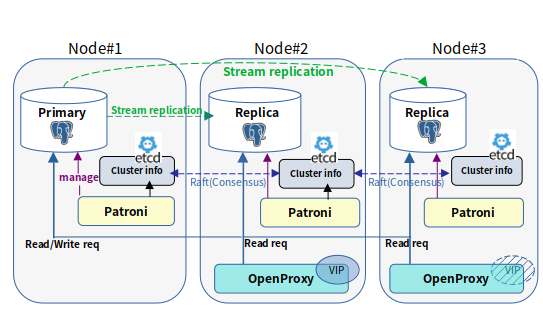
뷰에 대한 참조 안내서입니다.
o2views extension 설치 후 신규 뷰들이 추가되며, 아래의 2가지 형식으로 사용하여야 합니다.
스키마(기본 oracle)의 이름을 View 앞에 추가하여 사용합니다.
{schema_name}.{view_name}
-- 예시) o2views extension 설치 후, 새로 추가된 dba_tab_columns라는 뷰 사용합니다.
-- select * from oracle.dba_tab_columns;
스키마(기본 oracle)를 가장 높은 우선순위 search_path로 설정한 경우, 스키마를 생략하고 사용할 수 있습니다.
-- 현재 접속 세션에서 스미카 'oracle'를 가장 우선순위 높은 search_path로 설정합니다.
set search_path to oracle, public;
{view_name}
-- 예시) o2views extension 설치 후, 새로 추가된 dba_tab_columns라는 뷰 사용합니다.
-- select * from dba_tab_columns;아래 사양들은 스키마를 생략한 형태로 기술합니다.
ALL_COL_PRIVS는 다음 유형의 권한을 보여줍니다.
현재 유저가 객체의 소유자, 권한 부여자 또는 권한 피부여자인 컬럼 객체 권한
활성화된 Role이나 PUBLIC이 권한 피부여자인 컬럼 객체 권한
ALL_CONS_COLUMNS는 현재 사용자가 접근할 수 있고 Constraint에 지정된 컬럼들을 보여줍니다.
ALL_CONSTRAINTS는 현재 사용자가 접근 가능한 테이블에 대한 Constraint 정의를 보여줍니다.
ALL_INDEXES는 현재 사용자가 접근 가능한 테이블에 존재하는 인덱스에 대한 정보를 보여줍니다.
ALL_IND_COLUMNS은 현재 사용자가 접근 가능한 테이블에 정의된 인덱스를 구성하는 컬럼들의 정보를 보여줍니다.
ALL_OBJECTS는 데이터베이스에 존재하는 모든 객체에 대한 정보를 보여줍니다.
ALL_PART_TABLES는 현재 사용자가 접근할 수 있는 파티션 테이블의 객체 수준 파티셔닝 정보를 보여줍니다.
ALL_SOURCE를 통해 함수, 프로시저, 트리거, 패키지 명세, 패키지 본문 등 다양한 프로그램 유형의 소스 코드를 보여줍니다.
ALL_TABLES는 현재 사용자가 액세스할 수 있는 모든 테이블을 보여줍니다.
ALL_TAB_COLUMNS는 현재 사용자가 접근할 수 있는 테이블, 뷰, 클러스터의 컬럼들을 보여줍니다.
ALL_TAB_PARTITIONS는 현재 사용자가 접근할 수 있는 파티션에 대해 파티션 레벨의 파티셔닝 정보, 파티션 저장 매개변수를 보여줍니다.
ALL_TAB_PRIVS는 다음 유형의 권한을 보여줍니다.
현재 유저가 객체의 소유자, 권한 부여자 또는 권한 피부여자인 테이블 객체 권한
활성화된 Role이나 PUBLIC이 권한 피부여자인 테이블 객체 권한
ALL_TRIGGERS는 현재 사용자가 액세스할 수 있는 모든 트리거를 표시합니다.
ALL_TYPES는 현재 사용자가 액세스할 수 있는 모든 유형을 표시합니다.
ALL_USERS는 현재 사용자에게 보이는 데이터베이스의 모든 사용자를 보여줍니다.
ALL_VIEWS는 사용자 정의된 모든 뷰들에 대한 정보를 보여줍니다.
DBA_CONS_COLUMNS는 Database 내 제약 조건이 설정된 모든 컬럼을 보여줍니다.
DBA_COL_PRIVS는 Database 내 모든 컬럼 객체 권한을 보여줍니다.
DBA_CONSTRAINTS는 Database 내 모든 테이블의 모든 제약 조건 정의를 보여줍니다.
DBA_INDEXES는 Database에 존재하는 모든인덱스에 대한 정보를 보여줍니다.
DBA_IND_COLUMNS은 Database 내 모든테이블에 정의된 인덱스를 구성하는 컬럼들의 정보를 보여줍니다.
DBA_OBJECTS는 데이터베이스에 존재하는 모든 객체에 대한 정보를 보여줍니다.
DBA_PART_TABLES는 데이터베이스에 존재하는 모든 파티션 테이블의 정보를 보여줍니다.
DBA_PROCEDURES는 사용 가능한 모든 함수와 프로시저를 연관된 속성과 함께 보여줍니다.
DBA_ROLES는 데이터베이스 내의 모든 ROLE을 보여줍니다.
DBA_ROLE_PRIVS는 사용자에게 할당된 모든 역할에 대한 정보를 보여줍니다.
DBA_SOURCE를 통해 함수, 프로시저, 트리거, 패키지 명세, 패키지 본문 등 다양한 프로그램 유형의 소스 코드를 보여줍니다.
DBA_TAB_COLUMNS는 Database 내 모든 테이블, 뷰들의 컬럼을 보여줍니다.
DBA_TAB_PARTITIONS는 모든 파티션에 대해 파티션 레벨의 파티셔닝 정보, 파티션 저장 매개변수를 보여줍니다.
DBA_TAB_PRIVS는 Database 내 모든 테이블의 권한을 보여줍니다.
DBA_TABLES는 데이터베이스의 모든 테이블을 보여줍니다.
DBA_TRIGGERS는 데이터베이스의 모든 트리거를 표시합니다.
DBA_TYPES는 모든 유형을 표시합니다.
DBA_USERS는 Database 내 모든 유저의 이름에 대한 정보를 보여줍니다.
DBA_VIEWS는 Database 내사용자 정의된 모든 뷰들에 대한 정보를 보여줍니다.
DUAL 테이블은 다른 테이블을 참조하지 않는 SELECT 문에서 사용할 수 있으며, 최소한 한 개의 행을 반환해야 할 때 유용합니다. DUAL 테이블에서 선택하는 것은 SELECT 문을 사용하여 상수 표현식을 계산할 때 유용합니다. DUAL 테이블에는 단 하나의 행만 존재하므로, 상수 값은 한 번만 반환됩니다.
각 O2 extension과 O2의 버전 정보와 업데이트 시점을 출력하는 뷰입니다.
O2_MEMORY_CONTEXT_INFO는 O2에서 사용하는 메모리 컨텍스트 정보를 제공하는 뷰입니다.
O2_SHARED_MEMORY_INFO는 SHARED MEMORY 사용량을 보여주는 뷰입니다.
PRODUCT_COMPONENT_VERSION은 구성 요소 제품에 대한 버전과 상태에 대한 뷰입니다.
USER_COL_PRIVS는 현재 유저가 객체의 소유자, 권한 부여자 또는 권한 피부여자인 컬럼 객체 권한을 보여줍니다.
USER_CONS_COLUMNS는 현재 사용자가 소유하고 있고 Constraint에 지정된 컬럼들을 보여줍니다.
USER_CONSTRAINTS는 현재 사용자가 소유한 테이블에 대한 Constraint 정의를 보여줍니다.
USER_INDEXES는 현재 사용자가 소유한 테이블에 존재하는 인덱스에 대한 정보를 보여줍니다.
USER_IND_COLUMNS은 현재 사용자가 소유한 테이블에 정의된 인덱스를 구성하는 컬럼들의 정보를 보여줍니다.
USER_OBJECTS는 현재 유저가 소유한 객체에 대한 정보를 보여줍니다.
USER_PART_TABLES는 현재 사용자가 소유한 파티션 테이블의 객체 수준 파티셔닝 정보를 보여줍니다.
USER_ROLE_PRIVS는 현재 사용자에게 부여된 권한에 대한 정보를 보여줍니다.
USER_SOURCE를 통해 함수, 프로시저, 트리거, 패키지 명세, 패키지 본문 등 다양한 프로그램 유형의 소스 코드를 보여줍니다.
USER_TABLES는 현재 사용자가 소유한 모든 테이블을 보여줍니다.
USER_TAB_COLUMNS는 현재 사용자가 소유한 테이블, 뷰, 클러스터의 컬럼들을 보여줍니다.
USER_TAB_PARTITIONS는 현재 사용자가 소유한 파티션에 대해 파티션 레벨의 파티셔닝 정보, 파티션 저장 매개변수를 보여줍니다.
USER_TAB_PRIVS는 현재 유저가 객체의 소유자인 테이블 권한을 보여줍니다.
USER_TRIGGERS는 현재 사용자가 소유한 모든 트리거를 표시합니다.
USER_TYPES는 현재 사용자가 소유한 모든 유형을 표시합니다.
USER_USERS는 현재 사용자를 보여줍니다.
USER_VIEWS는 현재 유저가 정의한 뷰들에 대한 정보를 보여줍니다.
GRANTOR
NAME
권한 부여자의 이름입니다.
GRANTEE
NAME
OWNER
TEXT
Constraint 소유자의 이름입니다.
SCHEMA_NAME
TEXT
OWNER
TEXT
Constraint 소유자의 이름입니다.
SCHEMA_NAME
TEXT
OWNER
TEXT
인덱스 소유자의 이름입니다.
SCHEMA_NAME
INDEX_OWNER
NAME
인덱스 소유자의 이름입니다.
SCHEMA_NAME
NAME
OBJECT_NAME
NAME
오브젝트의 이름입니다.
OBJECT_TYPE
TEXT
OWNER
NAME
테이블의 소유자 이름입니다.
SCHEMA_NAME
OWNER
NAME
프로그램 소유자의 이름입니다.
SCHEMA_NAME
NAME
OWNER
NAME
테이블의 소유자입니다.
SCHEMA_NAME
NAME
OWNER
NAME
테이블 소유자의 이름입니다.
SCHEMA_NAME
NAME
TABLE_OWNER
NAME
테이블 소유자의 이름입니다.
GRANTOR
NAME
권한 부여자의 이름입니다.
GRANTEE
NAME
OWNER
NAME
트리거의 소유자입니다.
SCHEMA_NAME
NAME
OWNER
NAME
타입 소유자입니다.
SCHEMA_NAME
NAME
USERNAME
NAME
사용자의 이름입니다.
USER_ID
OID
VIEW_NAME
NAME
뷰의 이름입니다.
OWNER
NAME
OWNER
TEXT
Constraint 소유자의 이름입니다.
SCHEMA_NAME
TEXT
GRANTOR
NAME
권한 부여자의 이름입니다.
GRANTEE
NAME
OWNER
TEXT
Constraint 소유자의 이름입니다.
SCHEMA_NAME
TEXT
OWNER
TEXT
인덱스 소유자의 이름입니다.
SCHEMA_NAME
INDEX_OWNER
NAME
인덱스 소유자의 이름입니다.
SCHEMA_NAME
NAME
OBJECT_NAME
NAME
오브젝트의 이름입니다.
OBJECT_TYPE
TEXT
OWNER
NAME
테이블의 소유자 이름입니다.
SCHEMA_NAME
OBJECT_NAME
TEST
오브젝트 이름입니다.
ROLE
NAME
ROLE의 이름입니다.
ROLE_ID
OID
GRANTEE
NAME
권한 피부여자입니다.
GRANTED_ROLE
NAME
OWNER
TEXT
프로그램 소유자의 이름입니다.
SCHEMA_NAME
TEXT
OWNER
NAME
테이블 소유자의 이름입니다.
SCHEMA_NAME
NAME
TABLE_OWNER
NAME
테이블 소유자의 이름입니다.
GRANTOR
NAME
권한 부여자의 이름입니다.
GRANTEE
NAME
OWNER
NAME
테이블의 소유자입니다.
SCHEMA_NAME
NAME
OWNER
NAME
트리거의 소유자입니다.
SCHEMA_NAME
NAME
OWNER
NAME
타입 소유자입니다.
SCHEMA_NAME
NAME
USERNAME
NAME
사용자의 이름입니다.
USER_ID
OID
VIEW_NAME
NAME
뷰의 이름입니다.
OWNER
NAME
DUMMY
TEXT
'X'입니다.
VERSION_INFO
TEXT
각 O2 extension과 O2의 버전 정보와 업데이트 시점입니다.
NAME
TEXT
메모리 컨텍스트 이름입니다.
IDENT
TEXT
KEY
TEXT
Shared memory segment의 식별자입니다.
USAGE
INTEGER
PRODUCT
TEXT
구성 요소 이름입니다.
VERSION
TEXT
GRANTOR
NAME
권한 부여자의 이름입니다.
GRANTEE
NAME
OWNER
TEXT
Constraint 소유자의 이름입니다.
SCHEMA_NAME
TEXT
SCHEMA_NAME
TEXT
Constraint가 속한 스키마의 이름입니다.
CONSTRAINT_NAME
TEXT
SCHEMA_NAME
TEXT
인덱스가 속한 스키마의 이름입니다.
INDEX_NAME
INDEX_OWNER
NAME
인덱스 소유자의 이름입니다.
SCHEMA_NAME
NAME
OBJECT_NAME
NAME
오브젝트의 이름입니다.
OBJECT_TYPE
TEXT
SCHEMA_NAME
NAME
테이블이 속한 스키마의 이름입니다.
TABLE_NAME
USERNAME
NAME
권한이 부여된 사용자의 이름입니다.
GRANTED_ROLE
NAME
SCHEMA_NAME
TEXT
프로그램이 속한 스키마의 이름입니다.
NAME
TEXT
SCHEMA_NAME
NAME
테이블이 속한 스키마 이름입니다.
TABLE_NAME
NAME
SCHEMA_NAME
NAME
테이블이 속한 스키마의 이름입니다.
TABLE_NAME
NAME
SCHEMA_NAME
NAME
테이블이 속한 스키마의 이름입니다.
TABLE_NAME
GRANTOR
NAME
권한 부여자의 이름입니다.
GRANTEE
NAME
SCHEMA_NAME
NAME
트리거가 속한 스키마 이름입니다.
TRIGGER_NAME
NAME
SCHEMA_NAME
NAME
타입이 속한 스키마 이름입니다.
TYPE_NAME
NAME
USERNAME
NAME
사용자의 이름입니다.
USER_ID
OID
VIEW_NAME
NAME
뷰의 이름입니다.
OWNER
NAME
권한 피부여자의 이름입니다.
OWNER
NAME
테이블의 소유자의 이름입니다.
TABLE_SCHEMA
NAME
테이블이 속한 스키마의 이름입니다.
TABLE_NAME
NAME
테이블의 이름입니다.
COLUMN_NAME
NAME
컬럼의 이름입니다.
PRIVILEGE
CHARACTER VARYING
컬럼에 부여된 권한입니다.
GRANTABLE
CHARACTER VARYING
해당 권한을 다른 유저에게 부여가능한지의 여부입니다. (YES/NO)
COMMON
CHARACTER VARYING
권한의 부여 방식입니다.
호환성을 위해 존재하는 컬럼입니다.
항상 'NO'를 반환합니다.
INHERITED
CHARACTER VARYING
다른 컨테이너에서 상속 받았는지에 대한 여부입니다.
호환성을 위해 존재하는 컬럼입니다.
항상 'NO'를 반환합니다.
Constraint가 속한 스키마의 이름입니다.
CONSTRAINT_NAME
TEXT
Constraint의 이름입니다.
TABLE_NAME
TEXT
Constraint가 속한 테이블의 이름입니다.
COLUMN_NAME
TEXT
Constraint가 참조하는 컬럼의 이름입니다.
POSITION
SMALLINT
테이블의 정의에서 컬럼의 위치입니다.
CONSTRAINT_REF
TEXT
Constraint의 정의입니다.
Constraint가 속한 스키마의 이름입니다.
CONSTRAINT_NAME
TEXT
Constraint의 이름입니다.
CONSTRAINT_TYPE
TEXT
Constraint의 타입입니다.
'P' : Primary key
'R' : Foreign key
'U' : Unique
'C' : Check
TABLE_NAME
TEXT
Constraint가 속한 테이블의 이름입니다.
SEARCH_CONDITION
TEXT
CHECK Constraint에 적용되는 조회 조건입니다.
R_OWNER
TEXT
참조 제약 조건에 의해 참조되는 테이블의 소유자입니다.
R_CONSTRAINT_NAME
TEXT
참조되는 테이블에 대한 제약 조건 정의의 이름입니다.
DELETE_RULE
TEXT
참조 제약조건에 대한 삭제 규칙입니다.
DEFERRABLE
BOOLEAN
제약 조건의 검사 시점이 미룰 수 있는지에 대한 여부입니다. (T/F)
DEFERRED
BOOLEAN
제약 조건의 검사 시점이 미뤄졌는지에 대한 여부입니다. (T/F)
INDEX_OWNER
TEXT
인덱스 소유자의 이름입니다.
INDEX_NAME
TEXT
인덱스의 이름입니다.
CONSTRAINT_DEF
TEXT
Constraint의 정의입니다.
TEXT
인덱스가 속한 스키마의 이름입니다.
INDEX_NAME
TEXT
인덱스의 이름입니다.
INDEX_TYPE
TEXT
인덱스의 타입입니다.
호환성을 위해 존재하는 컬럼입니다.
항상 'BTREE'을 반환합니다.
TABLE_OWNER
TEXT
인덱스가 걸린 테이블의 소유자입니다.
TABLE_NAME
TEXT
인덱스가 걸린 테이블의 이름입니다.
TABLE_TYPE
TEXT
테이블의 타입입니다.
호환성을 위해 존재하는 컬럼입니다.
항상 'TABLE'을 반환합니다.
UNIQUENESS
TEXT
인덱스가 유니크한지에 대한 여부입니다.
UNIQUE/NONUNIQUE
COMPRESSION
TEXT
인덱스의 압축 여부입니다.
호환성을 위해 존재하는 컬럼입니다.
항상 'n'을 반환합니다.
TABLESPACE_NAME
TEXT
테이블이 기본 테이블스페이스에 있지 않은 경우, 해당 테이블이 위치하는 테이블스페이스의 이름입니다.
DEGREE
INTEGER
인덱스를 스캔하기 위한 인스턴스 당 스레드의 수입니다.
LOGGING
TEXT
인덱스 변경 사항이 기록되는지 여부입니다.
호환성을 위해 존재하는 컬럼입니다.
항상 'LOGGING'을 반환합니다.
STATUS
TEXT
파티셔닝되지 않은 인덱스의 사용 가능 여부입니다.
PARTITIONED
TEXT
파티셔닝 되었는지에 대한 여부입니다.
호환성을 위해 존재하는 컬럼입니다.
항상 'NO'를 반환합니다.
TEMPORARY
TEXT
인덱스가 임시 테이블에 존재하는지에 대한 여부입니다.
호환성을 위해 존재하는 컬럼입니다.
항상 'n'을 반환합니다.
SECONDARY
TEXT
호환성을 위해 존재하는 컬럼입니다.
항상 'NO'를 반환합니다.
JOIN_INDEX
TEXT
인덱스가 조인 인덱스인지에 대한 여부입니다.
호환성을 위해 존재하는 컬럼입니다.
항상 'NO'를 반환합니다.
DROPPED
TEXT
인덱스가 삭제되었는지에 대한 여부입니다.
호환성을 위해 존재하는 컬럼입니다.
항상 'NO'를 반환합니다.
인덱스가 속한 스키마의 이름입니다.
TABLE_OWNER
NAME
테이블 소유자의 이름입니다.
COLUMN_POSITION
SMALLINT
인덱스에서 컬럼의 위치입니다.
COLUMN_LENGTH
SMALLINT
컬럼의 길이입니다. (단위 : byte)
COLUMN_NAME
NAME
컬럼의 이름입니다.
CHAR_LENGTH
INTEGER
컬럼이 가질 수 있는 최대 길이입니다.
INDEX_NAME
NAME
인덱스의 이름입니다.
TABLE_NAME
NAME
테이블의 이름입니다.
DESCEND
TEXT
컬럼이 내림차순으로 정렬되어 있는지에 대한 여부입니다.
호환성을 위해 존재하는 컬럼입니다.
항상 'YES'를 반환합니다.
오브젝트의 타입입니다.
INDEX
SEQUENCE
VIEW
PARTITIONED TABLE
PARTITIONED INDEX
FOREIGN TABLE
TRIGGER
FUNCTION
CREATED
TIMESTAMP
오브젝트의 생성 일시입니다.
호환성을 위해 존재하는 컬럼입니다.
항상 NULL을 반환합니다.
LAST_DDL_TIME
TIMESTAMP
객체에 대한 마지막 변경 사항(권한 부여 및 취소 포함)이 DDL 문에 의해 발생한 시간입니다.
호환성을 위해 존재하는 컬럼입니다.
항상 NULL을 반환합니다.
OWNER
NAME
오브젝트의 소유자 이름입니다.
SCHEMA_NAME
NAME
오브젝트가 속한 스키마의 이름입니다.
STATUS
TEXT
객체가 유효한 상태인지의 여부입니다.
TEMPORARY
TEXT
임시 객체인지에 대한 여부입니다.
NAME
테이블이 속한 스키마의 이름입니다.
TABLE_NAME
NAME
테이블의 이름입니다.
PARTITIONING_TYPE
TEXT
파티셔닝 방식입니다.
RANGE, LIST, HASH
SUBPARTITIONING_TYPE
TEXT
복합 파티셔닝 방식입니다.
현재 SUBPARTITION 기능은 지원하고 있지 않습니다.
항상 'NONE'을 반환합니다.
PARTITION_COUNT
BIGINT
파티션의 개수입니다.
DEF_SUBPARTITION_COUNT
INTEGER
기본 서브 파티션의 개수입니다.
현재 SUBPARTITION 기능은 지원하고 있지 않습니다.
항상 0을 반환합니다.
PARTITIONING_KEY_COUNT
INTEGER
PARTITION BY 구문에 명시된 컬럼의 개수입니다.
SUBPARTITIONING_KEY_COUNT
INTEGER
SUBPARTITION BY 구문에 명시된 컬럼의 개수입니다.
현재 SUBPARTITION 기능은 지원하고 있지 않습니다.
항상 0을 반환합니다.
STATUS
TEXT
호환성을 위해 존재하는 컬럼입니다.
항상 'VALID'를 반환합니다.
DEF_TABLESPACE_NAME
TEXT
호환성을 위해 존재하는 컬럼입니다.
항상 NULL을 반환합니다.
DEF_PCT_FREE
TEXT
호환성을 위해 존재하는 컬럼입니다.
항상 NULL을 반환합니다.
DEF_PCT_USED
TEXT
호환성을 위해 존재하는 컬럼입니다.
항상 NULL을 반환합니다.
DEF_INI_TRANS
TEXT
호환성을 위해 존재하는 컬럼입니다.
항상 NULL을 반환합니다.
DEF_MAX_TRANS
TEXT
호환성을 위해 존재하는 컬럼입니다.
항상 NULL을 반환합니다.
DEF_INITIAL_EXTENT
TEXT
호환성을 위해 존재하는 컬럼입니다.
항상 NULL을 반환합니다.
DEF_NEXT_EXTENT
TEXT
호환성을 위해 존재하는 컬럼입니다..
항상 NULL을 반환합니다.
DEF_MIN_EXTENTS
TEXT
호환성을 위해 존재하는 컬럼입니다.
항상 NULL을 반환합니다.
DEF_MAX_EXTENTS
TEXT
호환성을 위해 존재하는 컬럼입니다.
항상 NULL을 반환합니다.
DEF_FREELISTS
TEXT
호환성을 위해 존재하는 컬럼입니다.
항상 NULL을 반환합니다.
DEF_FREELIST_GROUPS
TEXT
호환성을 위해 존재하는 컬럼입니다.
항상 NULL을 반환합니다.
DEF_LOGGING
TEXT
호환성을 위해 존재하는 컬럼입니다.
항상 'YES'를 반환합니다.
DEF_COMPRESSION
TEXT
호환성을 위해 존재하는 컬럼입니다.
항상 'NONE'을 반환합니다.
DEF_BUFFER_POOL
TEXT
호환성을 위해 존재하는 컬럼입니다.
항상 'DEFAULT'를 반환합니다.
REF_PTN_CONSTRAINT_NAME
TEXT
호환성을 위해 존재하는 컬럼입니다.
항상 NULL을 반환합니다.
INTERVAL
TEXT
호환성을 위해 존재하는 컬럼입니다.
항상 NULL을 반환합니다.
프로그램이 속한 스키마의 이름입니다.
NAME
NAME
프로그램의 이름입니다.
TYPE
TEXT
프로그램의 타입입니다.
PROCEDURE, FUNCTION, TRIGGER
LINE
INTEGER
해당 프로그램 기준으로 계산된 소스 코드 줄 번호입니다.
TEXT
TEXT
소스 코드입니다.
스키마 이름입니다.
TABLE_NAME
NAME
테이블 이름입니다.
TABLESPACE_NAME
NAME
테이블이 포함된 테이블스페이스의 이름입니다..
STATUS
TEXT
테이블의 사용 가능 여부입니다.
TEMPORARY
TEXT
임시 테이블 여부입니다.
테이블이 속한 스키마의 이름입니다.
TABLE_NAME
NAME
테이블의 이름입니다.
COLUMN_NAME
NAME
컬럼의 이름입니다.
DATA_TYPE
NAME
컬럼의 데이터 타입입니다.
DATA_LENGTH
INTEGER
TEXT 컬럼의 길이입니다.
DATA_PRECISION
INTEGER
NUMBER 컬럼의 정밀도입니다.
DATA_SCALE
INTEGER
NUMBER 컬럼의 배율입니다.
NULLABLE
TEXT
컬럼의 NULL 가능 여부입니다.
컬럼이 NULL이 될 수 있으면 : 'Y'
컬럼에 NULL이 허용되지 않으면 : 'N'
COLUMN_ID
SMALLINT
테이블이나 뷰에서 컬럼의 상대적인 위치입니다.
DATA_DEFAULT
TEXT
컬럼에 할당된 기본 값입니다.
SCHEMA_NAME
NAME
테이블이 속한 스키마의 이름입니다.
TABLE_NAME
NAME
테이블의 이름입니다.
COMPOSITE
TEXT
테이블이 복합 파티셔닝 되었는지에 대한 여부입니다.
PARTITION_NAME
NAME
파티션의 이름입니다.
SUBPARTITION_COUNT
BIGINT
서브파티션의 개수입니다.
HIGH_VALUE
TEXT
파티션 경계값 표현식입니다.
HIGH_VALUE_LENGTH
INTEGER
파티션 경계값 표현식의 길이입니다.
PARTITION_POSITION
INTEGER
이 파티션이 몇 번째 파티션인지 나타내는 순서입니다.
TABLESPACE_NAME
NAME
파티션이 속한 테이블스페이스의 이름입니다.
PCT_FREE
INTEGER
블록 내 최소 여유 공간 비율입니다.
PCT_USED
TEXT
블록 내 최소 사용 공간 비율입니다.
INI_TRANS
TEXT
호환성을 위해 존재하는 컬럼입니다.
항상 NULL을 반환합니다.
MAX_TRANS
TEXT
호환성을 위해 존재하는 컬럼입니다.
항상 NULL을 반환합니다.
INITIAL_EXTENT
TEXT
호환성을 위해 존재하는 컬럼입니다.
항상 NULL을 반환합니다.
NEXT_EXTENT
TEXT
호환성을 위해 존재하는 컬럼입니다.
항상 NULL을 반환합니다.
MIN_EXTENT
TEXT
호환성을 위해 존재하는 컬럼입니다.
항상 NULL을 반환합니다.
MAX_EXTENT
TEXT
호환성을 위해 존재하는 컬럼입니다.
항상 NULL을 반환합니다.
PCT_INCREASE
TEXT
호환성을 위해 존재하는 컬럼입니다.
항상 NULL을 반환합니다.
FREELISTS
TEXT
호환성을 위해 존재하는 컬럼입니다.
항상 NULL을 반환합니다.
FREELIST_GROUPS
TEXT
호환성을 위해 존재하는 컬럼입니다.
항상 NULL을 반환합니다.
LOGGING
TEXT
호환성을 위해 존재하는 컬럼입니다.
항상 'YES'를 반환합니다.
COMPRESSION
TEXT
호환성을 위해 존재하는 컬럼입니다.
항상 'NONE'을 반환합니다.
NUM_ROWS
DOUBLE PRECISION
파티션 내 행의 대략적인 개수입니다.
BLOCKS
DOUBLE PRECISION
파티션 내 블럭의 대략적인 개수입니다.
EMPTY_BLOCKS
TEXT
호환성을 위해 존재하는 컬럼입니다.
항상 NULL을 반환합니다.
AVG_SPACE
TEXT
호환성을 위해 존재하는 컬럼입니다.
항상 NULL을 반환합니다.
CHAIN_CNT
TEXT
호환성을 위해 존재하는 컬럼입니다.
항상 NULL을 반환합니다.
AVG_ROW_LEN
DOUBLE PRECISION
파티션 내 행의 평균 길이(Byte)입니다.
SAMPLE_SIZE
TEXT
호환성을 위해 존재하는 컬럼입니다.
항상 NULL을 반환합니다.
LAST_ANALYZED
TIMESTAMPTZ
파티션이 가장 최근에 분석된 날짜입니다.
BUFFER_POOL
TEXT
호환성을 위해 존재하는 컬럼입니다.
항상 'DEFAULT'를 반환합니다.
GLOBAL_STATS
TEXT
통계 수집 여부입니다.
USER_STATS
TEXT
호환성을 위해 존재하는 컬럼입니다.
항상 NULL을 반환합니다.
권한 피부여자의 이름입니다.
OWNER
NAME
테이블을 소유한 사람의 이름입니다.
SCHEMA_NAME
NAME
테이블이 속한 스키마의 이름입니다.
TABLE_NAME
NAME
테이블의 이름입니다.
PRIVILEGE
CHARACTER VARYING
권한의 이름입니다.
GRANTABLE
CHARACTER VARYING
해당 권한을 다른 유저에게 부여가능한지의 여부입니다. (YES/NO)
COMMON
CHARACTER VARYING
권한의 부여 방식입니다.
호환성을 위해 존재하는 컬럼입니다.
항상 'NO'를 반환합니다.
HIERARCHY
CHARACTER VARYING
HIERARCHY 옵션과 함께 권한이 부여되었는지에 대한 여부입니다.
TYPE
TEXT
오브젝트의 타입입니다.
INHERITED
CHARACTER VARYING
다른 컨테이너에서 상속 받았는지에 대한 여부입니다.
호환성을 위해 존재하는 컬럼입니다.
항상 'NO'를 반환합니다.
트리거가 속한 스키마 이름입니다.
TRIGGER_NAME
NAME
트리거 이름입니다.
TRIGGER_TYPE
TEXT
트리거가 언제 실행되며, 어떤 단위로 동작하는지 표시입니다.
트리거 실행 시점 : BEFORE / INSTEAD OF / AFTER
트리거 실행 단위 : ROW / STATEMENT
TRIGGERING_EVENT
TEXT
트리거가 반응하는 DML 이벤트입니다.
INSERT
DELETE
UPDATE
TRUNCATE
TABLE_OWNER
NAME
트리거가 설정된 테이블의 소유자 이름입니다.
BASE_OBJECT_TYPE
TEXT
트리거가 걸려 있는 객체의 종류입니다.
호환성을 위해 존재하는 컬럼입니다.
항상 'TABLE''을 반환합니다.
TABLE_NAME
NAME
트리거가 설정된 테이블의 이름입니다.
REFERENCING_NAME
TEXT
트리거가 OLD 및 NEW 열 값을 읽기 위해 참조하는 이름입니다.
호환성을 위해 존재하는 컬럼입니다.
항상 'REFERENCING NEW AS NEW OLD AS OLD'를 반환합니다.
STATUS
TEXT
트리거의 현재 활성화 여부입니다.
ENABLE/DISABLE
DESCRIPTION
TEXT
트리거에 대한 설명입니다.
TRIGGER_BODY
TEXT
트리거가 호출하는 함수의 정의 또는 본문입니다.
타입이 속한 스키마 이름입니다.
TYPE_NAME
NAME
타입 이름입니다.
TYPE_OID
OID
타입 OID입니다.
TYPECODE
TEXT
타입 CODE입니다.
OBJECT : 사용자 정의 객체 타입
COLLECTION : 배열 타입
현재는 지원하지 않는 타입입니다.
OTHER : 기타 타입
ATTRIBUTES
SMALLINT
타입의 속성 수입니다.
사용자에게 부여된 Numeric 형태의 ID입니다.
EXPIRY_DATE
TIMESTAMPTZ
계정의 만기일입니다.
DEFAULT_TABLESPACE
TEXT
데이터를 위한 기본 테이블스페이스입니다.
호환성을 위해 존재하는 컬럼입니다.
항상 NULL을 반환합니다.
TEMPORARY_TABLESPACE
TEXT
임시 테이블을 위한 기본 테이블스페이스의 이름 또는 테이블스페이스 그룹의 이름입니다.
호환성을 위해 존재하는 컬럼입니다.
항상 NULL을 반환합니다.
CREATED
TIMESTAMPTZ
계정이 생성된 날짜입니다.
호환성을 위해 존재하는 컬럼입니다.
항상 NULL을 반환합니다.
INITIAL_RSRC_CONSUMER_GROUP
TEXT
사용자의 초기 리소스 소비자 그룹입니다.
호환성을 위해 존재하는 컬럼입니다.
항상 NULL을 반환합니다.
EXTERNAL_NAME
TEXT
유저의 외부 이름입니다.
호환성을 위해 존재하는 컬럼입니다.
항상 NULL을 반환합니다.
뷰 소유자의 이름입니다.
SCHEMA_NAME
NAME
뷰가 속한 스키마의 이름입니다.
TEXT
CHARACTER VARYING
뷰를 생성하는 데 사용된 SELECT 문입니다.
Constraint가 속한 스키마의 이름입니다.
CONSTRAINT_NAME
TEXT
Constraint의 이름입니다.
TABLE_NAME
TEXT
Constraint가 속한 테이블의 이름입니다.
COLUMN_NAME
TEXT
Constraint가 참조하는 컬럼의 이름입니다.
POSITION
SMALLINT
테이블의 정의에서 컬럼의 위치입니다.
CONSTRAINT_REF
TEXT
Constraint의 정의입니다.
권한 피부여자의 이름입니다.
OWNER
NAME
테이블 소유자의 이름입니다.
TABLE_SCHEMA
NAME
테이블이 속한 스키마의 이름입니다.
TABLE_NAME
NAME
테이블의 이름입니다.
COLUMN_NAME
NAME
컬럼의 이름입니다.
PRIVILEGE
CHARACTER VARYING
컬럼에 부여된 권한입니다.
GRANTABLE
CHARACTER VARYING
해당 권한을 다른 유저에게 부여가능한지의 여부입니다. (YES/NO)
COMMON
CHARACTER VARYING
권한의 부여 방식입니다.
호환성을 위해 존재하는 컬럼입니다.
항상 'NO'를 반환합니다.
INHERITED
CHARACTER VARYING
다른 컨테이너에서 상속 받았는지에 대한 여부입니다.
호환성을 위해 존재하는 컬럼입니다.
항상 'NO'를 반환합니다.
Constraint가 속한 스키마의 이름입니다.
CONSTRAINT_NAME
TEXT
Constraint의 이름입니다.
CONSTRAINT_TYPE
TEXT
Constraint의 타입입니다.
'P' : Primary key
'R' : Foreign key
'U' : Unique
'C' : Check
TABLE_NAME
TEXT
Constraint가 속한 테이블의 이름입니다.
SEARCH_CONDITION
TEXT
CHECK Constraint에 적용되는 조회 조건입니다.
R_OWNER
TEXT
참조 제약 조건에 의해 참조되는 테이블의 소유자입니다.
R_CONSTRAINT_NAME
TEXT
참조되는 테이블에 대한 제약 조건 정의의 이름입니다.
DELETE_RULE
TEXT
참조 제약조건에 대한 삭제 규칙입니다.
DEFERRABLE
BOOLEAN
제약 조건의 검사 시점이 미룰 수 있는지에 대한 여부입니다. (T/F)
DEFERRED
BOOLEAN
제약 조건의 검사 시점이 미뤄졌는지에 대한 여부입니다. (T/F)
INDEX_OWNER
TEXT
인덱스 소유자의 이름입니다.
INDEX_NAME
TEXT
인덱스의 이름입니다.
CONSTRAINT_DEF
TEXT
Constraint의 정의입니다.
TEXT
인덱스가 속한 스키마의 이름입니다..
INDEX_NAME
TEXT
인덱스의 이름입니다.
INDEX_TYPE
TEXT
인덱스의 타입입니다.
호환성을 위해 존재하는 컬럼입니다.
항상 'BTREE'을 반환합니다.
TABLE_OWNER
TEXT
인덱스가 걸린 테이블의 소유자입니다.
TABLE_NAME
TEXT
인덱스가 걸린 테이블의 이름입니다.
TABLE_TYPE
TEXT
테이블의 타입입니다.
호환성을 위해 존재하는 컬럼입니다.
항상 'TABLE'을 반환합니다.
UNIQUENESS
TEXT
인덱스가 유니크한지에 대한 여부입니다.
UNIQUE/NONUNIQUE
COMPRESSION
TEXT
인덱스의 압축 여부입니다.
호환성을 위해 존재하는 컬럼입니다.
항상 'n'을 반환합니다.
TABLESPACE_NAME
TEXT
테이블이 기본 테이블스페이스에 있지 않은 경우, 해당 테이블이 위치하는 테이블스페이스의 이름입니다.
DEGREE
INTEGER
인덱스를 스캔하기 위한 인스턴스 당 스레드의 수입니다.
LOGGING
TEXT
인덱스 변경 사항이 기록되는지 여부입니다.
호환성을 위해 존재하는 컬럼입니다.
항상 'LOGGING'을 반환합니다.
STATUS
TEXT
파티셔닝되지 않은 인덱스의 사용 가능 여부입니다.
PARTITIONED
TEXT
파티셔닝 되었는지에 대한 여부입니다.
호환성을 위해 존재하는 컬럼입니다.
항상 'NO'를 반환합니다.
TEMPORARY
TEXT
인덱스가 임시 테이블에 존재하는지에 대한 여부입니다.
호환성을 위해 존재하는 컬럼입니다.
항상 'n'을 반환합니다.
SECONDARY
TEXT
호환성을 위해 존재하는 컬럼입니다.
항상 'NO'를 반환합니다.
JOIN_INDEX
TEXT
인덱스가 조인 인덱스인지에 대한 여부입니다.
호환성을 위해 존재하는 컬럼입니다.
항상 'NO'를 반환합니다.
DROPPED
TEXT
인덱스가 삭제되었는지에 대한 여부입니다.
호환성을 위해 존재하는 컬럼입니다.
항상 'NO'를 반환합니다.
인덱스가 속한 스키마의 이름입니다.
TABLE_OWNER
NAME
테이블 소유자의 이름입니다.
COLUMN_POSITION
SMALLINT
인덱스에서 컬럼의 위치입니다.
COLUMN_LENGTH
SMALLINT
컬럼의 길이입니다.(단위 : byte)
COLUMN_NAME
NAME
컬럼의 이름입니다.
CHAR_LENGTH
INTEGER
컬럼이 가질 수 있는 최대 길이입니다.
INDEX_NAME
NAME
인덱스의 이름입니다.
TABLE_NAME
NAME
테이블의 이름입니다.
DESCEND
TEXT
컬럼이 내림차순으로 정렬되어 있는지에 대한 여부입니다.
호환성을 위해 존재하는 컬럼입니다.
항상 'YES'를 반환합니다.
오브젝트의 타입입니다.
INDEX
SEQUENCE
VIEW
PARTITIONED TABLE
PARTITIONED INDEX
FOREIGN TABLE
TRIGGER
FUNCTION
CREATED
TIMESTAMP
오브젝트의 생성 일시입니다.
호환성을 위해 존재하는 컬럼입니다.
항상 NULL을 반환합니다.
LAST_DDL_TIME
TIMESTAMP
객체에 대한 마지막 변경 사항(권한 부여 및 취소 포함)이 DDL 문에 의해 발생한 시간입니다.
호환성을 위해 존재하는 컬럼입니다.
항상 NULL을 반환합니다.
OWNER
NAME
오브젝트의 소유자 이름입니다.
SCHEMA_NAME
NAME
오브젝트가 속한 스키마의 이름입니다.
STATUS
TEXT
객체가 유효한 상태인지의 여부입니다.
TEMPORARY
TEXT
임시 객체인지에 대한 여부입니다.
NAME
테이블이 속한 스키마의 이름입니다.
TABLE_NAME
NAME
테이블의 이름입니다.
PARTITIONING_TYPE
TEXT
파티셔닝 방식입니다.
RANGE, LIST, HASH
SUBPARTITIONING_TYPE
TEXT
복합 파티셔닝 방식입니다.
현재 SUBPARTITION 기능은 지원하고 있지 않습니다.
항상 'NONE'을 반환합니다.
PARTITION_COUNT
BIGINT
파티션의 개수입니다.
DEF_SUBPARTITION_COUNT
INTEGER
기본 서브 파티션의 개수입니다.
현재 SUBPARTITION 기능은 지원하고 있지 않습니다.
항상 0을 반환합니다.
PARTITIONING_KEY_COUNT
INTEGER
PARTITION BY 구문에 명시된 컬럼의 개수입니다.
SUBPARTITIONING_KEY_COUNT
INTEGER
SUBPARTITION BY 구문에 명시된 컬럼의 개수입니다.
현재 SUBPARTITION 기능은 지원하고 있지 않습니다.
항상 0을 반환합니다.
STATUS
TEXT
호환성을 위해 존재하는 컬럼입니다.
항상 'VALID'를 반환합니다.
DEF_TABLESPACE_NAME
TEXT
호환성을 위해 존재하는 컬럼입니다.
항상 NULL을 반환합니다.
DEF_PCT_FREE
TEXT
호환성을 위해 존재하는 컬럼입니다.
항상 NULL을 반환합니다.
DEF_PCT_USED
TEXT
호환성을 위해 존재하는 컬럼입니다.
항상 NULL을 반환합니다.
DEF_INI_TRANS
TEXT
호환성을 위해 존재하는 컬럼입니다.
항상 NULL을 반환합니다.
DEF_MAX_TRANS
TEXT
호환성을 위해 존재하는 컬럼입니다.
항상 NULL을 반환합니다.
DEF_INITIAL_EXTENT
TEXT
호환성을 위해 존재하는 컬럼입니다.
항상 NULL을 반환합니다.
DEF_NEXT_EXTENT
TEXT
호환성을 위해 존재하는 컬럼입니다.
항상 NULL을 반환합니다.
DEF_MIN_EXTENTS
TEXT
호환성을 위해 존재하는 컬럼입니다.
항상 NULL을 반환합니다.
DEF_MAX_EXTENTS
TEXT
호환성을 위해 존재하는 컬럼입니다.
항상 NULL을 반환합니다.
DEF_FREELISTS
TEXT
호환성을 위해 존재하는 컬럼입니다.
항상 NULL을 반환합니다.
DEF_FREELIST_GROUPS
TEXT
호환성을 위해 존재하는 컬럼입니다.
항상 NULL을 반환합니다.
DEF_LOGGING
TEXT
호환성을 위해 존재하는 컬럼입니다.
항상 'YES'를 반환합니다.
DEF_COMPRESSION
TEXT
호환성을 위해 존재하는 컬럼입니다.
항상 'NONE'을 반환합니다.
DEF_BUFFER_POOL
TEXT
호환성을 위해 존재하는 컬럼입니다.
항상 'DEFAULT'를 반환합니다.
REF_PTN_CONSTRAINT_NAME
TEXT
호환성을 위해 존재하는 컬럼입니다.
항상 NULL을 반환합니다.
INTERVAL
TEXT
호환성을 위해 존재하는 컬럼입니다.
항상 NULL을 반환합니다.
ROLED의 ID입니다.
AUTHENTICATE_TYPE
TEXT
ROLE에 대한 인증 메커니즘입니다.
호환성을 위해 존재하는 컬럼입니다.
항상 'NONE'을 반환합니다.
부여된 권한 이름입니다.
ADMIN_OPTION
TEXT
관리 권한을 위임할 수 있는 옵션(admin option)과 함께 부여되었다면 'YES', 그렇지 않다면 'NO'를 표시합니다.
DEFAULT_ROLE
TEXT
권한이 권한 피부여자가 세션 생성할 때 활성화되는지에 대한 여부입니다.
INHERITED
TEXT
부여된 역할의 권한을 자동 상속하는지 여부입니다.
PG 16 이상부터 지원됩니다.
프로그램이 속한 스키마의 이름입니다.
NAME
TEXT
프로그램의 이름입니다.
TYPE
TEXT
프로그램의 타입입니다.
PROCEDURE, FUNCTION, TRIGGER
LINE
INTEGER
해당 프로그램 기준으로 계산된 소스 코드 줄 번호입니다.
TEXT
TEXT
소스 코드입니다.
테이블이 속한 스키마의 이름입니다.
TABLE_NAME
NAME
테이블의 이름입니다.
COLUMN_NAME
NAME
컬럼의 이름입니다.
DATA_TYPE
NAME
컬럼의 데이터 타입입니다.
DATA_LENGTH
INTEGER
TEXT 컬럼의 길이입니다.
DATA_PRECISION
INTEGER
NUMBER 컬럼의 정밀도입니다.
DATA_SCALE
INTEGER
NUMBER 컬럼의 배율입니다.
NULLABLE
TEXT
컬럼의 NULL 가능 여부입니다.
컬럼이 NULL이 될 수 있으면 : 'Y'
컬럼에 NULL이 허용되지 않으면 : 'N'
COLUMN_ID
SMALLINT
테이블이나 뷰에서 컬럼의 상대적인 위치입니다.
DATA_DEFAULT
TEXT
컬럼에 할당된 기본 값입니다.
SCHEMA_NAME
NAME
테이블이 속한 스키마의 이름입니다.
TABLE_NAME
NAME
테이블의 이름입니다.
COMPOSITE
TEXT
테이블이 복합 파티셔닝 되었는지에 대한 여부입니다.
PARTITION_NAME
NAME
파티션의 이름입니다.
SUBPARTITION_COUNT
BIGINT
서브파티션의 개수입니다.
HIGH_VALUE
TEXT
파티션 경계값 표현식입니다.
HIGH_VALUE_LENGTH
INTEGER
파티션 경계값 표현식의 길이입니다.
PARTITION_POSITION
INTEGER
이 파티션이 몇 번째 파티션인지 나타내는 순서입니다.
TABLESPACE_NAME
NAME
파티션이 속한 테이블스페이스의 이름입니다.
PCT_FREE
INTEGER
블록 내 최소 여유 공간 비율입니다.
PCT_USED
TEXT
블록 내 최소 사용 공간 비율입니다.
INI_TRANS
TEXT
호환성을 위해 존재하는 컬럼입니다.
항상 NULL을 반환합니다.
MAX_TRANS
TEXT
호환성을 위해 존재하는 컬럼입니다.
항상 NULL을 반환합니다.
INITIAL_EXTENT
TEXT
호환성을 위해 존재하는 컬럼입니다.
항상 NULL을 반환합니다.
NEXT_EXTENT
TEXT
호환성을 위해 존재하는 컬럼입니다.
항상 NULL을 반환합니다.
MIN_EXTENT
TEXT
호환성을 위해 존재하는 컬럼입니다.
항상 NULL을 반환합니다.
MAX_EXTENT
TEXT
호환성을 위해 존재하는 컬럼입니다.
항상 NULL을 반환합니다.
PCT_INCREASE
TEXT
호환성을 위해 존재하는 컬럼입니다.
항상 NULL을 반환합니다.
FREELISTS
TEXT
호환성을 위해 존재하는 컬럼입니다.
항상 NULL을 반환합니다.
FREELIST_GROUPS
TEXT
호환성을 위해 존재하는 컬럼입니다.
항상 NULL을 반환합니다.
LOGGING
TEXT
호환성을 위해 존재하는 컬럼입니다.
항상 'YES'를 반환합니다.
COMPRESSION
TEXT
호환성을 위해 존재하는 컬럼입니다.
항상 'NONE'을 반환합니다.
NUM_ROWS
DOUBLE PRECISION
파티션 내 행의 대략적인 개수입니다.
BLOCKS
DOUBLE PRECISION
파티션 내 블럭의 대략적인 개수입니다.
EMPTY_BLOCKS
TEXT
호환성을 위해 존재하는 컬럼입니다.
항상 NULL을 반환합니다.
AVG_SPACE
TEXT
호환성을 위해 존재하는 컬럼입니다.
항상 NULL을 반환합니다.
CHAIN_CNT
TEXT
호환성을 위해 존재하는 컬럼입니다.
항상 NULL을 반환합니다.
AVG_ROW_LEN
DOUBLE PRECISION
파티션 내 행의 평균 길이(Byte)입니다.
SAMPLE_SIZE
TEXT
호환성을 위해 존재하는 컬럼입니다.
항상 NULL을 반환합니다.
LAST_ANALYZED
TIMESTAMPTZ
파티션이 가장 최근에 분석된 날짜입니다.
BUFFER_POOL
TEXT
호환성을 위해 존재하는 컬럼입니다.
항상 'DEFAULT'를 반환합니다.
GLOBAL_STATS
TEXT
통계 수집 여부입니다.
USER_STATS
TEXT
호환성을 위해 존재하는 컬럼입니다.
항상 NULL을 반환합니다.
권한 피부여자의 이름입니다.
OWNER
NAME
테이블을 소유한 사람의 이름입니다.
SCHEMA_NAME
NAME
테이블이 속한 스키마의 이름입니다.
TABLE_NAME
NAME
테이블의 이름입니다.
PRIVILEGE
CHARACTER VARYING
권한의 이름입니다.
GRANTABLE
CHARACTER VARYING
해당 권한을 다른 유저에게 부여가능한지의 여부입니다. (YES/NO)
COMMON
CHARACTER VARYING
권한의 부여 방식입니다.
호환성을 위해 존재하는 컬럼입니다.
항상 'NO'를 반환합니다.
HIERARCHY
CHARACTER VARYING
HIERARCHY 옵션과 함께 권한이 부여되었는지에 대한 여부입니다.
TYPE
TEXT
오브젝트의 타입입니다.
INHERITED
CHARACTER VARYING
다른 컨테이너에서 상속 받았는지에 대한 여부입니다.
호환성을 위해 존재하는 컬럼입니다.
항상 'NO'를 반환합니다.
테이블이 속한 스키마 이름입니다.
TABLE_NAME
NAME
테이블 이름입니다.
TABLESPACE_NAME
NAME
테이블이 포함된 테이블스페이스의 이름입니다.
STATUS
TEXT
테이블의 사용 가능 여부입니다.
TEMPORARY
TEXT
임시 테이블 여부입니다.
트리거가 속한 스키마 이름입니다.
TRIGGER_NAME
NAME
트리거 이름입니다.
TRIGGER_TYPE
TEXT
트리거가 언제 실행되며, 어떤 단위로 동작하는지 표시입니다.
트리거 실행 시점 : BEFORE / INSTEAD OF / AFTER
트리거 실행 단위 : ROW / STATEMENT
TRIGGERING_EVENT
TEXT
트리거가 반응하는 DML 이벤트입니다.
INSERT
DELETE
UPDATE
TRUNCATE
TABLE_OWNER
NAME
트리거가 설정된 테이블의 소유자 이름입니다.
BASE_OBJECT_TYPE
TEXT
트리거가 걸려 있는 객체의 종류입니다.
호환성을 위해 존재하는 컬럼입니다.
항상 'TABLE''을 반환합니다.
TABLE_NAME
NAME
트리거가 설정된 테이블의 이름입니다.
REFERENCING_NAME
TEXT
트리거가 OLD 및 NEW 열 값을 읽기 위해 참조하는 이름입니다.
호환성을 위해 존재하는 컬럼입니다.
항상 'REFERENCING NEW AS NEW OLD AS OLD'를 반환합니다.
STATUS
TEXT
트리거의 현재 활성화 여부입니다.
ENABLE/DISABLE
DESCRIPTION
TEXT
트리거에 대한 설명입니다.
TRIGGER_BODY
TEXT
트리거가 호출하는 함수의 정의 또는 본문입니다.
타입이 속한 스키마 이름입니다.
TYPE_NAME
NAME
타입 이름입니다.
TYPE_OID
OID
타입 OID입니다.
TYPECODE
TEXT
타입 CODE입니다.
OBJECT : 사용자 정의 객체 타입
COLLECTION : 배열 타입
현재는 지원하지 않는 타입입니다.
OTHER : 기타 타입
ATTRIBUTES
SMALLINT
타입의 속성 수입니다.
사용자에게 부여된 Numeric 형태의 ID입니다.
EXPIRY_DATE
TIMESTAMPTZ
계정의 만기일입니다.
DEFAULT_TABLESPACE
TEXT
데이터를 위한 기본 테이블스페이스입니다.
호환성을 위해 존재하는 컬럼입니다.
항상 NULL을 반환합니다.
TEMPORARY_TABLESPACE
TEXT
임시 테이블을 위한 기본 테이블스페이스의 이름 또는 테이블스페이스 그룹의 이름입니다.
호환성을 위해 존재하는 컬럼입니다.
항상 NULL을 반환합니다.
CREATED
TIMESTAMPTZ
계정이 생성된 날짜입니다.
호환성을 위해 존재하는 컬럼입니다.
항상 NULL을 반환합니다.
INITIAL_RSRC_CONSUMER_GROUP
TEXT
사용자의 초기 리소스 소비자 그룹입니다.
호환성을 위해 존재하는 컬럼입니다.
항상 NULL을 반환합니다.
EXTERNAL_NAME
TEXT
유저의 외부 이름입니다.
호환성을 위해 존재하는 컬럼입니다.
항상 NULL을 반환합니다.
뷰 소유자의 이름입니다.
SCHEMA_NAME
NAME
뷰가 속한 스키마의 이름입니다.
TEXT
CHARACTER VARYING
뷰를 생성하는 데 사용된 SELECT 문입니다.
해당 컨텍스트에 대한 추가 식별자 정보입니다.
PARENT
TEXT
상위 메모리 컨텍스트 이름입니다.
LEVEL
INTEGER
메모리 컨텍스트의 계층 수준입니다.
TOTAL_BYTES
BIGINT
컨텍스트가 할당한 총 메모리 크기입니다.
TOTAL_NBLOCKS
BIGINT
할당된 블록 수입니다.
FREE_BYTES
BIGINT
현재 할당된 메모리 중 사용 가능한 공간입니다.
FREE_CHUNCKS
BIGINT
사용 가능한 메모리 조각 수입니다.
USED_BYTES
BIGINT
실제로 사용 중인 메모리 크기입니다.
사용량입니다.
버전입니다.
STATUS
TEXT
아키텍처와 빌드 모드입니다.
권한 피부여자의 이름입니다.
OWNER
NAME
테이블 소유자의 이름입니다.
TABLE_SCHEMA
NAME
테이블이 속한 스키마의 이름입니다.
TABLE_NAME
NAME
테이블의 이름입니다.
COLUMN_NAME
NAME
컬럼의 이름입니다.
PRIVILEGE
CHARACTER VARYING
컬럼에 부여된 권한입니다.
GRANTABLE
CHARACTER VARYING
해당 권한을 다른 유저에게 부여가능한지의 여부입니다. (YES/NO)
COMMON
CHARACTER VARYING
권한의 부여 방식입니다.
호환성을 위해 존재하는 컬럼입니다.
항상 'NO'를 반환합니다.
INHERITED
CHARACTER VARYING
다른 컨테이너에서 상속 받았는지에 대한 여부입니다.
호환성을 위해 존재하는 컬럼입니다.
항상 'NO'를 반환합니다.
Constraint가 속한 스키마의 이름입니다.
CONSTRAINT_NAME
TEXT
Constraint의 이름입니다.
TABLE_NAME
TEXT
Constraint가 속한 테이블의 이름입니다.
COLUMN_NAME
TEXT
Constraint가 참조하는 컬럼의 이름입니다.
POSITION
SMALLINT
테이블의 정의에서 컬럼의 위치입니다.
CONSTRAINT_REF
TEXT
Constraint의 정의입니다.
Constraint의 이름입니다.
CONSTRAINT_TYPE
TEXT
Constraint의 타입입니다.
'P' : Primary key
'R' : Foreign key
'U' : Unique
'C' : Check
TABLE_NAME
TEXT
Constraint가 속한 테이블의 이름입니다.
SEARCH_CONDITION
TEXT
CHECK Constraint에 적용되는 조회 조건입니다.
R_OWNER
TEXT
참조 제약 조건에 의해 참조되는 테이블의 소유자입니다.
R_CONSTRAINT_NAME
TEXT
참조되는 테이블에 대한 제약 조건 정의의 이름입니다.
DELETE_RULE
TEXT
참조 제약조건에 대한 삭제 규칙입니다.
DEFERRABLE
BOOLEAN
제약 조건의 검사 시점이 미룰 수 있는지에 대한 여부입니다.(T/F)
DEFERRED
BOOLEAN
제약 조건의 검사 시점이 미뤄졌는지에 대한 여부입니다. (T/F)
INDEX_OWNER
TEXT
인덱스 소유자의 이름입니다.
INDEX_NAME
TEXT
인덱스의 이름입니다.
CONSTRAINT_DEF
TEXT
Constraint의 정의입니다.
TEXT
인덱스의 이름입니다.
INDEX_TYPE
TEXT
인덱스의 타입입니다.
호환성을 위해 존재하는 컬럼입니다.
항상 'BTREE'을 반환합니다.
TABLE_OWNER
TEXT
인덱스가 걸린 테이블의 소유자입니다.
TABLE_NAME
TEXT
인덱스가 걸린 테이블의 이름입니다.
TABLE_TYPE
TEXT
테이블의 타입입니다.
호환성을 위해 존재하는 컬럼입니다.
항상 'TABLE'을 반환합니다.
UNIQUENESS
TEXT
인덱스가 유니크한지에 대한 여부입니다.(UNIQUE/NONUNIQUE)
COMPRESSION
TEXT
인덱스의 압축 여부입니다.
호환성을 위해 존재하는 컬럼입니다.
항상 'n'을 반환합니다.
TABLESPACE_NAME
TEXT
테이블이 기본 테이블스페이스에 있지 않은 경우, 해당 테이블이 위치하는 테이블스페이스의 이름입니다.
DEGREE
INTEGER
인덱스를 스캔하기 위한 인스턴스 당 스레드의 수입니다.
LOGGING
TEXT
인덱스 변경 사항이 기록되는지 여부입니다.
호환성을 위해 존재하는 컬럼입니다.
항상 'LOGGING'을 반환합니다.
STATUS
TEXT
파티셔닝되지 않은 인덱스의 사용 가능 여부입니다.
PARTITIONED
TEXT
파티셔닝 되었는지에 대한 여부입니다.
호환성을 위해 존재하는 컬럼입니다.
항상 'NO'를 반환합니다.
TEMPORARY
TEXT
인덱스가 임시 테이블에 존재하는지에 대한 여부입니다.
호환성을 위해 존재하는 컬럼입니다.
항상 'n'을 반환합니다.
SECONDARY
TEXT
호환성을 위해 존재하는 컬럼입니다.
항상 'NO'를 반환합니다.
JOIN_INDEX
TEXT
인덱스가 조인 인덱스인지에 대한 여부입니다.
호환성을 위해 존재하는 컬럼이다.
항상 'NO'를 반환합니다.
DROPPED
TEXT
인덱스가 삭제되었는지에 대한 여부입니다.
호환성을 위해 존재하는 컬럼입니다.
항상 'NO'를 반환합니다.
인덱스가 속한 스키마의 이름입니다.
TABLE_OWNER
NAME
테이블 소유자의 이름입니다.
COLUMN_POSITION
SMALLINT
인덱스에서 컬럼의 위치입니다.
COLUMN_LENGTH
SMALLINT
컬럼의 길이입니다. (단위 : byte)
COLUMN_NAME
NAME
컬럼의 이름입니다.
CHAR_LENGTH
INTEGER
컬럼이 가질 수 있는 최대 길이입니다.
INDEX_NAME
NAME
인덱스의 이름입니다.
TABLE_NAME
NAME
테이블의 이름입니다.
DESCEND
TEXT
컬럼이 내림차순으로 정렬되어 있는지에 대한 여부입니다.
호환성을 위해 존재하는 컬럼입니다.
항상 'YES'를 반환합니다.
오브젝트의 타입입니다.
INDEX
SEQUENCE
VIEW
PARTITIONED TABLE
PARTITIONED INDEX
FOREIGN TABLE
TRIGGER
FUNCTION
CREATED
TIMESTAMP
오브젝트의 생성 일시입니다.
호환성을 위해 존재하는 컬럼입니다.
항상 NULL을 반환합니다.
LAST_DDL_TIME
TIMESTAMP
객체에 대한 마지막 변경 사항(권한 부여 및 취소 포함)이 DDL 문에 의해 발생한 시간입니다.
호환성을 위해 존재하는 컬럼입니다.
항상 NULL을 반환합니다.
SCHEMA_NAME
NAME
오브젝트가 속한 스키마의 이름입니다.
STATUS
TEXT
객체가 유효한 상태인지의 여부입니다.
TEMPORARY
TEXT
임시 객체인지에 대한 여부입니다.
NAME
테이블의 이름입니다.
PARTITIONING_TYPE
TEXT
파티셔닝 방식입니다.
RANGE, LIST, HASH
SUBPARTITIONING_TYPE
TEXT
복합 파티셔닝 방식입니다.
현재 SUBPARTITION 기능은 지원하고 있지 않다.
항상 'NONE'을 반환합니다.
PARTITION_COUNT
BIGINT
파티션의 개수입니다.
DEF_SUBPARTITION_COUNT
INTEGER
기본 서브 파티션의 개수입니다.
현재 SUBPARTITION 기능은 지원하고 있지 않다.
항상 0을 반환합니다.
PARTITIONING_KEY_COUNT
INTEGER
PARTITION BY 구문에 명시된 컬럼의 개수입니다.
SUBPARTITIONING_KEY_COUNT
INTEGER
SUBPARTITION BY 구문에 명시된 컬럼의 개수입니다.
현재 SUBPARTITION 기능은 지원하고 있지 않다.
항상 0을 반환합니다.
STATUS
TEXT
호환성을 위해 존재하는 컬럼입니다.
항상 'VALID'를 반환합니다.
DEF_TABLESPACE_NAME
TEXT
호환성을 위해 존재하는 컬럼입니다.
항상 NULL을 반환합니다.
DEF_PCT_FREE
TEXT
호환성을 위해 존재하는 컬럼입니다.
항상 NULL을 반환합니다.
DEF_PCT_USED
TEXT
호환성을 위해 존재하는 컬럼입니다.
항상 NULL을 반환합니다.
DEF_INI_TRANS
TEXT
호환성을 위해 존재하는 컬럼입니다.
항상 NULL을 반환합니다.
DEF_MAX_TRANS
TEXT
호환성을 위해 존재하는 컬럼입니다.
항상 NULL을 반환합니다.
DEF_INITIAL_EXTENT
TEXT
호환성을 위해 존재하는 컬럼입니다.
항상 NULL을 반환합니다.
DEF_NEXT_EXTENT
TEXT
호환성을 위해 존재하는 컬럼입니다.항상 NULL을 반환합니다.
DEF_MIN_EXTENTS
TEXT
호환성을 위해 존재하는 컬럼입니다.
항상 NULL을 반환합니다.
DEF_MAX_EXTENTS
TEXT
호환성을 위해 존재하는 컬럼입니다.
항상 NULL을 반환합니다.
DEF_FREELISTS
TEXT
호환성을 위해 존재하는 컬럼입니다.
항상 NULL을 반환합니다.
DEF_FREELIST_GROUPS
TEXT
호환성을 위해 존재하는 컬럼입니다.
항상 NULL을 반환합니다.
DEF_LOGGING
TEXT
호환성을 위해 존재하는 컬럼입니다.
항상 'YES'를 반환합니다.
DEF_COMPRESSION
TEXT
호환성을 위해 존재하는 컬럼입니다.
항상 'NONE'을 반환합니다.
DEF_BUFFER_POOL
TEXT
호환성을 위해 존재하는 컬럼입니다.
항상 'DEFAULT'를 반환합니다.
REF_PTN_CONSTRAINT_NAME
TEXT
호환성을 위해 존재하는 컬럼입니다.
항상 NULL을 반환합니다.
INTERVAL
TEXT
호환성을 위해 존재하는 컬럼입니다.
항상 NULL을 반환합니다.
권한 피부여자에게 부여된 권한의 이름입니다.
ADMIN_OPTION
TEXT
관리 권한을 위임할 수 있는 옵션(admin option)과 함께 부여되었다면 'YES', 그렇지 않다면 'NO'를 표시합니다.
DEFAULT_ROLE
TEXT
권한이 권한 피부여자가 세션을 생성할 때 활성화되는지에 대한 여부입니다.
OS_OPTIONS
TEXT
OS에 의해 부여된 권한의 여부입니다.
호환성을 위해 존재하는 컬럼입니다.
항상 'NO'를 반환합니다.
프로그램의 이름입니다.
TYPE
TEXT
프로그램의 타입입니다.
PROCEDURE, FUNCTION, TRIGGER
LINE
INTEGER
해당 프로그램 기준으로 계산된 소스 코드 줄 번호입니다.
TEXT
TEXT
소스 코드입니다.
테이블 이름입니다.
TABLESPACE_NAME
NAME
테이블이 포함된 테이블스페이스의 이름입니다.
STATUS
TEXT
테이블의 사용 가능 여부입니다.
TEMPORARY
TEXT
임시 테이블 여부입니다.
테이블의 이름입니다.
COLUMN_NAME
NAME
컬럼의 이름입니다.
DATA_TYPE
NAME
컬럼의 데이터 타입입니다.
DATA_LENGTH
INTEGER
TEXT 컬럼의 길이입니다.
DATA_PRECISION
INTEGER
NUMBER 컬럼의 정밀도입니다.
DATA_SCALE
INTEGER
NUMBER 컬럼의 배율입니다.
NULLABLE
TEXT
컬럼의 NULL 가능 여부입니다.
컬럼이 NULL이 될 수 있으면 : 'Y'
컬럼에 NULL이 허용되지 않으면 : 'N'
COLUMN_ID
SMALLINT
테이블이나 뷰에서 컬럼의 상대적인 위치입니다.
DATA_DEFAULT
TEXT
컬럼에 할당된 기본 값입니다.
NAME
테이블의 이름입니다.
COMPOSITE
TEXT
테이블이 복합 파티셔닝 되었는지에 대한 여부입니다.
PARTITION_NAME
NAME
파티션의 이름입니다.
SUBPARTITION_COUNT
BIGINT
서브파티션의 개수입니다.
HIGH_VALUE
TEXT
파티션 경계값 표현식입니다.
HIGH_VALUE_LENGTH
INTEGER
파티션 경계값 표현식의 길이입니다.
PARTITION_POSITION
INTEGER
이 파티션이 몇 번째 파티션인지 나타내는 순서입니다.
TABLESPACE_NAME
NAME
파티션이 속한 테이블스페이스의 이름입니다.
PCT_FREE
INTEGER
블록 내 최소 여유 공간 비율입니다.
PCT_USED
TEXT
블록 내 최소 사용 공간 비율입니다.
INI_TRANS
TEXT
호환성을 위해 존재하는 컬럼입니다.
항상 NULL을 반환합니다.
MAX_TRANS
TEXT
호환성을 위해 존재하는 컬럼입니다.
항상 NULL을 반환합니다.
INITIAL_EXTENT
TEXT
호환성을 위해 존재하는 컬럼입니다.
항상 NULL을 반환합니다.
NEXT_EXTENT
TEXT
호환성을 위해 존재하는 컬럼입니다.
항상 NULL을 반환합니다.
MIN_EXTENT
TEXT
호환성을 위해 존재하는 컬럼입니다.
항상 NULL을 반환합니다.
MAX_EXTENT
TEXT
호환성을 위해 존재하는 컬럼입니다.
항상 NULL을 반환합니다.
PCT_INCREASE
TEXT
호환성을 위해 존재하는 컬럼입니다.
항상 NULL을 반환합니다.
FREELISTS
TEXT
호환성을 위해 존재하는 컬럼입니다.
항상 NULL을 반환합니다.
FREELIST_GROUPS
TEXT
호환성을 위해 존재하는 컬럼입니다.
항상 NULL을 반환합니다.
LOGGING
TEXT
호환성을 위해 존재하는 컬럼입니다.
항상 'YES'를 반환합니다.
COMPRESSION
TEXT
호환성을 위해 존재하는 컬럼입니다.
항상 'NONE'을 반환합니다.
NUM_ROWS
DOUBLE PRECISION
파티션 내 행의 대략적인 개수입니다.
BLOCKS
DOUBLE PRECISION
파티션 내 블럭의 대략적인 개수입니다.
EMPTY_BLOCKS
TEXT
호환성을 위해 존재하는 컬럼입니다.
항상 NULL을 반환합니다.
AVG_SPACE
TEXT
호환성을 위해 존재하는 컬럼입니다.
항상 NULL을 반환합니다.
CHAIN_CNT
TEXT
호환성을 위해 존재하는 컬럼입니다.
항상 NULL을 반환합니다.
AVG_ROW_LEN
DOUBLE PRECISION
파티션 내 행의 평균 길이(Byte)입니다.
SAMPLE_SIZE
TEXT
호환성을 위해 존재하는 컬럼입니다.
항상 NULL을 반환합니다.
LAST_ANALYZED
TIMESTAMPTZ
파티션이 가장 최근에 분석된 날짜입니다.
BUFFER_POOL
TEXT
호환성을 위해 존재하는 컬럼입니다.
항상 'DEFAULT'를 반환합니다.
GLOBAL_STATS
TEXT
통계 수집 여부입니다.
USER_STATS
TEXT
호환성을 위해 존재하는 컬럼입니다.
항상 NULL을 반환합니다.
권한 피부여자의 이름입니다.
OWNER
NAME
테이블을 소유한 사람의 이름입니다.
SCHEMA_NAME
NAME
테이블이 속한 스키마의 이름입니다.
TABLE_NAME
NAME
테이블의 이름입니다.
PRIVILEGE
CHARACTER VARYING
권한의 이름입니다.
GRANTABLE
CHARACTER VARYING
해당 권한을 다른 유저에게 부여가능한지의 여부입니다. (YES/NO)
COMMON
CHARACTER VARYING
권한의 부여 방식입니다.
호환성을 위해 존재하는 컬럼입니다.
항상 'NO'를 반환합니다.
HIERARCHY
CHARACTER VARYING
HIERARCHY 옵션과 함께 권한이 부여되었는지에 대한 여부입니다.
TYPE
TEXT
오브젝트의 타입입니다.
INHERITED
CHARACTER VARYING
다른 컨테이너에서 상속 받았는지에 대한 여부입니다.
호환성을 위해 존재하는 컬럼입니다.
항상 'NO'를 반환합니다.
트리거 이름입니다.
TRIGGER_TYPE
TEXT
트리거가 언제 실행되며, 어떤 단위로 동작하는지 표시입니다.
트리거 실행 시점 : BEFORE / INSTEAD OF / AFTER
트리거 실행 단위 : ROW / STATEMENT
TRIGGERING_EVENT
TEXT
트리거가 반응하는 DML 이벤트입니다.
INSERT
DELETE
UPDATE
TRUNCATE
TABLE_OWNER
NAME
트리거가 설정된 테이블의 소유자 이름입니다.
BASE_OBJECT_TYPE
TEXT
트리거가 걸려 있는 객체의 종류입니다.
호환성을 위해 존재하는 컬럼입니다.
항상 'TABLE''을 반환합니다.
TABLE_NAME
NAME
트리거가 설정된 테이블의 이름입니다.
REFERENCING_NAME
TEXT
트리거가 OLD 및 NEW 열 값을 읽기 위해 참조하는 이름입니다.
호환성을 위해 존재하는 컬럼입니다.
항상 'REFERENCING NEW AS NEW OLD AS OLD'를 반환합니다.
STATUS
TEXT
트리거의 현재 활성화 여부입니다.
ENABLE/DISABLE
DESCRIPTION
TEXT
트리거에 대한 설명입니다.
TRIGGER_BODY
TEXT
트리거가 호출하는 함수의 정의 또는 본문입니다.
타입 이름입니다.
TYPE_OID
OID
타입 OID입니다.
TYPECODE
TEXT
타입 CODE입니다.
OBJECT : 사용자 정의 객체 타입
COLLECTION : 배열 타입
현재는 지원하지 않는 타입이다.
OTHER : 기타 타입
ATTRIBUTES
SMALLINT
타입 내 속성 개수입니다.
사용자에게 부여된 Numeric 형태의 ID입니다.
EXPIRY_DATE
TIMESTAMPTZ
계정의 만기일입니다.
DEFAULT_TABLESPACE
TEXT
데이터를 위한 기본 테이블스페이스입니다.
호환성을 위해 존재하는 컬럼입니다.
항상 NULL을 반환합니다.
TEMPORARY_TABLESPACE
TEXT
임시 테이블을 위한 기본 테이블스페이스의 이름 또는 테이블스페이스 그룹의 이름입니다.
호환성을 위해 존재하는 컬럼입니다.
항상 NULL을 반환합니다.
CREATED
TIMESTAMPTZ
계정이 생성된 날짜입니다.
호환성을 위해 존재하는 컬럼입니다.
항상 NULL을 반환합니다.
INITIAL_RSRC_CONSUMER_GROUP
TEXT
사용자의 초기 리소스 소비자 그룹입니다.
호환성을 위해 존재하는 컬럼입니다.
항상 NULL을 반환합니다.
EXTERNAL_NAME
TEXT
유저의 외부 이름입니다.
호환성을 위해 존재하는 컬럼입니다.
항상 NULL을 반환합니다.
뷰 소유자의 이름입니다.
SCHEMA_NAME
NAME
뷰가 속한 스키마의 이름입니다.
TEXT
CHARACTER VARYING
뷰를 생성하는 데 사용된 SELECT 문입니다.
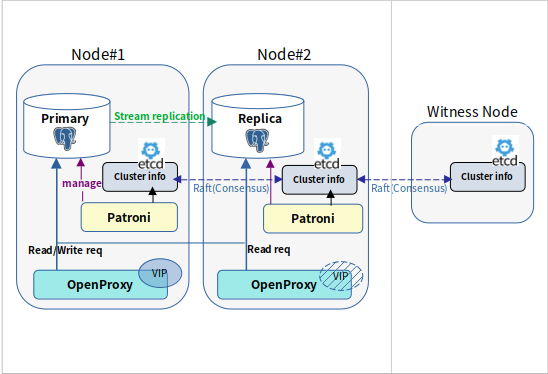
BIN_TO_NUM는 bit vector를 해당 정수 값으로 변환해주는 함수입니다.
expr
expr는 숫자형 타입이나 숫자형 타입으로 변환될 수 있는 값을 반환하는 임의의 연산식입니다.expr의 반환 값이 숫자형 타입이 아니면 숫자형 타입으로 변환 후 정수 값으로 변환해서 사용합니다. (trunc() 결과와 같다)변환 후의 정수 값은 0 또는 1 이어야 합니다.
BIN_TO_NUM
(
expr1, expr2, ..., exprn IN numeric -- variadic: treated as numeric[]
)
RETURNS numeric;SELECT BIN_TO_NUM(1,0,1);
bin_to_num
------------
5
(1개 행)
SELECT BIN_TO_NUM('1',0,1);
bin_to_num
------------
5
(1개 행)
SELECT BIN_TO_NUM('2',0,1);
ERROR: Invalid value in array, only 0 and 1 are allowed