Since Tmax O2 Extensions is an OpenSQL-only extension of TmaxTibero, this is integrated into the OpenSQL documentation as an 'O2 Extensions' topic.
Tmax OpenSQL Overview
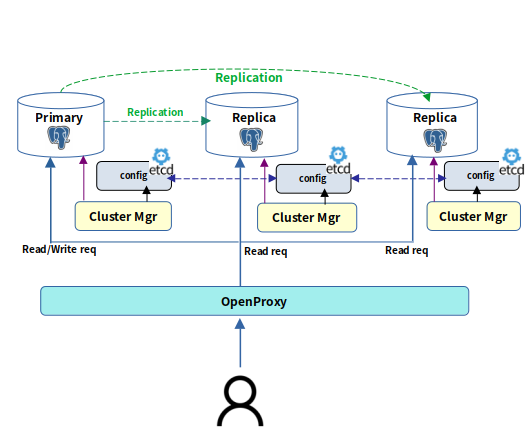
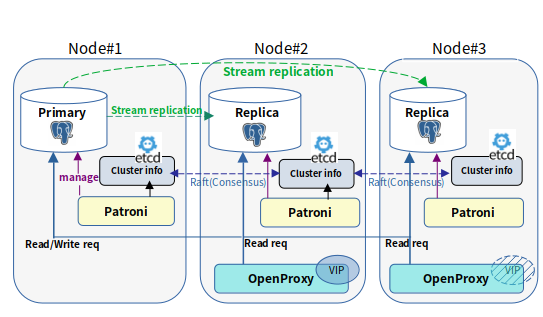
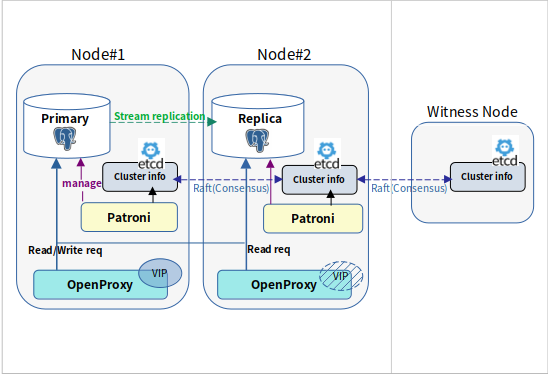
Tmax OpenSQL v3.0 is an open source relational database management system(RDBMS) that uses the database cluster that provides high performance and high availability based on PostgreSQL.
Tmax OpenSQL v3.0 Configuration
OpenSQL Components
PostgreSQL
An open-source relational database management system that is scalable and compliant with SQL
standards.
Patroni
Performs PostgreSQL database cluster management. It is open source, written in Python, runs as a server process, detects the status of each node, and provides automatic failover, election of a new primary PostgreSQL node, and database configuration management.
An open source Distributed Key-Value Store written in Go language that provides stability, data consistency, and scalability optimized for distributed systems. It stores cluster membership information and configuration information managed by Patroni.
A high-performance connection pooler written in Rust language that provides PostgreSQL connection pooling, load balancing, and VIP Failover features.
An open source PostgreSQL database backup management solution written in Python that offers full, incremental, and differential backups.
Components configuration
The execution order of OpenSQL v3.0 is as follows.
Etcd
Patroni + PostgreSQL
OpenProxy
The configuration and execution for each component are described in the following order.
Etcd
Patroni
OpenProxy
Etcd
Etcd is an open source distributed key-value store. OpenSQL utilizes etcd as a Distributed Configuration Store(DCS) that manages the state of each instance in the cluster and performs leader election, and provides the etcdctl tool for effective control.
Once installed, you can check the version of etcd and etcdctl with the command below.
Patroni
Patroni is a Python 3-based server process and template that provides lifecycle management of PostgreSQL database instances installed on nodes, high availability management through cluster configuration, and cluster management through REST APIs.
The node must have a PostgreSQL server installed and the postgres user configured. Patroni manages the life cycle of the PostgreSQL server directly at runtime by referencing the PostgreSQL server's Data Directory and Binary Directory, which are included in the definition of its PostgreSQL configuration values.
The node intended for Patroni installation must be configured with a PostgreSQL server.
OpenProxy
OpenProxy is a Rust-based server process that functions as a proxy for PostgreSQL databases, providing connection pooling, query-based load balancing, database sharding, and failover using virtual IP (VIP).
This document describes how to install OpenProxy from an OpenSQL package created using the OpenSQL packaging tool.
The $OPENSQL_INSTALL_HOME/openproxy directory in the OpenSQL package contains the following three files.
Openproxy binary openproxy
Aggregate Functions
Conditional Functions
Reference guide
SQL function
DateTime Functions
Format Functions
Math Functions
Misc Functions
Installation
Release Note
Text Functions
SESSIONTIMEZONE
Syntax
Overview
The sessiontimezone function returns the timezone of the current session as a text value.
Internally, it calls the show_timezone() function to view the time zone of the current session and then converts it to text, and returns it.
Example
DBTIMEZONE
Syntax
Overview
The dbtimezone function returns the server's default time zone in text.
Internally, it looks at the pg_db_role_setting table to determine the settings for the current database.
If it doesn't exist, it will get the default TimeZone value from pg_settings.
In other words, it views the default time zone set on the server and provides it as a string.
Example
SYSTIMESTAMP
Syntax
Overview
The systimestamp function returns the timestamp of the current statement based on the server's time zone.
Internally, it calls GetCurrentTimestamp() to get the timestamp value based on the server's timezone.
Example
SINH
Syntax
Overview
SINH is the hyperbolic sine of num.
Parameter
Arguments
Description
num
It can take a numeric data type or a data type that can be converted to numeric as an argument.
The return type is the same as the numeric data type given as an argument.
Example
SYSDATE
Syntax
Overview
The sysdate function returns the current statement timestamp based on the server time zone.
It runs similarly to Oracle's sysdate, and the returned timestamp is used like Oracle DATE type by removing decimal places.
Example
Example
SYS_GUID
Syntax
SYS_GUID()
Overview
SYS_GUID generates and returns a globally unique identifier consisting of 16 bytes of RAW data.
UUIDs are generated using a pseudorandom method.
Example
COSH
Syntax
Overview
COSH is the hyperbolic cosine of n.
Parameter
Arguments
Description
num
It can take a numeric data type or a data type that can be converted to numeric as an argument.
The return type is the same as the numeric data type given as an argument.
Example
LENGTH
Syntax
Overview
LENGTH returns the length of the given str.
Parameter
Parameter
Description
str
Arbitrary expression that returns a string.
It can have CHAR or TEXT type.
In OpenSQL, the Distributed Configuration Store (DCS), such as etcd, must be running before starting Patroni.
Once installed, you can check the version of patroni and patronictl with the command below.
Installation
Requirement
1. Setting OPENSQL_INSTALL_HOME directory
2. Installing Patroni
3. Veryfying Patroni installation
Configuration file required to run (openproxy.toml)
Service file required for systemd registration (openproxy.service)
You can configure OpenProxy using the supplied configuration files and register it as a service via systemd.
You can check the version of binary with the command below.
. ./setenv.sh `pwd`
OPENSQL_INSTALL_HOME is set to: /home/opensql3.0-rockylinux9.4-pg16.8
sudo -E ./install_rpm.sh etcd
[root@396dd54381db etcd-v3.5.6-linux-amd64]etcd --version
etcd Version: 3.5.6
Git SHA: cecbe35ce
Go Version: go1.16.15
Go OS/Arch: linux/amd64
[root@396dd54381db etcd-v3.5.6-linux-amd64]etcdctl version
etcdctl version: 3.5.6
API version: 3.5
Installation
1. Setting OPENSQL_INSTALL_HOME directory
2. Installing etcd
3. Verifying etcd installation
Etcd
OpenProxy
Barman
Postgresql
OpengreSQL is a database package based on PostgreSQL, and this manual will guide you through the basic environment setup for installing OpengreSQL and the PostgreSQL installation process.
Installation
1. Setting OPENSQL_INSTALL_HOME directory
Once you unzip the OpenSQL binaries, you will find the scripts for installing OpenSQL inside the scripts directory, such as setenv.sh , install_rpm.sh .
. ./setenv.sh `pwd`
OPENSQL_INSTALL_HOME is set to: /home/opensql3.0-rockylinux9.4-pg16.8
2. Installing Postgresql
sudo -E ./install_rpm.sh postgresql
3. Verifying Postgresql Installation
Once installed, you can check the the installation path and the version of postgresql with the command below.
pg_config intalled with a binary from Postgresql is located in the path of /usr/pgsql-{postgresql_Major_version}/bin .
Architecture Overview
Introduction to Extensions in PostgreSQL
PostgreSQL is known for being a highly scalable open source database. A large part of this reputation is due to the Extension Framework, which provides a flexible way to extend PostgreSQL's functionality. Extensions allow PostgreSQL to support a wide variety of data types and functions, and even improve its internal functionality.
An important feature of extensions is that they are dynamically loaded into the PostgreSQL instance, meaning that PostgreSQL does not need to rebuild the source or replace the executable when adding new functionality through an extension. Adding an extension also doesn't require restarting the instance, except for extensions that require initialization at instance startup. This makes adding new features very easy in PostgreSQL.
Introduction to O2 Extensions
O2 stands for OpenSQL for Oracle, which is a set of extensions that provide compatibility with Oracle data types, views, built-in functions, and built-in packages. O2 is based on the open source project Orafce, but it has changed in many ways. Orafce, which was originally managed as a single extension, has been split into multiple extensions.
Package Extensions: A collection of extensions compatible with Oracle's built-in packages.
DBMS_ALERT
DBMS_OUTPUT
DBMS_PIPE
The O2 project was started based on the open source project Orafce, but it has changed in many ways. Originally managed as a single extension, Orafce was split into several extensions, which greatly increased the flexibility of patching. In addition, the lack of a common convention or framework was a problem due to its gradual development over a long period of time, which was improved during the integration process.
The built-in functions or packages provided by O2 Extension are internally organized as user-defined functions (UDFs). PostgreSQL supports a variety of programming languages for writing user-defined functions, including SQL and PL/pgSQL, as well as C/C++, Python, Perl, and Rust. The O2 Extension specifically improves performance by turning custom functions written in SQL and PL/pgSQL into C code. When the PostgreSQL Query execution engine executes a UDF written in SQL or PL/pgSQL, it internally creates a cursor to execute subqueries, but functions written in C code are executed directly from the compiled library, ensuring fast performance. In addition, implementing in C code allows for more sophisticated and flexible implementations by utilizing PostgreSQL libraries.
Since the existing Orafce was managed as a single Extension, if a problem occurred in one element of the entire implementation, the entire Extension had to be updated. On the other hand, O2 is managed by dividing it into several Extensions, so only the Extension that has a problem needs to be replaced.
For example, packages that use shared memory, such as DBMS_ALERT or DBMS_PIPE, need to be added to shared_preload_libraries and then start the DB instance. However, in the case of O2, these extensions are separated, so that only the necessary extensions can be added to shared_preload_libraries. This has reduced the hassle and increased flexibility during updates.
These improvements enable the O2 Extension to provide PostgreSQL users with more powerful and flexible Oracle compatibility. The introduction of the O2 Extension provides significant improvements in performance, flexibility, and stability.
REMAINDER
Syntax
REMAINDER(num1, num2);
Overview
REMAINDER is a function that returns the remainder of num1 divided by num2.
MODuses FLOOR, and REMAINDERis similar except that it uses Bankers' Round method.
Arguments
Description.
Connection pool
The connection pool to create must be specified in the openproxy.toml file.
Before creating a connection pool, create a PostgreSQL database to use.
some_db database is created in this example.
Create a section [pools.simple_db] in openproxy.toml.
MEDIAN
The MEDIAN aggregate function is a statistical function that calculates and returns the median of the values in a group. It is inspired by Oracle's MEDIAN function and implemented in PostgreSQL.
It is available for integer, real, and date/time data types. Internally, the MEDIAN function works in two steps.
This step collects the values in the group into a type-correct vector (list data structure).
The Tmax OpenSQL® (hereafter Tmax OpenSQL) product provides operations and management for the open source PostgreSQL DBMS. This guide is intended for users of Tmax OpenSQL.
Database
Type
The DATE type is a data type that represents a specific date and time to the nearest second. It has the same range of representation as TIMESTAMP(0).
Expresses year, month, day, hour, minute, and second.
Years can be expressed from 4,713 BC~ to 294,276 AD.
Time is expressed in 24-hour increments.
LNNVL
The lnnvl function returns the opposite value for the given boolean value, i.e., false if the argument is true and true if it is false. Also returns true if the argument is NULL.
Parameter
Description
GREATEST
The GREATEST function returns the largest value among the passed in arguments. If any of the arguments are NULL, the entire result will be NULL.
The PostgreSQL default function returns NULL only if all arguments are NULL, whereas this function returns NULL if even one is NULL.
Parameter
Description
LEAST
The LEAST function returns the smallest value among the passed in arguments. If any of the arguments are NULL, the entire result will be NULL.
The PostgreSQL default function returns NULL if and only if all arguments are NULL, which is NULL if even one is NULL.
Parameter
Description
NANVL
The NANVL function returns the value of the second argument if the first argument is NaN (Not a Number), otherwise it returns the value of the first argument as it is.
If the second argument is not varchar, it must be of the same type as the first argument. Used to replace NaN with another value in floating-point or numeric data.
Parameter
Description
LAST_DAY
The LAST_DAY function returns the last day of the month to which the given date belongs.
For the DATE type, it simply calculates the last day of the month.
For the TIMESTAMPTZ type, the date is truncated and the original time information is combined to return a timestamp value.
Parameter
Description
SYS_EXTRACT_UTC
The SYS_EXTRACT_UTC function converts the given timestamp (with/without time zone) to a timestamp in UTC (without timezone) and returns it.
For TIMESTAMP (without time zone), the value is interpreted based on the time zone of the session, then converted to a timestamp in UTC and returned.
In other words, theTIMESTAMP without time zone type is first converted to a TIMESTAMP WITH TIME ZONE, then shifted to the "utc" time zone and returned like a DATE in Oracle.
Parameter
Description
TO_SINGLE_BYTE
The TO_SINGLE_BYTE function converts the input multibyte string into the corresponding single-byte (ASCII) characters, if possible.
Multi-byte characters in the input string are replaced with single-byte values (usually values with ASCII code 0x20 or higher) by a predefined mapping table, and unconvertible characters are returned as they are.
Parameter
Description
TO_TIMESTAMP_TZ
This function converts the input string and format model into a timestamp with time zone (timestamptz) value.
Utilizes the PostgreSQL built-in to_timestamp function to parse a string according to the specified format and return the result as a timestamptz type.
Unlike Oracle, it doesn't accept date type variables in order to maintain type consistency.
Parameter
Description
TO_MULTI_BYTE
The TO_MULTI_BYTE function converts a single-byte (ASCII) character to the corresponding multi-byte character in the database encoding.
For example, characters in the ASCII range (0x20~ 0x7E) are converted according to a predefined multi- byte mapping table (UTF8, EUC_JP, EUC_CN, etc.).
If the database encoding corresponds to one of its mapping tables, it replaces each character in the input string with the corresponding multi-byte string, otherwise it returns the characters as they are.
Parameter
Description
MONTHS_BETWEEN
The MONTHS_BETWEEN function calculates and returns the number of months between two dates (or timestamps).
The year, month, and day of two dates are compared to calculate the difference in months. If both dates are the last day of the month, it calculates as an integer number of months.
Otherwise, the difference in days divided by 31 is returned with the decimal point added. In other words, the decimal point value is calculated based on 31 days.
Parameter
Description
DUMP
DUMP returns TEXT with data type code, length in bytes, and internal representation of expr.
By default, the return value does not contain character set information.
To find the character set name of expr ,add 1000 to return_fmt.
Parameter
Description
MOD
MODis a function that returns the remainder of num1 divided by num2. If num2 is 0, it returns num1.
This function returns a result that differs from the traditional Modulus function when num1 or num2 is negative.
The traditional Modulus function is as follows.
Arguments
Description
TANH
COSH is the hyperbolic cosine of n.
Arguments
Description
DBMS_RANDOM
DBMS_SQL
UTL_FILE
Benefits and improvements of O2 Extensions
Change custom functions written in SQL, PL/pgSQL to C code
Reduce blast radius by splitting the extension into multiple extensions
num1, num2
num1 and num2 must be numeric types or types that can be converted to numeric types. num1 and num2 are converted to the type with the higher numeric precedence of the two types, and are returned as that type.
Example
str
text type; Target string to convert. Multi-byte characters are converted to single-byte characters.
Syntax
Overview
Parameter
Example
num
It can take a numeric data type or a data type that can be converted to numeric as an argument.
The return type is the same as the numeric data type given as an argument.
Syntax
Overview
Parameter
Example
Create a section [pools.simple_db.users.0] in openproxy.toml.
Create a section in openproxy.toml called [pools.simple_db.shard.0].
Execute the OpenProxy with the openproxy.toml file that sets up the connection pool to create.
Check the Connection Pool created by psql -h 127.0.0.1 -p 6432 -d openproxy -U postgres command.
Connection Pool creation
simple_db connection pool creation
Connection Pool to create : simple_db
Set Connection Pool user information
List the cluster address and database to connect to
Full example of a simple_db connection pool creation configuration file
OpenProxy Execution
Connection Pool Verification
• When all the values in the group have been collected, the median value is finally calculated.
• First, we sort the values in the aggregated vector with a quick sort algorithm.
• Returns the median value if the number of aggregated values is odd.
• If the number of aggregated values is even, compute and return the average of the two values in the center.
For date and time-related data with time zones, calculate the average value after timezoning the two center values to UTC.
Calculate the average value in UTC and adopt the timezone of the larger of the two center values.
Parameter
Description
expression
The value to be aggregated, which supports the
following data types.
Integer types: smallint, int, bigint
Real number type: real(float4), double precision
Date/Time types: timestamp, timestamptz, time, timetz, date NULL values are ignored when aggregating, and values are stored in internal vectors for each type.
If an even number of values are aggregated, the average of the two values in the center is calculated and returned.
Internally, the C code uses the qsort function to sort the values.
For date and time related data, additional timezone and type conversion processing is performed according to Oracle's processing logic.
Syntax
Overview
Aggregation step
Final calculation step
Parameters
Caution
Example
Like the CHARACTER VARYING type, the VARCHAR2 type also has a variable length, where the string length is not constant.
A string can be declared up to 10,485,760 bytes (=10 MB). If the length of the converted string exceeds that size, an error is raised.
If the size of the string is not specified, it behaves like the Postgresql native type TEXT.
The length of the string can be specified in bytes.
Always use single quotes (' ') to represent values of type VARCHAR2 in SQL statements.
The following example illustrates the VARCHAR2 type.
As shown in the example above, the EMP_NAME column has a string length of 10 bytes. For example, if the string 'Peter' is entered, the string 'Peter' is stored. In other words, the string length of the EMP_NAME column is declared to be 10 bytes, but the actual stored string length is 5 bytes.
As you can see, the VARCHAR2 type has a length equal to the length of the entered string within the range of the declared string length.
The NVARCHAR2 type is for storing Unicode strings. It is characterized by having a variable length, where the length of the string is not constant.
It is basically similar to the VARCHAR2 type, but the length of the string is in characters.
The length of the types stored in the database depends on the multilingual character set.
For example, it can be up to three times the size in UTF8 and up to twice the size in UTF16.
The maximum length of a string of type NVARCHAR2 is 10,485,760 characters.
Always use single quotes (' ') to represent values of type NVARCHAR2 in SQL statements.
DATE
VARCHAR2
NVARCHAR2
value
Syntax
Overview
Parameters
boolean type: the boolean value to compare. If NULL, the result is true
Example
anynonarray type: the first value to compare. It must be non-NULL.
expr_array
variadic anyarray type: an array containing additional arguments. If there is a NULL in the array, the entire result is NULL. Each element of the array must be of the same type as expr1.
Syntex
Overview
Parameters
expr1
Example
anynonarray type: the first value to compare. Must be non-NULL.
expr_array
VARIADIC anyarray type: an array containing additional arguments. If there is a NULL in the array, the entire result is NULL.
The elements of the array must have the same type as expr1.
Syntax
Overview
Parameters
expr1
Example
value
The numeric value to check (real, double precision, numeric).
if NaN, returns the replacement value.
replacement
The value to return instead when value is NaN (varchar, real , double precision , numeric ). if it is a varchar, it is automatically cast to the type of value.
Syntax
Overview
Parameters
Example
date, timestamptz type: the base date to get the last date from. For timestamptz, it is calculated by finding the first day of the month, adding one month and subtracting one day.
Syntax
Overview
Parameters
value
Example
time
timestamp, timestamptz type: the target timestamp value to convert to UTC. For timestamp, it is internally converted to timestamptz based on the timezone of the session and then converted to UTC.
Syntax
Overview
Parameters
Example
text type; String to convert. ASCII
characters are replaced with multibyte characters.
Syntax
Overview
Parameter
str
Example
date1 / timestamptz1
date / timestamptz type: the date (or timestamp) value that the comparison is based on.
date2 / timestamptz2
date / timestamptz type: date1/timestamptz1 to compare to the target date (or timestamp)
Syntax
Overview
Parameters
Example
expr
Arbitrary expression that can come as a string.
Returns NULL if expr is NULL.
return_fmt
return_fmt specifies the type of the return value and can have one of the following values.
8 returns the result in octal notation.
start_position
It indicates the starting position.
length
It specifies the length to display.
10 returns the result in decimal.
16 returns the result in hexadecimal.
17 returns each byte output only if it can be interpreted as a printable character in the compiler's character set. Some ASCII characters may be output as ‘?’. Otherwise, they are output in hexadecimal. All NLS parameters are ignored. The DUMP function with return_fmt set to 17 should not depend on any specific output format.
Syntax
Overview
Parameter
Example
num1, num2
num1 and num2 must be numeric types or types that can be converted to numeric types. num1 and num2 are converted to the type with the higher numeric precedence of the two types, and are also returned as that type.
MEDIAN
(
expression IN { smallint, int, bigint,
real, double precision,
timestamp, timestamptz, time, timetz, date }
)
RETURNS median;
# Test table
create table employees (name varchar, salary integer, hire_date timestamptz);
INSERT INTO employees (name, salary, hire_date) VALUES
('John Doe', 55000, '2020-03-15 09:00:00'),
('Jane Smith', 62000, '2019-07-22 10:30:00'),
('Michael Johnson', 72000, '2018-11-10 08:45:00'),
('Emily Davis', 48000, '2021-05-01 12:00:00'),
('David Wilson', 53000, '2017-09-17 14:20:00'),
('Sarah Brown', 60000, '2016-12-05 09:15:00'),
('James Taylor', 75000, '2015-06-30 16:45:00'),
('Jessica Martinez', 68000, '2022-01-25 11:10:00'),
('Daniel Anderson', 58000, '2020-10-05 13:35:00'),
('Laura Thomas', 49500, '2023-08-12 08:00:00');
-- Example of calculating the median for integer data
SELECT oracle.MEDIAN(salary) FROM employees;
median
--------
59000
(1 row)
-- Example of calculating the median for datatype data
SELECT oracle.MEDIAN(hire_date) FROM employees;
median
------------------------
2019-11-17 21:45:00+09
DATE
CREATE TABLE T (a date);
INSERT INTO T VALUES ('4713-01-01 01:11:30 BC');
INSERT INTO T VALUES ('2023-03-19 13:29:30');
VARCHAR2[(size)]
EMP_NAME VARCHAR2(10)
NVARCHAR(size)
LNNVL
(
value IN boolean
)
RETURNS boolean;
# test 1
SELECT oracle.LNNVL(true);
lnnvl
-------
f
(1 row)
# test 2
SELECT oracle.LNNVL(false);
lnnvl
-------
t
(1 row)
# test 3
SELECT oracle.LNNVL(NULL);
lnnvl
-------
t
(1 row)
GREATEST
(
expr1 IN anynonarray,
expr_array IN variadic anyarray
)
RETURNS anynonarray;
LEAST
(
expr1 IN anynonarray,
expr_array IN variadic anyarray
)
RETURNS anynonarray;
# test 1
SELECT oracle.LEAST(5, 3, 9);
least
-------
3
(1 row)
# test 2
SELECT oracle.LEAST('apple'::text, 'banana', 'cherry'); -- result: apple (Compare strings alphabetically)
least
-------
apple
(1 row)
# test 3
SELECT oracle.LEAST(10, NULL, 7); -- result: NULL
least
-------
(1 row)
NANVL
(
value IN { real, double precision, numeric },
replacement IN { varchar, real, double precision, numeric }
)
RETURNS { real, double precision, numeric };
# test 1
SELECT oracle.NANVL(3.14, 0.0); -- result: 3.14 (return the original value as 3.14 is not NaN)
nanvl
-------
3.14
(1 row)
# test 2
SELECT oracle.NANVL('NaN'::float4, 0.0); -- result: 0.0 (return the 0.0,replacement value, as 1st value is NaN)
nanvl
-------
0
(1 row)
LAST_DAY
(
value IN date
)
RETURNS date;
LAST_DAY
(
value IN TIMESTAMP with time zone
)
RETURNS TIMESTAMP without time zone;
-- DATE type example: returns the last day of month that '2023-05-15'belongs to
SELECT oracle.LAST_DAY('2023-05-15'::date);
-- result: '2023-05-31' (the last day of May,2023)
last_day
------------
2023-05-31
(1 row)
-- TIMESTAMPTZ type example: return the last day of month that '2023-05-15 14:30:00+09'belongs to
SELECT oracle.LAST_DAY('2023-05-15 14:30:00+09'::timestamptz);
-- result: The timestamp value is returned with the last day of the month combined with the original time information.
last_day
---------------------
2023-05-31 14:30:00
(1 row)
SYS_EXTRACT_UTC
(
time IN timestamp with time zone
)
RETURNS timestamp without time zone;
SYS_EXTRACT_UTC
(
time IN timestamp without time zone
)
RETURNS timestamp without time zone;
# test 1
SELECT oracle.SYS_EXTRACT_UTC('2023-06-01 12:34:56+07'::timestamptz);
sys_extract_utc
---------------------
2023-06-01 05:34:56
(1 row)
# test 2
-- Convert to timestamptz based on the session time zone '+09:00', then shift to UTC.
SELECT oracle.SYS_EXTRACT_UTC('2023-06-01 12:34:56'::timestamp);
sys_extract_utc
---------------------
2023-06-01 03:34:56
(1 row)
MONTHS_BETWEEN
(
date1 IN date,
date2 IN date
)
RETURNS numeric;
MONTHS_BETWEEN
(
timestamptz1 IN timestamptz,
timestamptz2 IN timestamptz
)
RETURNS numeric;
SELECT MOD(-11, 4), MOD(11, -4);
mod | mod
-----+-----
-3 | 3
RDBMS
PostgreSQL
OSs and system environments
Unix (including Linux)
These are the copyright notices for Tmax OpenSQL manual.
Tmax Tower, 45 Jeongjail-ro, Bundang-gu, Seongnam-si, Gyeonggi-do, Republic of Korea
Tel : +82-1544-8629
E-Mail : gitbook@tibero.com
The contents of this software (Tmax OpenSQL®) manual and the program are protected by copyright laws and international convention. The contents of this manual and the programs described herein are available only under a license agreement with TmaxTibero Co., Ltd. and may be distributed or reproduced only within the scope of the license agreement.
No part of this document may be transmitted, copied, deployed, or reproduced in any form or by any means, electronic, mechanical, or optical, without the prior written consent of TmaxTibero Co., Ltd. Nothing in this software document and agreement constitutes a transfer of intellectual property rights regardless of whether or not such rights are registered) or any rights to TmaxTibero trademarks, logos, or any other brand features.
This document is for information purposes only. The company assumes no direct or indirect responsibilities for the contents of this document, and does not guarantee that the information contained in this document satisfies certain legal or commercial conditions. The information contained in this document is subject to change without prior notice due to product upgrades or updates. The company assumes no liability for any errors in this document.
Tmax OpenSQL® is a registered trademark of TmaxTibero Co., Ltd. All other product and company names are trademarks of their respective owners and are used for reference purposes only.
Noto is a trademark of Google Inc. Noto fonts are open source. All Noto fonts are published under the SIL Open Font License, version 1.1. (https://www.google.com/get/noto/)
Some modules or files of this product are subject to the terms of the following licenses.
Apache License Version 2.0
Apache License Version 1.1
Mozilla Public License Version 1.1
Berkeley Software Distribution (BSD)
MIT License
The guide contains 4 chapters.
Describes the configuration of TmaxTibero's OpenSQL
LISTAGG
(
expression IN TEXT
)
RETURNS text;
LISTAGG
(
expression IN TEXT,
delimite IN TEXT
)
RETURNS text;
Overview
The LISTAGG function is a PostgreSQL implementation extension of Oracle's LISTAGG aggregate function. This function combines multiple text values within a group into a single string and returns it.
Parameters
Parameter
Description
expression
text type; the value to aggregate, ignoring it if it is NULL.
ADD_MONTHS
Syntax
ADD_MONTHS
(
date IN,
number IN
)
RETURNS date;
ADD_MONTHS
(
TIMESTAMP WITH TIME ZONE IN,
number IN
)
RETURNS TIMESTAMP WITHOUT TIME ZONE;
Overview
The ADD_MONTHS function returns a new date or timestamp that is the given date or timestamp plus the number of months you specify.
Internally, it decomposes the input date into years, months, and days, and then adds the total number of months to calculate a new year and month.
In particular, if the input date is the last day of the current month, it will be adjusted to the last day of the new month.
If the first argument is timestamptz, it will keep the existing time information after calculating the date.
Parameters
Parameter
Description
WM_CONCAT
Syntax
WM_CONCAT
(
expr IN text
)
RETURNS text;
Overview
This aggregation function combines multiple text values in a group into a single string. It sequentially combines the input text values to create a single string.
The inner workings are as follows:
If the input value is NULL, exclude it from the aggregation.
When the first value is entered, a new state (string buffer) is created.
If a value is subsequently entered, the existing string is appended with a default delimiter (comma), followed by the value.
When aggregation is complete, the accumulated string is returned as the final result.
Parameter
Description
TO_DATE
Syntax
TO_DATE
(
str IN text
)
RETURNS timestamp;
TO_DATE
(
str IN text,
fmt IN text
)
RETURNS timestamp;
TO_DATE
(
num IN integer,
fmt IN text
)
RETURNS timestamp;
Overview
The TO_DATE function converts text (or integer values converted to strings) to TIMESTAMP(0)(date to hours, minutes, and seconds without milliseconds) values in Oracle style date/time format.
If a format model (FMT) is provided, the date is interpreted according to that format; if not, it is converted according to the default format.
Returns NULL if an empty string is keyed in.
Unlike Oracle, it doesn't accept variables of type date to preserve type safety.
Parameter
Parameter
Description
NUMTODSINTERVAL
Syntax
NUMTODSINTERVAL
(
number IN double precision,
unit IN text
)
RETURNS interval;
Overview
The NUMTODSINTERVAL function interprets the given numeric value as a specific unit (e.g., ‘DAY’, ‘HOUR’, ‘MINUTE’, ‘SECOND’) and converts it to the INTERVAL type.
Numeric values are divided into integer and decimal parts.
If 'DAY', the integer part is converted to day and the decimal part is converted to hours, minutes, and seconds by multiplying by 24.
If 'HOUR', the integer part is converted to hours and the decimal part is converted to minutes and seconds by multiplying by 60.
If 'MINUTE', the integer part is converted to minutes and the decimal part is converted to seconds
by multiplying by 60.
If 'SECOND', the entire number is interpreted as a second
If an invalid unit is passed, an error occurs.
Parameter
Description
RTRIM
Syntax
RTRIM(str [, char_set])
Overview
RTRIM is a function that removes all characters contained in char_set from the right side of str.
Parameter
Parameter
Description
str
Arbitrary operation that returns a string.
BITAND
Syntax
BITAND(expr1, expr2)
Overview
BITAND operations are processed as vectors consisting of inputs and outputs in bits. The output is the result of AND operations performed on the inputs in bits.
BITAND is calculated through the following steps.
Argument A is replaced by SIGN(A) * FLOOR(ABS(A)).
Argument A is converted to an n-bit two's complement binary integer value. 2-bit values are combined using a bitwise AND operation.
n-bit two's complement value is converted back to NUMBER.
Parameter
Description
LTRIM
Syntax
LTRIM(str [, char_set])
Overview
LTRIM is a function that removes all characters contained in char_set from the left side of str.
Parameter
Parameter
Description
str
Arbitrary operation that returns a string.
REGEXP_COUNT
Syntax
REGEXP_COUNT(str, pattern [, position [, match_param]])
Overview
REGEXP_COUNT is a function that returns how many times a pattern given as a regular expression matches within str.
Parameter
Parameter
Description.
str
Arbitrary operation that returns a string.
It can be of type TEXT or CHAR.
INSTR
Syntax
INSTR(string, substring [, position [, occurrence]])
Ovrview
INSTR is a function that searches for substring in string. The search operation works by sequentially comparing substrings of the same length as the target substring within the given string to check for a match. The search can proceed either forward or backward, with each new substring starting one character after (or before, in backward search) the previous one. If a matching substring is found, the function returns an integer indicating the position of the first character of the match. If no match is found, it returns 0.
Parameter
Parameter
Description
string, substring
LPAD
Syntax
LPAD(expr1, num [, expr2])
Overview
LPAD is a function that concatenates expr2 to the left of expr1 and returns a string with a length equal to num.
In most character sets, the number of characters in a returned string is the same as its length, but in multi-byte character sets such as Korean, these two values can differ.
Parameter
Parameter
Description
expr1
NLSSORT
Syntax
NLSSORT(str [, ' nlsparam '])
Overview
NLSSORT is a function that returns the character bytes used to sort str.
Parameter
Parameter
Description
str
String value for sorting. It can be TEXT or CHAR type data.
nls_param
REGEXP_LIKE
Syntax
REGEXP_COUNT(str, pattern [, match_param])
Overview
REGEXP_LIKE compares str with the pattern given as a regular expression.
It follows the POSIX regular expression standard.
Parameter
Parameter
Description
str
Arbitrary operation that returns a string.
It can be of type TEXT or CHAR.
SUBSTR
Syntax
SUBSTR(str, position [, length])
Overview
SUBSTR is a function that extracts and returns a string of length length from position position within str.
Parameter
Parameter
Description
str
Arbitrary operation that returns a string.
When values of numeric types such as smallint, integer, bigint, decimal, or numeric are input, they are automatically converted to strings and processed as string values.
REGEXP_REPLACE
Syntax
REGEXP_LIKE(str, pattern [, replace_str [, position [, occurrence [, match_param]]]])
Overview
REGEXP_COUNT is a function that searches for a pattern given as a regular expression within str and replaces it with another string.
Parameter
Parameter
Description
str
Arbitrary operation that returns a string.
It can be of type TEXT or CHAR.
RPAD
Syntax
RPAD(expr1, num [, expr2])
Overview
RPAD is a function that concatenates expr2 on the right side of expr1 and returns a string with length equal to num.
In most character sets, the number of characters in the returned string is the same as its length, but in multi-byte character sets such as Korean, the two values may differ.
Parameter
Parameter
Description
expr1
REGEXP_SUBSTR
Syntax
REGEXP_SUBSTR(str, pattern [, position [, occurrence [, match_param [, subexp]]]])
Overview
REGEXP_COUNT is a function that searches for a pattern given as a regular expression within str and returns the corresponding string.
The type of the result is the same as the type of str.
Parameter
Parameter
Description
str
Load balancing
This document provides a general description of the PostgreSQL server load balancing and query routing features provided by the OpenProxy module in OpenSQL v3.0 and how to configure them.
In PostgreSQL's Streaming Replication configuration, a non-primary Replica instance can only process Read-Only queries. OpenProxy provides a load-balancing feature that sends read-only queries to one of the Replica instances to process and return results, depending on the configuration.
By default, OpenProxy manages load balancing options on a per-pool basis (a group of PostgreSQL servers distinguished by their database names when connecting to OpenProxy), and you can assign different settings to different pools.
To identify and send Read-Only queries to the Replica instance, you must options in the openproxy.toml configuration.
NVL2
The NVL2 function returns the value of the second argument if the first argument is non-NULL, and the value of the third argument if the first argument is NULL.
The second and third arguments must be types of the same category, and there is a separate casts function that performs implicit casting if necessary.
Parameter
Description
NEXT_DAY
The NEXT_DAY function returns the date of the first specific day of the week that occurs after the given date.
This function takes a string representing the day of the week (e.g., ‘Monday’, ‘Tue’, etc.) or a day index (1 to 7, where 1 is Sunday) as an argument and processes it.
For the TIMESTAMP WITH TIME ZONE type, it returns a timestamp value with the original time portion intact after calculating the date.
Parameter
Description
ROUND
The ROUND function rounds a date or timestamp value according to a given format model.
In other words, it adjusts the date or time value according to the specified unit (e.g., year, month, minute, etc.) and returns it.
The format string (fmt) allows you to specify the rounding unit, and if the value is NULL, it will be returned as NULL for the new value.
For the timestamp version, the seconds are set to zero after rounding up the time portion.
Parameter
TO_CHAR
The TO_CHAR function converts a number, date, timestamp, or string value to a string according to the format model (fmt) specified.
If no format model is provided, each data type is converted to a string according to its default output format.
For numeric types, integers, floating point numbers, and numeric values are converted according to the format.
Dates and timestamps are converted to the specified format (e.g., 'YYYY-MM-DD', 'HH24:MI:SS').
Parameter
Description
UNISTR
The UNISTR function converts Unicode escape sequences in the input text to actual Unicode characters and returns them.
The supported escape formats are as follows:
\XXXX : 4-digit hexadecimal format
\uXXXX : 4-digit hexadecimal format (prefixed with a 'u')
TRUNC
The TRUNC function truncates subunits from a date or timestamp value and returns the truncated (discarded) result to fit the specified format model.
In other words, it removes the decimal part (or detail units) from the time or date part of the value, leaving only the desired units (e.g., year, month, day, etc.).
If no format string (fmt) is provided, it defaults to 'DDD' (day in days out).
For the timestamp version, the internal time information is processed together to truncate sub-hour increments, and sub-second information is set to zero.
NVL
The NVL function returns the value of the first of the two arguments if it is not NULL, and the value of the second argument if it is NULL.
Called only for arguments of the same type, but performs an implicit cast if they are of different types. The return type follows the type of the first argument.
Parameter
Description
TO_NUMBER
The TO_NUMBER function converts the entered string or numeric value to an Oracle-style numeric value.
If entered as text, it converts the numeric format string to a number after adjusting the decimal and thousands separator characters based on your locale settings.
Also, type values of smallint, int, bigint anddouble precision are converted to numeric
types through internal logic specific to each type.
Input of type numeric
REGEXP_INSTR
REGEXP_INSTR is a function that returns the position where the pattern given as a regular expression matches within str.
double precision type; the time value to convert. If there is a decimal part, it is converted to a lower unit (hour, minute, second).
unit
text type; It specifies the unit of the numeric value. Valid units are ‘DAY’, ‘HOUR’, ‘MINUTE’, and ‘SECOND’. For example, if ‘DAY’ is specified, the decimal part is converted to hours, minutes, and seconds in that order.
Parameter
Example
char_set
Arbitrary operation that returns a string.
If the value of the char_set parameter is not specified, the default value is one space character.
Example
expr1, expr2
If any of the arguments of an arbitrary operation that returns an integer value is NULL, the result is NULL. Arguments must be within the range -(2^(n-1)) to (2^(n-1) - 1). If the argument is out of range, the result is undefined.* Currently, n is 64.
Parameter
Example
char_set
Arbitrary operation that returns a string.
If the value of the char_set parameter is not specified, the default value is one space character.
Example
pattern
Arbitrary operation that returns a string written as a regular expression. It can be of type TEXT or CHAR.
position
Arbitrary operation that returns a numeric value.
It specifies where to start pattern checking.
match_param
Arbitrary operation returning a string. It sets how to check for patterns. The following values can be used, and multiple values can be used simultaneously.
i : It is not case sensitive.
c : It is case sensitive.
n : Periods (.) include line breaks.
m : The input string is more than one line.
x : This ignores whitespace characters in the pattern.
Example
Arbitrary operations that all return strings. If the string substr is not found within the string str, 0 is returned. The position value of the string starts from 1.
position
Arbitrary operation that returns a non-zero integer value. (Default: 1) If position is given, search starts from the position of the string str. If position is negative, search starts from the end of the string str.
occurrence
Arbitrary operation that returns an integer value other than 0. (Default: 1) Given occurrence, returns the position of substr, which appears occurrence times within the search string. occurrence must be a positive integer.
Example
Arbitrary operation expression that returns a string, CLOB type, or BLOB type. If the length of expr1 is greater than num, returns the string from the left side of expr1 that is equal to num.
expr2
Arbitrary operation that returns a string, CLOB type, or BLOB type. If expr2 is not specified, a space character is used.
num
Arbitrary operation that returns a numeric value. num refers to the length of the output to the terminal.
Example
Parameter that defines the character set to be used for sorting str. It can be TEXT or CHAR type data. It can be defined in the format ‘NLS_SORT=sort’. If not defined, the value defined in the session is used.
Example
pattern
Arbitrary operation that returns a string written as a regular expression. Arbitrary operation that returns a string.
It can be of type TEXT or CHAR.
match_param
Arbitrary operation returning a string. It sets how to check for patterns. The following values can be used, and multiple values can be used simultaneously.
i : It is not case sensitive.
c : It is case sensitive.
n : Periods (.) include line breaks.
m : The input string is more than one line.
x : This ignores whitespace characters in the pattern.
Example
position
Arbitrary operation returning an integer value. If position is less than 0, it is extracted from the end of str.
length
Arbitrary operation returning an integer value. If length is not specified, the string is extracted from the position of str to the end. If length is less than 1, returns NULL.
Example
pattern
Arbitrary operation that returns a string written as a regular expression. Arbitrary operation that returns a string.
It can be of type TEXT or CHAR.
replace_str
Arbitrary operation that returns a string.
It can be of type TEXT or CHAR.
position
Arbitrary operation that returns a numeric value.
It specifies where to start pattern checking.
occurrence
Arbitrary operation that returns a numeric value. It specifies how many times to check the pattern.
match_param
Arbitrary operation returning a string. It sets how to check for patterns. The following values can be used, and multiple values can be used simultaneously.
i : It is not case sensitive.
c : It is case sensitive.
n : Periods (.) include line breaks.
m : The input string is more than one line.
x : This ignores whitespace characters in the pattern.
Example
Arbitrary operation expression that returns a string, CLOB type, or BLOB type. If the length of expr1 is greater than num, returns the string from the left side of expr1 that is equal to num.
expr2
Arbitrary operation that returns a string, CLOB type, or BLOB type. If expr2 is not specified, a space character is used.
num
Arbitrary operation that returns a numeric value. num refers to the length of the output to the terminal.
Example
Arbitrary operation that returns a string.
It can be of type TEXT or CHAR.
pattern
Arbitrary operation that returns a string written as a regular expression. Arbitrary operation that returns a string.
It can be of type TEXT or CHAR.
position
Arbitrary operation that returns a numeric value.
It specifies where to start pattern checking.
occurrence
Arbitrary operation that returns a numeric value. It specifies how many times to check the pattern.
match_param
Arbitrary operation returning a string. It sets how to check for patterns. The following values can be used, and multiple values can be used simultaneously.
i : It is not case sensitive.
c : It is case sensitive.
n : Periods (.) include line breaks.
m : The input string is more than one line.
x : This ignores whitespace characters in the pattern.
subexp
Arbitrary operation that returns a numeric value. It can be used from 0 to 9. subexp assigns numbers to each group enclosed in parentheses in pattern from left to right.
Example
query_parser_enabled : Enables the Query Parsing feature. In addition to Read / Write Splitting, you need to enable the corresponding options to utilize the plugin's features.
query_parser_read_write_splitting : Enables the Infer feature that determines whether a query can be sent to Replica (Read-Only) or can only be processed by Primary based on the parsed query.
Depending on the PostgreSQL configuration of the pool, the OpenProxy operating with the above options will parse the user query and send the user request to the server with the Replica Role for processing.
If you are processing SELECT queries with the Simple Query protocol or parsing and processing SELECTs without explicit transaction blocks with the Extended protocol, you can route them to Replica.
To process one or multiple statements within an explicit transaction, use the Route to Primary.
If you also want to include the Primary node as a target for sending Read-Only queries, enable the
primary_reads_enabled option as shown below.
This option also works in session pooling mode (where one client is processed on one PostgreSQL server connection), but because the PostgreSQL server connection obtained as a result of infer() the client's first query is persisted until the client session ends, errors can occur if you process a SELECT query first and then send a query that should be processed only on Primary.
session 풀링 모드 (하나의 클라이언트가 하나의 PostgreSQL 서버 연결에서 처리되는 방식) 에서도 해당 옵션은 동작하지만 클라이언트의 첫 쿼리를 infer() 한 결과로 얻은 PostgreSQL 서버 연결이 클라이언트 세션 종료시까지 유지되므로, SELECT 쿼리를 먼저 처리하고 이후 Primary에서만 처리되어야 하는 쿼리를 보내는 경우 에러가 발생할 수 있다.
• If you want to use query parsing and load balancing features, we recommend using transaction pooling mode (where one transaction is processed on one PostgreSQL server connection).
On a per-pool basis, you can set how you want to select replicas to process read-only queries.
The random method selects one of the PostgreSQL servers at random to route the request.
The loc method routes requests to the PostgreSQL server with the fewest number of currently active.
A Prepared Statement is a way of executing queries in the PostgreSQL Extended Protocol that uses a customized query as a precompiled query execution plan that is stored as an object on the DBMS server.
PostgreSQL supports the creation and processing of Prepared Statements on a per-client session basis.
In OpenProxy's session pooling mode, a single client is processed on only one PostgreSQL server connection until it terminates, so no action is required, but in transaction pooling mode, a single client can be processed on multiple PostgreSQL server connections per transaction, which can cause problems when processing Prepared Statements.
To accomplish this, OpenProxy provides a global Prepared Statement cache when operating in transaction pooling mode.
All Prepared Statements declared by Clients are stored in the cache, and when a Client wants to run a Prepared Statement, it fetches the Prepared Statement from the cache and checks whether it has been declared in the current PostgreSQL server session; if not, it declares it before executing it.
To enable this global cache, you must specify a value for the Pool's prepared_statements_cache_size. The default value is 0, which disables the global cache.
When the global cache is disabled, it only supports processing of Unnamed (unnamed by the client) Prepared Statements within the Client, meaning that if the Client tries to bind and execute more than one Prepared Statement, an error will occur.
The global cache is maintained in LRU fashion, and if the value is too small, problems may occur when processing client requests that declare many Prepared Statements.
When Query Parser is enabled in transaction pooling mode, the processing of the following SQL commands is limited.
PREPARE, EXECUTE
This is a command that explicitly creates a Named Prepared Statement at the SQL level and instructs the user to execute it. It does not work in transaction pooling mode because each transaction can run on a different server connection.
You can use session pooling mode because the connection between the client and server is the same for the duration of the session.
Execution of user-defined function
If you create a custom function in Database using the CREATE FUNCTION syntax, and the function contains DDL or DML statements that should be executed only on the Primary node, execution of the function using a SELECT query might be routed to the Replica node, depending on the OpenProxy configuration settings, resulting in an error.
You can wrap the execution of a specific statement in an explicit Transaction Block BEGIN ... COMMIT to create a Primary. You can bypass the direction to route only to the node.
Overview
Features
Read-Only Load Balancing
Configuration
Enable Query Parser
Load Balancing configuration
Prepared Statement Cache configuration
Cautions
Unsupported features
The first value to evaluate. If this value is non-NULL, it is the basis for returning the second argument.
expr2
The value that will be returned if the first argument is not NULL.
expr3
The value that will be returned if the first argument is NULL.
The types of the second and third arguments must match, and casting is performed if necessary.
Syntax
Overview
Parameters
expr1
Example
value
date, timestamp type: a date string value to base on.
weekday
text type: A string representing the target day of the week to be searched. It follows Oracle's day of the week convention, and only the first three characters of the string are used.
The first three characters of the string, regardless of case, are as follows
"sun", "mon", "tue", "wed", "thu", "fri", "sat"
weekday_index
integer type: the index of the day of the week you want to find. Valid values are 1 through 7, where 1 is considered Sunday, 2 is considered Monday, ..., and 7 is considered Saturday.
Syntax
Overview
Parameters
Example
Description
expr
date, timestamp, timestamptz type: the date or timestamp value to round to.
fmt
text type: A format string indicating the rounding criteria. For example, you can round to various units such as ‘YYYY’, ‘MM’, ‘DDD’, ‘HH24’. If this value is NULL, it will be treated as the default, returning the original value, or as 'DDD' (rounded to the nearest day).
Syntax
Overview
Parameters
Example
\+XXXXXX : hexadecimal format consisting of six digits following the ‘+’ symbol.
\UXXXXXXXX : 8-digit hexadecimal format following the ‘U’ symbol.
The function converts to the correct Unicode code points through surrogate pair processing, and raises an error if an invalid surrogate pair is detected.
Parameter
Description
str
text type; Target text to convert. The Unicode escape sequences within this string are replaced with actual Unicode characters.
Syntax
Overview
Parameter
Example
Parameter
Description
expr
date, timestamp, timestamptz type; the target date or timestamp value to truncate. If this value is NULL, the result will also be NULL.
fmt
text type;
A format string that specifies which units the date or timestamp value should be truncated to. For example, you can specify ‘YYYY’ (year), ‘MM’ (month), ‘DDD’ (day), etc.
If this value is NULL, the default value (e.g., ‘DDD’) is used.
Syntax
Overview
Parameters
Example
The first value to evaluate. If this value is not NULL, it is returned as is.
expr2
The value to be returned if the first argument is NULL; if the two arguments are of different types, an appropriate cast may be attempted (e.g., from text to number or date).
-- Convert date/time strings to TIMESTAMP using text and format models
SELECT oracle.TO_DATE('2023-06-01 12:34:56', 'YYYY-MM-DD HH24:MI:SS');
to_date
---------------------
2023-06-01 12:34:56
(1 row)
-- Use the default conversion format if only text is passed (empty strings return NULL)
SELECT oracle.TO_DATE('2023-06-01 12:34:56');
to_date
---------------------
2023-06-01 12:34:56
(1 row)
-- Convert integer values to strings and convert them to TIMESTAMP
SELECT oracle.TO_DATE(20230601, 'YYYYMMDD');
to_date
---------------------
2023-06-01 00:00:00
(1 row)
-- 1.5 DAYS is converted to 1 day of 12 hours.
SELECT oracle.NUMTODSINTERVAL(1.5, 'DAY');
numtodsinterval
-----------------
1 day 12:00:00
(1 row)
-- 2.75 HOURS is converted to 2 hours 45 minutes.
SELECT oracle.NUMTODSINTERVAL(2.75, 'HOUR');
numtodsinterval
-----------------
02:45:00
(1 row)
-- 30 MINUTE is converted to 30 minutes 0 seconds.
SELECT oracle.NUMTODSINTERVAL(30, 'MINUTE');
numtodsinterval
-----------------
00:30:00
(1 row)
-- 90 SECOND returns exactly 90 seconds.
SELECT oracle.NUMTODSINTERVAL(90, 'SECOND');
numtodsinterval
-----------------
00:01:30
(1 row)
# test data
create table employees (
first_name varchar,
last_name varchar,
salary integer,
hire_date timestamptz,
commission_pct integer,
bonus integer,
status varchar
);
INSERT INTO employees (first_name, last_name, salary, hire_date, commission_pct, bonus, status) VALUES
('John', 'Doe', 55000, '2020-03-15 09:00:00', NULL, 2000, 'Active'),
('Jane', 'Smith', 62000, '2019-07-22 10:30:00', 10, 3000, 'Active'),
('Michael', 'Johnson', 72000, '2018-11-10 08:45:00', 7, 2500, 'Inactive'),
('Emily', 'Davis', 48000, '2021-05-01 12:00:00', NULL, 1500, NULL),
('David', 'Wilson', 53000, '2017-09-17 14:20:00', 8, 2200, NULL),
('Sarah', 'Brown', 60000, '2016-12-05 09:15:00', 12, 2800, 'Active'),
('James', 'Taylor', 75000, '2015-06-30 16:45:00', NULL, 2600, 'Resigned'),
('Jessica', 'Martinez', 68000, '2022-01-25 11:10:00', 5, 1800, NULL),
('Daniel', 'Anderson', 58000, '2020-10-05 13:35:00', 6, 2000, 'Active'),
('Laura', 'Thomas', 49500, '2023-08-12 08:00:00', 4, 1200, 'Probation');
# test 1
-- return bonus if commission_pct value is not NULL, and 0 if NULL
SELECT oracle.NVL2(commission_pct, bonus, 0)
FROM employees;
nvl2
------
0
3000
2500
0
2200
2800
0
1800
2000
1200
(10 rows)
# test 2
-- return the Second argument (e.g., 'Active') If the first argument is not NULL, and the third argument (e.g., 'Inactive') if NULL
SELECT oracle.NVL2(status, 'Active', 'Inactive')
FROM employees;
nvl2
----------
Active
Active
Active
Inactive
Inactive
Active
Active
Inactive
Active
Active
(10 rows)
NEXT_DAY
(
value IN date,
weekday IN text
)
RETURNS date;
NEXT_DAY
(
value IN date,
weekday_index IN integer
)
RETURNS date;
NEXT_DAY
(
value IN TIMESTAMP WITH TIME ZONE,
weekday IN text
)
RETURNS TIMESTAMP without time zone;
NEXT_DAY
(
value IN TIMESTAMP WITH TIME ZONE,
weekday_index IN integer
)
RETURNS TIMESTAMP without time zone;
-- char type day example: returns the first Monday after '2023-05-15'
SELECT oracle.NEXT_DAY('2023-05-15'::date, 'Monday');
next_day
------------
2023-05-22
(1 row)
-- index based day example : returns the first Monday(index 2) after '2023-05-15'
SELECT oracle.NEXT_DAY('2023-05-15'::date, 2);
next_day
------------
2023-05-22
(1 row)
-- TIMESTAMP WITH TIME ZONE example (char):
SELECT oracle.NEXT_DAY('2023-05-15 14:30:00+09'::timestamptz, 'Friday');
next_day
---------------------
2023-05-19 14:30:00
(1 row)
-- TIMESTAMP WITH TIME ZONE example (index):
SELECT oracle.NEXT_DAY('2023-05-15 14:30:00+09'::timestamptz, 6);
next_day
---------------------
2023-05-19 14:30:00
(1 row)
ROUND
(
expr IN date [, fmt IN text]
)
RETURN date;
ROUND
(
expr IN timestamp without time zone [, fmt IN text]
)
RETURN timestamp without time zone;
ROUND
(
expr IN timestamp with time zone [, fmt IN text]
)
RETURN timestamp with time zone;
# test 1
-- round date example: rounds the date '2023-05-15' to month
SELECT oracle.ROUND('2023-05-15'::date, 'MONTH');
-- result: returns a date adjusted to the start of the month or a specific reference date in the month.
round
------------
2023-05-01
(1 row)
# test 2
-- round date example (unformatted): rounds to the default format('DDD')
SELECT oracle.ROUND('2023-05-15'::date);
-- result: returns the result with the date '2023-05-15' rounded according to the format model
round
------------
2023-05-15
(1 row)
# test 3
-- round timestamp example: rounds timestamp '2023-05-15 14:35:20' to hours
SELECT oracle.ROUND('2023-05-15 14:35:20'::timestamp, 'HH24');
-- result: '2023-05-15 15:00:00' (minutes and seconds are adjusted to 0)
round
---------------------
2023-05-15 15:00:00
(1 row)
# test 4
-- round timestamp with time zone example: rounds to the default format('DDD')
SELECT oracle.ROUND('2023-05-15 14:35:20+09'::timestamptz);
-- result: returns the timestamp rounded according to the format model
round
------------------------
2023-05-16 00:00:00+09
(1 row)
UNISTR
(
str IN text
)
RETURNS text;
-- Example using 4-digit hexadecimal Unicode escape (e.g., \0041 is converted to ‘A’)
SELECT oracle.UNISTR('\0041\0042\0043');
-- result: 'ABC'
unistr
--------
ABC
(1 row)
-- Example including escape sequences in various formats
SELECT oracle.UNISTR('\u0041 \+00420042 \U00000041');
unistr
----------
A 42 A
(1 row)
select oracle.unistr('\0441\043B\043E\043D');
unistr
--------
слон
(1 row)
select oracle.unistr('d\u0061t\U00000061');
unistr
--------
data
(1 row)
-- Example of incorrect format
SELECT oracle.unistr('wrong: \db99');
ERROR: invalid Unicode surrogate pair
SELECT oracle.unistr('wrong: \db99\0061');
ERROR: invalid Unicode surrogate pair
SELECT oracle.unistr('wrong: \+00db99\+000061');
ERROR: invalid Unicode surrogate pair
SELECT oracle.unistr('wrong: \+2FFFFF');
ERROR: invalid Unicode escape value
SELECT oracle.unistr('wrong: \udb99\u0061');
ERROR: invalid Unicode surrogate pair
SELECT oracle.unistr('wrong: \U0000db99\U00000061');
ERROR: invalid Unicode surrogate pair
SELECT oracle.unistr('wrong: \U002FFFFF');
ERROR: invalid Unicode escape value
TRUNC
(
expr IN date [, fmt IN text]
)
RETURNS date;
TRUNC
(
expr IN timestamp without time zone [, fmt IN text]
)
RETURNS timestamp without time zone;
TRUNC
(
expr IN timestamp with time zone [, fmt IN text]
)
RETURNS timestamp with time zone;
# test 1
-- date truncation: truncates '2023-05-15' to the month, returning the first day of the month
SELECT oracle.TRUNC('2023-05-15'::date, 'MONTH');
-- result: '2023-05-01'
trunc
------------
2023-05-01
(1 row)
# test 2
-- date truncation: when unformatted, the original date is returned as is.
SELECT oracle.TRUNC('2023-05-15'::date);
-- result: '2023-05-15'
trunc
------------
2023-05-15\q
(1 row)
# test 3
-- truncate timestamp: truncates '2023-05-15 14:35:20' to hours, removing minutes and seconds
SELECT oracle.TRUNC('2023-05-15 14:35:20'::timestamp, 'HH24');
-- result: '2023-05-15 14:00:00'
trunc
---------------------
2023-05-15 14:00:00
(1 row)
# test 4
-- timestamptz truncation: for '2023-05-15 14:35:20+09',if no format is specified, it is truncated to the default format (‘DDD’).
SELECT oracle.TRUNC('2023-05-15 14:35:20+09'::timestamptz);
-- result: returns the result with timestamp values truncated (truncated by days)
trunc
------------------------
2023-05-15 00:00:00+09
(1 row)
NVL(expr1, expr2)
# test data
create table employees (first_name varchar, last_name varchar, salary integer, hire_date timestamptz);
INSERT INTO employees (first_name, last_name, salary, hire_date) VALUES
('John', 'Doe', NULL, '2020-03-15 09:00:00'),
(NULL, 'Smith', 62000, '2019-07-22 10:30:00'),
('Michael', 'Johnson', 72000, '2018-11-10 08:45:00'),
('Emily', 'Davis', 48000, '2021-05-01 12:00:00'),
('David', 'Wilson', 53000, '2017-09-17 14:20:00'),
(NULL, 'Brown', NULL, '2016-12-05 09:15:00'),
('James', 'Taylor', NULL, '2015-06-30 16:45:00'),
('Jessica', 'Martinez', 68000, '2022-01-25 11:10:00'),
(NULL, 'Anderson', 58000, '2020-10-05 13:35:00'),
('Laura', 'Thomas', 49500, '2023-08-12 08:00:00');
# test 1
# return 0 if salary value is NULL; return last_name if first_name value is NULL;
select oracle.NVL(salary,0), oracle.NVL(first_name, last_name) from employees ;
nvl | nvl
-------+---------
55000 | John
62000 | Jane
72000 | Michael
48000 | Emily
53000 | David
60000 | Sarah
75000 | James
68000 | Jessica
58000 | Daniel
49500 | Laura
(10 rows)
value
smallint | int | bigint | real | double precision | numeric | text | timestamp | timestamptz
The target value to convert. This can be numbers, dates, timestamps, or string values. For text type, the fmt argument is not available, and you must use the mouth Returns the received string as is.
fmt
text type; It is a format model that specifies the output format. For example, numbers can be specified as ‘FM9999’, and dates/times can be specified as ‘YYYY-MM-DD HH24:MI:SS’.
For supported format models, refer to the .
TO_CHAR
(
value IN { smallint | int | bigint | real | double precision | numeric | text | timestamp | timestamptz }
[, fmt IN text]
)
RETURNS text
is returned as is, and if a format model (fmt) is provided, additional conversion formats can be applied using the PG built-in function (pg_catalog.
to_number
).
Parameter
Description
value
text, smallint, int, bigint, double precision, numeric type; Target value to convert.
fmt
numeric type; Format model that specifies the number format to be applied to text input. (ex. '99999.99')
For supported format models, refer to the .
TO_NUMBER
(
value IN { text | smallint | int | bigint | double precision | numeric }
)
RETURNS numeric;
TO_NUMBER
(
value IN numeric,
fmt IN numeric
)
RETURNS numeric;
Syntax
Overview
-- Convert text to numeric (default conversion)SELECT oracle.TO_NUMBER('12345.67');
to_number
-----------
12345.67
(1 row)
-- Convert numeric values using numeric values and numeric value format models
SELECT oracle.TO_NUMBER(12345.12467, 99999.9);
to_number
-----------
12345.1
(1 row)
-- Convert integer values to numeric
SELECT oracle.TO_NUMBER(12345::int);
to_number
-----------
12345
(1 row)
-- Convert double precision values to numeric
SELECT oracle.TO_NUMBER(12345.67::double precision);
to_number
-----------
12345.67
(1 row)
Parameter
Example
pattern
Arbitrary operation that returns a string written as a regular expression. Arbitrary operation that returns a string.
It can be of type TEXT or CHAR.
position
Arbitrary operation that returns a numeric value.
It specifies where to start pattern checking.
occurrence
Arbitrary operation that returns a numeric value. It specifies how many times to check the pattern.
return_option
Arbitrary operation that returns a numeric value.
0 : It returns the first position of a string that matches the pattern.
1 : It returns the next position of a string that matches the pattern.
match_param
Arbitrary operation returning a string. It sets how to check for patterns. The following values can be used, and multiple values can be used simultaneously.
i : It is not case sensitive.
c : It is case sensitive.
sub_expr
Arbitrary operation that returns a numeric value. It can be used from 0 to 9. sub_expr assigns numbers to each group enclosed in parentheses in pattern from left to right.
This document describes the virtual router multiplexing protocol provided by the OpenProxy module in OpenSQL v3.0. (VRRP)-based virtual IP configuration and management features, including how to set up and configure them.
Virtual IP management features
OpenProxy uses the Virtual Router Multiplexing Protocol to perform Virtual IP management.
OpenProxy handles virtual router events through a separate asynchronous runtime to avoid impacting PostgreSQL connection pooling and load balancing features.
It can also work in a unicast manner by sending advertisement packets to the multicast address of a specified network interface or by setting the IPv4 addresses of other peer nodes (other nodes with OpenProxy configured).
Sending/receiving advertisement packets is accomplished by opening a Linux Raw (L3; IP) socket and binding to the network's Multicast address 224.0.0.18 or to the IPv4 address of the node you are running on (if the Unicast option is enabled).
Virtual IP acquisition/release is done by opening a Linux Netlink socket and sending RTM_NEWADDR or RTM_DELADDR
To enable the virtual IP feature, the OpenProxy process requires the Linux system privilege You need to set cap_net_admin and cap_net_raw.
For PostgreSQL clusters configured with Patroni, you can specify that OpenProxy should perform topology discovery via Patroni's REST API without having to define the roles of the PostgreSQL servers to connect to.
For each Shard in each Pool, you can enable it by setting the use_patroni (Boolean) key to
true; if it is not defined, the feature is disabled.
You can enable the virtual router feature by setting the [general.virtual_router] entry in the OpenProxy configuration file, openproxy.toml.
Once defined, the virtual router state machine is activated by a separate runtime at the start of the OpenProxy process to handle virtual IP-related events.
The interface entry specifies the name of this node's network interface to communicate with other OpenProxy nodes.
The router_id entry is an identifier to distinguish the virtual router cluster on this network, with a value between 1 and 255. It must have the same value as the other OpenProxy nodes that will participate in the virtual IP MASTER election.
The priority
In the OpenProxy configuration file, openproxy.toml, enable the topology discovery feature by setting the use_patroni key in the Shard definition in the section where the Pool you want to work with the Patroni REST API is defined.
You can set the renew_interval value in the [general] section to adjust how often to update the
PostgreSQL server's Role by reading the openproxy.toml file or querying the Patroni server.
The Port number and Role values are not actually referenced when creating an OpenProxy Connection, but should be entered for backward compatibility.
To enable the virtual router feature, the OpenProxy process must run as root user or be granted cap_net_raw and cap_net_admin privileges.
cap_net_raw is required to open a RAW type network socket.
cap_net_admin is required to add/delete Secondary IPs on a network interface.
Authorize the executable binary openproxy using Linux setcap as shown below.
If you are executing it as a systemd service, add the options below to grant permissions.
Patroni
Describes setting up and running Patroni, an OpenSQL cluster manager.
Since Patroni needs to run/stop/restart PostgreSQL directly, the PostgreSQL-related parameter settings should be set as a subset of the Patroni configuration settings.
Patroni has three different types of configurations.
These options are stored in the ETCD and applied to all cluster nodes.
1.0
Initial release of O2 Extensions
O2Types
O2Functions
n : Periods (.) include line breaks.
m : The input string is more than one line.
x : This ignores whitespace characters in the pattern.
Improved O2 Common Module functionality: Fixed errors in DBMS_ALERT, DBMS_PIPE, DBMS_OUTPUT, O2Views and some other functions (apply error fixes in bulk for functions with multiple out parameters)
Resolved "Failed to open version file" error when viewing O2_EXTENSION_VERSION_INFO view.
O2Views: Minor bugfix in create extension initialization function
O2Types: Minor bugfix in create extension initialization function
Resolved an issue with MONTHS_BETWEEN input argument date values ignoring and incorrectly calculating the presence of hours/minutes/seconds.
Resolved server crashes when using the ROUND function.
Resolved the session goes down when running the MEDIAN aggregation function, if any of the records to be aggregated contain NULL records.
Improved function functionality to handle timestamp type variables as first argument of TO_DATE
function
When TO_TIMESTAMP_TZ function arguments are NULL or ''(empty string), like oracle
Improved to return null values
DBMS_OUTPUT, DBMS_ALERT : resolved errors related to internal transactions for PG14, PG15
versions
Modify DBMS_SQL.BIND ARRAY index parameter range calculation method to align with Oracle
Additionally, an error is thrown if a value outside the array range is specified or if it is put into an empty array.
Resolved the DBMS_PIPE.NEXT_ITEM_TYPE Result Value Error
Improved performance of MEDIAN function and session down when performing function on columns with only NULLs
Resolved session crashes when using UTL_FILE
Resolved an issue where callstack information from Assert, SIGSEGV, etc. was not properly captured in the log.
Improved an issue where calling the new_line(file) interface of the new_line function in the UTL_FILE package without a second argument value would cause the second argument value to have a garbage value and write an unintended number of newlines.
Developed feature to detect 'attempting to wait on uncommitted signal from same session' in DBMS_ALERT
Resolved an issue where the linesize argument of the fopen function of the UTL_FILE package was omitted, resulting in an unintended error with a memory garbage value when called.
UTL_FILE package: Improved internal logic across the board for all functions to ensure that when an argument is omitted, the argument does not have a memory garbage value and cause unintended action.
Resolved an issue that oracle.sysdate result was not inserted into the corresponding type column due to incompatibility with the timestamp type caused by changing in the definition of oracle.date type during the uprade from v.1.0.5 to 1.0.6 patch.
Resolved an issue that caused the server to crash when the second argument (format) of a TRUNC
function that takes a date type as an argument was omitted.
1.0.0
1.0.1
Others
1.0.2
Troubleshooting
Others
1.0.3
Troubleshooting
Feature improvements
Others
Caution
O2Functions Extension needs to be regenerated.
1.0.4
Troubleshooting
Others
Caution
DBMS_PIPE extension needs to be regenerated.
1.0.5
Troubleshooting
Others
Caution
O2Functions and DBMS_OUTPUT extension need to be regenerated.
1.0.6
Troubleshooting
Others
Caution
UTL_FILE extension needs to be regenerated.
1.0.7
Troubleshooting
Others
1.0.8
Troubleshooting
Caution
O2Types extension needs to be regenerated.
1.0.9
Troubleshooting
Caution
O2Functions extension needs to be regenerated.
messages directly to the kernel.
For each shard, you can additionally set the patroni_port variable as needed to set the default
Port 8008 You can also integrate with Patroni servers that are listening on ports other than the default.
When importing a cluster topology in conjunction with a Patroni server, each server in the shard
must have a port number to connect to PostgreSQL and a PostgreSQL node role (Primary or Replica) is ignored.
A Pool set up to work with Patroni sends a request to Patroni's REST API server every set renew_interval (in milliseconds, default: 5000) to get the connection information and Primary/Replica Role information of the PostgreSQL server.
HTTP requests to the Patroni server have a timeout of 1 second by default. After sending a request to a server in the shard, if it does not receive a response within the timeout or fails to parse the response, it will send the request to the next server.
If all servers are queried and the response is not processed properly, the Role of the server is not updated. This can cause Query Parsing and Read-Write Splitting functions in transaction pooling mode to not work properly.
entry is the priority value that this node will have in electing the MASTER virtual router, with a value between 1 and 255. A node with a priority value of 255 will attempt to occupy the virtual IP in the MASTER state rather than the BACKUP state at startup. Otherwise, the node with the highest priority value is recognized through advertisement packets and becomes the MASTER. It is recommended that you set this differently for each node.
The advert_int entry is the frequency at which the MASTER node will forward advertisement packets that propagate its status and priority values within the network, measured in seconds, and has a value between 1~ 255. All nodes in the cluster must have the same value, and if the advertisement packet is not received for three consecutive times, the other BACKUP nodes begin to elect the MASTER.
vip_addresses is a list of virtual IPs to be occupied by the MASTER node and should be given as a comma- separated list of IPv4 addresses and the bitmask length of the network.
pre_promote_script (Optional) is an entry that specifies a command to run on this node when the BACKUP→ MASTER promotion occurs. In certain cloud vendor environments, the node's network interface is virtualized, so registering a virtual IP might require additional work beyond registering the node's Secondary IP.
pre_demote_script (Optional) is an entry that specifies the command to run on this node if a MASTER→ BACKUP demote occurs.
unicast_peers (Optional) is an option to forward advertisement packets to other OpenProxy nodes in a unicast manner instead of a multicast manner. Specify the IPv4 addresses of other OpenProxy nodes that will participate in the virtual IP MASTER election as a comma-separated array.
Patroni integration
Configuration
Virtual routers
Patroni REST API integration
Execution
Dynamic configuration can be set using the patronictl edit-config tool or the rest api.
Dynamic configuration changes are reflected asynchronously to all nodes.
Dynamic reload without restarting patroni after modifying patroni.yml
SIGHUP to Patroni process causes local config file to be reread
POST /reload REST-API
Use Spatronictl reload command
Some local configuration parameters can be set and overridden with environment variables.
This manual describes setting up and running with a Local Configuration File of the three methods.
When the Patroni process is run, it reads the settings from the yaml file located in the path entered as a parameter. You can send a SIGHUP signal to the Patroni process or send a POST /reload request to the REST API server to reload the configuration file. The path to the default template configuration file is /etc/patroni/patroni.yml. Create a yml file in that path and modify the contents of the file to suit your configuration.
You can define meta information for Patroni clusters, etcd connection information, logging configuration, REST API server configuration, and PostgreSQL parameter information.
PostgreSQL parameters can be set in Local Configuration and Global Dynamic Configuration. If there are duplicate keys, the value in Local Configuration takes precedence.
You can define a bootstrap.dcs entry to set the initial configuration set for the Global Dynamic
Configuration below.
Create a patroni.yml file for each node as below,
Change the connect_address value in the REST API part and the hosts setting in etcd3 to the node- specific ip-address address.
In case of configuring a patroni cluster with the following node addresses
node1 172.176.0.2
node2 172.176.0.3
node3 172.176.0.4
After creating patroni.yml, execute the patroni process with the command below on each node as shown below. The path to a valid Configuration .yml file must be entered as an argument.
Use the command,patronictl , to check the cluster is running normally.
As shown in the example below, the Leader is running and the Replicas are streaming, which is expected during the normal cluster boot state .
[general]
renew_interval = 5000 ## You can update the Config by reading the openproxy.toml file or query the Patroni server
## to set the period to update the Role of the PostgreSQL server.
## The unIt IS milliseconds, wIth a default value of 5000.
[pools.my_pool]
[pools.my_pool.shards.0]
servers = [
[
"192.168.0.8", ## Enter the IPv4 addreSS of the hoStS where the Patroni REST API Server IS runnIng.
5432, ## Port number to connect to PoStgreSQL, Ignored when connectIng Patroni.
"Auto", ## Whether the PostgreSQL InStance haS a Primary / Replica Role IS Ignored when IntegratIng Patroni.
],
[
"192.168.0.9",
5432,
"Auto",
],
[
"192.168.0.10",
5432,
"Auto",
]
]
database = "postgres"
use_patroni = true
patroni_port = 8765 ## Specifies the port number of the Patroni REST API server. If left blank, the default value 8008 is used.
postgresql:
listen: 0.0.0.0:5432
connect_address: 192.168.0.100:5432
proxy_address: 127.0.0.1:6432 # The address of connection pool (e.g., pgbouncer) running next to Patroni/Postgres. Only for service discovery.
#data_dir: data/postgresql0
data_dir: /var/lib/pgsql/16/data
bin_dir: /usr/pgsql-16/bin
# config_dir:
pgpass: /tmp/pgpass0
authentication:
replication:
username: patroni_repl
password: patroni_repl
superuser:
username: postgres
password: zalando
rewind: # Has no effect on postgres 10 and lower
username: patroni_rewind
password: patroni_rewind
pg_hba:
- local all all trust
- host replication patroni_repl 192.168.0.0/24 trust
- host replication patroni_repl 127.0.0.1/32 trust
- host all all 0.0.0.0/0 md5
- host all barman 192.168.0.0/24 trust
- host replication streaming_barman 192.168.0.0/24 trust
parameters:
log_line_prefix: '%m [%r] [%u] [%a]'
archive_command: 'barman-wal-archive node4 pg %p'
archive_mode: 'true'
wal_level: 'replica'
# /etc/patroni/patroni.yml
scope: opensql
name: postgresql0
restapi:
listen: 0.0.0.0:8008
connect_address: 178.176.0.2:8008
etcd3:
protocol: http
hosts:
- 178.176.0.2:2379
- 178.176.0.3:2379
- 178.176.0.4:2379
bootstrap:
# This section will be written into Etcd:/<namespace>/<scope>/config after initializing new cluster
# and all other cluster members will use it as a `global configuration`.
# WARNING! If you want to change any of the parameters that were set up
# via `bootstrap.dcs` section, please use `patronictl edit-config`!
dcs:
ttl: 30
loop_wait: 10
retry_timeout: 10
maximum_lag_on_failover: 1048576
postgresql:
use_pg_rewind: true
parameters:
# wal_level: hot_standby
# hot_standby: "on"
max_connections: 100
max_worker_processes: 8
# wal_keep_segments: 8
# max_wal_senders: 10
# max_replication_slots: 10
# max_prepared_transactions: 0
# max_locks_per_transaction: 64
# wal_log_hints: "on"
# track_commit_timestamp: "off"
# archive_mode: "on"
# archive_timeout: 1800s
# archive_command: mkdir -p ../wal_archive && test ! -f ../wal_archive/%f && cp %p ../wal_archive/%f
# recovery_conf:
# restore_command: cp ../wal_archive/%f %p
# some desired options for 'initdb'
initdb: # Note: It needs to be a list (some options need values, others are switches)
- encoding: UTF8
- data-checksums
postgresql:
listen: 0.0.0.0:5432
proxy_address: 127.0.0.1:6432 # The address of connection pool (e.g.,openproxy) running next to Patroni/Postgres. Only for service discovery.
data_dir: /home/postgres/data #
# config_dir:
pgpass: /tmp/pgpass0
authentication:
replication:
username: patroni_repl
password: patroni_repl
superuser:
username: postgres
password: postgres
rewind: # Has no effect on postgres 10 and lower
username: patroni_rewind
password: patroni_rewind
pg_hba:
- local all all trust
- host replication replicator all md5
- host all all all md5
parameters:
log_line_prefix: '%m [%r] [%u] [%a]'
tags:
noloadbalance: false
clonefrom: false
nostream: false
OpenSQL 3.0 can be installed and operated on the following hardware and operating system environments
HW/SW
CPU
OS
Binary Bits
GNU
x86
Oracle Linux 8
Oracle Linux 9
Rocky Linux 8
Rocky Linux 9
To compile and run OpenSQL 3.0, the following system software and library packages must be installed in advance.
Package name
Version
OpenSQL 3.0 recommends a 3-Node, 2-Node configuration to provide high availability, as follows
This is the classic configuration for high availability, providing redundancy between nodes and automatic failover.
High availability can also be achieved with a configuration that uses only two nodes, but requires an additional witness node to maintain quorum.
Item
Min. specification
Recommended specification
Provider
Type
vCPUs
Memory (GB)
Max. concurrent IOPS
Disk bandwidth (MB/s)
This manual provides example configurations of applications that are installed on each node based on a 3-Node configuration. Each server contains the main components required for a cluster configuration and is the foundation for configuring a highly available environment for OpenSQL 3.0.
Servers
Components
IP Address
clang
18.1.8
clang-devel
18.1.8
llvm
18.1.8
llvm-devel
18.1.8
llvm-libs
18.1.8
libstdc++-devel
8.5.0
zlib
1.2.11
readline
7.0
gettext
0.19.8.1
gettext-libs
0.19.8.1
libxslt
1.1.32
libicu
60.3
libicu-devel
60.3
openssl
1.1.1k
python3-libs
3.6.8
platform-python
3.6.8
perl-libs
5.26.3
perl-IO-Tty
1.12
perl-IPC-Run
0.99
Disk type
SSD
NVMe SSD
Disk IOPS
500 IOPS
3000 IOPS or more
Disk bandwidth
25MB/s
100MB/s or more
Disk capacity
50GB
100GB or more
Networks
1Gbps
10Gbps or more
56.25
GCE
n1-standard-2 + 50GB PD SSD
2
7.5
1500
25
node3
PostgreSQL, Patorni, etcd, Openproxy
178.176.0.4
64bits
make
4.2.1
gcc
8.5.0
gcc-c++
8.5.0
CPU
2
4 core or more
RAM
8GB
AWS
m4.large
2
8
node1
PostgreSQL, Patorni, etcd
178.176.0.2
node2
PostgreSQL, Patorni, etcd, Openproxy
178.176.0.3
System software requirements
Standard architecture configuration
3-Node Configuration
2-Node Configuration
Minimum configuration requirements of witness node
To restrict access to ETCD to users with valid client certificates by issuing TLS certificates and to encrypt end-to-end communication with clients, configure the following items.
It is divided into [client-server] authentication and [server-server] peer authentication, and the same TLS certificate set can be used in both cases.
Environment Variable
Example
Description
If you have the following node addresses and are configuring a cluster with etcd nodes
node1 172.176.0.2
node2 172.176.0.3
node3 172.176.0.4
Register and manage etcd as a systemd service file on each of the three nodes as shown below.
An example of registering as a Systemd service is shown below. Use the daemon- reload command of the command line tool systemctl to update the configuration with the newly defined etcd.service service definition.
Once registered, you can enable the service as shown in the example below. Enabled services are automatically started when the system boots.
Services can be started, stopped, or restarted directly, as shown in the examples below.
Even enabled services don't work until explicitly started by a user or rebooted, so run them directly as needed.
You can check the status of running services as shown in the example below.
Alternatively, you can also execute it directly from the command line, as shown in the example below.
Check the status of the etcd cluster on the three nodes by executing the command below.
If necessary, issue a private TLS certificate so that only clients with that TLS certificate can use the ETCD3. You can access the cluster and force it to perform data CRUD.
cfssl, cfssljson installation
Modify the Makefile as needed, as shown below.
ETCD_KEY_FILE
/etc/etcd/pki/node3-key.pem
Specify the path of the key file to be used for communication between the client and server.
ETCD_PEER_TRUSTED_CA_FILE
/etc/etcd/pki/etcd-ca.pem
This is the signing entity for the TLS certificate used for peer communication between servers, and specifies the root CA certificate path.
ETCD_PEER_CERT_FILE
/etc/etcd/pki/node3-peer.pem
Specify the certificate path to be used for peer communication between servers.
ETCD_PEER_KEY_FILE
/etc/etcd/pki/node3-peer-key.pem
Specify the path of the key file to be used for peer communication between servers.
ETCD_NAME
node1
Specifies the name of a unique node within the ETCD cluster. There must not be more than one node with the same name in the cluster and it must match the node name specified in the section describing cluster information later.
ETCD_INITIAL_CLUSTER
node1=http://172.18.0.5:2380,
node2=http://172.18.0.6:2380,
node3=http://172.18.0.7:2380
A list of URLs for communication between peers of ETCD nodes within a cluster separated by commas, used when initializing an ETCD cluster. Must match the ETCD_INITIAL_ADVERTISE_PEER_URLS value defined for each node.
ETCD_INITIAL_CLUSTER_STATE
new
Decides whether to start a new cluster or add this node to an existing cluster. Use new if this is the first node in a new cluster, and existing if this is a new node being added to an existing cluster.
ETCD_INITIAL_CLUSTER_TOKEN
my-etcd-cluster
Nodes with the same token value, which is a unique identifier used for initializing the ETCD cluster, can participate in the cluster.
ETCD_INITIAL_ADVERTISE_PEER_URLS
http://172.18.0.5:2380
A list of peer URLs of this node that are to be made public (advertised) to other nodes in order to communicate between ETCD nodes. A URL must be specified so that other nodes can access this node.
ETCD_LISTEN_PEER_URLS
http://172.18.0.5:2380
A list of URLs that this node's ETCD server will listen to for peer-to-peer communication.
ETCD_LISTEN_CLIENT_URLS
http://172.18.0.5:2379,
https://192.168.0.31:2379,
http://127.0.0.1:2379
A list of URLs that this node's ETCD server will listen to for peer-to-peer communication.
ETCD_ADVERTISE_CLIENT_URLS
https://192.168.0.31:2379
A list of server URLs for this node to be advertised to clients. When cluster member information is retrieved using the ETCD API, this value is displayed as Client Addrs.
ETCD_DATA_DIR
/var/lib/etcd
ETCD's data directory
ETCD_TRUSTED_CA_FILE
/etc/etcd/pki/etcd-ca.pem
This is the signing entity for TLS certificates used for communication between clients and servers, and specifies the certificate path of the root CA (certification authority).
ETCD_CERT_FILE
/etc/etcd/pki/node3.pem
Specifies the certificate path to be used for communication between the client and server.
TLS authentication
Example etcd preferences for a 3-node cluster
Execution
Execute etcd with Systemd
Execute etcd with Command
Note
Etcd is recommended to be registered as Systemd.
Verification of configuration
On this example, the name template is changed for the .pem file that is generated by exporting with the cfssljson command for ease of file management.
Modify the certificate CSR (Certificate Signing Request) as needed, as shown below.
Delete the "CN" entry. The Python gRPC gateway that Patroni currently uses as a client to access ETCDs does not support certificates with TLS Common Name applied.
In the host entry, enter the IP address and hostname (if necessary) of the ETCD cluster to be configured as an array.
Modify the certificate authority (CA) CSR as needed, as shown below.
Delete “CN” entry.
Modify the names entry as needed, as shown below.
Execute make to generate the certificate.
The values of the infra0, infra1, and infra2 environment variables you set are used as file names for the generated .pem certificate.
When executing ETCD, set up https connection and certificate through environment variable file /etc/etcd/etcd.env or command line arguments.
Only clients with certificates signed using the certificate authority (CA) certificates etcd-ca, etcd-ca-key that you created can access this ETCD instance.
Change ADVERTISE_CLIENT_URLS, LISTEN_CLIENT_URLS via command line arguments when running /etc/etcd/etcd.env file or ETCD
http://127.0.0.1:2379 is for use in a local environment and can be deleted if not needed.
The #Certs entry registers the certificates issued through the above process. The peer is utilized for the client and the rest for the server-side TLS certificates.
ETCD_TRUSTED_CA_FILE : Path to the certificate authority (CA) certificate for the TLS certificate that the server will trust. If a valid certificate is configured, the ETCD server will validate the certificate for all clients. If you are utilizing client authentication without setting up a separate certificate authority, you should utilize the ETCD_CLIENT_CERT_AUTH=true option.
ETCD_CERT_FILE : Path to the TLS certificate to be used for Client - Sever communication.
ETCD_KEY_FILE : TLS Key path to be used for Client - Server communication.
ETCD_PEER_TRUSTED_CA_FILE : Path to the certificate authority (CA) certificate of the TLS
for ETCD peer-to-peer communication.
ETCD_PEER_CERT_FILE : Path to the TLS certificate to be used for communication between ETCD
peers.
ETCD_PEER_KEY_FILE : TLS Key path to be used for communication between ETCD Peers.
Overview
Create a certificate
Install the necessary tools
Issue a certificate
Note
Refer to the Certificate Issuance Example for ETCD3 Clusters.
#/etc/etcd/etcd.env
## Name the etcd node for this server as node1
ETCD_NAME=node1
## set the names of all etcd nodes in the cluster and their accessible peer URLs
ETCD_INITIAL_CLUSTER=node1=http://172.176.0.2:2380,node2=http://172.176.0.3:2380,node3=http://172.176.0.4:2380
ETCD_INITIAL_CLSUTER_TOKEN=etcd-cluster1
## In the initial cluster configuration, all 3 nodes are set to 'new' and working. Later modified to
existing.
ETCD_INITIAL_CLUSTER_STATE=new
## Specifies the peer URLs used to communicate between etcd nodes. The default port is 2380
ETCD_INITIAL_ADVERTISE_PEER_URLS=http://172.176.0.2:2380
ETCD_LISTEN_PEER_URLS=http://172.176.0.2:2380
# Client/server configuration
ETCD_ADVERTISE_CLIENT_URLS=http://172.176.0.2:2379
ETCD_LISTEN_CLIENT_URLS=http://172.176.0.2:2379,http://127.0.0.1:2379
# data dir
ETCD_DATA_DIR=/var/lib/etcd
$ sudo systemctl enable etcd.service
Created symlink from /etc/systemd/system/multi-user.target.wants/etcd.service to /usr/lib/systemd/system/etcd.service.
$ sudo systemctl start etcd.service
## Example of stopping the service
$ sudo systemctl stop etcd.service
## Example of restarting the service
$ sudo systemctl restart etcd.service
$ sudo systemctl status -l etcd
● etcd.service - etcd
Loaded: loaded (/usr/lib/systemd/system/etcd.service; enabled; vendor preset: disabled)
Active: active (running) since Mon 2025-03-17 16:49:45 KST; 3 weeks 2 days ago
Docs: https://github.com/coreos/etcd
Main PID: 4763 (etcd)
CGroup: /system.slice/etcd.service
└─4763 /usr/bin/etcd
Apr 09 17:46:30 node2 etcd[4763]: {"level":"warn","ts":"2025-04-09T17:46:30.542+0900","caller":"etcdserver/util.go:170","msg":"apply request took too long","took":"402.056395ms","expected-duration":"100ms","prefix":"read-only range ","request":"key:\"/service/opensql/\" range_end:\"/service/opensql\" ","response":"range_response_count:9 size:6173"}
$ ls -l
total 84
-rw-r--r-- 1 yhyjeon yhyjeon 985 1월 6 18:10 etcd-ca.csr
-rw------- 1 yhyjeon yhyjeon 1679 1월 6 18:10 etcd-ca-key.pem
-rw-rw-r-- 1 yhyjeon yhyjeon 1281 1월 6 18:10 etcd-ca.pem
-rw-r--r-- 1 yhyjeon yhyjeon 623 1월 6 18:10 node1.csr
-rw------- 1 yhyjeon yhyjeon 288 1월 6 18:10 node1-key.pem
-rw-rw-r-- 1 yhyjeon yhyjeon 1196 1월 6 18:10 node1.pem
-rw-r--r-- 1 yhyjeon yhyjeon 623 1월 6 18:10 node2.csr
-rw------- 1 yhyjeon yhyjeon 288 1월 6 18:10 node2-key.pem
-rw-rw-r-- 1 yhyjeon yhyjeon 1196 1월 6 18:10 node2.pem
-rw-r--r-- 1 yhyjeon yhyjeon 623 1월 6 18:10 node3.csr
-rw------- 1 yhyjeon yhyjeon 288 1월 6 18:10 node3-key.pem
-rw-rw-r-- 1 yhyjeon yhyjeon 1196 1월 6 18:10 node3.pem
-rw-r--r-- 1 yhyjeon yhyjeon 623 1월 6 18:10 node1-peer.csr
-rw------- 1 yhyjeon yhyjeon 288 1월 6 18:10 node1-peer-key.pem
-rw-rw-r-- 1 yhyjeon yhyjeon 1196 1월 6 18:10 node1-peer.pem
-rw-r--r-- 1 yhyjeon yhyjeon 623 1월 6 18:10 node2-peer.csr
-rw------- 1 yhyjeon yhyjeon 288 1월 6 18:10 node2-peer-key.pem
-rw-rw-r-- 1 yhyjeon yhyjeon 1196 1월 6 18:10 node2-peer.pem
-rw-r--r-- 1 yhyjeon yhyjeon 623 1월 6 18:10 node3-peer.csr
-rw------- 1 yhyjeon yhyjeon 288 1월 6 18:10 node3-peer-key.pem
-rw-rw-r-- 1 yhyjeon yhyjeon 1196 1월 6 18:10 node3-peer.pem
$ vim /etc/etcd/etcd.env
#/etc/etcd/etcd.env
## Add the following to register the certificate authority and public and private keys of the certificates to be allowed.
## The located .pem certificate is a file that the user who will start the etcd process has read permission to read.
#Cert
ETCD_TRUSTED_CA_FILE=/etc/etcd/pki/etcd-ca.pem
ETCD_CERT_FILE=/etc/etcd/pki/node3.pem
ETCD_KEY_FILE=/etc/etcd/pki/node3-key.pem
ETCD_PEER_TRUSTED_CA_FILE=/etc/etcd/pki/etcd-ca.pem
ETCD_PEER_CERT_FILE=/etc/etcd/pki/node3-peer.pem
ETCD_PEER_KEY_FILE=/etc/etcd/pki/node3-peer-key.pem
O2 is a PostgreSQL extension that improves user convenience by providing an interface that is compatible with functions/packages/types supported by Oracle in the PostgreSQL environment.
System requirements
Follows the operating system/hardware specifications supported by OpenSQL.
Overview
O2 Extension offers two installation methods for installing the product, including
Install with the make method
Install with the shell method
The O2 installation file collection directory, which will be enclosed inside the OpenSQL installation package, is in the following format. Inside, there are two installation files (Makefile and install.sh).
On Linux platforms with PostgreSQL installed, the O2 Extension can be installed automatically via the make command.
There are two types of installations: a full installation, which installs all extensions that include the O2 Extension at the same time, and individual installations, which install individual extensions.
PostgreSQL must be installed and the make and pg_config commands must be available on the terminal command line.
Navigate to the directory where the O2 Extension installation components are gathered (the directory where the Makefile is located) and execute the make command below.
A individual installation is done by adding the name of the extension you want to install as an argument to the make command.
DBMS_ALERT
DBMS_OUTPUT
DBMS_PIPE
DBMS_RANDOM
In environments where the make command is not available, you can install manually using a shell script.
You can install the O2 Extension manually on Linux platforms with PostgreSQL installed. You can install the O2 Extension in two ways: a full installation, which installs all the extensions that the O2 Extension includes at the same time, or an individual installation, which installs the individual extensions.
PostgreSQL must be installed and the pg_config binary must be available on the terminal command line.
Execute the install.sh script included in the directory (o2) where the O2 Extension installation components are located.
A individual installation is done by adding the name of the extension you want to install as an argument to the make command.
DBMS_ALERT
DBMS_OUTPUT
DBMS_PIPE
DBMS_RANDOM
Both make/shell installation methods require that you perform the installation with an account where pg_config is available. Verify that the value of the $PATH variable contains /usr/pgsql-{PGversion}/bin .
You will need to bypass the $PATH and proceed with the installation as the user with the set permissions. Execute the following commands with sudo privileges.
O2 extensions are categorized into four main groups as follows:
The sublists within each group list the names of the individual extensions that are actually available.
Types Extension
O2Types
Views Extension
Each extension consists of the following files, which can be created separately for each extension.
Ex) The configuration file for the O2Functions Extension is shown below.
And there's a VERSION.json file that organizes the version information for extensions into one place.
To activate the O2 Extension after installing it, you need to execute the SQL command like below.
The WITH SCHEMA clause allows you to specify the schema in which the objects defined by the extension will be created; otherwise, the default schema specified in the extension's control file will be used.
However, it is not available to specify the default schema for Package Extension (DBMS_ALERT, DBMS_PIPE, etc.).
To update the O2 Extension to a higher version, you need to execute the SQL command like below.
In HA configurations, you must manually attach to each node to install and update the O2 Extension. Ensure that the O2 Extension version installed on each node matches.
When a version difference occurs between nodes, the difference in behavior between versions causes a difference in which node the query was sent to when it was performed.
DBMS_SQL
UTL_FILE
O2Functions
O2Types
O2Views
DBMS_SQL
UTL_FILE
O2Functions
O2Types
O2Views
O2Views
Functions Extension
O2Functions
Package Extensions
DBMS_ALERT
DBMS_OUTPUT
DBMS_PIPE
DBMS_RANDOM
DBMS_SQL
UTL_FILE
O2 installation file directory structure
Installation with make method
Pre-installation requirements
Full installation
Individual installations
List of individual installation extension names
Installation with shell method
Pre-installation requirements
Full installation
Individual installation
List of individual installation extension names
Precaution with installation
Configuration of pg_config and $PATH
Method to install from a user account without PGpath set in the $PATH value
Installation components
Extension type
Extension components
Activate O2 Extension
Update O2 Extension
Precautions for HA configuration
ls -rlta
total 60
drwxr-xr-x 2 root root 4096 Mar 13 05:09 utl_file
drwxr-xr-x 2 root root 4096 Mar 13 05:09 o2views
drwxr-xr-x 2 root root 4096 Mar 13 05:09 o2types
drwxr-xr-x 2 root root 4096 Mar 13 05:09 o2functions
-rw-r--r-- 1 root root 3266 Mar 13 05:09 install.sh # script for sh installation
drwxr-xr-x 2 root root 4096 Mar 13 05:09 dbms_sql
drwxr-xr-x 2 root root 4096 Mar 13 05:09 dbms_random
drwxr-xr-x 2 root root 4096 Mar 13 05:09 dbms_pipe
drwxr-xr-x 2 root root 4096 Mar 13 05:09 dbms_output
drwxr-xr-x 2 root root 4096 Mar 13 05:09 dbms_alert
-rw-r--r-- 1 root root 1465 Mar 13 05:09 VERSION.json # o2 extensions ver. information
-rw-r--r-- 1 root root 672 Mar 13 05:09 Makefile # Installation file for the make method
drwxr-xr-x 12 root root 4096 Mar 13 05:09 .
drwxr-xr-x 6 root root 4096 Mar 13 05:09 ..
cd o2
make all # o2 extensions full installation
# Below is an example log that is output during the entire installation process
make[1]: Entering directory '/home/opensql/o2/build/o2-dist-1.0.1/o2functions'
/usr/bin/mkdir -p '/home/opensql/postgres/build/16/lib'
/usr/bin/mkdir -p '/home/opensql/postgres/build/16/share/extension'
/usr/bin/mkdir -p '/home/opensql/postgres/build/16/share/extension'
/usr/bin/install -c -m 755 o2functions.so '/home/opensql/postgres/build/16/lib/o2functions.so'
/usr/bin/install -c -m 644 .//o2functions.control '/home/opensql/postgres/build/16/share/extension/'
/usr/bin/install -c -m 644 .//VERSION.json .//o2functions--1.0.sql '/home/opensql/postgres/build/16/share/extension/'
make[1]: Leaving directory '/home/opensql/o2/build/o2-dist-1.0.1/o2functions'
...
cd o2
# make [ extension1 extension2 ... ]
make o2functions o2types dbms_output
# Below is an example log from a make execution
make -C o2functions install
make[1]: Entering directory '/home/opensql/o2/build/o2-dist-1.0.1/o2functions'
/usr/bin/mkdir -p '/home/opensql/postgres/build/16/lib'
/usr/bin/mkdir -p '/home/opensql/postgres/build/16/share/extension'
/usr/bin/mkdir -p '/home/opensql/postgres/build/16/share/extension'
/usr/bin/install -c -m 755 o2functions.so '/home/opensql/postgres/build/16/lib/o2functions.so'
/usr/bin/install -c -m 644 .//o2functions.control '/home/opensql/postgres/build/16/share/extension/'
/usr/bin/install -c -m 644 .//VERSION.json .//o2functions--1.0.sql '/home/opensql/postgres/build/16/share/extension/'
make[1]: Leaving directory '/home/opensql/o2/build/o2-dist-1.0.1/o2functions'
...
cd o2
sh install.sh
# Below is an example log that is output during the entire installation process
Installing extensions to:
Library directory: /home/opensql/postgres/build/16/lib
Shared extension directory: /home/opensql/postgres/build/16/share/extension
No extension names provided. Scanning ./extensions/ for valid extensions...
Extensions to install: o2checks dbms_alert dbms_output dbms_pipe dbms_random dbms_sql o2functions o2packages o2types utl_file o2views
Installing extension: o2checks
Skipped installing o2checks; This is the internal test framework.
Installing extension: dbms_alert
Copied control file: ./dbms_alert.control
Copied SQL file: ./dbms_alert--1.0.sql
Copied shared library: ./extensions/dbms_alert/dbms_alert.so
...
Copied METADATA: VERSION.json
Installation completed.
# sh install.sh [ extension1 extension2 ... ]
sh install.sh o2functions o2types dbms_output
# Below is an example log that is output during an individual inSstallation
Installing extensions to:
Library directory: /home/opensql/postgres/build/16/lib
Shared extension directory: /home/opensql/postgres/build/16/share/extension
Extensions to install: o2functions o2types dbms_output
Installing extension: o2functions
Copied control file: ./o2functions.control
Copied SQL file: ./o2functions--1.0.sql
Copied shared library: ./extensions/functions/o2functions.so
Installing extension: o2types
Copied control file: ./o2types.control
Copied SQL file: ./o2types--1.0.sql
Copied shared library: ./extensions/types/o2types.so
Installing extension: dbms_output
Copied control file: ./dbms_output.control
Copied SQL file: ./dbms_output--1.0.sql
Copied shared library: ./extensions/dbms_output/dbms_output.so
Copied METADATA: VERSION.json
Installation completed.
[root@20fec5585ddd /]# echo $PATH
/usr/local/sbin:/usr/local/bin:/usr/sbin:/usr/bin:/sbin:/bin:/usr/pgsql-16/bin/
# If the path doeS not exISt in $PATH for the account you are currently logged Into, add the path approprIate for the PG verSIon to the $PATH path
[root@20fec5585ddd /]# echo "export PATH=$PATH:/usr/pgsql-16/bin/" >> ~/.bashrc
[root@20fec5585ddd /]# source ~/.bashrc
sudo -u {another USER with PGpath Set to $PATH} bash -l -c "{command to install make or shell}"
# 예시)
# If the path, /usr/pgsql-16/bin/, is registered in the $PATH of postgres user
# and to install o2 accessing user, opensql, by the make method
[opensql@20fec5585ddd /]# sudo -u postgres bash -l -c "make all"
ALTER EXTENSION {extension name} UPDATE TO {new version};
View
This view outputs the version information for each O2 extension and O2 and when it was updated.
Column
Type
Description
O2_MEMORY_CONTEXT_INFO is a view that provides memory context information used by O2.
Column
Type
Description
NAME
TEXT
The name of the memory context.
IDENT
TEXT
Additional expression identifier information for that context.
O2_SHARED_MEMORY_INFO is a view that shows SHARED MEMORY usage.
Column
Type
Description
KEY
TEXT
The identifier of the shared memory segment
USAGE
INTEGER
Usage
DUAL tables can be used in SELECT statements that do not reference another table, and are useful when you need to return at least one row. Selecting from a DUAL table is useful when you use a SELECT statement to calculate a constant expression. Because there is only one row in a DUAL table, the constant value is returned only once.
Column
Type
Description
DUMMY
TEXT
'X'
DBA_TAB_COLUMNS shows the columns of all tables and views in the database.
Column
Type
Description
TABLE_NAME
TEXT
The names of the tables and views.
COLUMN_NAME
TEXT
The name of the column.
DBA_TABLES shows all tables in the database.
Column
Type
Description
TABLE_NAME
TEXT
Table name
DBA_CONS_COLUMNS shows all constrained columns in the database.
Column
Type
Description
CONSTRAINT_NAME
TEXT
The name of the constraint.
COLUMN_NAME
TEXT
The name of the column
DBA_CONSTRAINTS shows all constraint definitions for all tables in the database.
Column
Type
Description
CONSTRAINT_NAME
TEXT
The name of the constraint.
INDEX_NAME
TEXT
The name of index
PRODUCT_COMPONENT_VERSION is a view of the version and status for a component product.
Column
Type
Description
PRODUCT
TEXT
The name of the component
VERSION
TEXT
Version
DBA_OBJECTS is a view of all objects in the database.
Column
Type
Description
OBJECT_NAME
TEXT
오브젝트 이름이다.
SUBJECT_NAME
TEXT
하위 객체 이름이다.
호환성을 위해 추가된 컬럼이다.(Default : NULL)
DBA_PROCEDURES shows all available functions and procedures with their associated properties.
Column
Type
Description
OBJECT_NAME
TEST
The name of object
DBA_SOURCE shows the text source of all stored objects in the database.
Column
Type
Description
LINE
INTEGER
The line number of the source.
OID
OID
The ID of the object.
DBA_VIEWS shows all views in the database.
Column
Type
Description
VIEW_NAME
TEXT
The name of the view
OWNER
NAME
The name of the view generator
DBA_IND_COLUMNS shows the columns of all indexes for all tables in the database..
Column
Type
Description
COLUMN_NAME
TEXT
The name of the column
INDEX_NAME
TEXT
The name of the index
VERSION_INFO
TEXT
The version information for each O2 extension and O2 and when it was updated.
O2_EXTENSION_VERSION_INFO
O2_MEMORY_CONTEXT_INFO
O2_SHARED_MEMORY_INFO
DUAL
DBA_TAB_COLUMNS
DBA_TABLES
DBA_CONS_COLUMNS
DBA_CONSTRAINTS
PRODUCT_COMPONENT_VERSION
DBA_OBJECTS
DBA_PROCEDURES
DBA_SOURCE
DBA_VIEWS
DBA_IND_COLUMNS
Etcd
This document describes how to use etcdctl, a command line tool installed with ETCD3, to check the status of ETCD3 cluster members and endpoint health, query the values of keys that meet certain conditions, and test the read/write performance of the cluster.
Verify the installation of the command-line tool etcdctl
etcdctl, a command-line tool for managing ETCD3 clusters, is provided with the etcd server binary. You can check if etcdctl is installed on a node and its version.
$ which etcdctl
/usr/local/bin/etcdctl
$ etcdctl version
etcdctl version: 3.5.6
API version: 3.5
There are two versions of etcdctl's API, v2 and v3, and you can specify which version of the API to call when running etcdctl by setting the environment variable ETCDCTL_API to 2 or 3, respectively.
Starting with v3.4.0, the v3 version of the API is used by default, and this document also describes how to use the v3 version of the API.
This section describes common options that can be specified when running the etcdctl command.
--endpoints : etcdctl Specify the endpoint URLs of the ETCD3 gRPC servers to access as a list separated by commas ,. If not specified, the localhost 127.0.0.1:2379 of the running environment is recognized as the default gRPC endpoint URL and communication is attempted.
◦ An invalid Endpoint URL returns an error as shown below.
-w, --write-out : Options for setting the format of output values include fields, json, protobuf, simple, and table .
--key
Get a list and status of the cluster's members and endpoint URLs
etcdctl member list in the etcdctl member list, the URL for advertised peer communication list and a list of URLs for client communication.
ID : A unique identifier for that node, used by the Raft algorithm to elect an ETCD leader node.
STATUS : A value indicating whether the node has booted and successfully participated in the cluster's leader election. started or unstarted. For ETCD3 nodes that have not yet been started, it has the value unstarted.
NAME
You can check the access URL, database size, leader status, and Raft information of all member nodes in the cluster with etcdctl endpoint status .
ENDPOINT : A list of URLs for the advertised client communication of this node.
ID : Same as ENDPOINT
VERSION
View data stored in an ETCD3 cluster.
You can specify the --prefix option as an argument to the etcdctl get command to retrieve keys that match a specific preceding string.
You can get a list of keys that fall betweentwo points in the key index space, precisely [key, range_end), by specifying a specific key value key and a different key range_end as arguments to the etcdctl get command.
All keys stored in ETCD3 are replaced by an array of bytes and stored in the Index space, and are indexed case-sensitively.
aa < aba\xff < b
Keys matching range_end are not included. (Exclusive)
ETCD3 uses Multi-Version Concurrency Control (MVCC) based on revision information to control concurrent client access and maintain data consistency. If the cluster is maintained for a long period of time and there are many operations such as Patroni Switchover / Failover, there may be a problem that the DB size continues to increase even though the actual data size stored by Patroni in the ETCD3 cluster is small.
The etcdctl compact command specifies a specific revision to define revisions from a point in time before that as no longer referenced. This behavior is a cluster-wide operation and can be executed without specifying a separate endpoint.
The etcdctl defrag command deletes unreferenced revisions from the DB File to free up disk space. Without a separate --endpoints option, only the local node's disk space is freed. If you specify all endpoint URLs in the cluster with --endpoints option, it will free up disk space on each host.
You can test the overall write throughput of your cluster for one minute with the etcdctl check perf command.
--load option allows you to specify a different number of clients to request and a different number of requests per second.
s : 50 Clients
m : 200 Clients
l : 500 Clients
The output will have a PASS / FAIL Criteria.
More than 90% of the requests generated will have Throughput.
All requests will be processed within 500 ms.
• The standard deviation (stddev) of the time it took to process the request is 100 ms or less.
If the load imposed by the performance test is heavy, it is recommended to perform compact and defrag operations because the ETCD database size can increase significantly due to DB revision history.
ETCD3 manages all of the cluster's configuration, including itself, such as the cluster nodes' connection URLs, cluster tokens, and listen URLs, like a database snapshot. If you change the configuration of a node in an already configured ETCD3 cluster and restart it with only the key-value data preserved, it will generally not work.
If you want to change the environmental configuration of an already configured ETCD3 cluster to restart it, such as a failure caused by a service outage that requires a scale-in, a scale-out by adding new nodes, or a change in the IPv4 address of a host that requires the cluster to be reset, you should use the command line tool etcdctl to perform the recovery.
For recovery, you need a snapshot of the ETCD3 node that contains the key-value data you want to import. A snapshot of ETCD3 corresponds to a data file in a relational database and stores not only the key- value data stored in the ETCD3 cluster at a specific point in time, but also the configuration information and raft state of the cluster. You can import a database file of ETCD3 stored in the file system or create it from a running ETCD3 cluster.
The ETCD3 data path ETCD_DATA_DIR is located in the subpath member/snap/db.
You can take a snapshot of the current point in time from the ETCD3 server using the snapshot save command in the command line tool etcdctl .
Only one ETCD3 server URL should be given as the ENDPOINT argument, even if a cluster of multiple nodes is running
You can create ETCD3 cluster data from a snapshot using the snapshot restore command in the command line tool etcdctl.
As with the initial configuration of an ETCD3 cluster, all of the arguments included in the Database
Snapshot during initial setup of a newly configured cluster must be given as command line arguments.
--name : Node name of the ETCD3 server to be repaired
• If the data is successfully recovered, a new cluster is created inside the directory named
${ETCD_NAME}.etcd.
• Restart the ETCD3 service based on the recovered data directory. The arguments used to recover the data must match the arguments used to restart the service.
The created ${ETCD_NAME}.etcd directory should be located in the member/ subdirectory
The total amount of memory allocated by the context
TOTAL_NBLOCKS
BIGINT
The number of blocks allocated.
FREE_BYTES
BIGINT
The available space of the currently allocated memory.
FREE_CHUNCKS
BIGINT
The number of available memory fragments.
USED_BYTES
BIGINT
The amount of memory actually in use.
DATA_TYPE
TEXT
The data type of the column.
DATA_LENGTH
INTEGER
The length of the data (bit size of the number type).
DATA_PRECISION
INTEGER
The precision of the NUMERIC type.
DATA_SCALE
INTEGER
The number of decimal places.
NULLABLE
TEXT
Whether NULLs are allowed in the column.
COLUMN_ID
INTEGER
The consecutive numbers in the column.
TABLE_NAME
TEXT
The name of table
CONSTRAINT_TYPE
TEXT
Constraint type 'P' is Primary key and 'R' is Referential integrity.
TABLE_NAME
TEXT
The name of table
R_CONSTRAINT_NAME
TEXT
Unique for the referenced table
STATUS
TEXT
Architecture and build mode
OBJECT_ID
OID
오브젝트 ID다.
OBJECT_TYPE
TEXT
오브젝트 타입이다.
CREATED
TIMESTAMP
오브젝트 생성일시다.
호환성을 위해 추가된 컬럼이다.(Default : NULL)
LAST_DDL_TIME
TIMESTAMP
DDL로 인한 오브젝으 및 하위 오브젝트의 변경에 대한 시점이다.
호환성을 위해 추가된 컬럼이다.(Default : NULL)
STATUS
TEXT
오브젝트의 상태이다.
NAMESPACE
OID
오브젝트의 NAMESPACE다.
TEXT
TEXT
The text source of the saved object.
NAME
TEXT
The name of the object.
TYPE
TEXT
The type of the object.
TABLE_NAME
TEXT
The name of the table
: Specifies the path to the Client Key file to use for TLS.
--cert : Specifies the path to the Client certificate file to use for TLS authentication.
--cacert : : Specifies the path to the certificate authority (CA) certificate file to use for TLS.
: The unique name of the node, specified by the --name argument when starting the ETCD3
PEER ADDRS : A list of URLs for this node's advertised peer communications.
CLIENT ADDRS : A list of URLs for this node's advertised client communications.
IS LEARNER : The member has learned the snapshot and WAL replication status from the ETCD cluster. Indicates if it is a Learner node that supports but does not participate in the leader election quorum.
: Indicates the version of the ETCD3 server running on this node.
DB SIZE : Indicates the size of the ETCD3 database stored on disk.
IS LEADER : Indicates whether the node is the Raft Leader for this cluster.
IS LEARNER : Same as IS LEADER
RAFT TERM : Current term of office (Term) according to the Raft algorithm. The value is incremented by 1 each time a new Leader is elected.
RAFT INDEX : Indicates the log entry location of the write operations stored on this node. The node with the highest Raft Index (i.e., the most up-to-date), which is referenced when electing a leader, has priority when electing a leader.
RAFT APPLIED INDEX : Indicates the location of the log entry that is applied to the local environment key-value store of the node and is readable (Applied). Depending on the CPU and disk environment of the node, the Raft Applied Index may have a value less than the Raft Index (i.e., a data write operation) may occur, in which case Data Consistency may not be maintained depending on client settings.
The behavior depends on the value of the etcdctl get flag --consistency. -- consistency=s (Serializable, default) fetches data from a point in time in the past.
ERRORS : : Represents the problem detected on the endpoint of this node in the form of a message.
xl : 1000 Clients
--initial-cluster
: Node name of all ETCD3 servers in the cluster and endpoint URL for
peer communication
--initial-cluster-token : Initialize Token to join the cluster
--initial-advertise-peer-urls : This node's Endpoint URL for peer communication
--skip-hash-check option is used to skip verifying the data integrity of the original snapshot being recovered.
For snapshots created by a running ETCD3 server with the snapshot save command, data integrity is preserved and can be restored normally without this option.
ETCD3 data db files copied from the filesystem contain cluster meta-information at runtime and cannot be recovered normally without this option. Skip data integrity verification by giving the --skip- hash-check option.
## Check Endpoint Status to get the most recent revision information maintained by each node.
$ etcdctl endpoint status -w json | jq | grep 'revision'
"revision": 447871,
"revision": 447871,
"revision": 447871,
## Marks revisions prior to this revision as no longer referenced.
$ rev=447871
$ etcdctl compact $rev
compacted revision 447871
$ ls -l
total 0
drwx------. 3 root root 20 Mar 17 14:48 node1.etcd
$ ls -l node1.etcd/
drwx------. 2 root root 246 Mar 17 14:41 snap
drwx------. 2 root root 257 Mar 17 14:41 wal
$ rm -rf $ETCD_DATA_DIR/member
$ cp -r node1.etcd $ETCD_DATA_DIR/member
## Check the contents of the etcd.env file referenced in the Service definition
$ vi /etc/etcd/etcd.env
ETCD_NAME=node1
ETCD_INITIAL_CLUSTER=node1=http://192.168.0.8:2380,node2=http://192.168.0.9:2380,node3=http://192.168.0.10:2380
ETCD_INITIAL_CLUSTER_TOKEN=new-etcd-cluster
ETCD_INITIAL_CLUSTER_STATE=new
--initial-cluster-token new-etcd-cluster \
--initial-advertise-peer-urls http://192.168.0.8:2380 \
$ systemctl restart etcd.service
Patroni
patronictl is a Python 3-based CLI (command line interface) installed with the Patroni package, which provides functions for monitoring clusters and accessing DCS using the REST API provided by Patroni clusters.
Used to manage PostgreSQL clusters, check their status, and verify configuration settings.
Check Installation
patronictl is provided by default with the Python 3 package patroni. You can check whether patronictl is installed on the node and its version as follows.
$ which patronictl
/usr/local/bin/patronictl
$ patronictl version
patronictl version 3.3.0
Configure Local Configuration File
This is a configuration value that is read from a yml file located in the path that is input as a parameter when the Patroni process runs.
You can send a SIGHUP signal to the Patroni process or send a POST /reload request to the REST API server to reload the configuration file. The path to the default template environment configuration file is /etc/patroni/patroni.yml. Create a yml file in that path and modify the contents of the file to suit the environment you want to configure
You can define meta information for the Patroni cluster, etcd connection information, logging configuration, REST API server configuration, and PostgreSQL parameter information.
The PostgreSQL parameter set is defined in the Local Configuration and Global Dynamic. If there are duplicate keys, the value in the Local Configuration takes precedence.
Configuration below. Define the bootstrap.dcs item to set the initial configuration set for Global Dynamic Configuration below.
scope: the Patroni cluster you want to configure. PostgreSQL parameters Applied to cluster_name.
namespace: Prefix of the key to use within the Configuration Store.
name: The name of this instance (node). Must be unique within the cluster; if not set, the hostname is used.
log.type: Specifies the log format. Two options are supported: plain and json. Using the json
type requires an additional installation of the Python package patroni[jsonlogger].
log.format: Specify the format of the log messages. Use the LogRecord module of the Python
restapi.listen: The IPv4 address and port number to which the Patroni REST API server will be bound.
restapi.connect_address: The externally identifiable Rest API server address of this node to use for communication between Patroni members. This value is also parsed and used as the Host address when making API calls to lookup cluster members.
Example for etcd v3
etcd3.protocol: Supports http or https as the protocol to use when accessing the etcd3 cluster. http is used as the default value, and if it is https, you need to set etcd3.cacert , etcd3.cert , etcd3.key additionally.
etcd3.host: etcd3 endpoint URL
If a PostgreSQL database is not initialized on the node when Patroni starts, use the information in this section to initialize a database instance. If there is an already configured PostgreSQL database on the node, the contents of this section or any changes you add will not be reflected in Patroni.
The contents of the sub-item bootstrap.dcs initialize the Patroni cluster and are the values that will be stored in the DCS as Global Dynamic Configuration.
bootstrap.dcs: When When initializing with Patroni cluster preferences, this is the Global Dynamic Configuration set stored in /<namespace>/<scope>/config in DCS.
bootstrap.initdb: If you set initdb (default) as the database initialization method, this is an array of parameters to pass to initdb when it is run.
Defines system parameters, default users, host-based authentication rules, database parameters, and other settings for the PostgreSQL database.
The key in the Global Dynamic Configuration is the same as the one specified by postgresql. If the same key is defined twice in this file and in the Global Dynamic Configuration, the value defined in this file (i.e., the Local Configuration File) takes precedence.
postgresql.listen: Enter the address for the PostgreSQL server to be run by Patroni on this node to listen to in the form of <IP address>:<Port number> .
postgresql.connect_address: Enter the connection URL of PostgreSQL to be referenced by other nodes or client applications. This is the value returned when retrieving cluster information and DSN.
postgresql.proxy_address: If you have a proxy server to access the PostgreSQL server, you can enter the URL of that proxy server for service discovery as needed, and this value is stored with the cluster information in DCS.
patronictl does not store any configuration settings and must be given a DCS connection URL or Patroni connection URL to get information about the cluster on each run.
Use the Configuration .yml file that you used to configure the cluster as an argument as shown below.
You can also register with a Linux alias as shown below.
Displays the configuration nodes in the cluster, as well as the connection and status information for each node.
Outputs the DSN (Data Source Name) of the cluster node. If no separate option is specified, outputs the connection information for the leader node.
You can also print access information for members with specific roles, or you can print access information for specific members by name.
Restart the PostgreSQL process on one of the member nodes of the cluster. The cluster name (set in the meta information) must be given as an argument, with the name of the member node as an optional extra. If no member name is specified, all nodes are restarted once.
Provides an interactive prompt to enter a restart date and time (with the option to restart immediately and the ability to schedule a restart by specifying a timestamp), and the ability to filter by checking the version of the PostgreSQL server to restart.
This function reloads the configuration without restarting the PostgreSQL server on one of the member nodes of the cluster. The cluster name must be given as an argument, with the name of the member node as an option.
Confirm whether you want to schedule a cluster member reload through an interactive prompt.
PostgreSQL variables (GUC) with Context values of internal and postmaster cannot be changed by the Reloading feature. The internal variable is determined when compiling the server program or when initializing the database with the initdb command and cannot be changed without reinstalling the database, and the postmaster variable can only be changed by restarting the PostgreSQL process.
View the history of Failover and Switchover that occurred in the cluster.
You can run a database query against a PostgreSQL node with a specific role to see the results.
If there is no Leader node due to a failure in the cluster, you can manually run a failover.
You can also perform a manual failover with the patronictl failover command in a healthy cluster. However, if you want to change the Leader instance in a healthy cluster, we recommend using the patronictl switchover command.
This action converts the PostgreSQL/Patroni Leader node to a Replica and promotes one of the other Replica nodes to Leader.
Stops the automatic failover feature of the Patroni cluster and puts the cluster into Maintenance Mode.
Exit maintenance mode with the Resume command and re-enable the automatic failover feature of the cluster.
You can view the DCS to see the configuration currently applied to your Patroni cluster.
You can modify the Dynamic Configuration values of your Patroni cluster stored in DCS.
You can run a text editor or vi specified by the local user's EDITOR environment variable as a subprocess to modify and save the configuration in TTY format.
logging package.
◦If the log type is plain, it should be given as a string like the example above.
◦If the log type is json, it can be given as an array of items to be logged.
◦See https://docs.py
◦log.dir: The path to the directory where Patroni logs will be written, and the default retention for
log files. The size is 425 MB.
◦For items not mentioned, see the documentation at the links below;
etcd3.hosts: Array of etcd3 cluster endpoint URLs
postgresql.data_dir: The data path to the PostgreSQL server. The user running the Patroni process must have access to this path. If this path is empty, the Patroni process will run with the initdb behavior.
postgresql.bin_dir: Specifies the path where the PostgreSQL executable binaries pg_ctl, initdb, postgres, etc. are located.
postgresql.config_dir: Path to the directory to hold the PostgreSQL configuration file
postgresql.conf. The default value is the same as the data_dir value.
postgresql.pg_hba: Enter items to write to the pg_hba.conf file (PostgreSQL's default host-based authentication settings) that Patroni will create. This entry is ignored if the PostgreSQL parameter hba_file is set to a custom value.
postgresql.parameters: PostgreSQL database parameters. They are entered in key-value format a n d are used when generating the postgresql.conf file.
scope: batman
#namespace: /service/
name: postgresql0
bootstrap:
# This section will be written into Etcd:/<namespace>/<scope>/config after initializing new cluster
# and all other cluster members will use it as a `global configuration`.
# WARNING! If you want to change any of the parameters that were set up
# via `bootstrap.dcs` section, please use `patronictl edit-config`!
dcs:
ttl: 30
loop_wait: 10
retry_timeout: 10
maximum_lag_on_failover: 1048576
# primary_start_timeout: 300
# synchronous_mode: false
#standby_cluster:
#host: 127.0.0.1
#port: 1111
#primary_slot_name: patroni
slots:
barman:
type: physical
postgresql:
use_pg_rewind: true
use_slots: true
parameters:
# wal_level: hot_standby
# hot_standby: "on"
max_connections: 100
max_worker_processes: 8
# wal_keep_segments: 8
# max_wal_senders: 10
# max_replication_slots: 10
# max_prepared_transactions: 0
# max_locks_per_transaction: 64
# wal_log_hints: "on"
# track_commit_timestamp: "off"
# archive_mode: "on"
# archive_timeout: 1800s
# archive_command: mkdir -p ../wal_archive && test ! -f ../wal_archive/%f && cp %p ../wal_archive/%f
# recovery_conf:
# restore_command: cp ../wal_archive/%f %p
# some desired options for 'initdb'
initdb: # Note: It needs to be a list (some options need values, others are switches)
- encoding: UTF8
- data-checksums
postgresql:
listen: 0.0.0.0:5432
connect_address: 192.168.0.100:5432
proxy_address: 127.0.0.1:6432 # The address of connection pool (e.g., pgbouncer) running next to Patroni/Postgres. Only for service discovery.
#data_dir: data/postgresql0
data_dir: /var/lib/pgsql/16/data
bin_dir: /usr/pgsql-16/bin
# config_dir:
pgpass: /tmp/pgpass0
authentication:
replication:
username: patroni_repl
password: patroni_repl
superuser:
username: postgres
password: zalando
rewind: # Has no effect on postgres 10 and lower
username: patroni_rewind
password: patroni_rewind
pg_hba:
# For kerberos gss based connectivity (discard @.*$)
- local all all trust
- host replication patroni_repl 192.168.0.0/24 trust
- host replication patroni_repl 127.0.0.1/32 trust
- host all all 0.0.0.0/0 md5
- host all barman 192.168.0.0/24 trust
- host replication streaming_barman 192.168.0.0/24 trust
parameters:
log_line_prefix: '%m [%r] [%u] [%a]'
archive_command: 'barman-wal-archive node4 pg %p'
archive_mode: 'true'
wal_level: 'replica'
$ patronictl list
2024-10-29 17:20:56,603 - WARNING - Listing members: No cluster names were provided
$ patronictl list opensql
Error: Can not find suitable configuration of distributed configuration store
Available implementations: etcd, etcd3, kubernetes
$ pctl restart opensql postgresql0
+ Cluster: opensql (7364637789542980847) ----------+----+-----------+------------------------+
| Member | Host | Role | State | TL | Lag in MB | Tags |
+-------------+-------------+---------+-----------+----+-----------+------------------------+
| postgresql0 | 192.1.1.218 | Replica | streaming | 16 | 0 | |
+-------------+-------------+---------+-----------+----+-----------+------------------------+
| postgresql1 | 192.1.1.236 | Replica | streaming | 16 | 0 | failover_priority: 150 |
| | | | | | | nofailover: false |
+-------------+-------------+---------+-----------+----+-----------+------------------------+
| postgresql2 | 192.1.1.238 | Leader | running | 16 | | |
+-------------+-------------+---------+-----------+----+-----------+------------------------+
When should the restart take place (e.g. 2024-10-31T12:16) [now]:
## restart immediately arter typing now
Are you sure you want to restart members postgresql0? [y/N]:
Restart if the PostgreSQL version is less than provided (e.g. 9.5.2) []:
Success: restart on member postgresql0
$ pctl reload <cluster_name>
$ pctl reload opensql
+ Cluster: opensql (7364637789542980847) ----------+----+-----------+------------------------+
| Member | Host | Role | State | TL | Lag in MB | Tags |
+-------------+-------------+---------+-----------+----+-----------+------------------------+
| postgresql0 | 192.1.1.218 | Replica | streaming | 16 | 0 | |
+-------------+-------------+---------+-----------+----+-----------+------------------------+
| postgresql1 | 192.1.1.236 | Replica | streaming | 16 | 0 | failover_priority: 150 |
| | | | | | | nofailover: false |
+-------------+-------------+---------+-----------+----+-----------+------------------------+
| postgresql2 | 192.1.1.238 | Leader | running | 16 | | |
+-------------+-------------+---------+-----------+----+-----------+------------------------+
Are you sure you want to reload members postgresql0, postgresql1, postgresql2? [y/N]:
Reload request received for member postgresql0 and will be processed within 10 seconds
Reload request received for member postgresql1 and will be processed within 10 seconds
Reload request received for member postgresql2 and will be processed within 10 seconds
This section explains how to set up and run OpenProxy, which handles OpenSQL’s connection pooling, load balancing, and virtual IP failover functions.
Environment configuration
This document lists the values that can be set when OpenProxy is run. If you want to run OpenProxy with a configuration file of your choice, enter the path to the configuration file after the OpenProxy command.
General Settings
These are the values declared in [general]. The values set in [general] set network settings, such as port, and the admin name and password for OpenProxy.
Variable name
Type
Default
Description
Set this under the [general.virtual_router] section if you want to enable OpenProxy's virtual IP-related features. If not, remove the section.
Variable name
Type
Default
Description
[pools.{pool_name}]
If you want to add a new connection, add it to [pools].
Variable name
Type
Default
Description
Openproxy's Connection pool can be used by registering multiple users.
User configuration allows for user-specific settings and further overrides of general and pool settings.
Register user-related entries in the [pools.{pool_name}.users.0] sub-entry.
Variable name
Type
Default
Description
You need to define the database server address to connect to the pools.{pool_name}.shards.0 sub-section.
Variable name
Type
Default
Description
The example setup above makes the following assumptions.
The “my_database” pooler you set up runs on the same machine as PostgreSQL.
postgres database is defined.
User: developer, password: very-security-password has CONNECT privileges in the postgres database.
Execute the installed openproxy binary as shown below. You can specify the path to the toml configuration file as an argument, and if no value is given, it defaults to the openproxy.toml file in the execution path.
The following options can be specified as command line arguments.
--log-target : Specifies the target pipeline for outputting log entries written by the OpenProxy process. Supported options are file, stdout, and both.
-l , --log-level : Defines the log level to be written. Supported levels are ERROR
The above options can also be defined as environment variables. If environment variables and command line options are given together, the command line options take precedence.
LOG_TARGET : Corresponds to the log target.
LOG_LEVEL : Corresponds to the log level definition
MAX_LOGFILE_NUM : Corresponds to the maximum number of log files to keep.
In addition to this, you can print help or view version or revision information
You can utilize the administrator features by connecting to the OpenProxy node with the PostgreSQL user admin using the openproxy database name. It provides functions such as viewing configuration and currently active pools, checking stat information, etc.
This is the number of worker threads in the asynchronous runtime that are launched when the program is executed. It is recommended to set this to match the number of CPU cores.
connect_timeout
Number
1000
Sets the timeout applied when connecting to the PostgreSQL server. The unit is milliseconds (ms).
idle_timeout
Number
600000
Specifies the idle timeout for connections created to the PostgreSQL server. The unit is milliseconds (ms). If the server connection is not used during this time, the connection is terminated.
server_lifetime
Number
3600000
Specifies the maximum lifetime of connections created to the PostgreSQL server. The unit is milliseconds (ms). Connections created will be terminated after this time, even if they are still in use.
idle_client_in_transaction_timeout
Number
0
Specifies the maximum idle timeout value for client transactions. The unit is milliseconds (ms). If set to 0, the timeout is not applied.
healthcheck_timeout
Number
1000
The timeout for health check messages sent to the PostgreSQL server is in milliseconds. If the PostgreSQL server does not respond within that time, OpenProxy bans the server from the pool and does not send any queries.
healthcheck_delay
Number
30000
Specify the interval for performing health checks on the PostgreSQL server. The unit is milliseconds (ms). If there is no activity on the server during this time, a health check is performed.
shutdown_timeout
Number
60000
When the OpenProxy process receives a SIGINT signal and shuts down gracefully, if there are any connected clients, it waits for the client connections to terminate during that time, which is measured in milliseconds.
ban_time
Number
60
If a PostgreSQL server fails the health check, it will be banned from the pool for the specified time in seconds. Once the banned PostgreSQL server has been banned for the specified time, it will be included in the pool again and become subject to the health check.
tcp_keepalives_idle
Number
5
If the TCP socket that maintains the connection created to the PostgreSQL server is idle for the specified period of time, it begins sending keepalive packets periodically to check the status. The unit is seconds (sec).
tcp_keepalives_interval
Number
5
The unit for the interval at which keepalive packets are sent is seconds (sec).
tcp_keepalives_count
Number
5
If the PostgreSQL server does not receive a response to the specified number of Keepalive packets sent periodically, the TCP connection is terminated.
auth_type
Enum
md5
Specifies the PostgreSQL password authentication method to use for client authentication. Supports the md5 and scram-sha-256 options.
prepared_statements_cache_size
Number
0
This option is only valid when using Transaction mode Pooling. It enables a global cache to store Prepared Statements sent from the Client and specifies the size of the cache. This option must be enabled to process Prepared Statements in Transaction pool mode. Prepared statements use OpenProxy memory and PostgreSQL resources, so it is recommended not to set this value too large.
admin_username
String
-
This is the admin username for managing OpenProxy
admin_userpassword
String
-
This is the password for the admin user used to manage OpenProxy.
server_tls
Bool
false
The TLS connection to the PostgreSQL server is enabled in OpenProxy. PostgreSQL must also be configured to accept TLS connections.
verify_server_certificate
Bool
false
If server_tls is enabled, verify that the server certificate is valid. Disallow connections to “self signed certificates” that are not stored in the root store where Openproxy is running.
renew_interval
Number
5000
Specifies the period for reloading TOML configuration files and updating the primary/replica status of nodes in shards managed by Patroni..
reload_toml
Bool
true
Specifies the period for reloading TOML configuration files and updating the primary/replica status of nodes in shards managed by Patroni.
dns_cache_enabled
Bool
false
If enabled, resolves and caches the DNS for the Openproxy PostgreSQL server (overriding the default TTL provided by system DNS servers). This is useful when routing PostgreSQL servers via DNS. If the cached value obtained from a DNS query has changed, the connection pool automatically creates a new connection to the new PostgreSQL server.
dns_mas_ttl
Number
30
The time for which cached DNS values are stored. If they expire, DNS refresh begins.
-
Virtual router IDs can have values from 1 to 255. They are used to distinguish virtual router clusters within the same network.
priority
Number
-
The priority value of the virtual router ranges from 0 to 255.
advert_int
Number
-
The interval is in seconds. VRRP advertisement packets are sent at the specified interval.
vip_addresses
Array
-
List of virtual IP addresses to be occupied.
The format should be [“192.168.35.200/24“,”192.168.35.201/24"], separated by commas, and IPv4 addresses including the netmask bit length must be provided.
pre_promote_script
String
-
Optional.
You can specify the OS command to execute before virtual IP occupation when BACKUP→MASTER promotion occurs.
pre_demote_script
String
-
Optional.
You can specify the OS command to execute before releasing the virtual IP when MASTER→BACKUP demotion occurs.
unicast_peers
Array
-
Optional. If the network environment does not support multicast, VRRP packets can be sent in unicast mode, and the IPv4 addresses of all peer virtual router nodes are entered in an array format separated by commas, such as [“192.168.0.6", “192.168.0.8”].
random
Specifies the load balancing algorithm for replica nodes and supports random and loc. Random uses a random number generator to decide which replica to use. Loc selects the replica with the fewest connections being processed.
query_parser_enabled
Bool
false
Using the Rust library sqlparser, all queries requested by OpenProxy are parsed. This variable is used by the pooler to separate queries into read/write or extract sharding keys.
query_parser_read_write_splitting
Bool
false
When enabled, read queries are assigned to standby and write queries are assigned to primary.
primary_reads_enabled
Bool
false
When query_parser_enabled and query_parser_read_write_splitting are enabled together, read queries are distributed to the primary as well as the replica.
idle_timeout
Number
-
Reset the idle_timeout value in General settings for this pool.
connect_timeout
Number
-
Reset the connect_timeout value in General settings for this Pool unit.
-
The user's password. Only MD5 authentication is supported, so the client must provide a password that matches this.
pool_size
Number
-
The maximum number of connections to PostgreSQL.
min_pool_size
Number
0
This is the minimum number of PostgreSQL connections to keep open in the pool. Specifying this value reduces the cold start time when new clients connect. Setting this value too high relative to the load can increase the number of PostgreSQL connections, wasting server resources and preventing other pools from using them.
statement_timeout
Number
0
The maximum time (in milliseconds) to wait for the server to respond to the client's query. This feature is implemented in the PostgreSQL server and is not normally used, but can be used if PostgreSQL is unstable.
pool_mode
Enum
-
Resets the pool_mode value of [pools.pool_name].
server_lifetime
Number
-
Reset the server_lifetime value in General settings.
None
Set the cluster db-server address information to be accessed in array format. host/IP, port, role (primary, replica, Auto)
(Example)
servers = [ ["10.0.0.1", 5432,
"primary"],
["replica-1.internal- dns.net", 5432, "replica"],
]
use_patroni
Bool
false
To use vip-failover, set it to true.
,
WARN
,
INFO
,
DEBUG
, and
TRACE
.
--max-logfile-num: Specifies the maximum number of log files to keep. Excess log files are automatically deleted from disk.
--log-dir: Enter the directory path to write log files to.
--log-format: Specifies the format of the log entries to be written.
text, structured, debug option is also supported.
LOG_DIR : Corresponds to the directory path to write log files to.
LOG_FORMAT : Corresponds to the log entry format.
host
String
0.0.0.0
The host address bound when the OpenProxy process starts.
port
Number
6432
It is the port bound when the OpenProxy process starts.
worker_threads
Number
interface
String
-
The network interface name of the host on which to register the virtual IP.
router_id
pool_mode
Enum
transaction
The pooling mode of OpenProxy is set in this pool unit and supports session mode and transaction mode. In session mode, one PostgreSQL server connection is provided for each client connection, while in transaction mode, each client transaction is divided and processed across multiple PostgreSQL server connections.
load_balancing_mode
username
String
-
The username
password
database
String
None
This is the name of the database connected to PostgreSQL.