> For the complete documentation index, see [llms.txt](https://docs.tibero.com/tiberostudio.en/llms.txt). Markdown versions of documentation pages are available by appending `.md` to page URLs; this page is available as [Markdown](https://docs.tibero.com/tiberostudio.en/about/schema-tree-browser/main-feature.md). Agents can also search and read this documentation through its [MCP server](https://docs.tibero.com/tiberostudio.en/~gitbook/mcp).
# Key features
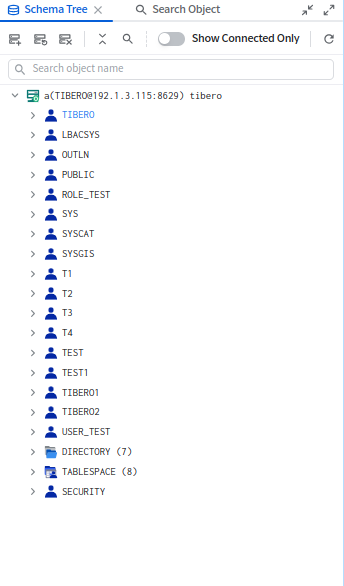
This chapter introduces the main features provided by the Schema Tree Browser.
Schema Tree Browser screen
## Generate SQL
Automatically generates INSERT/UPDATE/DELETE/SELECT/MERGE SQL templates for database objects (Table, View, Materialized View).
### Supported objects
Use the Generate SQL feature for The following database objects.
* Table
* View
* Materialized View
### Execution
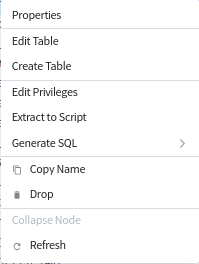
1. Find the desired item (Table/View/Materialized View) in the object tree.
2. Right-click on the item to open the context menu.
3. Select 'Generate SQL' from the menu.
Table Context Menu
### Generate SQL window
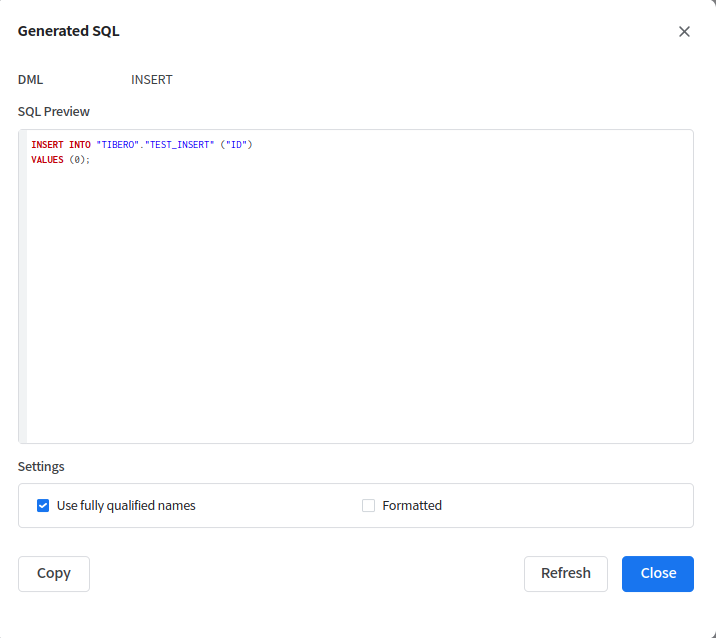
In the SQL window that appears when executing Generate SQL, the following information are shown.
* The names of all columns in the selected object
* SQL template for each column's data type
* Example automatically generated INSERT/UPDATE/DELETE/SELECT/MERGE statements
Window when selecting Generate SQL - INSERT type
### Execution
1. Copy the generated SQL template.
2. Enter the correct value for the data type.
## Search Object
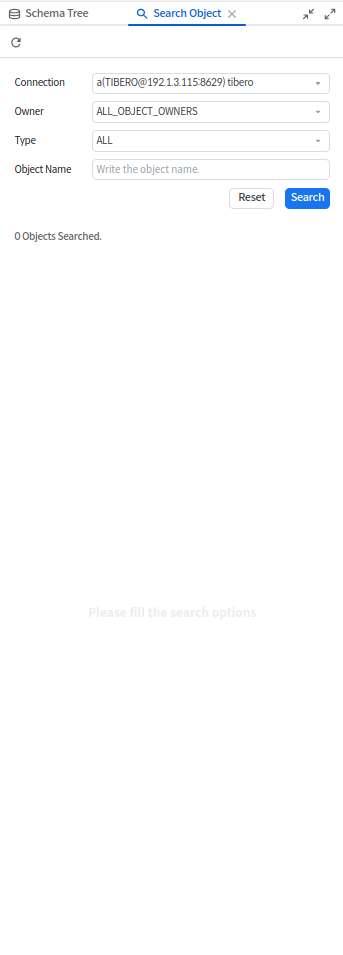
Provides the search function of Schema Object.
Search Object window
The user can search for a Schema Tree Object with the desired conditions by entering values such as Connection, Owner, Type, Object Name, etc.
###