> For the complete documentation index, see [llms.txt](https://docs.tibero.com/tiberostudio.en/llms.txt). Markdown versions of documentation pages are available by appending `.md` to page URLs; this page is available as [Markdown](https://docs.tibero.com/tiberostudio.en/about/preference/shortcuts.md). Agents can also search and read this documentation through its [MCP server](https://docs.tibero.com/tiberostudio.en/~gitbook/mcp).

# Shortcuts

## Shortcuts Settings

<figure><img src="https://content.gitbook.com/content/nNfkYJbwJttSkGBYdvi9/blobs/qCEZ8PDozFQ170YpmMkQ/image.png" alt=""><figcaption></figcaption></figure>

### Search Field

Filters the options shown through the feature name. Partial search is possible and case insensitive. When entering a value in the field, only features that contain the word searched for will be filtered and highlighted if there is a match.

<figure><img src="https://content.gitbook.com/content/nNfkYJbwJttSkGBYdvi9/blobs/WZGx6gyFuVMviKyrWR46/image.png" alt=""><figcaption></figcaption></figure>

### Shortcuts

Views features and their shortcuts by category. Clicks the category name to collapse or expand it.

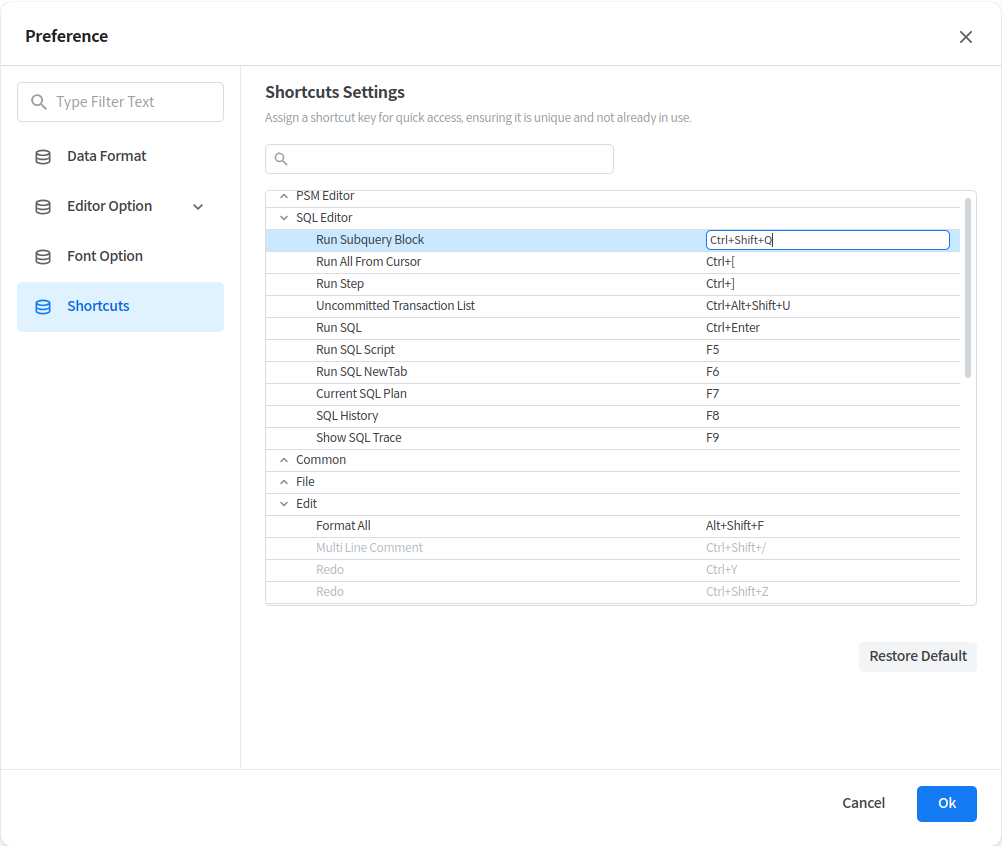
The user can enter edit mode by clicking the shortcut area of a feature that can be changed (unchangeable features are grayed out) then type the desired shortcut and press Enter to apply it.

<figure><img src="https://content.gitbook.com/content/nNfkYJbwJttSkGBYdvi9/blobs/U9BCSKEPopumUzGbA8ec/image.png" alt=""><figcaption></figcaption></figure>

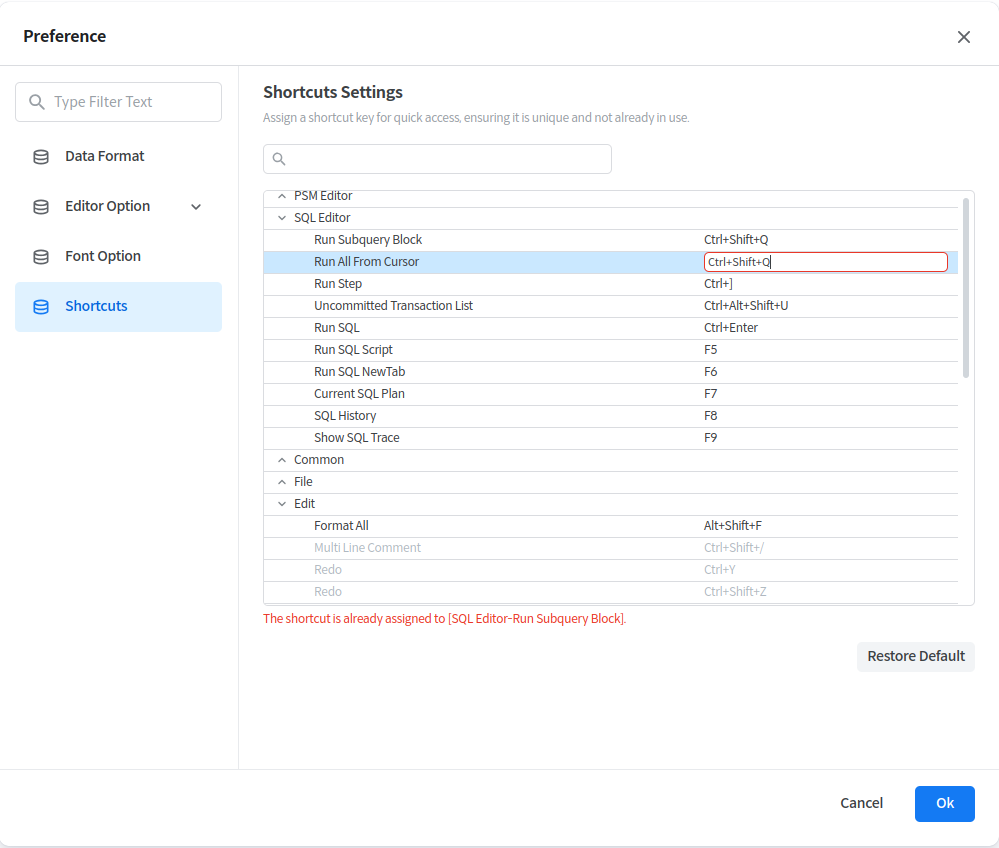
In case of duplication with other functions, the user can check the function to which the key is mapped through the error message in the lower left corner. (However, shortcuts in SQL Editor and PSM Editor can be duplicated with each other).

<figure><img src="https://content.gitbook.com/content/nNfkYJbwJttSkGBYdvi9/blobs/TMzoLFxZT5kX2zjc9meu/image.png" alt=""><figcaption></figcaption></figure>

## Default shortcut list

The default shortcuts for each category are as follows

### PSM Editor

<table data-full-width="false"><thead><tr><th width="153">Feature</th><th width="160">Shortcut</th><th width="376">Description</th><th width="61" data-type="checkbox">Change</th></tr></thead><tbody><tr><td><strong>Subprogram</strong></td><td><code>Ctrl+G</code></td><td>Shows or hides Subprogram Tree.</td><td>true</td></tr><tr><td><strong>PSM Debug</strong></td><td><code>Ctrl+Shift+D</code></td><td>Debugs PSM statement.</td><td>true</td></tr><tr><td><strong>PSM Run</strong></td><td><code>Ctrl+Shift+N</code></td><td>Executes PSM statement.</td><td>true</td></tr><tr><td><strong>PSM Compile</strong></td><td><code>Ctrl+Shift+P</code></td><td>Executes PSM Compile.</td><td>true</td></tr><tr><td><strong>Terminate PSM Debug</strong></td><td><code>Ctrl+Shift+T</code></td><td>Terminates debugging.</td><td>true</td></tr><tr><td><strong>Breakpopint</strong></td><td><code>F5</code></td><td>Sets the Breakpoint in current Line.</td><td>true</td></tr><tr><td><strong>Step Any Return</strong></td><td><code>F6</code></td><td>Moves the debug line to the next line in the procedure </td><td>true</td></tr><tr><td><strong>Step Into</strong></td><td><code>F7</code></td><td>Moves the debug line to the next line (if it is a procedure call, procedure, move the debug line into the procedure)</td><td>true</td></tr><tr><td><strong>Resume</strong></td><td><code>F8</code></td><td>Moves the debug line to the next set breakpoint.</td><td>true</td></tr><tr><td><strong>Step Over</strong></td><td><code>F9</code></td><td>Moves the debug line to the next linetrue.</td><td>true</td></tr></tbody></table>

### SQL Editor

<table data-full-width="false"><thead><tr><th width="153">Feature</th><th width="160">Shortcut</th><th width="376">Description</th><th width="61" data-type="checkbox">Change</th></tr></thead><tbody><tr><td><strong>Run Subquery Block</strong></td><td><code>Alt+F5</code></td><td>Executes the subquery where the current cursor is located.</td><td>true</td></tr><tr><td><strong>Run All From Cursor</strong></td><td><code>Ctrl+[</code></td><td>Executes multiple SQL from the SQL statement where the current cursor is located to the last SQL statement.</td><td>true</td></tr><tr><td><strong>Run Step</strong></td><td><code>Ctrl+]</code></td><td>After running a single SQL where the current cursor is located, Moves the cursor to the next SQL statement.</td><td>true</td></tr><tr><td><strong>Uncommitted Transaction List</strong></td><td><code>Ctrl+Alt</code><br><code>+Shift+U</code></td><td>Opens Uncommitted List window.</td><td>true</td></tr><tr><td><strong>Run SQL</strong></td><td><code>Ctrl+Enter</code></td><td>Executes a single SQL at the current cursor. If it is executed after blocking a certain area of the SQL wrote, it will run the SQL in the blocked area.</td><td>true</td></tr><tr><td><strong>Run SQL Script</strong></td><td><code>F5</code></td><td>Executes all multiple SQL written in the Editor.</td><td>true</td></tr><tr><td><strong>Run SQL NewTab</strong></td><td><code>F6</code></td><td>Executes a single SQL (same as Run SQL), and creates a new result window.</td><td>true</td></tr><tr><td><strong>Current SQL Plan</strong></td><td><code>F7</code></td><td>Views the SQL Plan.</td><td>true</td></tr><tr><td><strong>SQL History</strong></td><td><code>F</code>8</td><td>Opens the SQL History Tab.</td><td>true</td></tr><tr><td><strong>Show SQL Trace</strong></td><td><code>F9</code></td><td>View the SQL Trace information.</td><td>true</td></tr></tbody></table>

### Common

<table data-full-width="false"><thead><tr><th width="153">Feature</th><th width="160">Shortcut</th><th width="376">Description</th><th width="61" data-type="checkbox">Change</th></tr></thead><tbody><tr><td><strong>Maximize Editor</strong></td><td><code>Alt</code><br><code>+Arrowdown</code></td><td>Maximizes the Editor window.</td><td>true</td></tr><tr><td><strong>Close</strong></td><td><code>Alt+F4</code></td><td>Closes the application.</td><td>false</td></tr><tr><td><strong>Line Number Display</strong></td><td><code>Alt+L</code></td><td>Toggles the line number display option.</td><td>true</td></tr><tr><td><strong>Open a new PSM Editor</strong></td><td><code>Alt+P</code></td><td>Creates the new PSM Editor window.</td><td>true</td></tr><tr><td><strong>Split Pane Evenly</strong></td><td><code>Alt</code><br><code>+Arrowright</code></td><td></td><td>true</td></tr><tr><td><strong>Open a new SQL Editor</strong></td><td><code>Alt+S</code></td><td>Creates the new SQL Editor window.</td><td>true</td></tr><tr><td><strong>Schema Tree Browser</strong></td><td><code>Alt+T</code></td><td>Opens the Schema Tree window.</td><td>true</td></tr><tr><td><strong>Maximize Result</strong></td><td><code>Alt+Arrowup</code></td><td>Maximizes the Result window.</td><td>true</td></tr><tr><td><strong>Append Query Result Tab</strong></td><td><code>Ctrl+.</code></td><td>Creates the new Result tab when generating results in SQL Editor.The default is False.</td><td>true</td></tr><tr><td><strong>Show Shortcut List</strong></td><td><code>Ctrl+Alt+L</code></td><td>Opens the Preference - Shortcut window.</td><td>true</td></tr><tr><td><strong>Preferences</strong></td><td><code>Ctrl+Alt+P</code></td><td>Opens the Preference window.</td><td>true</td></tr><tr><td><strong>Open Recent Editor</strong></td><td><code>Ctrl+Alt+T</code></td><td>Opens the Open Recent Editor menu of GNB.</td><td>true</td></tr><tr><td><strong>Toggle Result Tab</strong></td><td><code>Ctrl+H</code></td><td>Collapses or expands the Result Tab.</td><td>true</td></tr><tr><td><strong>Close All Tab</strong></td><td><code>Ctrl+Shift+W</code></td><td>Closes all tabs in the focused group.</td><td>false</td></tr><tr><td><strong>Close Tab</strong></td><td><code>Ctrl+W</code></td><td>Closes tabs in the focused group.</td><td>false</td></tr><tr><td><strong>Template</strong></td><td><code>F3</code></td><td>Opens the Template area.</td><td>true</td></tr><tr><td><strong>Go to Next Tab</strong></td><td><code>F4</code></td><td>Moves to the next tab in the focused group.</td><td>true</td></tr><tr><td><strong>Go to Prev Tab</strong></td><td><code>Shift+F4</code></td><td>Moves to the previous tab in the focused group.</td><td>true</td></tr></tbody></table>

### File

<table data-full-width="false"><thead><tr><th width="153">Feature</th><th width="160">Shortcut</th><th width="376">Description</th><th width="61" data-type="checkbox">Change</th></tr></thead><tbody><tr><td><strong>End Connection</strong></td><td><code>Ctrl+E</code></td><td>Disconnects the selected connection.</td><td>true</td></tr><tr><td><strong>New Connection</strong></td><td><code>Ctrl+N</code></td><td>Opens the Create Connection window.</td><td>true</td></tr><tr><td><strong>Open File</strong></td><td><code>Ctrl+O</code></td><td>Loads a script saved in a file.</td><td>true</td></tr><tr><td><strong>Save</strong></td><td><code>Ctrl+S</code></td><td>Saves the contents of the script to a file.</td><td>true</td></tr><tr><td><strong>Commit</strong></td><td><code>Ctrl+Shift+C</code></td><td>Executes Commit </td><td>false</td></tr><tr><td><strong>End All Connection</strong></td><td><code>Ctrl+Shift+E</code></td><td>Disconnects all connected connections.</td><td>true</td></tr><tr><td><strong>Rollback</strong></td><td><code>Ctrl+Shift+R</code></td><td>Executes Rollback.</td><td>false</td></tr><tr><td><strong>Save All</strong></td><td><code>Ctrl+Shift+S</code></td><td>Saves the contents of all currently open editor.</td><td>true</td></tr></tbody></table>

### Edit

<table data-full-width="false"><thead><tr><th width="153">Feature</th><th width="160">Shortcut</th><th width="376">Description</th><th width="61" data-type="checkbox">Change</th></tr></thead><tbody><tr><td><strong>Format All</strong></td><td><code>Alt+Shift+F</code></td><td>Makes all irregular and hard-to-read SQL look nice, making it more readable.</td><td>true</td></tr><tr><td><strong>Multi Line Comment</strong></td><td><code>Ctrl+Shift+/</code></td><td>Comments the selected area with a block comment (/* */)</td><td>false</td></tr><tr><td><strong>Redo</strong></td><td><code>Ctrl+Y</code> 또는<code>Ctrl+Shift+Z</code></td><td>Reruns a canceled execution.</td><td>false</td></tr><tr><td><strong>Single Line Comment</strong></td><td><code>Ctrl+/</code></td><td>Comments the selected line with a single line comment (--).</td><td>false</td></tr><tr><td><strong>Clear DBMS Output</strong></td><td><code>Ctrl+,</code></td><td>Deletes the DBMS Output contents of the selected tabs.</td><td>false</td></tr><tr><td><strong>Select All</strong></td><td><code>Ctrl+A</code></td><td>Selects all contents.</td><td>false</td></tr><tr><td><strong>Copy</strong></td><td><code>Ctrl+C</code></td><td>Copies the selected area.</td><td>false</td></tr><tr><td><strong>Find/Replace</strong></td><td><code>Ctrl+F</code></td><td>Calls the Find/Replace window.</td><td>false</td></tr><tr><td><strong>Invert Case</strong></td><td><code>Ctrl+I</code></td><td>Reverses the case of the selected text, converts uppercase to lowercase and lowercase to uppercase.</td><td>true</td></tr><tr><td><strong>Capitalize</strong></td><td><code>Ctrl+K</code></td><td>Capitalizes the first letter of each word in the selected text and converts the rest to lowercase.</td><td>true</td></tr><tr><td><strong>Uncomment</strong></td><td><code>Ctrl+Shift+-</code></td><td>Deletes comments. If the line is uncommented, it will be commented out.</td><td>true</td></tr><tr><td><strong>Word Wrap</strong></td><td><code>Ctrl+Shift</code><br><code>+Alt+W</code></td><td>Automatically wraps long lines of text to fit the editor window size.</td><td>true</td></tr><tr><td><strong>Trim Spaces</strong></td><td><code>Ctrl+Shift</code><br><code>+Backspace</code></td><td>Automatically removes unnecessary spaces at both ends of lines of code or text. unnecessary spaces at the end of lines of code or text.</td><td>true</td></tr><tr><td><strong>Delete All</strong></td><td><code>Ctrl+Shift</code><br><code>+Delete</code></td><td>Deletes all current scripts. </td><td>true</td></tr><tr><td><strong>Formatting</strong></td><td><code>Ctrl+Shift+F</code></td><td>Makes irregular, hard-to-read single SQL more readable by making it readable.</td><td>true</td></tr><tr><td><strong>Sentensize</strong></td><td><code>Ctrl+Shift+K</code></td><td>Capitalizes the first letter of a sentence and converts the rest to lowercase. the rest in lowercase.</td><td>true</td></tr><tr><td><strong>Upper Case</strong></td><td><code>Ctrl+Shift+U</code></td><td>Converts all letters in the selected text to uppercase.</td><td>true</td></tr><tr><td><strong>Auto Complete WIndow</strong></td><td><code>Ctrl+Space</code></td><td>Calls the AutoComplete window.</td><td>true</td></tr><tr><td><strong>Lower Case</strong></td><td><code>Ctrl+U</code></td><td>Converts all letters in the selected text to lowercase to lower case.</td><td>true</td></tr><tr><td><strong>Paste</strong></td><td><code>Ctrl+V</code></td><td>Pastes copied contents.</td><td>false</td></tr><tr><td><strong>Cut</strong></td><td><code>Ctrl+X</code></td><td>Cuts the selected area.</td><td>false</td></tr><tr><td><strong>Undo</strong></td><td><code>Ctrl+Z</code></td><td>Undoes the operation.</td><td>false</td></tr><tr><td><strong>Delete</strong></td><td><code>Ctrl+Delete</code></td><td>Deletes the selected area.</td><td>false</td></tr><tr><td><strong>Indent</strong></td><td><code>Tab</code></td><td>Executes indents.</td><td>false</td></tr><tr><td><strong>UnIndent</strong></td><td><code>Shift+Tab</code></td><td>Executes outdents.</td><td>false</td></tr></tbody></table>

###
