> For the complete documentation index, see [llms.txt](https://docs.tibero.com/tiberostudio.en/llms.txt). Markdown versions of documentation pages are available by appending `.md` to page URLs; this page is available as [Markdown](https://docs.tibero.com/tiberostudio.en/about/preference.md).

# Preference

Tibero Studio 3 provides various preferences options to customize your experience.

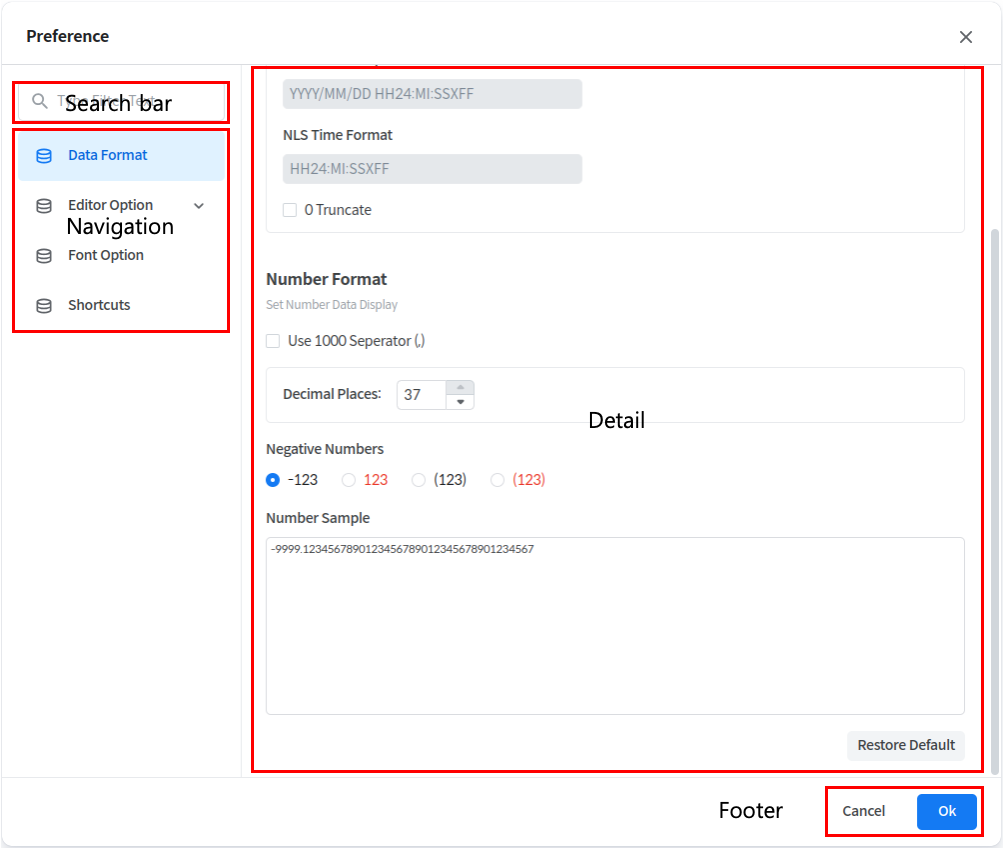
The following items are available in Preferences

* Data Format: Changes the format of your data.
* Editor Option: Changes the application theme and options related to Editor and Result Table.
* Font Option: Changes the font options for the application.
* Shortcuts: Changes options related to shortcuts.

<figure><img src="https://content.gitbook.com/content/nNfkYJbwJttSkGBYdvi9/blobs/UB1m0vGqsubsz7akpHUS/image.png" alt=""><figcaption></figcaption></figure>

The overall UI of the Preference feature is described below

<table><thead><tr><th width="181">Area</th><th>Description</th></tr></thead><tbody><tr><td><strong>Search Bar</strong></td><td>Searchs by category name or detailed option name.</td></tr><tr><td><strong>Navigation</strong></td><td>Moves to each option detail item through the Navigation button.</td></tr><tr><td><strong>Detail</strong></td><td><p>Checks and changes the selected option in Detail Navigation.</p><p>Also resets the option through the [Restore Default] button in each detail item.</p></td></tr><tr><td><strong>Footer</strong></td><td><ul><li>OK:  Apply the changed option and close the window</li><li>Cancel: Close the window without applying the changed option.</li></ul></td></tr></tbody></table>

###
