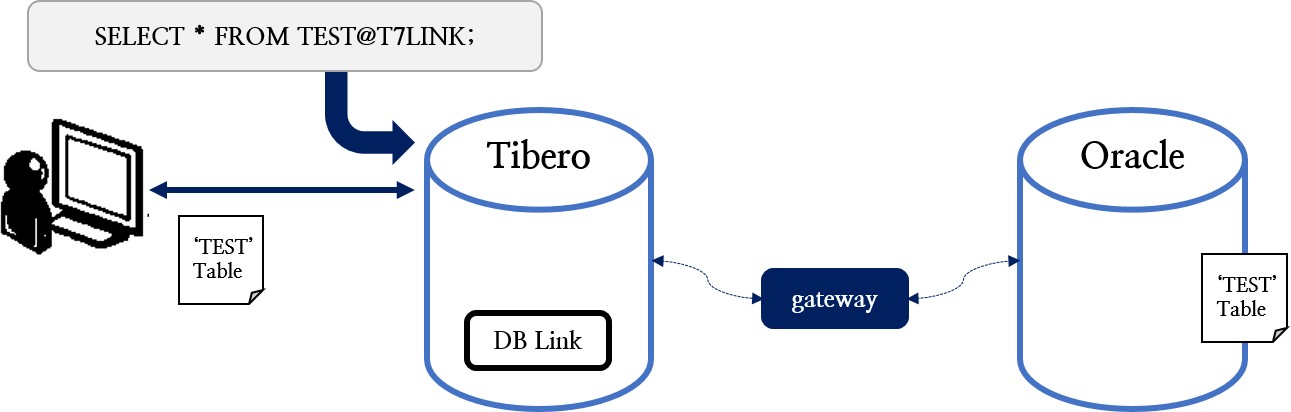
# Tibero_B 정보
tibero=(
    (INSTANCE=(HOST=localhost)
              (PORT=5555)
              (DB_NAME=tibero)
          )
)

# 접속할 Tibero_A의 정보 추가 설정
tibero_a=(
          (INSTANCE=(HOST=192.168.1.121)
                    (PORT=4444)
                    (DB_NAME=tibero)
          )
)$ tbsql sys/tibero@tibero_a
tbSQL 7
TmaxTibero Corporation Copyright (c) 2020-. All rights reserved.
Connected to Tibero using tibero_a.SQL> select * from v$instance;
INSTANCE_NUMBER INSTANCE_NAME DB_NAME HOST_NAME PARALLEL THREAD# VERSION
STARTUP_TIME STATUS SHUTDOWN_PENDING TIP_FILE
----------------- ------------ ---------- --------- ------- ----------------
--------------------- ----------------------------------
0 tibero tibero dqa-optane1 NO 0 7
2023/06/12 NORMAL NO
/hdd/home/sampler22/tibero7/config/tibero.tip
1 row selected.SQL> create database link < DB LINK명 > connect to < 접속 사용자 ID > identified by < 접속 패스워드 >
2 using < 접속에 사용할 alias >;$ tbsql tibero/tmax
tbSQL 7
TmaxTibero Corporation Copyright (c) 2020-. All rights reserved.
Connected to Tibero.
SQL> create database link T7LINK connect to tibero identified by 'tmax'
2 using 'tibero_a';
Database Link 'T7LINK' created.SQL> CONN tibero/tmax
Connected to Tibero.
SQL> ls
NAME SUBNAME TYPE
-------------------------------- ------------------ -------------------
T7LINK DATABASE LINK
SQL> select * from dual@T7LINK;
DUMMY
-------
X
1 row selected.SQL> select * from user_db_links;
OWNER DB_LINK USERNAME HOST CREATED
------- -------- -------- ----- ----------
TIBERO T7LINK TIBERO tibero_a 2023/06/14
1 row selected. $TBGW_HOME
+-- < DBMS Vender명 >
|-- config
|-- tbgw.cfg
|-- log
|-- Log File
[/yuha/t7/gateway]$ cd $TBGW_HOME
[/yuha/t7/gateway]$ pwd
/yuha/t7/gateway
[/yuha/t7/gateway]$ tree -F
.
├── gw4orcl*
└── oracle/
├── config/
└── log/
3 directories, 1 fileexport TBGW_HOME=$TB_HOME/client/gateway
export ORACLE_HOME=<Oracle Home>
export LD_LIBRARY_PATH=$ORACLE_HOME/lib:$LD_LIBRARY_PATH
export ORACLE_SID=<Oracle SID>
export PATH=$ORACLE_HOME/bin:$PATH# Gateway for Oracle 19c
export TBGW_HOME=/yuha/t7/gateway
export ORACLE_HOME=/yuha/oracle/ORA19/app/oracle/product/19.0.0/db_1
export LD_LIBRARY_PATH=$ORACLE_HOME/lib:$LD_LIBRARY_PATH
export ORACLE_SID=oracle19
export PATH=$ORACLE_HOME/bin:$PATHchmod o+rx $HOME
chmod o+rx $ORACLE_HOME
chmod o+rx $ORACLE_HOME/lib
chmod o+r $ORACLE_HOME/lib/*
chmod o+rx $ORACLE_HOME/bin
chmod o+rx $ORACLE_HOME/bin/sqlplus
chmod o+x $ORACLE_HOME/network
chmod o+x $ORACLE_HOME/network/admin
chmod o+r $ORACLE_HOME/network/admin/tnsnames.ora$ mkdir $TBGW_HOME
$ cp <Gateway Binary명> $TBGW_HOME/gw4orcl
$ chmod u+x $TBGW_HOME/gw4orcl$ mkdir $TBGW_HOME
$ cp $TB_HOME/client/bin/gw4orcl $TBGW_HOME/gw4orcl
$ chmod u+x $TBGW_HOME/gw4orcl
$ cd $TBGW_HOME
$ ls
gw4orcl$ ldd gw4orcl
linux-vdso.so.1 => (0x00007fff1e1ee000)
libclntsh.so.19.1 =>
/yuha/oracle/ORA19/app/oracle/product/19.0.0/db_1/lib/libclntsh.so.19.1
(0x00007f3c88537000)
libdl.so.2 => /lib64/libdl.so.2 (0x00007f3c88333000)
libpthread.so.0 => /lib64/libpthread.so.0 (0x00007f3c88117000)
libm.so.6 => /lib64/libm.so.6 (0x00007f3c87e15000)
libc.so.6 => /lib64/libc.so.6 (0x00007f3c87a47000)
libnnz19.so =>
/yuha/oracle/ORA19/app/oracle/product/19.0.0/db_1/lib/libnnz19.so
(0x00007f3c872ff000)
libnsl.so.1 => /lib64/libnsl.so.1 (0x00007f3c870e5000)
librt.so.1 => /lib64/librt.so.1 (0x00007f3c86edd000)
libaio.so.1 => /lib64/libaio.so.1 (0x00007f3c86cdb000)
libresolv.so.2 => /lib64/libresolv.so.2 (0x00007f3c86ac1000)
/lib64/ld-linux-x86-64.so.2 (0x00007f3c8c545000)
libclntshcore.so.19.1 =>
/yuha/oracle/ORA19/app/oracle/product/19.0.0/db_1/lib/libclntshcore.so.19.1
(0x00007f3c86521000)<Gateway
Alias명>=( (GATEWAY=
(PROGRAM=<Gateway Binary 경로 및 파일명>)
(TARGET=<tnsnames.ora에 설정된 Alias>)
(TX_MODE={GLOBAL | LOCAL})
)
)[/yuha/t7/tibero7/client/config]$ sqlplus tibero/tmax@ORCL
SQL*Plus: Release 19.0.0.0.0 - Production on Wed Jun 14 14:56:07 2023
Version 19.3.0.0.0
Copyright (c) 1982, 2019, Oracle. All rights reserved.
Last Successful login time: Wed Jun 14 2023 14:55:11 +09:00
Connected to:
Oracle Database 19c Enterprise Edition Release 19.0.0.0.0 - Production
Version 19.3.0.0.0
SQL># gateway for oracle
# local
gw_local=(
(GATEWAY=
(PROGRAM=/yuha/t7/gateway/gw4orcl)
(TARGET=ORCL)
(TX_MODE=GLOBAL)
)
)LOG_DIR = <log-dir>
LOG_LVL = <log_lvl>
MAX_LOG_SIZE = <max-log-size>
MAX_LOG_BAKCUP_SIZE = <max-log-backup-size>
FETCH_SIZE = <fetch-size>
SKIP_CHAR_CONV = <skip-char-conv>$ cd $TBGW_HOME/oracle/config
$ vi tbgw.cfg
LOG_DIR=/yuha/t7/gateway/oracle/log
LOG_LVL=2
MAX_LOG_SIZE=502400000create database link <DB Link명> connect to <user명> identified by '<password>'
using '<Network Alias명>';GRANT CREATE DATABASE LINK TO USER_NAME;
GRANT CREATE PUBLIC DATABASE LINK TO USER_NAME;$ tbsql tibero/tmax
tbSQL 7
TmaxTibero Corporation Copyright (c) 2020-. All rights reserved.
Connected to Tibero.
SQL> create database link T7LINK connect to tibero identified by 'tmax'
2 using 'gw_local';
Database Link 'T7LINK' created.$ tbsql tibero/tmax
tbSQL 7
TmaxTibero Corporation Copyright (c) 2020-. All rights reserved.
Connected to Tibero.
SQL> select * from dual@T7LINK;
DUMMY
-------
X
1 row selected.$ sqlplus tibero/tmax
SQL*Plus: Release 19.0.0.0.0 - Production on Wed Jun 14 16:01:10 2023
Version 19.3.0.0.0
Copyright (c) 1982, 2019, Oracle. All rights reserved.
Last Successful login time: Wed Jun 14 2023 15:58:11 +09:00
Connected to:
Oracle Database 19c Enterprise Edition Release 19.0.0.0.0 - Production
Version 19.3.0.0.0
SQL> create table test(c1 number);
Table created.
SQL> insert into test values(100);
1 row created.
SQL> commit;
Commit complete.
SQL> select * from test;
C1
------------
100$ tbsql tibero/tmax
tbSQL 7
TmaxTibero Corporation Copyright (c) 2020-. All rights reserved.
Connected to Tibero.
SQL> select * from test@T7LINK;
C1
--------
100
1 row selected.
SQL> insert into test@T7LINK values(200);
row inserted.
SQL> commit;
Commit completed.
SQL> select * from test@T7LINK;
C1
--------
100
200
2 rows selected.export TBGW_HOME=$TB_HOME/client/gateway
export ORACLE_HOME=<Oracle Home>
export LD_LIBRARY_PATH=$ORACLE_HOME/lib:$LD_LIBRARY_PATH
export ORACLE_SID=<Oracle SID>
export PATH=$ORACLE_HOME/bin:$PATH# Gateway for Oracle 19c
export TBGW_HOME=/yuha/t7/gateway
export ORACLE_HOME=/yuha/oracle/ORA19/app/oracle/product/19.0.0/db_1
export LD_LIBRARY_PATH=$ORACLE_HOME/lib:$LD_LIBRARY_PATH
export ORACLE_SID=oracle19
export PATH=$ORACLE_HOME/bin:$PATHchmod o+rx $HOME
chmod o+rx $ORACLE_HOME
chmod o+rx $ORACLE_HOME/lib
chmod o+r $ORACLE_HOME/lib/*
chmod o+rx $ORACLE_HOME/bin
chmod o+rx $ORACLE_HOME/bin/sqlplus
chmod o+x $ORACLE_HOME/network
chmod o+x $ORACLE_HOME/network/admin
chmod o+r $ORACLE_HOME/network/admin/tnsnames.ora$ mkdir $TBGW_HOME
$ cp <Gateway Binary명> $TBGW_HOME/gw4orcl
$ chmod u+x $TBGW_HOME/gw4orcl$ mkdir $TBGW_HOME
$ cp $TB_HOME/client/bin/gw4orcl $TBGW_HOME/gw4orcl
$ chmod u+x $TBGW_HOME/gw4orcl
$ cd $TBGW_HOME
$ ls
gw4orcl$ ldd gw4orcl
linux-vdso.so.1 => (0x00007fff1e1ee000)
libclntsh.so.19.1 =>
/yuha/oracle/ORA19/app/oracle/product/19.0.0/db_1/lib/libclntsh.so.19.1
(0x00007f3c88537000)
libdl.so.2 => /lib64/libdl.so.2 (0x00007f3c88333000)
libpthread.so.0 => /lib64/libpthread.so.0 (0x00007f3c88117000)
libm.so.6 => /lib64/libm.so.6 (0x00007f3c87e15000)
libc.so.6 => /lib64/libc.so.6 (0x00007f3c87a47000)
libnnz19.so =>
/yuha/oracle/ORA19/app/oracle/product/19.0.0/db_1/lib/libnnz19.so
(0x00007f3c872ff000)
libnsl.so.1 => /lib64/libnsl.so.1 (0x00007f3c870e5000)
librt.so.1 => /lib64/librt.so.1 (0x00007f3c86edd000)
libaio.so.1 => /lib64/libaio.so.1 (0x00007f3c86cdb000)
libresolv.so.2 => /lib64/libresolv.so.2 (0x00007f3c86ac1000)
/lib64/ld-linux-x86-64.so.2 (0x00007f3c8c545000)
libclntshcore.so.19.1 =>
/yuha/oracle/ORA19/app/oracle/product/19.0.0/db_1/lib/libclntshcore.so.19.1
(0x00007f3c86521000)<Gateway
Alias명>=( (GATEWAY=
(LISTENER=
(HOST=<Gateway IP>)
(PORT=<Gateway PORT>)
)
(TARGET=<tnsnames.ora에 설정된 Alias>)
(TX_MODE= {GLOBAL | LOCAL })
)
)[/yuha/t7/tibero7/client/config]$ sqlplus tibero/tmax@ORCL
SQL*Plus: Release 19.0.0.0.0 - Production on Wed Jun 14 14:56:07 2023
Version 19.3.0.0.0
Copyright (c) 1982, 2019, Oracle. All rights reserved.
Last Successful login time: Wed Jun 14 2023 14:55:11 +09:00
Connected to:
Oracle Database 19c Enterprise Edition Release 19.0.0.0.0 - Production
Version 19.3.0.0.0
SQL># gateway for oracle
# listener
gw_listen=(
(GATEWAY=
(LISTENER=
(HOST=192.168.17.24)
(PORT=9999)
)
(TARGET=ORCL)
(TX_MODE=GLOBAL)
)
)LISTENER_PORT = <port-no>
LOG_DIR = <log-dir>
LOG_LVL = <log_lvl>
MAX_LOG_SIZE = <max-log-size>
MAX_LOG_BAKCUP_SIZE = <max-log-backup-size>
FETCH_SIZE = <fetch-size>
SKIP_CHAR_CONV = <skip-char-conv>$ cd $TBGW_HOME/oracle/config
$ vi tbgw.cfg
LISTENER_PORT=9999
LOG_DIR=/yuha/t7/gateway/oracle/log
LOG_LVL=2
MAX_LOG_SIZE=502400000$ ./gw4orcl$ ps -ef |grep gw4orcl
t7 15840 12233 0 15:35 pts/2 00:00:00 grep --color=auto gw4orcl
$ ./gw4orcl
$ ps -ef |grep gw4orcl
t7 15844 1 1 15:35 ? 00:00:00 ./gw4orcl
t7 15857 12233 0 15:35 pts/2 00:00:00 grep --color=auto gw4orcl$ netstat -na |grep 9999
tcp 0 0 0.0.0.0:9999 0.0.0.0:* LISTEN$ tbsql tibero/tmax
tbSQL 7
TmaxTibero Corporation Copyright (c) 2020-. All rights reserved.
Connected to Tibero.
SQL> create database link T7LINK connect to tibero identified by 'tmax'
2 using 'gw_listen';
Database Link 'T7LINK' created.$ tbsql tibero/tmax
tbSQL 7
TmaxTibero Corporation Copyright (c) 2020-. All rights reserved.
Connected to Tibero.
SQL> select * from dual@T7LINK;
DUMMY
-----
X
1 row selected.$ unzip instantclient-basic-linux.x64-19.16.0.0.0dbru.zip
Archive: instantclient-basic-linux.x64-19.16.0.0.0dbru.zip
inflating: instantclient_19_16/adrci
inflating: instantclient_19_16/BASIC_LICENSE
inflating: instantclient_19_16/BASIC_README
inflating: instantclient_19_16/genezi
inflating: instantclient_19_16/libclntshcore.so.19.1
linking: instantclient_19_16/libclntsh.so -> libclntsh.so.19.1
linking: instantclient_19_16/libclntsh.so.10.1 -> libclntsh.so.19.1
linking: instantclient_19_16/libclntsh.so.11.1 -> libclntsh.so.19.1
linking: instantclient_19_16/libclntsh.so.12.1 -> libclntsh.so.19.1
linking: instantclient_19_16/libclntsh.so.18.1 -> libclntsh.so.19.1
inflating: instantclient_19_16/libclntsh.so.19.1
inflating: instantclient_19_16/libipc1.so inflating: i
nstantclient_19_16/libmql1.so inflating:
instantclient_19_16/libnnz19.so
linking: instantclient_19_16/libocci.so -> libocci.so.19.1
linking: instantclient_19_16/libocci.so.10.1 -> libocci.so.19.1
linking: instantclient_19_16/libocci.so.11.1 -> libocci.so.19.1
linking: instantclient_19_16/libocci.so.12.1 -> libocci.so.19.1
linking: instantclient_19_16/libocci.so.18.1 -> libocci.so.19.1
inflating: instantclient_19_16/libocci.so.19.1
inflating: instantclient_19_16/libociei.so
inflating: instantclient_19_16/libocijdbc19.so
inflating: instantclient_19_16/liboramysql19.so
creating: instantclient_19_16/network/
inflating: instantclient_19_16/ojdbc8.jar
inflating: instantclient_19_16/ucp.jar
inflating: instantclient_19_16/uidrvci
inflating: instantclient_19_16/xstreams.jar
creating: instantclient_19_16/network/admin/
inflating: instantclient_19_16/network/admin/README
finishing deferred symbolic links:
instantclient_19_16/libclntsh.so -> libclntsh.so.19.1
instantclient_19_16/libclntsh.so.10.1 -> libclntsh.so.19.1
instantclient_19_16/libclntsh.so.11.1 -> libclntsh.so.19.1
instantclient_19_16/libclntsh.so.12.1 -> libclntsh.so.19.1
instantclient_19_16/libclntsh.so.18.1 -> libclntsh.so.19.1
instantclient_19_16/libocci.so -> libocci.so.19.1
instantclient_19_16/libocci.so.10.1 -> libocci.so.19.1
instantclient_19_16/libocci.so.11.1 -> libocci.so.19.1
instantclient_19_16/libocci.so.12.1 -> libocci.so.19.1
instantclient_19_16/libocci.so.18.1 -> libocci.so.19.1# Instanct client
export TBGW_HOME=/yuha/t7/gateway
export ORACLE_HOME=/yuha/t7/instantclient_19_16
export LD_LIBRARY_PATH=$ORACLE_HOME:$LD_LIBRARY_PATH
export PATH=.:$ORACLE_HOME:$PATH
export TNS_ADMIN=$ORACLE_HOME$ cd $TNS_ADMIN
$ vi tnsnames.ora
<Alias명> =
(DESCRIPTION =
(ADDRESS = (PROTOCOL = TCP)(HOST = <Oracle 서버 접속 IP>)
(PORT = <Oracle 서버 접속 Port>))
(CONNECT_DATA = (SERVER = DEDICATED)(SERVICE_NAME = <Oracle 서버의 SID>)
)
)$ cd $TNS_ADMIN
$ cat tnsnames.ora
ORCL =
(DESCRIPTION =
(ADDRESS = (PROTOCOL = TCP)(HOST = 192.168.17.24)(PORT = 1521))
(CONNECT_DATA = (SERVER = DEDICATED)(SERVICE_NAME = oracle19)
)
)$ sh gw_install.sh
Configuring gateway environment for tibero to oracle...
TBGW_HOME is /yuha/t7/gateway.
Gateway configuration file is created in /yuha/t7/gateway/oracle/config. Check the file,
and add or rewrite options if you want.
Gateway install is done.$ cd $TBGW_HOME
$ tree -f
.
└── ./oracle
├── ./oracle/config
│ └── ./oracle/config/tbgw.cfg
├── ./oracle/lib
│ └── ./oracle/lib/libclntsh.so.19.1 ->
/yuha/oracle/ORA19/app/oracle/product/19.0.0/db_1/lib/libclntsh.so
└── ./oracle/log
4 directories, 2 files$ pwd
/yuha/t7/tibero7/client/bin
$ ldd gw4orcl
linux-vdso.so.1 => (0x00007fffd65df000)
libclntsh.so.19.1 =>
/yuha/oracle/ORA19/app/oracle/product/19.0.0/db_1/lib/libclntsh.so.19.1
(0x00007f055e271000)
libdl.so.2 => /lib64/libdl.so.2 (0x00007f055e06d000)
libpthread.so.0 => /lib64/libpthread.so.0 (0x00007f055de51000)
libm.so.6 => /lib64/libm.so.6 (0x00007f055db4f000)
libc.so.6 => /lib64/libc.so.6 (0x00007f055d781000)
libnnz19.so => /yuha/oracle/ORA19/app/oracle/product/19.0.0/db_1/lib/libnnz19.so
(0x00007f055d039000)
libnsl.so.1 => /lib64/libnsl.so.1 (0x00007f055ce1f000)
librt.so.1 => /lib64/librt.so.1 (0x00007f055cc17000)
libaio.so.1 => /lib64/libaio.so.1 (0x00007f055ca15000)
libresolv.so.2 => /lib64/libresolv.so.2 (0x00007f055c7fb000)
/lib64/ld-linux-x86-64.so.2 (0x00007f056227f000)
libclntshcore.so.19.1 =>
/yuha/oracle/ORA19/app/oracle/product/19.0.0/db_1/lib/libclntshcore.so.19.1
(0x00007f055c25b000)$ tbsql tibero/tmax@gw_listen
tbSQL 7
TmaxTibero Corporation Copyright (c) 2020-. All rights reserved.
Connected to using gw_listen.
SQL> select * from dual;
DUMMY
------
X
1 row selected.$ ls -al $ORACLE_HOME/bin/dg4odbc
-rwxr-x--x 1 oracle dba 738168 4월 10 15:49
/yuha/oracle/ORA19/app/oracle/product/19.0.0/db_1/bin/dg4odbc$ file $ORACLE_HOME/bin/dg4odbc
/yuha/oracle/ORA19/app/oracle/product/19.0.0/db_1/bin/dg4odbc: ELF 64-bit LSB
executable, x86-64, version 1 (SYSV), dynamically linked (uses shared libs), for
GNU/Linux 2.6.32, BuildID[sha1]=05c8c6e1646c7f78af76fec4fc034f83383843f1, not
stripped# Oracle To Tibero DB Link Setting
export TB_HOME=/yuha/oracle/tibero7
export LD_LIBRARY_PATH=$TB_HOME/client/lib:$LD_LIBRARY_PATH
export PATH=$TB_HOME/client/bin:$PATH
alias nadm='cd $ORACLE_HOME/network/admin'
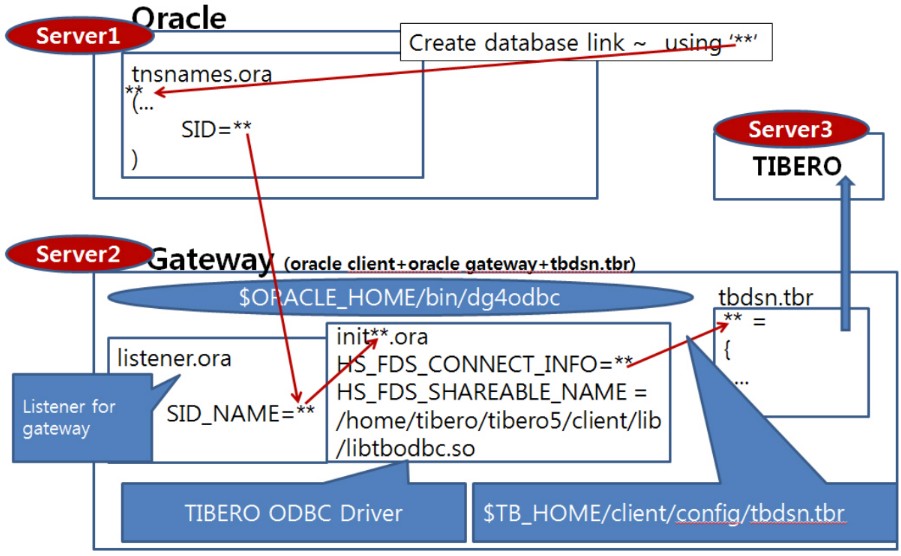
alias hadm='cd $ORACLE_HOME/hs/admin'<Alias명>=( (INSTANCE=(HOST=<Tibero 서버 IP>)
(PORT=<Tibero 서버 Port>)
(DB_NAME=<Tibero 서버 DB명>)
)
)o2t=(
(INSTANCE=(HOST=192.168.17.24)
(PORT=5555
(DB_NAME=tibero)
)
)$ tbsql sys/tibero@o2t
tbSQL 7
TmaxTibero Corporation Copyright (c) 2020-. All rights reserved.
Connected to VGliZXJv using o2t.<Alias명>=
(DESCRIPTION =
(ADDRESS = (PROTOCOL = TCP)(HOST = <Gateway 서버 IP>)
(PORT = <Gateway 서버 Port>))
(CONNECT_DATA = (SID = <Gateway 서버 SID명>))
(HS = OK)
)tb7=
(DESCRIPTION =
(ADDRESS = (PROTOCOL = TCP)(HOST = 192.168.17.24)(PORT = 1522))
(CONNECT_DATA = (SID = dg4_tibero))
(HS = OK)
)<LISTENER_NAME> =
(ADDRESS_LIST=
(ADDRESS=(PROTOCOL=tcp)(HOST=<Listening할 IP>)(PORT=<Listening할 Port>))
)
SID_LIST_<LISTENER_NAME> =
(SID_LIST=
(SID_DESC=
(SID_NAME=<Oracle 서버 SID명>)
(ORACLE_HOME=<Oracle 홈주소>)
(PROGRAM= {dg4odbc | hsodbc})
)
)LTIBERO =
(ADDRESS_LIST=
(ADDRESS=(PROTOCOL=tcp)(HOST=192.168.17.24)(PORT=1522))
)
SID_LIST_LTIBERO =
(SID_LIST=
(SID_DESC=
(SID_NAME=dg4_tibero)
(ORACLE_HOME=/yuha/oracle/ORA19/app/oracle/product/19.0.0/db_1)
(PROGRAM=dg4odbc)
)
)$ lsnrctl start <listener_name>]$ lsnrctl start ltibero
LSNRCTL for Linux: Version 19.0.0.0.0 - Production on 15-JUN-2023 17:17:49
Copyright (c) 1991, 2019, Oracle. All rights reserved.
Starting /yuha/oracle/ORA19/app/oracle/product/19.0.0/db_1/bin/tnslsnr: please
wait...
TNSLSNR for Linux: Version 19.0.0.0.0 - Production
System parameter file is
/yuha/oracle/ORA19/app/oracle/product/19.0.0/db_1/network/admin/listener.ora
Log messages written to
/yuha/oracle/ORA19/app/oracle/diag/tnslsnr/haeun/ltibero/alert/log.xml
Listening on: (DESCRIPTION=(ADDRESS=(PROTOCOL=tcp)(HOST=192.168.17.24)
(PORT=1522)))
Connecting to (ADDRESS=(PROTOCOL=tcp)(HOST=192.168.17.24)(PORT=1522))
STATUS of the LISTENER
--------------------------
Alias ltibero
Version TNSLSNR for Linux: Version 19.0.0.0.0 - Production
Start Date 15-JUN-2023 17:17:49
Uptime 0 days 0 hr. 0 min. 0 sec
Trace Level off
Security ON: Local OS Authentication
SNMP OFF
Listener Parameter File
/yuha/oracle/ORA19/app/oracle/product/19.0.0/db_1/network/admin/listener.ora
Listener Log File
/yuha/oracle/ORA19/app/oracle/diag/tnslsnr/haeun/ltibero/alert/log.xml
Listening Endpoints Summary...
(DESCRIPTION=(ADDRESS=(PROTOCOL=tcp)(HOST=192.168.17.24)(PORT=1522)))
Services Summary...
Service "dg4_tibero" has 1 instance(s).
Instance "dg4_tibero", status UNKNOWN, has 1 handler(s) for this service...
The command completed successfully$ netstat -na |grep 1522
tcp 0 0 192.168.17.24:1522 0.0.0.0:* LISTEN$ lsnrctl stop <listener_name>$ lsnrctl stop ltibero
LSNRCTL for Linux: Version 19.0.0.0.0 - Production on 15-JUN-2023 16:13:05
Copyright (c) 1991, 2019, Oracle. All rights reserved.
Connecting to (ADDRESS=(PROTOCOL=tcp)(HOST=192.168.17.24)(PORT=1522))
The command completed successfully$ lsnrctl status <listener_name>$ lsnrctl status ltibero
LSNRCTL for Linux: Version 19.0.0.0.0 - Production on 15-JUN-2023 17:18:20
Copyright (c) 1991, 2019, Oracle. All rights reserved.
Connecting to (ADDRESS=(PROTOCOL=tcp)(HOST=192.168.17.24)(PORT=1522))
STATUS of the LISTENER
-------------------------
Alias ltibero
Version TNSLSNR for Linux: Version 19.0.0.0.0 - Production
Start Date 15-JUN-2023 17:18:15
Uptime 0 days 0 hr. 0 min. 4 sec
Trace Level off
Security ON: Local OS Authentication
SNMP OFF
Listener Parameter File
/yuha/oracle/ORA19/app/oracle/product/19.0.0/db_1/network/admin/listener.ora
Listener Log File
/yuha/oracle/ORA19/app/oracle/diag/tnslsnr/haeun/ltibero/alert/log.xml
Listening Endpoints Summary...
(DESCRIPTION=(ADDRESS=(PROTOCOL=tcp)(HOST=192.168.17.24)(PORT=1522)))
Services Summary...
Service "dg4_tibero" has 1 instance(s).
Instance "dg4_tibero", status UNKNOWN, has 1 handler(s) for this service...
The command completed successfully$ tnsping <alias_name>$ tnsping tb7
TNS Ping Utility for Linux: Version 19.0.0.0.0 - Production on 15-JUN-2023 17:18:34
Copyright (c) 1997, 2019, Oracle. All rights reserved.
Used parameter files:
/yuha/oracle/ORA19/app/oracle/product/19.0.0/db_1/network/admin/sqlnet.ora
Used TNSNAMES adapter to resolve the alias
Attempting to contact (DESCRIPTION = (ADDRESS = (PROTOCOL = TCP)
(HOST = 192.168.17.24)(PORT = 1522)) (CONNECT_DATA = (SID = dg4_tibero)) (HS = OK))
OK (0 msec)$ pwd
/yuha/oracle/ORA19/app/oracle/product/19.0.0/db_1/hs/admin
$ ls -al |grep init
-rw-r--r-- 1 oracle dba 489 4월 17 2019 initdg4odbc.ora
만약 SID_NAME이 'dg4_tibero'일 경우 initdg4_tibero.ora 파일을 생성한다.
```shell
$ cp initdg4odbc.ora initdg4_tibero.oraHS_FDS_CONNECT_INFO = dg4_tibero
HS_FDS_SHAREABLE_NAME = /yuha/oracle/tibero7/client/lib/libtbodbc.soHS_FDS_CONNECT_INFO=dg4_tibero
#HS_FDS_TRACE_LEVEL=DEBUG
# Tibero ODBC Driver
HS_FDS_SHAREABLE_NAME=/home/ora11/tibero7/client/lib/libtbodbc.so
# iODBC Driver Manager
#HS_FDS_SHAREABLE_NAME=/home/ora11/iodbc/lib/libiodbc.so
#HS_LANGUAGE=AMERICAN_AMERICA.KO16MSWIN949
#
# ODBC specific environment variables
#
#set ODBCINI=<full path name of the odbc initilization file>
#set ODBCINI=/home/ora11/.odbc.ini
#
# Environment variables required for the non-Oracle system
#
#set <envvar>=<value>
#set TB_NLS_LANG=UTF8
#set TBCLI_LOG_LVL=TRACEcreate database link <DB Link명> connect to <user명> identified by "<password>" using
'<Network Alias명>';GRANT CREATE DATABASE LINK TO USER_NAME;
GRANT CREATE PUBLIC DATABASE LINK TO USER_NAME;$ sqlplus / as sysdba
SQL*Plus: Release 19.0.0.0.0 - Production on Thu Jun 15 17:26:24 2023
Version 19.3.0.0.0
Copyright (c) 1982, 2019, Oracle. All rights reserved.Connected to:
Oracle Database 19c Enterprise Edition Release 19.0.0.0.0 - Production
Version 19.3.0.0.0
SQL> drop database link o2t_link;
Database link dropped.
SQL> create database link o2t_link connect to tibero identified by tmax using 'tb7';
Database link created.SQL> select * from dual@o2t_link;
DUM
---
X$ tbsql tibero/tmax@o2t
tbSQL 7
TmaxTibero Corporation Copyright (c) 2020-. All rights reserved.
Connected to VGliZXJv using o2t.
SQL> create table test(c1 number);
Table 'TEST' created.
SQL> insert into test values(10);
1 row inserted.
SQL> commit;
Commit completed.$ sqlplus / as sysdba
SQL*Plus: Release 19.0.0.0.0 - Production on Thu Jun 15 17:34:02 2023
Version 19.3.0.0.0
Copyright (c) 1982, 2019, Oracle. All rights reserved.Connected to:
Oracle Database 19c Enterprise Edition Release 19.0.0.0.0 - Production
Version 19.3.0.0.0
SQL> select * from test@o2t_link;
C1
----------
10
SQL> insert into test@o2t_link values(20);
1 row created.
SQL> commit;
Commit complete.
SQL> select * from test@o2t_link;
C1
----------
10
20$ tar -xvzf libiodbc-3.52.7.tar.gz
$ ls -al libiodbc-3.52.7
합계 868
drwxr-xr-x 14 oracle dba 4096 9월 10 2009 .
drwxrwxrwx 16 oracle dba 4096 6월 15 17:53 ..
-rw-r--r-- 1 oracle dba 1038 7월 27 2005 AUTHORS
-rw-r--r-- 1 oracle dba 735 8월 30 2009 COPYING
-rw-r--r-- 1 oracle dba 66851 9월 10 2009 ChangeLog
-rw-r--r-- 1 oracle dba 1480 9월 10 2009 IAFA-PACKAGE
-rw-r--r-- 1 oracle dba 9236 2월 21 2004 INSTALL
-rw-r--r-- 1 oracle dba 735 8월 30 2009 LICENSE
-rw-r--r-- 1 oracle dba 1520 8월 30 2009 LICENSE.BSD
-rw-r--r-- 1 oracle dba 25277 1월 21 2006 LICENSE.LGPL
-rw-r--r-- 1 oracle dba 10099 9월 10 2009 Makefile.am
-rw-r--r-- 1 oracle dba 32869 9월 10 2009 Makefile.in
-rw-r--r-- 1 oracle dba 12592 9월 10 2009 NEWS
-rwxr-xr-x 1 oracle dba 8828 9월 9 2009 PORT.OpenLink
-rw-r--r-- 1 oracle dba 11328 8월 30 2009 README
-rw-r--r-- 1 oracle dba 3193 9월 1 2009 README.CVS
-rw-r--r-- 1 oracle dba 2653 9월 10 2009 README.MACOSX
-rw-r--r-- 1 oracle dba 3949 8월 30 2009 acinclude.m4
-rw-r--r-- 1 oracle dba 37029 9월 10 2009 aclocal.m4
drwxr-xr-x 2 oracle dba 4096 9월 10 2009 admin
drwxr-xr-x 2 oracle dba 4096 9월 10 2009 bin
-rwxr-xr-x 1 oracle dba 5963 8월 30 2009 bootstrap.sh
-rwxr-xr-x 1 oracle dba 512594 9월 10 2009 configure
-rw-r--r-- 1 oracle dba 22978 9월 10 2009 configure.in
drwxr-xr-x 2 oracle dba 4096 9월 10 2009 debian
drwxr-xr-x 4 oracle dba 4096 9월 10 2009 drvproxy
drwxr-xr-x 2 oracle dba 4096 9월 10 2009 etc
drwxr-xr-x 2 oracle dba 4096 9월 10 2009 include
drwxr-xr-x 3 oracle dba 4096 9월 10 2009 iodbc
drwxr-xr-x 4 oracle dba 4096 9월 10 2009 iodbcadm
drwxr-xr-x 2 oracle dba 4096 9월 10 2009 iodbcinst
drwxr-xr-x 11 oracle dba 4096 9월 10 2009 mac
drwxr-xr-x 2 oracle dba 4096 9월 10 2009 man
drwxr-xr-x 2 oracle dba 4096 9월 10 2009 samples$ mkdir iodbc
$ cd libiodbc-3.52.7/
./configure --prefix=$HOME/iodbc --disable-guimakemake install$ cd $HOME/iodbc/bin
$ file iodbctest
iodbctest: ELF 64-bit LSB executable, x86-64, version 1 (SYSV), dynamically
linked (uses shared libs), for GNU/Linux 2.6.32,
BuildID[sha1]=9074c37e82e67ad88dfcf2534021d0b3d45edda4, not strippedexport CFLAGS=-m64
./configure --prefix=$HOME/iodbc --disable-gui./make./make install$ file iodbctest
iodbctest: ELF 64-bit LSB executable, AMD x86-64, version 1(SYSV),
for GNU/Linux 2.6.9, dynamically linked(uses shared libs), not stripped```
export CFLAGS=-maix64
export LDFLAGS="-maix64 -brtl"
./configure --prefix=$HOME/iodbc --disable-gui
``````
export OBJECT_MODE=64
./make
``````
./make install
``````
$ file iodbctest
iodbctest: 64-bit XCOFF executable or object module not stripped
```# iodbc setting
export IODBC_HOME=$HOME/iodbc
export LD_LIBRARY_PATH=$IODBC_HOME/lib:$LD_LIBRARY_PATH
export PATH=$IODBC_HOME/bin:$PATH[ODBC Data Sources]
<ODBC Data Sources> = Tibero7 ODBC driver
[ODBC]
Trace = 1
TraceFile = /yuha/oracle/iodbc/tmp/odbc.trace
[<ODBC Data Sources 세부설정>]
Driver = <Tibero ODBC Driver 파일>
Description = Tibero5 ODBC Datasource
SID = <tbdsn.tbr 파일에 설정한 alias 정보>
User = dbtech
Password = dbtech$ cat .odbc.ini
[ODBC Data Sources]
tibero7 = Tibero7 ODBC driver
[ODBC]
Trace = 1
TraceFile = /yuha/oracle/iodbc/tmp/odbc.trace
[Tibero7]
Server = 192.168.17.24
Port = 5555
Database = tibero
Driver = /yuha/oracle/tibero7/client/lib/libtbodbc.so
Description = Tibero7 ODBC Datasource
SID = tibero
User = tibero
Password = tmaxiodbctest "DSN=<dsn>;UID=<user>;PWD=<pwd>"$ iodbctest "DSN=Tibero7;UID=tibero;PWD=tmax"
iODBC Demonstration program
This program shows an interactive SQL processor
Driver Manager: 03.52.0709.0909
Driver: 07.00.0218 (libtbodbc.so)
SQL>select * from test;
C1
----------------------------------
10
20
result set 1 returned 2 rows.HS_FDS_CONNECT_INFO=tibero
#HS_FDS_TRACE_LEVEL=DEBUG
# Tibero ODBC Driver
HS_FDS_SHAREABLE_NAME=/home/ora11/tibero5/client/lib/libtbodbc.so
# iODBC Driver Manager
#HS_FDS_SHAREABLE_NAME=/home/ora11/iodbc/lib/libiodbc.so
#HS_LANGUAGE=AMERICAN_AMERICA.KO16MSWIN949
#
# ODBC specific environment variables
#
#set ODBCINI=<full path name of the odbc initilization file>
#set ODBCINI=/home/ora11/.odbc.ini
#
# Environment variables required for the non-Oracle system
#
#set <envvar>=<value>
#set TB_NLS_LANG=UTF8
#set TBCLI_LOG_LVL=TRACEHS_FDS_CONNECT_INFO=Tibero7
# iODBC Driver Manager
HS_FDS_SHAREABLE_NAME=/yuha/oracle/iodbc/lib/libiodbc.soSQL> select name, value$ from sys.props$ where name like 'NLS_CHAR%';
NAME
-----------------------------------------------------------------
VALUE$
-----------------------------------------------------------------
NLS_CHARACTERSET
AL32UTF8SQL> conn scott/tiger
Connected.
SQL> select * from dual@tlink;
select * from dual@tlink
*
ERROR at line 1:
ORA-28511: lost RPC connection to heterogeneous remote agent using
SID=ORA-28511: lost RPC connection to heterogeneous
remote agent using
SID=(DESCRIPTION=(ADDRESS=(PROTOCOL=TCP)(HOST=192.168.70.185)(PORT=1522))
(CONNECT_DATA=(SID=tibero)))
ORA-02063: preceding line from TLINK
Process ID: 14824
Session ID: 8 Serial number: 14464HS_LANGUAGE=AMERICAN_AMERICA.KO16MSWIN949$ sqlplus scott/tiger
SQL*Plus: Release 11.2.0.1.0 Production on Tue Jun 4 14:23:11 2013
Copyright (c) 1982, 2009, Oracle. All rights reserved.
Connected to:
Oracle Database 11g Enterprise Edition Release 11.2.0.1.0 - 64bit Production
With the Partitioning, OLAP, Data Mining and Real Application Testing options
SQL> select * from dual@tlink;
DUM
---
X
$ echo $TB_HOME
/yuha/t7/tibero7

$ echo $TBGW_HOME
/yuha/t7/gateway$ echo $TB_HOME
/yuha/t7/tibero7
$ echo $TBGW_HOME
/yuha/t7/gateway$ ldd gw4orcl
linux-vdso.so.1 => (0x00007ffd9d59b000)
libclntsh.so.19.1 => /yuha/t7/instantclient_19_16/libclntsh.so.19.1
(0x00007f4b5b99a000)
libdl.so.2 => /lib64/libdl.so.2 (0x00007f4b5b796000)
libpthread.so.0 => /lib64/libpthread.so.0 (0x00007f4b5b57a000)
libm.so.6 => /lib64/libm.so.6 (0x00007f4b5b278000)
libc.so.6 => /lib64/libc.so.6 (0x00007f4b5aeaa000)
libnnz19.so => /yuha/t7/instantclient_19_16/libnnz19.so
(0x00007f4b5a836000)
libnsl.so.1 => /lib64/libnsl.so.1 (0x00007f4b5a61c000)
librt.so.1 => /lib64/librt.so.1 (0x00007f4b5a414000)
libaio.so.1 => /lib64/libaio.so.1 (0x00007f4b5a212000)
libresolv.so.2 => /lib64/libresolv.so.2 (0x00007f4b59ff8000)
/lib64/ld-linux-x86-64.so.2 (0x00007f4b5fab5000)
libclntshcore.so.19.1 =>
/yuha/t7/instantclient_19_16/libclntshcore.so.19.1 (0x00007f4b59a54000)