> For the complete documentation index, see [llms.txt](https://docs.tibero.com/technical-guides/llms.txt). Markdown versions of documentation pages are available by appending `.md` to page URLs; this page is available as [Markdown](https://docs.tibero.com/technical-guides/getting-started/upgrade.md).
# 업그레이드
티베로 DBMS 업그레이드 방법을 안내합니다.
## 개요
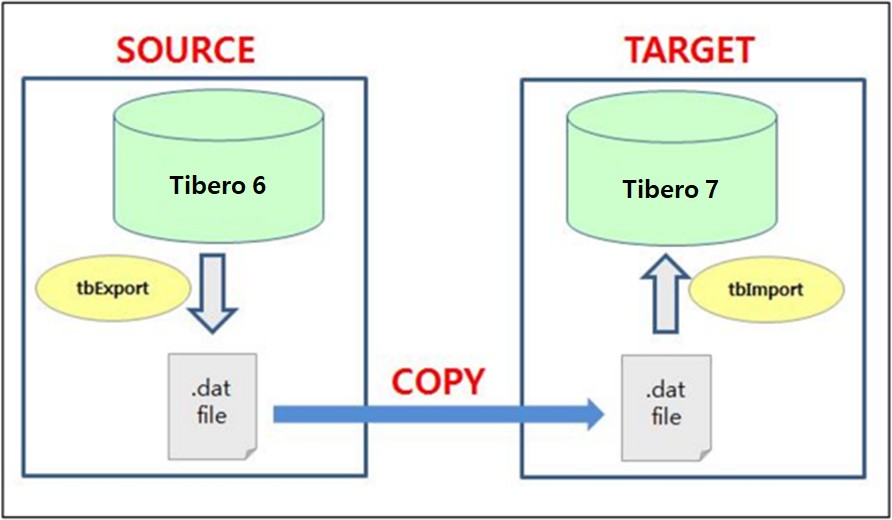
논리적 백업 및 복구(exp 및 imp)를 이용해 Tibero 6에서 Tibero 7로 업그레이드 방법을 안내합니다.
**\[Tibero6 to Tibero7 전환 구성도]**
 ###
## 사전 준비 사항
* Tibero 유틸리티 exp 및 imp 사용을 위한 JDK 1.7 이상 설치
* exp 및 imp 덤프 파일을 생성, 복사할 충분한 디스크 공간
* Tibero의 SYS 계정 또는 DBA 계정
###
## 안내서 구성
본 문서는 총 4개의 장으로 구성됩니다.
{% tabs %}
{% tab title="Source DB 작업" %}
Source DB인 Tibero6의 업그레이드 진행을 위한 작업 절차를 설명합니다.
🔎 [Source DB 작업 바로가기](/technical-guides/getting-started/upgrade/source-db-operations.md)
{% endtab %}
{% tab title="Target DB 작업" %}
Target DB인 Tibero 7의 작업 절차를 설명합니다.
[🔎 Target DB 작업 바로가기](/technical-guides/getting-started/upgrade/target-db-operations.md)
{% endtab %}
{% tab title="검증" %}
Target DB의 Object 및 Constraint 개수와 비교하여 Object Count 및 Constraint를확인합니다.
[🔎 검증 바로가기](/technical-guides/getting-started/upgrade/validation.md)
{% endtab %}
{% tab title="I/F Driver 변경" %}
JDBC, ODBC, DB Link 등 활용한 I/F Driver 변경을 안내합니다.
[🔎 I/F Driver 변경 바로가기](/technical-guides/getting-started/upgrade/i-f-driver-change.md)
{% endtab %}
{% endtabs %}
###
###
## 사전 준비 사항
* Tibero 유틸리티 exp 및 imp 사용을 위한 JDK 1.7 이상 설치
* exp 및 imp 덤프 파일을 생성, 복사할 충분한 디스크 공간
* Tibero의 SYS 계정 또는 DBA 계정
###
## 안내서 구성
본 문서는 총 4개의 장으로 구성됩니다.
{% tabs %}
{% tab title="Source DB 작업" %}
Source DB인 Tibero6의 업그레이드 진행을 위한 작업 절차를 설명합니다.
🔎 [Source DB 작업 바로가기](/technical-guides/getting-started/upgrade/source-db-operations.md)
{% endtab %}
{% tab title="Target DB 작업" %}
Target DB인 Tibero 7의 작업 절차를 설명합니다.
[🔎 Target DB 작업 바로가기](/technical-guides/getting-started/upgrade/target-db-operations.md)
{% endtab %}
{% tab title="검증" %}
Target DB의 Object 및 Constraint 개수와 비교하여 Object Count 및 Constraint를확인합니다.
[🔎 검증 바로가기](/technical-guides/getting-started/upgrade/validation.md)
{% endtab %}
{% tab title="I/F Driver 변경" %}
JDBC, ODBC, DB Link 등 활용한 I/F Driver 변경을 안내합니다.
[🔎 I/F Driver 변경 바로가기](/technical-guides/getting-started/upgrade/i-f-driver-change.md)
{% endtab %}
{% endtabs %}
###