> For the complete documentation index, see [llms.txt](https://docs.tibero.com/sysmasterdb/llms.txt). Markdown versions of documentation pages are available by appending `.md` to page URLs; this page is available as [Markdown](https://docs.tibero.com/sysmasterdb/8.4_manual/settings/alert.md).

# Alert

Alert(알림)는 특정 이벤트가 발생하게 되면 사용자에게 알림 메시지를 전달하도록 설정할 수 있는 메뉴이다.

Alert는 User-created Alert, System Alert 2개로 나누어진다.

## User-created Alert

사용자가 생성하는 Alert으로, 본인에게만 발생하도록 하거나 같은 그룹에 있는 그룹원들에게 발생하도록 할 수 있다.

### User-created Alert 생성

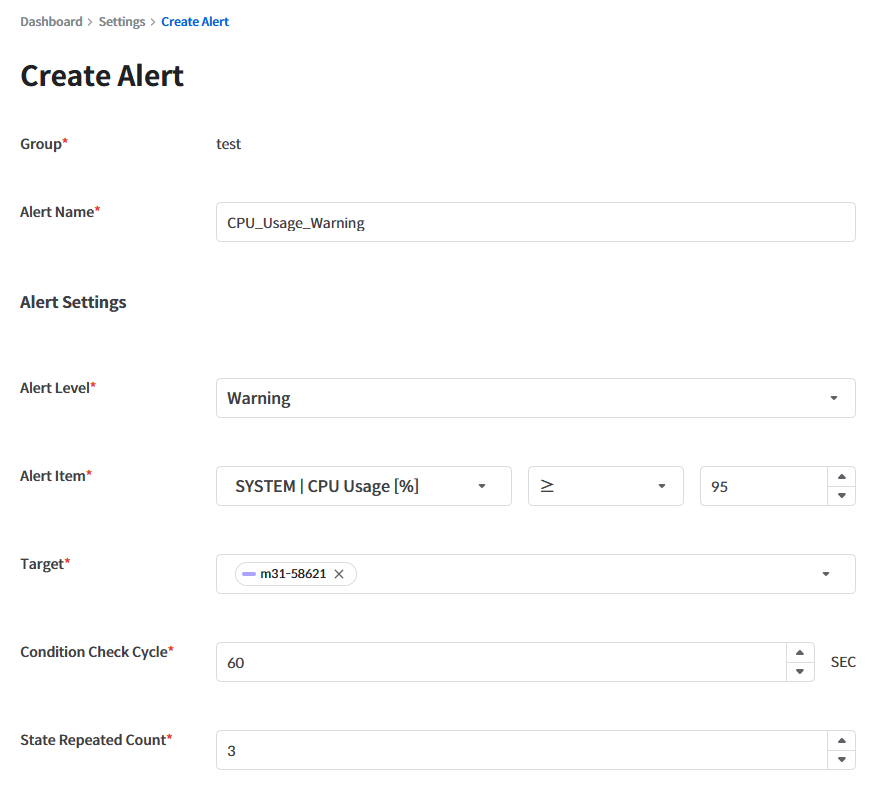
상단의 Create Alert 버튼을 클릭하면 알림을 생성할 수 있다.

![](https://264733866-files.gitbook.io/~/files/v0/b/gitbook-x-prod.appspot.com/o/spaces%2Fgw24XwSa6QXLFywb7Txd%2Fuploads%2FqMAsTiabpkLPtajXJXAB%2F305_alert-create.png?alt=media)

생성하기 위해 필요한 각 항목들은 다음과 같다

| 항목                    | 설명                                                                                                                                                                                                                                                                                                                                                                                                                                                                                                                                                                                                                           |
| --------------------- | ---------------------------------------------------------------------------------------------------------------------------------------------------------------------------------------------------------------------------------------------------------------------------------------------------------------------------------------------------------------------------------------------------------------------------------------------------------------------------------------------------------------------------------------------------------------------------------------------------------------------------- |
| Group                 | 알림이 적용될 그룹                                                                                                                                                                                                                                                                                                                                                                                                                                                                                                                                                                                                                   |
| Alert Name            | 알림의 이름                                                                                                                                                                                                                                                                                                                                                                                                                                                                                                                                                                                                                       |
| Alert Level           | <p>알림 설정에 의해 발생하는 알림의 레벨<br><br>– Error<br>– Warning<br>– Info</p>                                                                                                                                                                                                                                                                                                                                                                                                                                                                                                                                                           |
| Alert Item            | <p>알림을 위해 체크할 대상 지표. 지표를 선택한 뒤 비교 연산자(=, >, ≥, <, ≤)를 고르고 Threshold 값을 입력한다.<br><br>\[참고] 알림 체크 대상 지표 설명<br>– Disk Usage \[%] : 각 파일시스템별 TOTAL\_MB 대비 USED\_MB<br>– Tablespace Usage \[%] : 각 Tablespace별 TOTAL\_SIZE 대비 USED\_SIZE<br>– Session Usage \[%] : 사용자에게 할당 가능한 전체 세션 수 대비 해당 시점에 실제 사용 중인 세션 수<br>– PGA Memory (Total) \[%] : 해당 인스턴스의 PGA\_MAX\_MEMORY 대비 PGA\_USAGE<br>– PGA Memory (Session) \[%] : 해당 인스턴스의 PGA\_MAX\_MEMORY 대비 세션별 PGA\_USED\_MEM<br>– 그 외 지표 정보는 <a href="/pages/P6IQfkdH6bNpyLS645X3#appendix-a.-instance-monitoring-indicators">“Appendix A. Instance Monitoring Indicators”</a>를 참고</p> |
| Target                | 알림 대상 인스턴스. Alert Item을 선택한 뒤 하나 이상 선택한다.                                                                                                                                                                                                                                                                                                                                                                                                                                                                                                                                                                                    |
| Condition Check Cycle | <p>알림 상태(조건) 충족 여부 체크 주기(Sec)<br><br>\[참고] 알림 상태(조건) 충족 여부란, 사용자가 지정한 Alert Item이 설정한 Threshold 조건에 부합하는지를 의미한다.</p>                                                                                                                                                                                                                                                                                                                                                                                                                                                                                                         |
| State Repeated Count  | <p>조건 충족 상태 지속 횟수(Count)<br><br>\[참고] 사용자가 설정한 조건 충족 여부 체크 시, 해당 조건 충족 상태가 연속적으로 반복된 횟수를 의미한다.</p>                                                                                                                                                                                                                                                                                                                                                                                                                                                                                                                           |
| To                    | <p>알림을 수신할 대상. Only me 또는 Group Members를 선택한다.</p><p>Group Members는 Super Admin과 Admin에게만 표시된다.</p>                                                                                                                                                                                                                                                                                                                                                                                                                                                                                                                          |
| Email                 | <p>알림이 발생하면 To에서 선택한 대상에게 이메일을 보낼지 설정한다. SMTP 서버 정보가 설정되어 있지 않으면 켤 수 없다. From에는 발신 주소(SMTP 설정의 User Name)가 표시된다.</p><p>Biz Hour: 이메일을 수신 받을 요일(Everyday / Weekday / Weekend)과 시간대. 기본값은 Weekday 09:00 \~ 18:00이다. 시간대는 SysMasterDB 타임존 기준이며, Biz Hour가 아닌 시간이면, 알림이 발생해도 이메일을 수신 받지 않는다. 자정을 넘기는 구간(예: 22:00 \~ 02:00)도 설정할 수 있다.</p>                                                                                                                                                                                                                                                                                        |
| SSH                   | <p>해당 알림이 발생하면 실행할 커맨드 정보<br><br></p><p>ssh 접속 정보 ssh가 실행될 host 접속 정보를 입력하는 곳.</p><ul><li>Host Name: host ip address</li><li>Port: host port</li><li>User Name: host username</li><li>Password: host password</li><li>Access to server over SSH: 어떤 ssh로 접속할지 선택</li><li>Command: 실행할 커맨드</li></ul>                                                                                                                                                                                                                                                                                                                          |
| Description           | 해당 알림 설정에 대한 설명                                                                                                                                                                                                                                                                                                                                                                                                                                                                                                                                                                                                              |

### User-created Alert 수정

자신에게 권한이 있는 알림(자신이 만들었거나, Admin 또는 Super Admin인 경우)은 수정이 가능하다.

다음과 같이 우측에 있는 더보기 버튼을 누르고 Edit 버튼을 누르면 수정할 수 있다.

![](https://264733866-files.gitbook.io/~/files/v0/b/gitbook-x-prod.appspot.com/o/spaces%2Fgw24XwSa6QXLFywb7Txd%2Fuploads%2FIeapAOpa82auIabkuZPN%2F306_alert-more-edit.png?alt=media)

### User-created Alert **복사**

Copy를 하면 기존 알림을 바탕으로 비슷한 알림을 추가로 생성할 수 있다.

다음과 같이 우측에 있는 더보기 버튼을 누르고 Copy 버튼을 누르면 복사할 수 있다.

![](https://264733866-files.gitbook.io/~/files/v0/b/gitbook-x-prod.appspot.com/o/spaces%2Fgw24XwSa6QXLFywb7Txd%2Fuploads%2FMtPFQBEXPHBWyRbtCmXQ%2F307_alert-more-copy.png?alt=media)

Copy 버튼을 누르게 되면, 해당 알림의 내용을 그대로 가진 Create Alert 화면으로 넘어가게 된다.

<figure><img src="https://264733866-files.gitbook.io/~/files/v0/b/gitbook-x-prod.appspot.com/o/spaces%2Fgw24XwSa6QXLFywb7Txd%2Fuploads%2F9Ykb6YrKZqv5EnaarfGG%2F308_alert-copy.png?alt=media" alt=""><figcaption></figcaption></figure>

### User-created Alert 삭제

자신에게 권한이 있는 알림은 Delete를 통해 지울 수 있다.

다음과 같이 우측에 있는 더보기 버튼을 누르고 Delete 버튼을 누르면 삭제할 수 있다.

![](https://264733866-files.gitbook.io/~/files/v0/b/gitbook-x-prod.appspot.com/o/spaces%2Fgw24XwSa6QXLFywb7Txd%2Fuploads%2FAhWyuOcjkTb3gO3g6ODQ%2F309_alert-more-delete.png?alt=media)

<figure><img src="https://264733866-files.gitbook.io/~/files/v0/b/gitbook-x-prod.appspot.com/o/spaces%2Fgw24XwSa6QXLFywb7Txd%2Fuploads%2FIG9CQtxXxvmeUGIWuUv8%2Fa38_alert-delete-confirm.png?alt=media" alt=""><figcaption></figcaption></figure>

### User-created Alert ON/OFF

<figure><img src="https://264733866-files.gitbook.io/~/files/v0/b/gitbook-x-prod.appspot.com/o/spaces%2Fgw24XwSa6QXLFywb7Txd%2Fuploads%2FAUBzK8fGyFNu7JPMCrpD%2F310_alert-active-toggle.png?alt=media" alt=""><figcaption></figcaption></figure>

Alert 리스트 좌측에 있는 Alert Active 토글 버튼을 통해 해당 알람을 켜거나 끌 수 있다. OFF로 설정한 알람은 발생하지 않으며, Notification 이메일도 발송되지 않는다.

그룹원들을 대상으로 하는 그룹 알람은 Admin과 Super Admin만 On/Off 가능하다.

***

## System Alert

![](https://264733866-files.gitbook.io/~/files/v0/b/gitbook-x-prod.appspot.com/o/spaces%2Fgw24XwSa6QXLFywb7Txd%2Fuploads%2FzUxgbFtaNCc5GvWWGdan%2F311_system-alert.png?alt=media)

SysMasterDB에서 만들어주는 시스템 알림이다. 현재 DB Down 알람을 제공한다.

해당 알림은 자신에게 권한이 있는 인스턴스 기준으로 조회가 가능하며, 수정 및 ON/OFF는 Super Admin만 가능하다.

### System Alert 수정

다음과 같이 우측 더보기 버튼을 누르고 Edit 버튼을 누르면 시스템 알림을 수정할 수 있다.<br>

![](https://264733866-files.gitbook.io/~/files/v0/b/gitbook-x-prod.appspot.com/o/spaces%2Fgw24XwSa6QXLFywb7Txd%2Fuploads%2FNjHSwborn0UwmJ8TlSKo%2F312_system-alert-more.png?alt=media)

<figure><img src="https://264733866-files.gitbook.io/~/files/v0/b/gitbook-x-prod.appspot.com/o/spaces%2Fgw24XwSa6QXLFywb7Txd%2Fuploads%2FF4ApYsB1k7BLb0xi05nX%2Fa37_edit-system-alert.png?alt=media" alt=""><figcaption></figcaption></figure>

### System Alert ON/OFF

다음과 같이 좌측에 있는 토글 버튼을 통해 해당 시스템 알림을 켜거나 끌 수 있다.

![](https://264733866-files.gitbook.io/~/files/v0/b/gitbook-x-prod.appspot.com/o/spaces%2Fgw24XwSa6QXLFywb7Txd%2Fuploads%2FcCPx0BY61BxCY6ahWjX6%2F313_system-alert-toggle.png?alt=media)

### SMTP

Super Admin에게만 제공되는 기능으로, Alert 화면의 SMTP Server 버튼을 클릭하면 SMTP Server Info 창이 열린다. 알림 발생 시 Notification 이메일을 송신할 서버 정보를 설정할 수 있다. Notification 이메일을 발송하려면 SMTP 정보가 반드시 설정되어 있어야 한다.

![](https://264733866-files.gitbook.io/~/files/v0/b/gitbook-x-prod.appspot.com/o/spaces%2Fgw24XwSa6QXLFywb7Txd%2Fuploads%2FGou83kPfga0DTn3CVjFx%2F314_smtp-server.png?alt=media)

각 항목은 다음과 같다.

| 항목                  | 설명                                             |
| ------------------- | ---------------------------------------------- |
| Host Name           | SMTP 서버 주소                                     |
| Port                | SMTP 서버 포트                                     |
| User Name           | SMTP 접속 계정(이메일 주소). 알림 이메일의 발신 주소(From)로 사용된다. |
| Password            | SMTP 접속 유저 비밀번호                                |
| Connection Security | SMTP 보안 방식 (TLS / SSL)                         |