> For the complete documentation index, see [llms.txt](https://docs.tibero.com/sysmasterdb/llms.txt). Markdown versions of documentation pages are available by appending `.md` to page URLs; this page is available as [Markdown](https://docs.tibero.com/sysmasterdb/8.4_manual/analysis/usage-analysis/segment-usage.md).
# Segment Usage
글로벌 내비게이션 바에서 **\[Analysis] > \[Usage Analysis] > \[Segment Usage]** 메뉴를 클릭하면 Segment Usage 화면이 열린다.
Segment Usage 전체 화면
## Overview
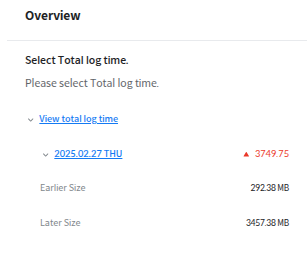
조회하기 원하는 날짜를 선택할 수 있는 기능이 있다. 조회한 기간의 Segment usage 목록에 간단하게 사용량 증감을 보여준다. 날짜 단위 화면으로 기본 조회 기간은 1 Week이며, 최대 31일까지 조회할 수 있다.
Segment Usage Overview
## Segment Usage
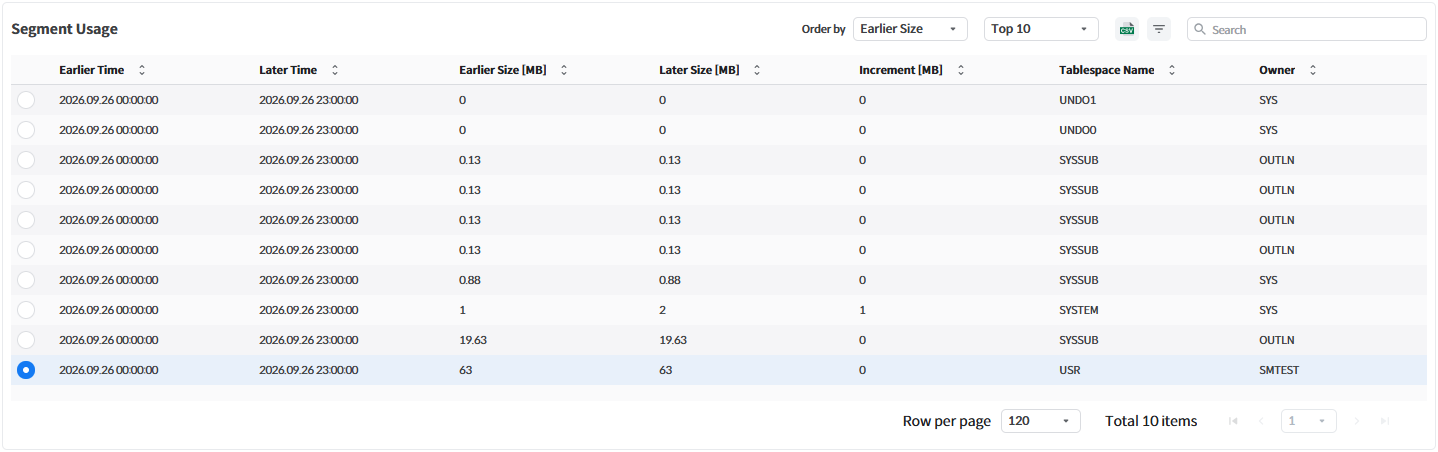
이 화면에서는 지정한 기간 동안의 세그먼트 이름별 크기의 변화량을 확인할 수 있다. 크기 항목은 기본적으로 MB 단위로 표시된다.
Segment Usage
다음은 Segment Usage 화면에서 제공하는 항목에 대한 설명이다.
| 항목 | 설명 |
| --------------- | --------------------- |
| Earlier Time | 이전 시점 |
| Later Time | 이후 시점 |
| Earlier Size | 이전 시점의 크기 |
| Later Size | 이후 시점의 크기 |
| Increment | 이전 시점 대비 이후 시점 크기 증감량 |
| Tablespace Name | 테이블스페이스 이름 |
| Owner | Object의 소유자 |
| Segment Name | 세그먼트 이름 |
| Segment Type | 세그먼트 종류 |
| Partition Name | 파티션 이름 |
| Earlier Extents | 이전 시점의 Extent 수 |
| Later Extents | 이후 시점의 Extent 수 |
| Earlier Blocks | 이전 시점의 Blocks |
| Later Blocks | 이후 시점의 Blocks |
## Segment Usage Header
Segment Usage Header에는 데이터 조회를 위한 필터링을 선택할 수 있는 기능이 있다.
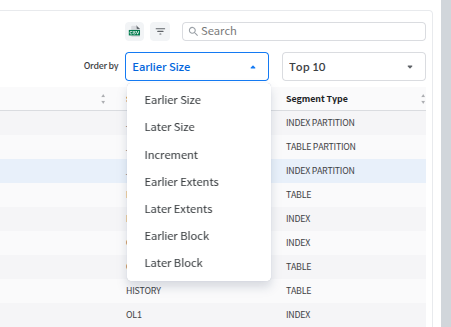
Order by
Order by 우측의 드롭박스를 이용해 정렬 기준(Earlier Size(기본값), Later Size, Increment, Earlier Extents, Later Extents, Earlier Block, Later Block)을 선택할 수 있다.
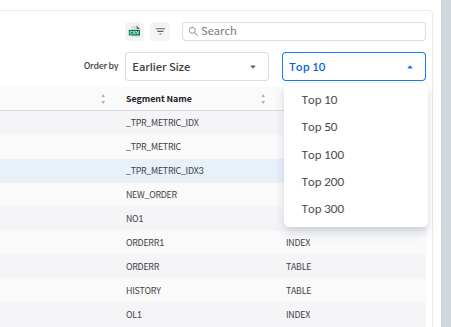
Top N
그 오른쪽의 드롭박스를 이용해 표시할 개수(Top 10(기본값) / Top 50 / Top 100 / Top 200 / Top 300)를 설정할 수 있다.
## Segment Info
Segment Usage에서 특정 데이터 클릭 시 해당 세그먼트의 일자별 크기 변화를 상세하게 확인할 수 있다. 이때 오른쪽의 그래프를 통해 크기 변화량을 한눈에 파악할 수 있다.
Segment Info
다음은 Segment Info 화면에서 제공하는 항목에 대한 설명이다.
| 항목 | 설명 |
| --------------- | ------- |
| Log Time | 수집 시간 |
| Partition Count | 파티션 수 |
| Size | 크기 |
| Blocks | Block 수 |