> For the complete documentation index, see [llms.txt](https://docs.tibero.com/sysmasterdb/llms.txt). Markdown versions of documentation pages are available by appending `.md` to page URLs; this page is available as [Markdown](https://docs.tibero.com/sysmasterdb/8.3_manual/global-navigation-bar-gnb/alert-alarm.md).

# Alert Alarm

Alert Alarm 항목에서는 아직 Confirm 처리되지 않은 Alert들의 리스트를 나타낸다. Alert는 유저가 직접 생성한 기준에 따라 발생한 User-created 카테고리와 자동으로 설정되어 전체 인스턴스에 대해서 발생하는 System 카테고리로 나뉘어져 있다.

각 Alert에 대해 Confirm 처리를 하거나, 우상단에 Confirm All 버튼을 눌러야 Alert Event를 제거할 수 있다.

## Alert 항목&#x20;

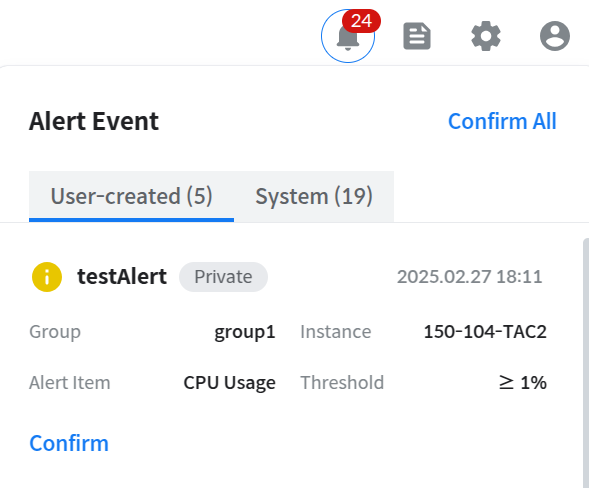
### User-Created Alert&#x20;

<figure><img src="https://content.gitbook.com/content/KFJJxDLiLb7KYeF0CGyF/blobs/IKYZUKqkeODO0biqx80X/image.png" alt=""><figcaption></figcaption></figure>

* Group : Alert 등록된 그룹명
* Instance: Alert가 발생한 인스턴스 명
* Alert Item: Alert 대상 지표
* Threshold: 설정한 Alert  발생 기준

###

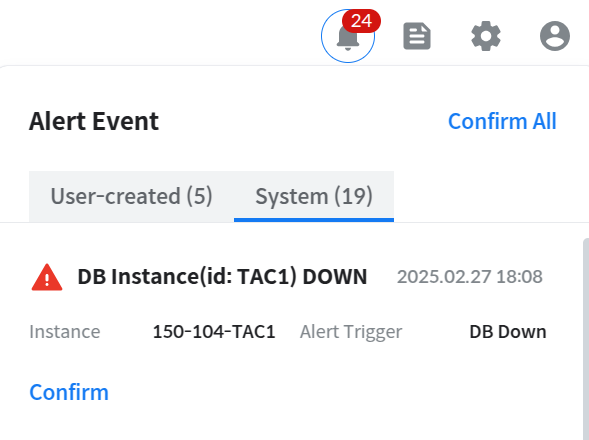
### System Alert&#x20;

<figure><img src="https://content.gitbook.com/content/KFJJxDLiLb7KYeF0CGyF/blobs/Q0r7eJ2M3cH54gllHMje/image.png" alt=""><figcaption></figcaption></figure>

* Instance: Alert가 발생한 인스턴스 명
* Alert Trigger: System Alert가 발생한 원인을 나타낸다.

###

***

## Alert 이력 확인

<figure><img src="https://content.gitbook.com/content/KFJJxDLiLb7KYeF0CGyF/blobs/MiUcTiC8bnDTCy8CAQQs/image.png" alt=""><figcaption></figcaption></figure>

하단에 Go to Alert Events History 버튼을 클릭하여 [Alert 이력을 확인 ](/sysmasterdb/8.3_manual/dashboard/instance-overview/alert-events.md#alert-events-history)할 수 있다.

###