> For the complete documentation index, see [llms.txt](https://docs.tibero.com/sysmasterdb.en/llms.txt). Markdown versions of documentation pages are available by appending `.md` to page URLs; this page is available as [Markdown](https://docs.tibero.com/sysmasterdb.en/8.3_manual/dashboard.md).
# Dashboard
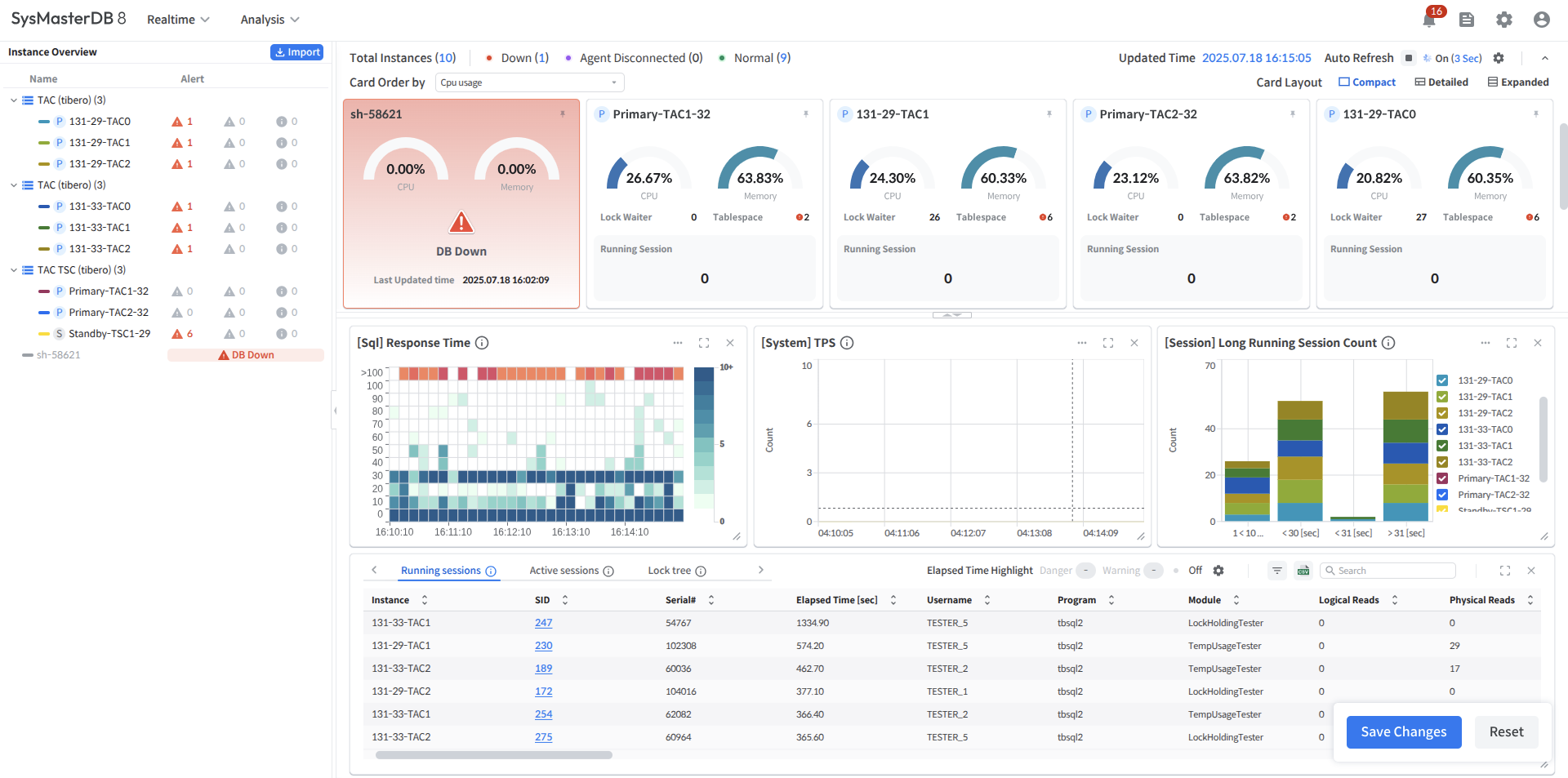
This chapter describes the Dashboard, which allows the users to monitor all monitoring database instances within the selected group.
It provides real-time status information and metrics for each monitored instance.
The users can set the Auto Refresh interval and pause by clicking the gear icon in the upper-right corner.
### Dashboard components
The Dashboard consists of the following main sections.
[Global Navigation Bar (GNB)](/sysmasterdb.en/8.3_manual/global-navigation-bar-gnb.md)
* Provides main menus and global navigation functions.
[Instance Overview](/sysmasterdb.en/8.3_manual/dashboard/instance-overview.md)
* Area for checking the status of DB instances and the status of alerts generated by instances
[Card View](/sysmasterdb.en/8.3_manual/dashboard/card-view.md)
* Provides key metrics such as the status and CPU/running sessions of each instance in a card view format.
[Custom Area](/sysmasterdb.en/8.3_manual/dashboard/custom-area.md)
* Provides charts and tables with more detailed real-time performance metrics for instances within a group.
**Layout Split**
* Button to adjust the size ratio between the Custom Area and Card View Area
* Drag or click to set the Card View : Custom Area ratio to 1:2 / 2:1 / 3:0
###
 The users can set the Auto Refresh interval and pause by clicking the gear icon in the upper-right corner.
### Dashboard components
The Dashboard consists of the following main sections.
[Global Navigation Bar (GNB)](/sysmasterdb.en/8.3_manual/global-navigation-bar-gnb.md)
* Provides main menus and global navigation functions.
[Instance Overview](/sysmasterdb.en/8.3_manual/dashboard/instance-overview.md)
* Area for checking the status of DB instances and the status of alerts generated by instances
[Card View](/sysmasterdb.en/8.3_manual/dashboard/card-view.md)
* Provides key metrics such as the status and CPU/running sessions of each instance in a card view format.
[Custom Area](/sysmasterdb.en/8.3_manual/dashboard/custom-area.md)
* Provides charts and tables with more detailed real-time performance metrics for instances within a group.
**Layout Split**
* Button to adjust the size ratio between the Custom Area and Card View Area
* Drag or click to set the Card View : Custom Area ratio to 1:2 / 2:1 / 3:0
###
The users can set the Auto Refresh interval and pause by clicking the gear icon in the upper-right corner.
### Dashboard components
The Dashboard consists of the following main sections.
[Global Navigation Bar (GNB)](/sysmasterdb.en/8.3_manual/global-navigation-bar-gnb.md)
* Provides main menus and global navigation functions.
[Instance Overview](/sysmasterdb.en/8.3_manual/dashboard/instance-overview.md)
* Area for checking the status of DB instances and the status of alerts generated by instances
[Card View](/sysmasterdb.en/8.3_manual/dashboard/card-view.md)
* Provides key metrics such as the status and CPU/running sessions of each instance in a card view format.
[Custom Area](/sysmasterdb.en/8.3_manual/dashboard/custom-area.md)
* Provides charts and tables with more detailed real-time performance metrics for instances within a group.
**Layout Split**
* Button to adjust the size ratio between the Custom Area and Card View Area
* Drag or click to set the Card View : Custom Area ratio to 1:2 / 2:1 / 3:0
###