> For the complete documentation index, see [llms.txt](https://docs.tibero.com/en-owldb-on-premise/llms.txt). Markdown versions of documentation pages are available by appending `.md` to page URLs; this page is available as [Markdown](https://docs.tibero.com/en-owldb-on-premise/dashboard.md).

# Dashboard

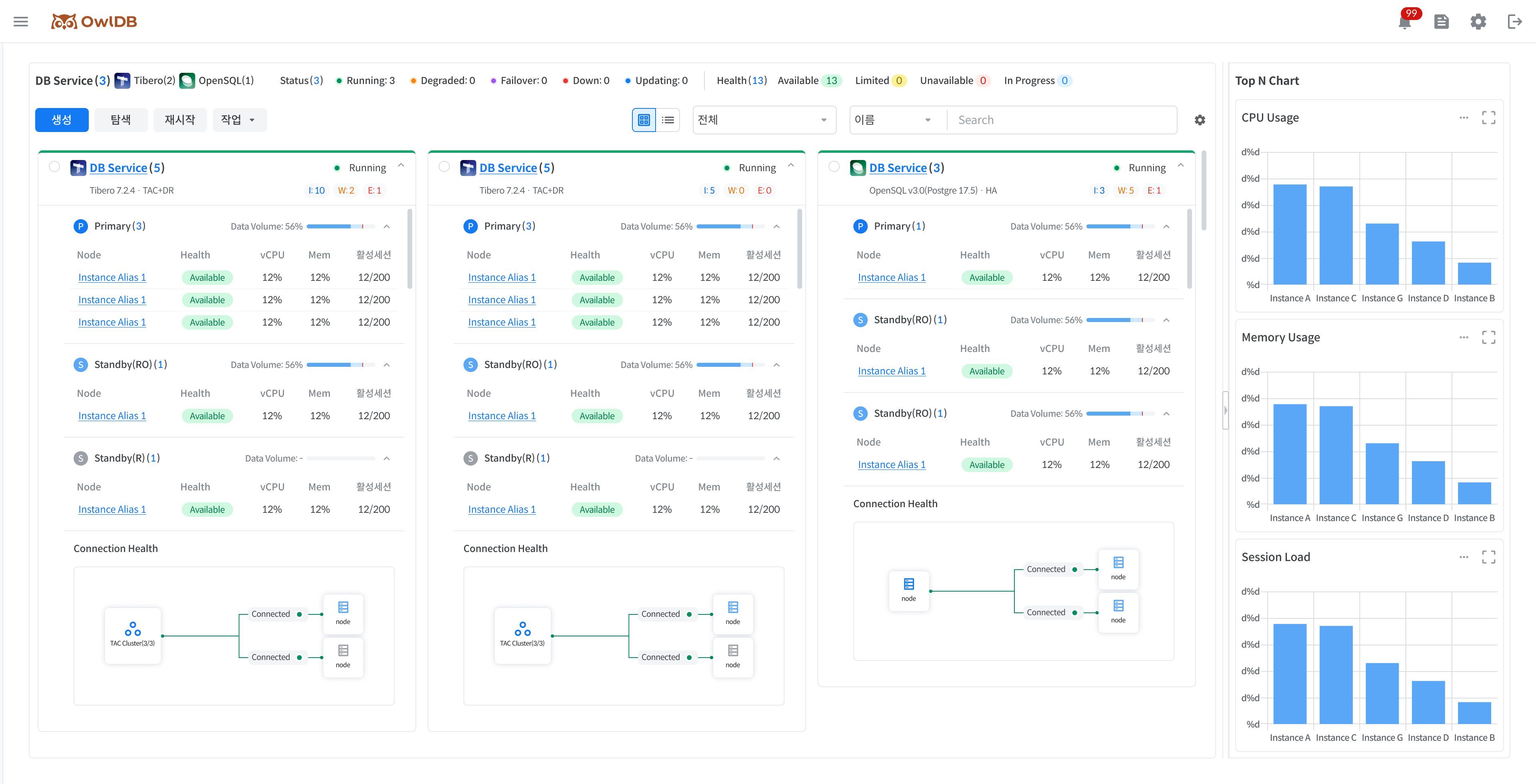
Provides summary information and notifications about the status of all databases and instances in operation. You can check the dashboard by clicking the **OwlDB Console Screen > OwlDB Logo**.

<figure><img src="https://1719342223-files.gitbook.io/~/files/v0/b/gitbook-x-prod.appspot.com/o/spaces%2FS4PbWfiB1HbqogoJBV9f%2Fuploads%2Fgit-blob-62a5065b6b469aee91d7689be13c5400008bd68c%2Fimage-ccc625b2.png?alt=media" alt=""><figcaption><p>Figure 1. Dashboard</p></figcaption></figure>

## Checking the Overall Status Summary Information <a href="#status-summary" id="status-summary"></a>

Check the top-level status value (**Status**) and the detailed status value (**Health**) for all databases/instances in operation. When you click each status, you can view the list of DB Services/instances with that status value in '[Checking the DB Service/Instance List](#service-instance-list)'.

{% tabs %}
{% tab title="Status" %}
Status, the top-level status, is displayed per database.

* Because the status may change per instance node, the count is displayed next to the status in the form (n/m). n: Number of available instance nodes m: Total number of instance nodes
* Types marked in bold and followed by `*` can be filtered on the dashboard.

| Type            | Description                                                                                                                   |
| --------------- | ----------------------------------------------------------------------------------------------------------------------------- |
| Deploying       | Installing new resource                                                                                                       |
| Registering     | Registering new resource                                                                                                      |
| **Running** \*  | Database is available for normal use                                                                                          |
| **Updating** \* | Applying planned operations/changes to the database (e.g., full restart, role switch, spec change, migration, recovery, etc.) |
| **Degraded** \* | Some databases/components are unavailable (e.g., individual instance restart, etc.)                                           |
| **Failover** \* | Performing Auto Failover due to database failure detection (occurs when the entire Primary DB cluster is Unavailable)         |
| **Down** \*     | All databases are unavailable (both Primary and Standby are unavailable)                                                      |
| Starting        | Transitioning from Stopped to Running                                                                                         |
| Stopping        | Transitioning from Running to Stopped (full DB shutdown)                                                                      |
| Stopped         | Suspend all resources temporarily (deactivate resources)                                                                      |
| Unregistering   | Deregistering the registered DB Service (excluded from management targets upon completion)                                    |
| Terminating     | Permanently deleting all resources and data (access/recovery unavailable upon completion)                                     |

The \* notation indicates a required input item.
{% endtab %}

{% tab title="Health" %}
The detailed status, Health, is displayed per instance node.

* Displayed by combining DB Boot Mode, Instance, Cluster Management Tool (hereinafter CMT), and Agent connection status.
* The features restricted according to the message can be checked via a banner when entering each menu.

The Health determination criteria for each engine are as follows.

* Tibero: Determined by combining DB Boot Mode, Cluster Management Tool (CMT), and Agent status.
* OpenSQL: Determined by combining Patroni, OpenProxy, etcd, and Agent status.

{% tabs %}
{% tab title="Tibero" %}

| Display        | Status      | Message                   | Description                                                 |
| -------------- | ----------- | ------------------------- | ----------------------------------------------------------- |
| 🟢 Available   | available   | -                         | Node normal                                                 |
| 🟡 Limited     | limited     | Issue: CMT Inactive       | Cluster Management Tool (CMT) abnormal                      |
|                | limited     | Issue: Mount Mode         | Node started in Mount mode                                  |
| 🔴 Unavailable | unavailable | Issue: Nomount Mode       | Node started in Nomount mode                                |
|                | unavailable | Issue: DB Down            | Node DB Down                                                |
|                | unavailable | Issue: Agent Disconnect   | Agent connection lost with the VM where the node is located |
|                | unavailable | Issue: VM Down            | VM where the node is located is Down                        |
| ⚫ Retired      | retired     | Issue: Failovered Primary | During Failover, (former) Primary terminated abnormally     |
| {% endtab %}   |             |                           |                                                             |

{% tab title="OpenSQL" %}
The Health of an OpenSQL instance node is determined by combining Patroni, OpenProxy, etcd, and Agent status.

| Display        | Status      | Message                   | Description                                                 |
| -------------- | ----------- | ------------------------- | ----------------------------------------------------------- |
| 🟢 Available   | available   | -                         | Node normal                                                 |
| 🟡 Limited     | limited     | Issue: etcd Inactive      | etcd abnormal                                               |
|                | limited     | Issue: OpenProxy Inactive | OpenProxy abnormal                                          |
| 🔴 Unavailable | unavailable | Issue: DB Down            | DB Down due to Patroni abnormal                             |
|                | unavailable | Issue: Agent Disconnect   | Agent connection lost with the VM where the node is located |
| {% endtab %}   |             |                           |                                                             |
| {% endtabs %}  |             |                           |                                                             |

The `🔵 In Progress` status applies commonly to both Tibero and OpenSQL.

| Level                    | Message                                                                              |
| ------------------------ | ------------------------------------------------------------------------------------ |
| Individual instance node | Reboot, Switchover, Failover, Rebuilding, Modify Spec (TAC Scale In/Out)             |
| All instances            | Modify Spec (Scale Up/Down), Migration, Restoring, Patch/Upgrade, Starting, Stopping |

{% hint style="info" %}
**Note**

A cluster management tool is a component required to operate a database in a cluster configuration. (e.g., Tibero Cluster Manager (CM), Tibero Active Storage (TAS), etc.)
{% endhint %}
{% endtab %}
{% endtabs %}

## Check DB Service/instance list <a href="#service-instance-list" id="service-instance-list"></a>

Check the list of all DB Services and their sub-instances. The DB Service and instance list displayed varies depending on the status value selected in '[Check overall status summary information](#status-summary)'.

* You can perform restart operations on the sub-instances of the selected database.
* You can perform start, stop, delete, role switch, and license renewal management operations on the selected database.
* Provides a database/instance alias search function.

{% hint style="info" %}
**Note**

You can perform various management operations on the DB Service. For details, refer to the **Operations** page.
{% endhint %}

#### Switch list view (Card View/List View) <a href="#undefined-2" id="undefined-2"></a>

You can check the DB Service/instance list in two ways: Card View and List View. When switching views, the sorting function is reset, but filtering is maintained.

{% tabs %}
{% tab title="Card View" %}
Card View organizes and displays the key information of DB Services in individual card form so it is easy to grasp visually. Up to 4 cards are displayed per row, and the size of each card is fixed. If the content exceeds the fixed size, internal scrolling is activated. A `➕` icon is displayed in the last slot of the list of currently operating DB Service cards, and clicking it navigates to the DB Service creation page.

| Item                   | Description                                                                                                                                                                                                                                                                                                                                                                                                                                                                                                                                                                                                                                                                                                                                                                                                                                                                                            |
| ---------------------- | ------------------------------------------------------------------------------------------------------------------------------------------------------------------------------------------------------------------------------------------------------------------------------------------------------------------------------------------------------------------------------------------------------------------------------------------------------------------------------------------------------------------------------------------------------------------------------------------------------------------------------------------------------------------------------------------------------------------------------------------------------------------------------------------------------------------------------------------------------------------------------------------------------ |
| DB Service information | <p>Displays a summary of the database's key information at the top of the card<br>Displayed items</p><ul><li>DB Type Logo</li><li>DB Service Name</li><li>Status</li><li>DB Type</li><li>DB version (for OpenSQL, the OpenSQL version and PostgreSQL version are displayed simultaneously)</li><li>Topology</li><li>Eventlog : I / W / E (Info / Warning / Error respectively)</li></ul>                                                                                                                                                                                                                                                                                                                                                                                                                                                                                                               |
| Node information       | <p>Displays information about instances linked under the database. Can be collapsed/expanded in accordion form based on Role<br>Sorting rules</p><ul><li>Tibero: Displayed in the order Primary → Standby(Read Only) → Standby(Recovery)</li><li>OpenSQL: Displayed in the order Leader → Replica</li><li>Sorted by AZ within the same Role<br>Displayed items</li><li>Role : Displays the number of instances for that role</li><li>Data volume (Tibero) / Volume (OpenSQL): Displays usage (%), bar chart, and Threshold<br>Table items</li><li>Instance alias</li><li>Health</li><li>vCPU: Current CPU usage (%)</li><li>Memory: Current memory usage (%)</li><li>Active sessions: Current number of active sessions / Max Session Count (not displayed for Standby(Recovery))</li><li>Availability zone: AZ information where the instance is located</li></ul>                                    |
| Cluster information    | <p>Displays Connection Health as a cluster diagram</p><ul><li>Single: Displays only Primary/Leader DB information</li><li>Single +DR / HA: Displays Primary/Leader DB and Standby/Replica DB information. Displays P-S connection status monitoring information; Standby/Replica DBs are each created per AZ</li><li>Tibero TAC: Displays multiple nodes inside the Primary DB Box</li><li>Tibero TAC + DR: Displays Primary DB and Standby DB information. Displays P-S connection status monitoring information; multiple nodes are displayed inside the Primary DB Box; Standby DBs are each created per AZ</li><li>DR configuration connection status monitoring: Expresses the connection status between Primary - Standby / Leader - Replica through line color and displayed information</li><li>Normal: green, <code>Connected</code></li><li>Failed: red, <code>Disconnected</code></li></ul> |
| {% endtab %}           |                                                                                                                                                                                                                                                                                                                                                                                                                                                                                                                                                                                                                                                                                                                                                                                                                                                                                                        |

{% tab title="List View" %}
List View displays the database and sub-instance information in a tree-form table so the hierarchical structure is easy to grasp.

{% hint style="info" %}
**Note**

'Default value' refers to items exposed by default on the initial screen, and 'Required value' refers to items that cannot be set to hidden.
{% endhint %}

| Column                           | Description                                                                                                                                                                                                                                                                                                                                                                                                                                                            | DB Service level                                                                                                                                                                                                                                                                                             | Instance level                                                                                            | Default value | Required value |
| -------------------------------- | ---------------------------------------------------------------------------------------------------------------------------------------------------------------------------------------------------------------------------------------------------------------------------------------------------------------------------------------------------------------------------------------------------------------------------------------------------------------------- | ------------------------------------------------------------------------------------------------------------------------------------------------------------------------------------------------------------------------------------------------------------------------------------------------------------ | --------------------------------------------------------------------------------------------------------- | ------------- | -------------- |
| **Name**                         | <p>Displays the name</p><ul><li>Clicking the DB Service name navigates to the '<a href="https://github.com/hhjinn/gitbookPAT/tree/dori/SNGSMUVdPJMBNhWqlXnC/doc/5d7daeb2-e4f4-4409-aa74-dcaf1d65ab46/README.md">View service meta information</a>' page</li><li>Clicking the instance alias navigates to the '<a href="https://github.com/hhjinn/gitbookPAT/tree/dori/SNGSMUVdPJMBNhWqlXnC/doc/dF57s45IXBUgU7RX1UvL/README.md">Instance management</a>' page</li></ul> | DB Service name                                                                                                                                                                                                                                                                                              | Instance alias                                                                                            | O             | O              |
| **Creation date**                | Displays the DB Service creation date in `yyyy.mm.dd HH\:mm:ss` format                                                                                                                                                                                                                                                                                                                                                                                                 | DB Service creation date                                                                                                                                                                                                                                                                                     | X                                                                                                         | X             | X              |
| **Status**                       | Displays Status or Health                                                                                                                                                                                                                                                                                                                                                                                                                                              | <ul><li>Creating</li><li>Running(n/m)</li><li>Updating(n/m)</li><li>Degraded(n/m)</li><li>Failover(n/m)</li><li>Down(n/m)</li><li>Starting</li><li>Stopping</li><li>Stopped</li><li>Terminating</li><li>Deploying (on-premise)</li><li>Registering (on-premise)</li><li>Unregistering (on-premise)</li></ul> | <ul><li>🟢 (available)</li><li>🟡 (limited)</li><li>🔵 (in progress)</li><li>🔴 (unavailable)</li></ul>   | O             | O              |
| **Type**                         | Displays the database engine type                                                                                                                                                                                                                                                                                                                                                                                                                                      | <ul><li>Tibero</li><li>OpenSQL</li></ul>                                                                                                                                                                                                                                                                     | -                                                                                                         | O             | X              |
| **Configuration**                | Display topology or role                                                                                                                                                                                                                                                                                                                                                                                                                                               | <ul><li>Tibero: Single, TAC(+DR)</li><li>OpenSQL: Single, HA</li></ul>                                                                                                                                                                                                                                       | <ul><li>Tibero: Primary, Standby(Read Only), Standby(Recovery)</li><li>OpenSQL: Leader, Replica</li></ul> | O             | O              |
| **Availability Zone (Cloud)**    | In a Cloud environment, display the Availability Zone (AZ) information where the instance is located                                                                                                                                                                                                                                                                                                                                                                   | -                                                                                                                                                                                                                                                                                                            | Availability Zone (AZ) information                                                                        | O             | X              |
| **vCPU**                         | Display the CPU count and usage as a bar chart                                                                                                                                                                                                                                                                                                                                                                                                                         | O                                                                                                                                                                                                                                                                                                            | O                                                                                                         | O             | X              |
| **Memory**                       | Display Memory and usage as a bar chart                                                                                                                                                                                                                                                                                                                                                                                                                                | O                                                                                                                                                                                                                                                                                                            | O                                                                                                         | O             | X              |
| **Active Sessions**              | <p>Display the number of currently active sessions as a bar chart</p><ul><li>Displayed only for Primary / Standby(RO) / Leader / Replica</li><li>Standby(Recovery): displayed as <code>-</code></li></ul>                                                                                                                                                                                                                                                              | O                                                                                                                                                                                                                                                                                                            | O                                                                                                         | O             | X              |
| **Data Volume (Tibero/OpenSQL)** | Display data volume usage as a bar chart + display Threshold                                                                                                                                                                                                                                                                                                                                                                                                           | O                                                                                                                                                                                                                                                                                                            | X                                                                                                         | O             | X              |
| **Redo log Volume (Tibero)**     | Display redo log volume usage as a bar chart                                                                                                                                                                                                                                                                                                                                                                                                                           | O                                                                                                                                                                                                                                                                                                            | X                                                                                                         | X             | X              |
| **Archive log Volume (Tibero)**  | Display archive log volume usage as a bar chart                                                                                                                                                                                                                                                                                                                                                                                                                        | O                                                                                                                                                                                                                                                                                                            | X                                                                                                         | X             | X              |
| **Root Volume**                  | Display Root volume usage as a bar chart                                                                                                                                                                                                                                                                                                                                                                                                                               | O                                                                                                                                                                                                                                                                                                            | O                                                                                                         | X             | X              |
| {% endtab %}                     |                                                                                                                                                                                                                                                                                                                                                                                                                                                                        |                                                                                                                                                                                                                                                                                                              |                                                                                                           |               |                |
| {% endtabs %}                    |                                                                                                                                                                                                                                                                                                                                                                                                                                                                        |                                                                                                                                                                                                                                                                                                              |                                                                                                           |               |                |

#### DB Service List User Settings <a href="#db-service-list" id="db-service-list"></a>

Clicking the ⚙️ **Settings** icon at the top right of the DB Service List screen lets you configure the display method to suit your environment.

* Card View: Configures the information areas displayed on the card.
* List View: Configures the columns displayed in the list.

The configured settings are saved per user and are applied identically thereafter.

{% tabs %}
{% tab title="Card View" %}
In Card View, you can select the information areas to display on the card.

1. Click ⚙️ **Settings** on the DB Service List screen.
2. In **Configuration**, turn the items to display ON/OFF.
3. Preview the changes in **Preview** on the right.
4. Click **Save** to apply.

#### Setting items <a href="#undefined-5" id="undefined-5"></a>

| Item            | Description                                       |
| --------------- | ------------------------------------------------- |
| DB Service Info | Display DB Service basic information              |
| Node Info       | Display status and resource information per node  |
| Cluster Info    | Display Cluster information and Connection Health |

{% hint style="info" %}
**Note**

You can check the changes in real time in the Preview area on the right. They are not applied to the actual screen until saved.
{% endhint %}
{% endtab %}

{% tab title="List View" %}
In List View, you can select the columns to display in the list or change the column order.

1. Click ⚙️ **Settings** on the DB Service List screen.
2. Turn the columns to display ON/OFF.
3. Change the column order via Drag & Drop.
4. Click **Save** to apply.

#### Key Features <a href="#undefined-6" id="undefined-6"></a>

| Feature                | Description                                                |
| ---------------------- | ---------------------------------------------------------- |
| Show/hide columns      | Set whether to display a column using the switch           |
| Column search          | Quickly find the desired item by searching the column name |
| Change column order    | Drag to change to the desired order                        |
| Reset to default value | Restore to the default column configuration                |
| {% endtab %}           |                                                            |
| {% endtabs %}          |                                                            |

## Top N Chart Lookup <a href="#top-n-charts" id="top-n-charts"></a>

On the dashboard screen, you can view the top instances based on CPU Usage, Memory Usage, and Session Load as charts, targeting DB Services for which you have view permission. The Top N charts are shown in the right area of the dashboard, and the data is automatically composed according to the view permission scope of the logged-in user without any separate configuration. If there is no DB Service for which you have view permission, a no-data state is displayed in the chart area.

{% hint style="info" %}
**Note**

**Differences in supported engines by environment**

* AWS environment: Only Tibero engine instances are included in the lookup targets.
* Azure environment: Both Tibero and OpenSQL engine instances are included in the lookup targets.
  {% endhint %}

#### Display metrics <a href="#undefined-7" id="undefined-7"></a>

| Metric       | Description                                                                                                                                                                                                                                                     |
| ------------ | --------------------------------------------------------------------------------------------------------------------------------------------------------------------------------------------------------------------------------------------------------------- |
| CPU Usage    | <p>Chart of the top 5 instances based on CPU usage</p><ul><li>Targets all instances regardless of engine type</li><li>X-axis: Instance Alias</li><li>Display data labels (%)</li></ul>                                                                          |
| Memory Usage | <p>Chart of the top 5 instances based on Memory usage</p><ul><li>Targets all instances regardless of engine type</li><li>X-axis: Instance Alias</li><li>Display data labels (%)</li></ul>                                                                       |
| Session Load | <p>Chart of the top 5 instances based on Session Load(%)</p><ul><li>A metric indicating the ratio of Active Sessions to Max Sessions</li><li>X-axis: Instance Alias</li><li>Display data labels (%)</li><li>Tooltip: (Active Session/Max Session)X100</li></ul> |

#### Expand/collapse the chart area <a href="#undefined-8" id="undefined-8"></a>

Clicking the button at the top of the Top N chart area collapses or expands the chart area.

* The default state is the expanded state.
* If the user has changed it to the collapsed state, the collapsed state is maintained even if you navigate to another screen within the same session and return.
* When you log out or the session ends and you connect with a new session, it resets to the expanded state.